chore: 纳入本地 Dify 1.19.0 源码及品牌与免登改动
演示目录只保留可重建的源码。运行密钥、数据卷、依赖和带口令的本地配置不进入仓库。 Co-authored-by: Cursor <cursoragent@cursor.com>
This commit is contained in:
 wuzilongandCursor committed
1 parent
60158935f4
commit
6519682885
15831 files changed
+3063428
No files matched your search
@@ -0,0 +1,59 @@
|
||||
# Advanced Setup
|
||||
|
||||
## Custom configurations
|
||||
|
||||
If you need to customize the configuration, edit `docker/.env`. The essential startup defaults live in [`docker/.env.example`](../docker/.env.example), and optional advanced variables are split under `docker/envs/` by theme. After making any changes, re-run `docker compose up -d` from the `docker` directory. You can find the full list of available environment variables [here](https://docs.dify.ai/getting-started/install-self-hosted/environments).
|
||||
|
||||
## Metrics Monitoring with Grafana
|
||||
|
||||
Import the dashboard to Grafana, using Dify's PostgreSQL database as data source, to monitor metrics in granularity of apps, tenants, messages, and more.
|
||||
|
||||
- [Grafana Dashboard by @bowenliang123](https://github.com/bowenliang123/dify-grafana-dashboard)
|
||||
|
||||
## Deployment with Kubernetes
|
||||
|
||||
If you'd like to configure a highly available setup, there are community-contributed [Helm Charts](https://helm.sh/) and YAML files which allow Dify to be deployed on Kubernetes.
|
||||
|
||||
- [Helm Chart by @LeoQuote](https://github.com/douban/charts/tree/master/charts/dify)
|
||||
- [Helm Chart by @BorisPolonsky](https://github.com/BorisPolonsky/dify-helm)
|
||||
- [Helm Chart by @magicsong](https://github.com/magicsong/ai-charts)
|
||||
- [YAML file by @Winson-030](https://github.com/Winson-030/dify-kubernetes)
|
||||
- [YAML file by @wyy-holding](https://github.com/wyy-holding/dify-k8s)
|
||||
- [🚀 NEW! YAML files (Supports Dify v1.6.0) by @Zhoneym](https://github.com/Zhoneym/DifyAI-Kubernetes)
|
||||
|
||||
### Using Terraform for Deployment
|
||||
|
||||
Deploy Dify to Cloud Platform with a single click using [terraform](https://www.terraform.io/)
|
||||
|
||||
#### Azure Global
|
||||
|
||||
- [Azure Terraform by @nikawang](https://github.com/nikawang/dify-azure-terraform)
|
||||
|
||||
#### Google Cloud
|
||||
|
||||
- [Google Cloud Terraform by @sotazum](https://github.com/DeNA/dify-google-cloud-terraform)
|
||||
|
||||
### Using AWS CDK for Deployment
|
||||
|
||||
Deploy Dify to AWS with [CDK](https://aws.amazon.com/cdk/)
|
||||
|
||||
#### AWS
|
||||
|
||||
- [AWS CDK by @KevinZhao (EKS based)](https://github.com/aws-samples/solution-for-deploying-dify-on-aws)
|
||||
- [AWS CDK by @tmokmss (ECS based)](https://github.com/aws-samples/dify-self-hosted-on-aws)
|
||||
|
||||
### Using Alibaba Cloud Computing Nest
|
||||
|
||||
Quickly deploy Dify to Alibaba cloud with [Alibaba Cloud Computing Nest](https://computenest.console.aliyun.com/service/instance/create/default?type=user&ServiceName=Dify%E7%A4%BE%E5%8C%BA%E7%89%88)
|
||||
|
||||
### Using Alibaba Cloud Data Management
|
||||
|
||||
One-Click deploy Dify to Alibaba Cloud with [Alibaba Cloud Data Management](https://www.alibabacloud.com/help/en/dms/dify-in-invitational-preview/)
|
||||
|
||||
### Deploy to AKS with Azure Devops Pipeline
|
||||
|
||||
One-Click deploy Dify to AKS with [Azure Devops Pipeline Helm Chart by @LeoZhang](https://github.com/Ruiruiz30/Dify-helm-chart-AKS)
|
||||
|
||||
### Using Sealos for Deployment
|
||||
|
||||
Deploy Dify with one click using the [Sealos App Store](https://sealos.io/products/app-store/dify/)
|
||||
@@ -0,0 +1,175 @@
|
||||
# Backend architecture
|
||||
|
||||
The backend uses a ports-and-adapters architecture, with application services orchestrating domain aggregates and domain services where business complexity warrants them. Each business capability is a slice. Application services own the use cases and declare ports for everything they need from outside. Adapters implement those ports, and a thin transport layer admits requests and translates them. One composition root connects the parts. The [API agent guide](../api/AGENTS.md) requires reading this document before backend changes; this document explains the architecture and how to review it. The legacy execution kernel is migration-only: never propose new files or extracted implementations there.
|
||||
|
||||
Most existing services are application services: they coordinate use cases, persistence, and other capabilities. Migrated slices primarily work with plain records, so business rules still collect in application services and repositories. The dedicated `api/domain/` package described below is a target for new or extracted domain code; it does not exist yet.
|
||||
|
||||
Class names do not establish architectural roles. For example, [`WorkflowRunAgg`](../api/services/workflow_run_agg.py) coordinates execution, persistence, and publication and depends on concrete repositories and runtime infrastructure. It is an application orchestration component with legacy coupling, not a pure DDD aggregate. Extract its business behavior before moving anything into the domain package; moving or renaming the whole class would not establish the boundary.
|
||||
|
||||
## Layers
|
||||
|
||||
Dependencies point toward the application core. Outer layers know about inner ones; inner layers never know about outer ones.
|
||||
|
||||
- **Transport**: admits the caller, validates input, maps it to application inputs, calls one use case, translates application errors into protocol errors, and serializes the result. It holds no business rules and never touches persistence.
|
||||
- **Application layer**: application services own use cases and orchestration. They work with plain values, the admitted caller identity, domain objects, and the ports they declare. They never depend on the web framework, the ORM, persistence models, configuration, task queues, transport code, or concrete adapters.
|
||||
- **Domain layer**: aggregates, entities, value objects, and domain services own business state, invariants, transitions, and policies. They perform no external I/O and depend on neither the application layer nor infrastructure. The application and domain layers together form the application core; this is a logical boundary, not the legacy `api/core/` directory.
|
||||
- **Infrastructure**: repositories and other adapters implement ports over the database, caches, task queues, external services, the execution kernel, and legacy code. They depend on the contracts they implement, never on the transport layer.
|
||||
- **Composition root**: the only place that chooses implementations, reads configuration, and constructs services. Everything else receives its dependencies.
|
||||
- **Persistence models**: describe tables and nothing else.
|
||||
- **Shared support types and utilities**: framework-neutral caller identity and business-agnostic utilities that any layer may use.
|
||||
|
||||
Import-boundary contracts encode these directions and run in lint. Treat a boundary violation as a design problem to fix, not an exception to record.
|
||||
|
||||
## Application services
|
||||
|
||||
An application module documents its boundary and business rules and contains:
|
||||
|
||||
- **Values**: immutable records for results and inputs. Records carry data, not behavior; they are not DDD entities or value objects merely because they are named `Entity`. Each optional field documents what its absence means. State belongs to the application contract or, when it participates in domain behavior, to the domain model, never to persistence alone.
|
||||
- **Ports**: interfaces owned by the consumer and named for the role they play: persistence for this use case, a read-only query, a gateway to an external system or legacy code, or a narrow capability such as notification, verification, or encryption. Query ports return records. Persistence ports accept and return records today, and aggregates in slices that adopt them. A port's documentation is the contract every adapter honors: owner scope, transaction boundary, the rules it enforces, the concurrency mechanism behind each of those rules, and the errors it raises.
|
||||
- **Errors**: one application error base per slice with specific subtypes that carry user-facing messages. Translate domain failures into these errors at the application boundary when needed to preserve the public contract. Neither application nor domain errors carry protocol status or response shape; domain errors belong to the domain package and never inherit from application errors.
|
||||
- **Services**: receive ports and plain settings at construction. Every use case takes the admitted caller identity first, derives its scope from that identity, obtains the facts needed by domain behavior, invokes that behavior, calls ports with explicit owner identifiers, and returns records. In slices without a domain model, existing business rules remain here until extracted. Once extracted, the domain is the rule's owner; do not duplicate the rule in the service.
|
||||
|
||||
Split a large business area into shared contracts, ports, one module per use-case group, and adapters instead of one large module. A read with no rule beyond owner scoping may be a query port that a repository implements directly; add a service once the read gains rules.
|
||||
|
||||
## Application services and domain services
|
||||
|
||||
An application service implements a use case: it determines which work to perform and in what order. A domain service implements a business operation that does not naturally belong to an entity or value object. Calling several repositories or sending a notification is orchestration, not a reason to introduce a domain service. These roles follow the separation in [Eric Evans's DDD reference](https://www.domainlanguage.com/wp-content/uploads/2016/05/DDD_Reference_2015-03.pdf); the no-I/O domain boundary and application-owned ports are this repository's concrete policy.
|
||||
|
||||
| Concern | Application service | Domain service |
|
||||
| --- | --- | --- |
|
||||
| Responsibility | Coordinate a use case and its success or failure path. | Express a business calculation, decision, or policy without a natural entity owner. |
|
||||
| Inputs | Admitted caller identity and use-case inputs; load other facts through ports. | Domain objects and explicit business facts already obtained by the caller. |
|
||||
| State | Coordinate progress; business state belongs to domain objects when a domain model exists. | No independently persisted identity or lifecycle; operate on supplied state. |
|
||||
| Dependencies | Domain behavior and consumer-owned persistence, query, and gateway ports. | Domain types and pure helpers; no repositories, application services, or I/O ports. |
|
||||
| Persistence | Ask a repository port to load or save; the adapter owns the session and transaction. | No queries, saves, commits, or ORM objects, including through injected interfaces. |
|
||||
| Notifications | Request delivery through a port after a successful commit. | May produce a business result or event value; never deliver it. |
|
||||
|
||||
Keep a rule on its entity or aggregate when that is its natural owner. Use a domain service only for the remaining domain operation, which may involve several domain objects. A named function is sufficient for a small stateless policy; an interface or service class is not mandatory. Merely involving several objects does not make an operation a domain service, and using one does not make writes to several aggregates atomic.
|
||||
|
||||
## Domain model and purity
|
||||
|
||||
In DDD, an **aggregate** is a consistency boundary, not a database aggregation or a collection of infrastructure dependencies:
|
||||
|
||||
- **Entity**: a business object with identity that persists across state changes. Its methods enforce its own valid behavior. A child entity is changed through its aggregate root so the root can protect aggregate-wide invariants.
|
||||
- **Value object**: a business value defined by its attributes, without independent identity. It can validate its invariants and provide business operations; it is not simply an application input or response record.
|
||||
- **Aggregate**: a root entity and any child entities or value objects whose invariants must be maintained together. The root controls changes to the boundary. A single entity can be an aggregate; do not mirror every table relationship or load an entire business area by default.
|
||||
- **Domain service**: a business policy or operation without a natural entity or value-object owner. It can call domain behavior, but must respect aggregate boundaries and cannot bypass their invariants.
|
||||
|
||||
Pure business logic can change an aggregate's in-memory state. Purity here means freedom from external effects and hidden infrastructure dependencies, not that every method must return a new immutable object. Given the same business state and explicit inputs, the decision should be reproducible. Pass in the current time, generated identifiers, membership facts, or policy values when a rule needs them; do not obtain them from clocks, framework globals, configuration, databases, or remote systems inside the domain.
|
||||
|
||||
Aggregates, entities, value objects, and domain services must not query or persist data, manage sessions or transactions, publish database notifications, dispatch signals, enqueue tasks, send email, access caches or storage, or call external APIs. Hiding those operations behind an injected repository, notifier, callback, or event bus does not make them domain logic. Application services obtain the required facts and perform effects through their own ports; adapters implement the technical operations.
|
||||
|
||||
A domain operation may return or record a plain domain event describing a business fact. Recording that value in memory is distinct from publishing it. Application orchestration owns handling the result and arranging delivery after the corresponding state commits. Domain code does not know about dispatchers, delivery retries, or outbox tables. Use a direct result when an event adds no value.
|
||||
|
||||
## Placement and dependencies
|
||||
|
||||
Place pure domain code under `api/domain/<business_area>/`, grouped by business capability. Keep application use cases and their ports under `api/services/`, persistence adapters under `api/repositories/`, and wiring in `api/extensions/ext_application_services.py` and its `application_services/` modules. Existing runtime adapter locations can remain where they are. The new domain package creates an explicit boundary without requiring a rename of the application-service tree.
|
||||
|
||||
For example, a future extraction of workflow comment behavior could use this layout. These domain files are illustrative, not existing modules or required scaffolding:
|
||||
|
||||
```text
|
||||
api/
|
||||
domain/
|
||||
workflow_comments/
|
||||
workflow_comment_agg.py # WorkflowCommentAgg and its owned domain types
|
||||
mention_policy.py # Pure recipient eligibility policy, if needed
|
||||
errors.py # Business failures, if separate errors are needed
|
||||
services/
|
||||
app/
|
||||
workflow_comment_service.py # Use cases, records, and ports
|
||||
workflow_comment_mention_gateway.py # Existing delivery adapter
|
||||
repositories/
|
||||
app/
|
||||
workflow_comment_repository.py # SQLAlchemy mapping and transactions
|
||||
extensions/
|
||||
ext_application_services.py # Composition root
|
||||
```
|
||||
|
||||
Keep an aggregate and its small child types together until separate modules are useful. Root class names end in `Agg`, and their Python modules end in `_agg.py`; child entities use ordinary business names. Name domain services for their policy or operation. Do not create global `aggregates/`, `entities/`, and `services/` buckets that separate one business model across the tree. `api/models/` remains persistence mappings, `api/core/` remains the migration-only execution kernel, and business-agnostic `api/libs/` is not a home for product rules.
|
||||
|
||||
Imports point from application services to domain code. Repositories may import domain types to reconstruct and persist aggregates, as well as the application ports they implement. Domain code never imports `services`, `repositories`, `models`, `controllers`, `extensions`, `configs`, `tasks`, or the legacy `core` package. It uses its own domain types, standard-library values, and pure helpers whose dependencies preserve this boundary. Transport continues to call application use cases and receive records. Keep each business area's domain internals private; another slice reaches it through application contracts and ports.
|
||||
|
||||
The existing [`WorkflowCommentService`](../api/services/app/workflow_comment_service.py) demonstrates application orchestration: it calls a store and then a notifier. In a domain extraction, comment content rules, creator-only edits, and resolution transitions can belong to `WorkflowCommentAgg`; a recipient policy can operate on supplied mention and membership facts if it needs a separate owner. The application service still obtains those facts and coordinates the save and notification, the repository still enforces owner scope and concurrency, and the existing Celery adapter still performs delivery. Do not move the store or notifier into the aggregate.
|
||||
|
||||
## Adapters
|
||||
|
||||
- **Repositories** implement persistence and query ports. Each operation owns its database session: a short read or one bounded write transaction. Every statement filters by the complete owner chain. Rows become records, or aggregates in slices that adopt them, before the session closes, so sessions, persistence models, and lazy relationships never cross a port. A repository depends on the application contracts it implements and the domain types it maps, never on application orchestration.
|
||||
- **Rules in repositories**: a repository enforces a business rule only when the rule must hold atomically with the write. When concurrent writers can change the state the rule reads, it uses a mechanism from the [consistency](#consistency) section. For an extracted domain rule, reuse the domain behavior when evaluating it inside a transaction; do not create a second policy implementation in the adapter. Database constraints and conditional writes remain necessary enforcement mechanisms. The port documents every rule its adapters enforce.
|
||||
- **Runtime adapters** implement the remaining ports over caches, task queues, enterprise or external services, the execution kernel, or legacy code. They translate third-party failures into application errors.
|
||||
- **Reuse**: one repository may implement several consumer-owned ports. Extend it instead of adding a parallel query path; see the [repositories guide](BACKEND_REPOSITORIES.md).
|
||||
|
||||
## Consistency
|
||||
|
||||
Each repository operation runs in its own session, and no transaction spans a whole use case, so a rule that a service checks before a write is not atomic with that write. Moving the check inside the write transaction does not fix this on its own: at the default isolation level, two concurrent transactions can both see the same state and both write.
|
||||
|
||||
For every rule that concurrent writers can break, name the mechanism that enforces it and document it on the port:
|
||||
|
||||
- **A database constraint**, such as a unique or check constraint, translated into the slice's error when it is violated.
|
||||
- **A conditional write**, such as an update guarded by the expected current state or by a version, that treats zero affected rows as a conflict.
|
||||
- **A lock or stricter isolation** held across the check and the write, with a retry or a clear error on conflict.
|
||||
|
||||
A check that reads only values that never change after creation, such as who created a record, needs no extra coordination inside the write transaction, apart from handling a record that was deleted concurrently.
|
||||
|
||||
## Composition root
|
||||
|
||||
Register every application service in the composition root and group related services by business area. Construct concrete adapters there, read configuration there, and pass plain values in. Application services never build their own infrastructure dependencies, and nothing outside the root creates repositories or module-level application-service instances. Pure domain functions and domain objects need no service registration.
|
||||
|
||||
## Transport layer
|
||||
|
||||
A handler:
|
||||
|
||||
1. Declares admission, including role and permission checks, which yields the framework-neutral caller identity.
|
||||
2. Validates the request and maps it into the use case's input record. It resolves protocol conventions here, such as a masked secret that a client echoes back.
|
||||
3. Calls exactly one use case obtained from the composition root.
|
||||
4. Translates application errors into the established protocol errors and keeps the existing status, error code, and message.
|
||||
5. Serializes the returned records with the shared response schemas, following the [API schema guide](../api/controllers/API_SCHEMA_GUIDE.md).
|
||||
|
||||
## Business rules
|
||||
|
||||
- Pass owner identifiers explicitly into every port call. Below the transport layer, never read the tenant or account from framework globals.
|
||||
- Keep external I/O outside open transactions. Materialize what the I/O needs and close the session first.
|
||||
- Trigger side effects after the write commits. The write port returns what the effect needs, and the application service triggers it through its own port. A domain event or in-memory state change alone is not evidence of a successful commit.
|
||||
- Keep persistence models free of session access, queries, caching, and application behavior. The repository maps application- or domain-owned states to primitive columns.
|
||||
- Raise protocol errors and build responses only in the transport layer.
|
||||
- Reach another slice through its contracts and ports, never through its repositories or internals.
|
||||
|
||||
Post-commit dispatch alone does not guarantee delivery: a process can fail between the commit and the notification. When a use case requires durable delivery, persist its delivery intent with the state change in the same repository transaction and dispatch it afterward with retries and idempotency, for example through a transactional outbox. This is an application and infrastructure concern; it adds no database or notification dependency to the domain. Database-specific notification mechanisms also belong to adapters and must respect commit visibility.
|
||||
|
||||
## Boundary contracts
|
||||
|
||||
Every new or migrated slice adds two import-boundary contracts in the same change. One keeps the application module free of framework, persistence, configuration, task-queue, and transport imports. The other keeps the handler from reaching persistence except through the composition root. The legacy layering baseline only shrinks: never add an exception, and remove the exception for each dependency a migration eliminates.
|
||||
|
||||
When the first domain package is introduced, add `domain` to the root packages in `api/.importlinter` and add a domain contract covering aggregates, entities, value objects, and domain services. Forbid application, persistence, framework, configuration, queue, transport, and legacy-kernel dependencies, including indirect imports through helpers. Preserve each slice's application and transport contracts; the domain rule supplements them. Import checks do not detect I/O hidden behind injected capabilities, so review signatures and behavior as well. The package and this enforcement must land together; this document alone does not add lint enforcement.
|
||||
|
||||
## Migrating legacy code
|
||||
|
||||
Legacy services that manage sessions themselves, handlers that query persistence models, and kernel code that calls services are migration debt. When a change touches them:
|
||||
|
||||
- Move the touched use cases into a slice and delete the replaced code and its tests in the same change. Do not leave forwarding wrappers.
|
||||
- Preserve the public contract: routes, admission order, status codes, error codes and messages, and response fields. Comment deliberate legacy compatibility where it is kept.
|
||||
- Add the slice's boundary contracts and shrink the legacy baseline.
|
||||
|
||||
## Tests
|
||||
|
||||
Follow the backend developer guide's [testing guidelines](../api/README.md#testing).
|
||||
|
||||
## Business-agnostic libraries
|
||||
|
||||
Shared libraries must not own product policy or orchestration. Move business decisions to their domain owner, or to the owning application slice until it has a domain model, and keep only business-agnostic support in libraries.
|
||||
|
||||
## Review checks
|
||||
|
||||
Flag each finding with the rule it violates:
|
||||
|
||||
- A handler that touches persistence, queries data, calls legacy code a slice replaced, or decides business policy.
|
||||
- An application module that depends on the framework, persistence, configuration, or task queues, or raises protocol errors.
|
||||
- A port that exposes sessions or persistence models, an aggregate that reaches the transport layer, or an adapter operation that misses an owner-chain filter.
|
||||
- A rule that concurrent writers can break without a named mechanism: a database constraint, a conditional write, or a lock or isolation level held across the check and the write.
|
||||
- A business rule enforced in a repository that its port does not document.
|
||||
- Dependencies chosen outside the composition root.
|
||||
- A new or migrated slice without boundary contracts, a weakened contract, or a new baseline exception.
|
||||
- Persistence models that gain behavior. They never become the domain model.
|
||||
- An aggregate root whose name does not end with `Agg`, a child entity named as if it were an aggregate, or an orchestration component presented as a domain service or aggregate.
|
||||
- Domain code outside its business-area package, or a domain object or service that depends on application services, I/O ports, sessions, persistence models, configuration, or infrastructure. Include notification and event-dispatch dependencies hidden behind interfaces.
|
||||
- New code in the legacy execution kernel, or product policy in shared libraries.
|
||||
- Tests that violate the [backend testing guidelines](../api/README.md#testing).
|
||||
@@ -0,0 +1,154 @@
|
||||
# Rule Catalog — DB Schema Design
|
||||
|
||||
## Scope
|
||||
- Covers: model/base inheritance, schema boundaries in model properties, tenant-aware schema design, index redundancy checks, dialect portability in models, and cross-database compatibility in migrations.
|
||||
- Does NOT cover: session lifecycle, transaction boundaries, and query execution patterns (handled by the [SQLAlchemy guide](BACKEND_SQLALCHEMY.md)).
|
||||
|
||||
## Rules
|
||||
|
||||
### Do not query other tables inside `@property`
|
||||
- Category: [maintainability, performance]
|
||||
- Description: A model `@property` must not open sessions or query other tables. This hides dependencies across models, tightly couples schema objects to data access, and can cause N+1 query explosions when iterating collections.
|
||||
- Suggested fix:
|
||||
- Keep model properties pure and local to already-loaded fields.
|
||||
- Move cross-table data fetching to service/repository methods.
|
||||
- For list/batch reads, fetch required related data explicitly (join/preload/bulk query) before rendering derived values.
|
||||
- Example:
|
||||
- Bad:
|
||||
```python
|
||||
class Conversation(TypeBase):
|
||||
__tablename__ = "conversations"
|
||||
|
||||
@property
|
||||
def app_name(self) -> str:
|
||||
with Session(db.engine, expire_on_commit=False) as session:
|
||||
app = session.execute(select(App).where(App.id == self.app_id)).scalar_one()
|
||||
return app.name
|
||||
```
|
||||
- Good:
|
||||
```python
|
||||
class Conversation(TypeBase):
|
||||
__tablename__ = "conversations"
|
||||
|
||||
@property
|
||||
def display_title(self) -> str:
|
||||
return self.name or "Untitled"
|
||||
|
||||
|
||||
# Service/repository layer performs explicit batch fetch for related App rows.
|
||||
```
|
||||
|
||||
### Prefer including `tenant_id` in model definitions
|
||||
- Category: maintainability
|
||||
- Description: In multi-tenant domains, include `tenant_id` in schema definitions whenever the entity belongs to tenant-owned data. This improves data isolation safety and keeps future partitioning/sharding strategies practical as data volume grows.
|
||||
- Suggested fix:
|
||||
- Add a `tenant_id` column and ensure related unique/index constraints include tenant dimension when applicable.
|
||||
- Propagate `tenant_id` through service/repository contracts to keep access paths tenant-aware.
|
||||
- Exception: if a table is explicitly designed as non-tenant-scoped global metadata, document that design decision clearly.
|
||||
- Example:
|
||||
- Bad:
|
||||
```python
|
||||
from sqlalchemy.orm import Mapped
|
||||
|
||||
|
||||
class Dataset(TypeBase):
|
||||
__tablename__ = "datasets"
|
||||
id: Mapped[str] = mapped_column(StringUUID, primary_key=True)
|
||||
name: Mapped[str] = mapped_column(sa.String(255), nullable=False)
|
||||
```
|
||||
- Good:
|
||||
```python
|
||||
from sqlalchemy.orm import Mapped
|
||||
|
||||
|
||||
class Dataset(TypeBase):
|
||||
__tablename__ = "datasets"
|
||||
id: Mapped[str] = mapped_column(StringUUID, primary_key=True)
|
||||
tenant_id: Mapped[str] = mapped_column(StringUUID, nullable=False, index=True)
|
||||
name: Mapped[str] = mapped_column(sa.String(255), nullable=False)
|
||||
```
|
||||
|
||||
### Detect and avoid duplicate/redundant indexes
|
||||
- Category: performance
|
||||
- Description: Review index definitions for leftmost-prefix redundancy. For example, index `(a, b, c)` can safely cover most lookups for `(a, b)`. Keeping both may increase write overhead and can mislead the optimizer into suboptimal execution plans.
|
||||
- Suggested fix:
|
||||
- Before adding an index, compare against existing composite indexes by leftmost-prefix rules.
|
||||
- Drop or avoid creating redundant prefixes unless there is a proven query-pattern need.
|
||||
- Apply the same review standard in both model `__table_args__` and migration index DDL.
|
||||
- Example:
|
||||
- Bad:
|
||||
```python
|
||||
__table_args__ = (
|
||||
sa.Index("idx_msg_tenant_app", "tenant_id", "app_id"),
|
||||
sa.Index("idx_msg_tenant_app_created", "tenant_id", "app_id", "created_at"),
|
||||
)
|
||||
```
|
||||
- Good:
|
||||
```python
|
||||
__table_args__ = (
|
||||
# Keep the wider index unless profiling proves a dedicated short index is needed.
|
||||
sa.Index("idx_msg_tenant_app_created", "tenant_id", "app_id", "created_at"),
|
||||
)
|
||||
```
|
||||
|
||||
### Avoid PostgreSQL-only dialect usage in models; wrap in `models.types`
|
||||
- Category: maintainability
|
||||
- Description: Model/schema definitions should avoid PostgreSQL-only constructs directly in business models. When database-specific behavior is required, encapsulate it in `api/models/types.py` using both PostgreSQL and MySQL dialect implementations, then consume that abstraction from model code.
|
||||
- Suggested fix:
|
||||
- Do not directly place dialect-only types/operators in model columns when a portable wrapper can be used.
|
||||
- Add or extend wrappers in `models.types` (for example, `AdjustedJSON`, `LongText`, `BinaryData`) to normalize behavior across PostgreSQL and MySQL.
|
||||
- Example:
|
||||
- Bad:
|
||||
```python
|
||||
from sqlalchemy.dialects.postgresql import JSONB
|
||||
from sqlalchemy.orm import Mapped
|
||||
|
||||
|
||||
class ToolConfig(TypeBase):
|
||||
__tablename__ = "tool_configs"
|
||||
config: Mapped[dict] = mapped_column(JSONB, nullable=False)
|
||||
```
|
||||
- Good:
|
||||
```python
|
||||
from sqlalchemy.orm import Mapped
|
||||
|
||||
from models.types import AdjustedJSON
|
||||
|
||||
|
||||
class ToolConfig(TypeBase):
|
||||
__tablename__ = "tool_configs"
|
||||
config: Mapped[dict] = mapped_column(AdjustedJSON(), nullable=False)
|
||||
```
|
||||
|
||||
### Guard migration incompatibilities with dialect checks and shared types
|
||||
- Category: maintainability
|
||||
- Description: Migration scripts under `api/migrations/versions/` must account for PostgreSQL/MySQL incompatibilities explicitly. For dialect-sensitive DDL or defaults, branch on the active dialect (for example, `conn.dialect.name == "postgresql"`), and prefer reusable compatibility abstractions from `models.types` where applicable.
|
||||
- Suggested fix:
|
||||
- In migration upgrades/downgrades, bind connection and branch by dialect for incompatible SQL fragments.
|
||||
- Reuse `models.types` wrappers in column definitions when that keeps behavior aligned with runtime models.
|
||||
- Avoid one-dialect-only migration logic unless there is a documented, deliberate compatibility exception.
|
||||
- Example:
|
||||
- Bad:
|
||||
```python
|
||||
with op.batch_alter_table("dataset_keyword_tables") as batch_op:
|
||||
batch_op.add_column(
|
||||
sa.Column(
|
||||
"data_source_type",
|
||||
sa.String(255),
|
||||
server_default=sa.text("'database'::character varying"),
|
||||
nullable=False,
|
||||
)
|
||||
)
|
||||
```
|
||||
- Good:
|
||||
```python
|
||||
def _is_pg(conn) -> bool:
|
||||
return conn.dialect.name == "postgresql"
|
||||
|
||||
|
||||
conn = op.get_bind()
|
||||
default_expr = sa.text("'database'::character varying") if _is_pg(conn) else sa.text("'database'")
|
||||
|
||||
with op.batch_alter_table("dataset_keyword_tables") as batch_op:
|
||||
batch_op.add_column(sa.Column("data_source_type", sa.String(255), server_default=default_expr, nullable=False))
|
||||
```
|
||||
@@ -0,0 +1,20 @@
|
||||
# Rule Catalog - Repositories Abstraction
|
||||
|
||||
## Scope
|
||||
- Covers: reaching persistence through consumer-owned ports, reusing existing repositories, and preserving dependency direction between application services and persistence adapters.
|
||||
- Does NOT cover: SQLAlchemy session lifecycle and query-shape specifics (handled by the [SQLAlchemy guide](BACKEND_SQLALCHEMY.md)), table/schema/migration design (handled by the [database schema guide](BACKEND_DATABASE_SCHEMA.md)), and the overall slice pattern (handled by the [backend architecture guide](BACKEND_ARCHITECTURE.md)).
|
||||
|
||||
## Rules
|
||||
|
||||
### Reach persistence only through consumer-owned ports
|
||||
- Category: maintainability
|
||||
- Description: Application services never query tables or hold persistence models. Each service declares the persistence it needs as a port in its own module, and a repository implements that port. When a table already has a repository, extend it or let it implement the new port instead of adding a parallel query path.
|
||||
- Domain boundary: Aggregates, entities, value objects, and domain services under `api/domain/<business_area>/` never call repositories, including through abstract ports. Application services load the required facts and save the results. Repository implementations may import domain types for mapping and invoke pure domain behavior when atomic evaluation is needed; they must not duplicate the business policy or depend on application orchestration. See [backend architecture](BACKEND_ARCHITECTURE.md#domain-model-and-purity).
|
||||
- Suggested fix:
|
||||
- First check `api/repositories`, `api/core/repositories`, and `api/extensions/*/repositories/` for an existing repository. If one exists, add the missing operation there and depend on it through the consumer's port.
|
||||
- Otherwise, declare the port next to the service that needs it and implement it in a repository outside migration-only `api/core/`. The repository owns its sessions, filters by the complete owner chain, and is wired only in the composition root. Query ports return plain records; aggregate repository ports, in slices that adopt aggregates, accept and return whole aggregates. Neither returns persistence models or sessions.
|
||||
- Example:
|
||||
- Bad: a service opens a session, queries a table, changes the loaded persistence model, and commits.
|
||||
- Good: the service calls an operation on a port it declares, passing the owner identifiers. The repository behind that port performs the scoped write in one bounded transaction and reports a missing target with an application error.
|
||||
- Bad: filters, joins, and pagination for one business area are repeated across several services.
|
||||
- Good: the services share one port for that area's reads, and a single repository implements it.
|
||||
@@ -0,0 +1,133 @@
|
||||
# Rule Catalog — SQLAlchemy Patterns
|
||||
|
||||
## Scope
|
||||
- Covers: SQLAlchemy session and transaction lifecycle, query construction, tenant scoping, raw SQL boundaries, and write-path concurrency safeguards.
|
||||
- Does NOT cover: table/model schema and migration design details (handled by the [database schema guide](BACKEND_DATABASE_SCHEMA.md)).
|
||||
|
||||
## Rules
|
||||
|
||||
### Use Session context manager with explicit transaction control behavior
|
||||
- Category: best practices
|
||||
- Description: Session and transaction lifecycle must be explicit and bounded on write paths. Missing commits can silently drop intended updates, while ad-hoc or long-lived transactions increase contention, lock duration, and deadlock risk.
|
||||
- Suggested fix:
|
||||
- Use **explicit `session.commit()`** after completing a related write unit.
|
||||
- Or use **`session.begin()` context manager** for automatic commit/rollback on a scoped block.
|
||||
- Keep transaction windows short: avoid network I/O, heavy computation, or unrelated work inside the transaction.
|
||||
- Example:
|
||||
- Bad:
|
||||
```python
|
||||
# Missing commit: write may never be persisted.
|
||||
with Session(db.engine, expire_on_commit=False) as session:
|
||||
run = session.get(WorkflowRun, run_id)
|
||||
run.status = "cancelled"
|
||||
|
||||
# Long transaction: external I/O inside a DB transaction.
|
||||
with Session(db.engine, expire_on_commit=False) as session, session.begin():
|
||||
run = session.get(WorkflowRun, run_id)
|
||||
run.status = "cancelled"
|
||||
call_external_api()
|
||||
```
|
||||
- Good:
|
||||
```python
|
||||
# Option 1: explicit commit.
|
||||
with Session(db.engine, expire_on_commit=False) as session:
|
||||
run = session.get(WorkflowRun, run_id)
|
||||
run.status = "cancelled"
|
||||
session.commit()
|
||||
|
||||
# Option 2: scoped transaction with automatic commit/rollback.
|
||||
with Session(db.engine, expire_on_commit=False) as session, session.begin():
|
||||
run = session.get(WorkflowRun, run_id)
|
||||
run.status = "cancelled"
|
||||
|
||||
# Keep non-DB work outside transaction scope.
|
||||
call_external_api()
|
||||
```
|
||||
|
||||
### Enforce tenant_id scoping on shared-resource queries
|
||||
- Category: security
|
||||
- Description: Reads and writes against shared tables must be scoped by `tenant_id` to prevent cross-tenant data leakage or corruption.
|
||||
- Suggested fix: Add `tenant_id` predicate to all tenant-owned entity queries and propagate tenant context through service/repository interfaces.
|
||||
- Example:
|
||||
- Bad:
|
||||
```python
|
||||
stmt = select(Workflow).where(Workflow.id == workflow_id)
|
||||
workflow = session.execute(stmt).scalar_one_or_none()
|
||||
```
|
||||
- Good:
|
||||
```python
|
||||
stmt = select(Workflow).where(
|
||||
Workflow.id == workflow_id,
|
||||
Workflow.tenant_id == tenant_id,
|
||||
)
|
||||
workflow = session.execute(stmt).scalar_one_or_none()
|
||||
```
|
||||
|
||||
### Prefer SQLAlchemy expressions over raw SQL by default
|
||||
- Category: maintainability
|
||||
- Description: Raw SQL should be exceptional. ORM/Core expressions are easier to evolve, safer to compose, and more consistent with the codebase.
|
||||
- Suggested fix: Rewrite straightforward raw SQL into SQLAlchemy `select/update/delete` expressions; keep raw SQL only when required by clear technical constraints.
|
||||
- Example:
|
||||
- Bad:
|
||||
```python
|
||||
row = session.execute(
|
||||
text("SELECT * FROM workflows WHERE id = :id AND tenant_id = :tenant_id"),
|
||||
{"id": workflow_id, "tenant_id": tenant_id},
|
||||
).first()
|
||||
```
|
||||
- Good:
|
||||
```python
|
||||
stmt = select(Workflow).where(
|
||||
Workflow.id == workflow_id,
|
||||
Workflow.tenant_id == tenant_id,
|
||||
)
|
||||
row = session.execute(stmt).scalar_one_or_none()
|
||||
```
|
||||
|
||||
### Protect write paths with concurrency safeguards
|
||||
- Category: quality
|
||||
- Description: Multi-writer paths without explicit concurrency control can silently overwrite data. Choose the safeguard based on contention level, lock scope, and throughput cost instead of defaulting to one strategy.
|
||||
- Suggested fix:
|
||||
- **Optimistic locking**: Use when contention is usually low and retries are acceptable. Add a version (or updated_at) guard in `WHERE` and treat `rowcount == 0` as a conflict.
|
||||
- **Redis distributed lock**: Use when the critical section spans multiple steps/processes (or includes non-DB side effects) and you need cross-worker mutual exclusion.
|
||||
- **SELECT ... FOR UPDATE**: Use when contention is high on the same rows and strict in-transaction serialization is required. Keep transactions short to reduce lock wait/deadlock risk.
|
||||
- In all cases, scope by `tenant_id` and verify affected row counts for conditional writes.
|
||||
- Example:
|
||||
- Bad:
|
||||
```python
|
||||
# No tenant scope, no conflict detection, and no lock on a contested write path.
|
||||
session.execute(update(WorkflowRun).where(WorkflowRun.id == run_id).values(status="cancelled"))
|
||||
session.commit() # silently overwrites concurrent updates
|
||||
```
|
||||
- Good:
|
||||
```python
|
||||
# 1) Optimistic lock (low contention, retry on conflict)
|
||||
result = session.execute(
|
||||
update(WorkflowRun)
|
||||
.where(
|
||||
WorkflowRun.id == run_id,
|
||||
WorkflowRun.tenant_id == tenant_id,
|
||||
WorkflowRun.version == expected_version,
|
||||
)
|
||||
.values(status="cancelled", version=WorkflowRun.version + 1)
|
||||
)
|
||||
if result.rowcount == 0:
|
||||
raise WorkflowStateConflictError("stale version, retry")
|
||||
|
||||
# 2) Redis distributed lock (cross-worker critical section)
|
||||
lock_name = f"workflow_run_lock:{tenant_id}:{run_id}"
|
||||
with redis_client.lock(lock_name, timeout=20):
|
||||
session.execute(
|
||||
update(WorkflowRun)
|
||||
.where(WorkflowRun.id == run_id, WorkflowRun.tenant_id == tenant_id)
|
||||
.values(status="cancelled")
|
||||
)
|
||||
session.commit()
|
||||
|
||||
# 3) Pessimistic lock with SELECT ... FOR UPDATE (high contention)
|
||||
run = session.execute(
|
||||
select(WorkflowRun).where(WorkflowRun.id == run_id, WorkflowRun.tenant_id == tenant_id).with_for_update()
|
||||
).scalar_one()
|
||||
run.status = "cancelled"
|
||||
session.commit()
|
||||
```
|
||||
@@ -0,0 +1,57 @@
|
||||
# الإعداد المتقدم
|
||||
|
||||
اضبط الإعدادات المحلية في `docker/.env`. يحتوي [`.env.example`](../../docker/.env.example) على القيم اللازمة للنشر الافتراضي فقط، وتوجد الإعدادات الاختيارية والخاصة بالخدمات في [`docker/envs/`](../../docker/envs/). انسخ القوالب المطلوبة دون اللاحقة `.example`. تكون الأولوية لقيم `.env`. بعد التعديل، شغّل `docker compose up -d` من `docker/`. راجع [دليل Docker](../../docker/README.md).
|
||||
|
||||
## مراقبة المقاييس باستخدام Grafana
|
||||
|
||||
استيراد لوحة التحكم إلى Grafana، باستخدام قاعدة بيانات PostgreSQL الخاصة بـ Dify كمصدر للبيانات، لمراقبة المقاييس بدقة للتطبيقات والمستأجرين والرسائل وغير ذلك.
|
||||
|
||||
- [لوحة تحكم Grafana بواسطة @bowenliang123](https://github.com/bowenliang123/dify-grafana-dashboard)
|
||||
|
||||
## النشر باستخدام Kubernetes
|
||||
|
||||
يوجد مجتمع خاص بـ [Helm Charts](https://helm.sh/) وملفات YAML التي تسمح بتنفيذ Dify على Kubernetes للنظام من الإيجابيات العلوية.
|
||||
|
||||
- [رسم بياني Helm من قبل @LeoQuote](https://github.com/douban/charts/tree/master/charts/dify)
|
||||
- [رسم بياني Helm من قبل @BorisPolonsky](https://github.com/BorisPolonsky/dify-helm)
|
||||
- [رسم بياني Helm من قبل @magicsong](https://github.com/magicsong/ai-charts)
|
||||
- [ملف YAML من قبل @Winson-030](https://github.com/Winson-030/dify-kubernetes)
|
||||
- [ملف YAML من قبل @wyy-holding](https://github.com/wyy-holding/dify-k8s)
|
||||
- [🚀 جديد! ملفات YAML (تدعم Dify v1.6.0) بواسطة @Zhoneym](https://github.com/Zhoneym/DifyAI-Kubernetes)
|
||||
|
||||
### استخدام Terraform للتوزيع
|
||||
|
||||
انشر Dify إلى منصة السحابة بنقرة واحدة باستخدام [terraform](https://www.terraform.io/)
|
||||
|
||||
#### Azure Global
|
||||
|
||||
- [Azure Terraform بواسطة @nikawang](https://github.com/nikawang/dify-azure-terraform)
|
||||
|
||||
#### Google Cloud
|
||||
|
||||
- [Google Cloud Terraform بواسطة @sotazum](https://github.com/DeNA/dify-google-cloud-terraform)
|
||||
|
||||
### استخدام AWS CDK للنشر
|
||||
|
||||
انشر Dify على AWS باستخدام [CDK](https://aws.amazon.com/cdk/)
|
||||
|
||||
#### AWS
|
||||
|
||||
- [AWS CDK بواسطة @KevinZhao (EKS based)](https://github.com/aws-samples/solution-for-deploying-dify-on-aws)
|
||||
- [AWS CDK بواسطة @tmokmss (ECS based)](https://github.com/aws-samples/dify-self-hosted-on-aws)
|
||||
|
||||
### استخدام Alibaba Cloud للنشر
|
||||
|
||||
[بسرعة نشر Dify إلى سحابة علي بابا مع عش الحوسبة السحابية علي بابا](https://computenest.console.aliyun.com/service/instance/create/default?type=user&ServiceName=Dify%E7%A4%BE%E5%8C%BA%E7%89%88)
|
||||
|
||||
### استخدام Alibaba Cloud Data Management للنشر
|
||||
|
||||
انشر Dify على علي بابا كلاود بنقرة واحدة باستخدام [Alibaba Cloud Data Management](https://www.alibabacloud.com/help/en/dms/dify-in-invitational-preview/)
|
||||
|
||||
### استخدام Azure Devops Pipeline للنشر على AKS
|
||||
|
||||
انشر Dify على AKS بنقرة واحدة باستخدام [Azure Devops Pipeline Helm Chart by @LeoZhang](https://github.com/Ruiruiz30/Dify-helm-chart-AKS)
|
||||
|
||||
### استخدام Sealos للنشر
|
||||
|
||||
انشر Dify بنقرة واحدة باستخدام [Sealos App Store](https://sealos.io/products/app-store/dify/)
|
||||
@@ -0,0 +1,159 @@
|
||||

|
||||
|
||||
<p align="center">
|
||||
<a href="https://cloud.dify.ai">Dify Cloud</a> ·
|
||||
<a href="https://docs.dify.ai/getting-started/install-self-hosted">الاستضافة الذاتية</a> ·
|
||||
<a href="https://docs.dify.ai">التوثيق</a> ·
|
||||
<a href="https://dify.ai/pricing">نظرة عامة على منتجات Dify</a>
|
||||
</p>
|
||||
|
||||
<p align="center">
|
||||
<a href="https://dify.ai" target="_blank">
|
||||
<img alt="Static Badge" src="https://img.shields.io/badge/Product-F04438"></a>
|
||||
<a href="https://dify.ai/pricing" target="_blank">
|
||||
<img alt="Static Badge" src="https://img.shields.io/badge/free-pricing?logo=free&color=%20%23155EEF&label=pricing&labelColor=%20%23528bff"></a>
|
||||
<a href="https://discord.gg/FngNHpbcY7" target="_blank">
|
||||
<img src="https://img.shields.io/discord/1082486657678311454?logo=discord&labelColor=%20%235462eb&logoColor=%20%23f5f5f5&color=%20%235462eb"
|
||||
alt="chat on Discord"></a>
|
||||
<a href="https://reddit.com/r/difyai" target="_blank">
|
||||
<img src="https://img.shields.io/reddit/subreddit-subscribers/difyai?style=plastic&logo=reddit&label=r%2Fdifyai&labelColor=white"
|
||||
alt="join Reddit"></a>
|
||||
<a href="https://twitter.com/intent/follow?screen_name=dify_ai" target="_blank">
|
||||
<img src="https://img.shields.io/twitter/follow/dify_ai?logo=X&color=%20%23f5f5f5"
|
||||
alt="follow on X(Twitter)"></a>
|
||||
<a href="https://www.linkedin.com/company/langgenius/" target="_blank">
|
||||
<img src="https://custom-icon-badges.demolab.com/badge/LinkedIn-0A66C2?logo=linkedin-white&logoColor=fff"
|
||||
alt="follow on LinkedIn"></a>
|
||||
<a href="https://hub.docker.com/u/langgenius" target="_blank">
|
||||
<img alt="Docker Pulls" src="https://img.shields.io/docker/pulls/langgenius/dify-web?labelColor=%20%23FDB062&color=%20%23f79009"></a>
|
||||
<a href="https://github.com/langgenius/dify/graphs/commit-activity" target="_blank">
|
||||
<img alt="Commits last month" src="https://img.shields.io/github/commit-activity/m/langgenius/dify?labelColor=%20%2332b583&color=%20%2312b76a"></a>
|
||||
<a href="https://github.com/langgenius/dify/" target="_blank">
|
||||
<img alt="Issues closed" src="https://img.shields.io/github/issues-search?query=repo%3Alanggenius%2Fdify%20is%3Aclosed&label=issues%20closed&labelColor=%20%237d89b0&color=%20%235d6b98"></a>
|
||||
<a href="https://github.com/langgenius/dify/discussions/" target="_blank">
|
||||
<img alt="Discussion posts" src="https://img.shields.io/github/discussions/langgenius/dify?labelColor=%20%239b8afb&color=%20%237a5af8"></a>
|
||||
<a href="https://insights.linuxfoundation.org/project/langgenius-dify" target="_blank">
|
||||
<img alt="LFX Health Score" src="https://insights.linuxfoundation.org/api/badge/health-score?project=langgenius-dify"></a>
|
||||
<a href="https://insights.linuxfoundation.org/project/langgenius-dify" target="_blank">
|
||||
<img alt="LFX Contributors" src="https://insights.linuxfoundation.org/api/badge/contributors?project=langgenius-dify"></a>
|
||||
<a href="https://insights.linuxfoundation.org/project/langgenius-dify" target="_blank">
|
||||
<img alt="LFX Active Contributors" src="https://insights.linuxfoundation.org/api/badge/active-contributors?project=langgenius-dify"></a>
|
||||
</p>
|
||||
|
||||
<p align="center">
|
||||
<a href="../../README.md"><img alt="README in English" src="https://img.shields.io/badge/English-d9d9d9"></a>
|
||||
<a href="../zh-TW/README.md"><img alt="繁體中文文件" src="https://img.shields.io/badge/繁體中文-d9d9d9"></a>
|
||||
<a href="../zh-CN/README.md"><img alt="简体中文文件" src="https://img.shields.io/badge/简体中文-d9d9d9"></a>
|
||||
<a href="../ja-JP/README.md"><img alt="日本語のREADME" src="https://img.shields.io/badge/日本語-d9d9d9"></a>
|
||||
<a href="../es-ES/README.md"><img alt="README en Español" src="https://img.shields.io/badge/Español-d9d9d9"></a>
|
||||
<a href="../fr-FR/README.md"><img alt="README en Français" src="https://img.shields.io/badge/Français-d9d9d9"></a>
|
||||
<a href="../tlh/README.md"><img alt="README tlhIngan Hol" src="https://img.shields.io/badge/Klingon-d9d9d9"></a>
|
||||
<a href="../ko-KR/README.md"><img alt="README in Korean" src="https://img.shields.io/badge/한국어-d9d9d9"></a>
|
||||
<a href="../ar-SA/README.md"><img alt="README بالعربية" src="https://img.shields.io/badge/العربية-d9d9d9"></a>
|
||||
<a href="../tr-TR/README.md"><img alt="Türkçe README" src="https://img.shields.io/badge/Türkçe-d9d9d9"></a>
|
||||
<a href="../vi-VN/README.md"><img alt="README Tiếng Việt" src="https://img.shields.io/badge/Ti%E1%BA%BFng%20Vi%E1%BB%87t-d9d9d9"></a>
|
||||
<a href="../de-DE/README.md"><img alt="README in Deutsch" src="https://img.shields.io/badge/German-d9d9d9"></a>
|
||||
<a href="../it-IT/README.md"><img alt="README in Italiano" src="https://img.shields.io/badge/Italiano-d9d9d9"></a>
|
||||
<a href="../pt-BR/README.md"><img alt="README em Português do Brasil" src="https://img.shields.io/badge/Portugu%C3%AAs%20do%20Brasil-d9d9d9"></a>
|
||||
<a href="../sl-SI/README.md"><img alt="README Slovenščina" src="https://img.shields.io/badge/Sloven%C5%A1%C4%8Dina-d9d9d9"></a>
|
||||
<a href="../bn-BD/README.md"><img alt="README in বাংলা" src="https://img.shields.io/badge/বাংলা-d9d9d9"></a>
|
||||
<a href="../hi-IN/README.md"><img alt="README in हिन्दी" src="https://img.shields.io/badge/Hindi-d9d9d9"></a>
|
||||
</p>
|
||||
|
||||
<div style="text-align: right;">
|
||||
مشروع Dify هو منصة تطوير تطبيقات الذكاء الصناعي مفتوحة المصدر. تجمع واجهته البديهية بين سير العمل الذكي بالذكاء الاصطناعي وخط أنابيب RAG وقدرات الوكيل وإدارة النماذج وميزات الملاحظة وأكثر من ذلك، مما يتيح لك الانتقال بسرعة من المرحلة التجريبية إلى الإنتاج. إليك قائمة بالميزات الأساسية:
|
||||
</br> </br>
|
||||
|
||||
**1. سير العمل**: قم ببناء واختبار سير عمل الذكاء الاصطناعي القوي على قماش بصري، مستفيدًا من جميع الميزات التالية وأكثر.
|
||||
|
||||
**2. الدعم الشامل للنماذج**: تكامل سلس مع مئات من LLMs الخاصة / مفتوحة المصدر من عشرات من موفري التحليل والحلول المستضافة ذاتيًا، مما يغطي GPT و Mistral و Llama3 وأي نماذج متوافقة مع واجهة OpenAI API. يمكن العثور على قائمة كاملة بمزودي النموذج المدعومين [هنا](https://docs.dify.ai/getting-started/readme/model-providers).
|
||||
|
||||

|
||||
|
||||
**3. بيئة التطوير للأوامر**: واجهة بيئة التطوير المبتكرة لصياغة الأمر ومقارنة أداء النموذج، وإضافة ميزات إضافية مثل تحويل النص إلى كلام إلى تطبيق قائم على الدردشة.
|
||||
|
||||
**4. خط أنابيب RAG**: قدرات RAG الواسعة التي تغطي كل شيء من استيعاب الوثائق إلى الاسترجاع، مع الدعم الفوري لاستخراج النص من ملفات PDF و PPT وتنسيقات الوثائق الشائعة الأخرى.
|
||||
|
||||
**5. قدرات الوكيل**: يمكنك تعريف الوكلاء بناءً على أمر وظيفة LLM أو ReAct، وإضافة أدوات مدمجة أو مخصصة للوكيل. توفر Dify أكثر من 50 أداة مدمجة لوكلاء الذكاء الاصطناعي، مثل البحث في Google و DALL·E وStable Diffusion و WolframAlpha.
|
||||
|
||||
**6. الـ LLMOps**: راقب وتحلل سجلات التطبيق والأداء على مر الزمن. يمكنك تحسين الأوامر والبيانات والنماذج باستمرار استنادًا إلى البيانات الإنتاجية والتعليقات.
|
||||
|
||||
**7.الواجهة الخلفية (Backend) كخدمة**: تأتي جميع عروض Dify مع APIs مطابقة، حتى يمكنك دمج Dify بسهولة في منطق أعمالك الخاص.
|
||||
|
||||
## استخدام Dify
|
||||
|
||||
- **سحابة </br>**
|
||||
جرّب [Dify Cloud](https://cloud.dify.ai) دون إدارة خادم. راجع [صفحة الأسعار](https://dify.ai/pricing) للاطلاع على الخطط وحصص الاستخدام الحالية.
|
||||
|
||||
- **استضافة ذاتية لنسخة المجتمع Dify</br>**
|
||||
ابدأ سريعًا في تشغيل Dify في بيئتك باستخدام \[دليل البدء السريع\](#البدء السريع).
|
||||
استخدم [توثيقنا](https://docs.dify.ai) للمزيد من المراجع والتعليمات الأعمق.
|
||||
|
||||
- **مشروع Dify للشركات / المؤسسات</br>**
|
||||
نحن نوفر ميزات إضافية مركزة على الشركات. [جدول اجتماع معنا](https://cal.com/guchenhe/30min) أو [أرسل لنا بريدًا إلكترونيًا](mailto:business@dify.ai?subject=%5BGitHub%5DBusiness%20License%20Inquiry) لمناقشة احتياجات الشركات. </br>
|
||||
|
||||
## البقاء قدمًا
|
||||
|
||||
قم بإضافة نجمة إلى Dify على GitHub وتلق تنبيهًا فوريًا بالإصدارات الجديدة.
|
||||
|
||||
<img width="1344" height="720" alt="star" src="https://github.com/user-attachments/assets/dcd086d1-af0f-471b-ae52-1ad2fa040595" />
|
||||
|
||||
## البداية السريعة
|
||||
|
||||
> قبل تثبيت Dify، تأكد من أن جهازك يلبي الحد الأدنى من متطلبات النظام التالية:
|
||||
>
|
||||
> - معالج >= 2 نواة
|
||||
> - ذاكرة وصول عشوائي (RAM) >= 4 جيجابايت
|
||||
|
||||
</br>
|
||||
|
||||
أسهل طريقة لبدء تشغيل خادم Dify هي تشغيل ملف [docker-compose.yml](../../docker/docker-compose.yaml) الخاص بنا. قبل تشغيل أمر التثبيت، تأكد من تثبيت [Docker](https://docs.docker.com/get-docker/) و [Docker Compose](https://docs.docker.com/compose/install/) على جهازك:
|
||||
|
||||
```bash
|
||||
cd docker
|
||||
cp .env.example .env
|
||||
docker compose up -d
|
||||
```
|
||||
|
||||
بعد التشغيل، يمكنك الوصول إلى لوحة تحكم Dify في متصفحك على [http://localhost/install](http://localhost/install) وبدء عملية التهيئة.
|
||||
|
||||
> إذا كنت ترغب في المساهمة في Dify أو القيام بتطوير إضافي، فانظر إلى [دليلنا للنشر من الشفرة (code) المصدرية](https://docs.dify.ai/getting-started/install-self-hosted/local-source-code)
|
||||
|
||||
## الخطوات التالية
|
||||
|
||||
لخيارات التكوين المخصص والمراقبة والنشر، راجع [الإعداد المتقدم](ADVANCED_SETUP.md).
|
||||
|
||||
## المساهمة
|
||||
|
||||
يرحب Dify بالمساهمات بجميع أشكالها:
|
||||
|
||||
- **الشفرة البرمجية**: اقرأ [دليل المساهمة](https://github.com/langgenius/dify/blob/main/CONTRIBUTING.md)، ثم تصفح [المشكلات المناسبة للمساهمين الجدد](https://github.com/langgenius/dify/issues?q=is%3Aissue%20state%3Aopen%20label%3A%22good%20first%20issue%22).
|
||||
- **الأفكار والملاحظات**: ابدأ أو انضم إلى [مناقشة على GitHub](https://github.com/langgenius/dify/discussions).
|
||||
- **الترجمات**: اتبع [دليل التدويل](https://github.com/langgenius/dify/blob/main/web/i18n/README.md) لإضافة لغة أو تحديثها.
|
||||
- **المجتمع**: شارك التطبيقات التي تبنيها، وساعد المستخدمين الآخرين، وساهم في نشر Dify.
|
||||
|
||||
### المساهمون
|
||||
|
||||
<a href="https://github.com/langgenius/dify/graphs/contributors">
|
||||
<img alt="Dify contributors" src="https://contrib.rocks/image?repo=langgenius/dify" />
|
||||
</a>
|
||||
|
||||
## المجتمع والاتصال
|
||||
|
||||
اختر القناة الأنسب لسؤالك:
|
||||
|
||||
- [مناقشات GitHub](https://github.com/langgenius/dify/discussions): للحصول على المساعدة ومشاركة الملاحظات واقتراح الأفكار.
|
||||
- [مشكلات GitHub](https://github.com/langgenius/dify/issues): للإبلاغ عن الأخطاء القابلة لإعادة الإنتاج ومتابعة العمل الهندسي. اقرأ [دليل المساهمة](https://github.com/langgenius/dify/blob/main/CONTRIBUTING.md) قبل فتح مشكلة.
|
||||
- [Discord](https://discord.gg/FngNHpbcY7): للدردشة الفورية ومشاركة تطبيقاتك والتواصل مع مستخدمي Dify الآخرين.
|
||||
- [X](https://x.com/dify_ai): لمتابعة أخبار الإصدارات وتحديثات المشروع.
|
||||
## تاريخ النجمة
|
||||
|
||||
[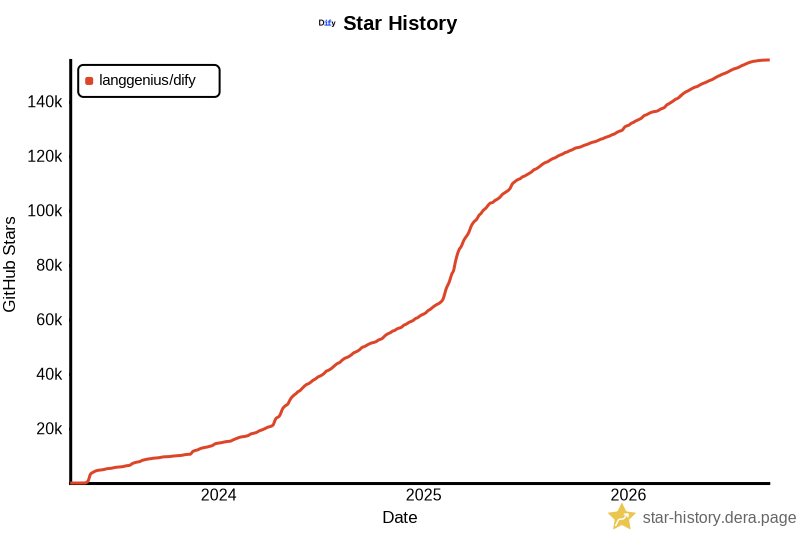](https://star-history.dera.page/langgenius/dify?type=date&legend=top-left#gh-light-mode-only) [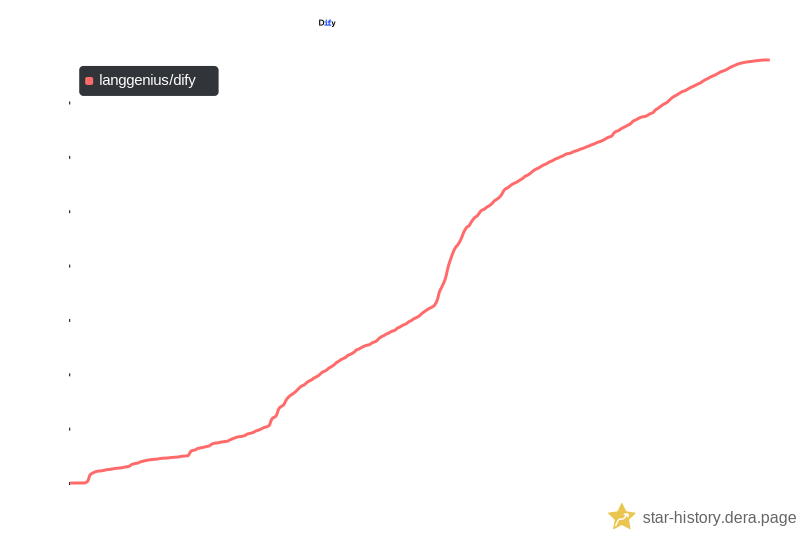](https://star-history.dera.page/langgenius/dify?type=date&legend=top-left#gh-dark-mode-only)
|
||||
|
||||
## الكشف عن الأمان
|
||||
|
||||
أبلغ عن الثغرات بشكل خاص عبر GitHub Security Advisories وفقًا [لسياسة الأمان](../../SECURITY.md). لا تفصح عنها في المشكلات أو المناقشات أو طلبات السحب العامة.
|
||||
|
||||
## الرخصة
|
||||
|
||||
هذا المستودع متاح تحت [رخصة البرنامج الحر Dify](../../LICENSE)، والتي تعتبر بشكل أساسي Apache 2.0 مع بعض القيود الإضافية.
|
||||
@@ -0,0 +1,57 @@
|
||||
# উন্নত সেটআপ
|
||||
|
||||
স্থানীয় সেটিংস `docker/.env`-এ পরিবর্তন করুন। [`.env.example`](../../docker/.env.example)-এ ডিফল্ট ডেপ্লয়মেন্টের প্রয়োজনীয় মান থাকে; ঐচ্ছিক ও পরিষেবা-নির্দিষ্ট সেটিংস [`docker/envs/`](../../docker/envs/)-এ রয়েছে। প্রয়োজনীয় টেমপ্লেটের `.example` প্রত্যয় বাদ দিয়ে কপি করুন। `.env`-এর মান অগ্রাধিকার পায়। পরিবর্তনের পরে `docker/` থেকে `docker compose up -d` চালান। [Docker নির্দেশিকা](../../docker/README.md) দেখুন।
|
||||
|
||||
## Grafana দিয়ে মেট্রিক্স মনিটরিং
|
||||
|
||||
Dify-এর PostgreSQL ডাটাবেসকে ডেটা সোর্স হিসাবে ব্যবহার করে, অ্যাপ, টেন্যান্ট, মেসেজ ইত্যাদির গ্র্যানুলারিটিতে মেট্রিক্স মনিটর করার জন্য Grafana-তে ড্যাশবোর্ড ইম্পোর্ট করুন।
|
||||
|
||||
- [@bowenliang123 কর্তৃক Grafana ড্যাশবোর্ড](https://github.com/bowenliang123/dify-grafana-dashboard)
|
||||
|
||||
## Kubernetes এর সাথে ডেপ্লয়মেন্ট
|
||||
|
||||
যদি আপনি একটি হাইলি এভেইলেবল সেটআপ কনফিগার করতে চান, তাহলে কমিউনিটি [Helm Charts](https://helm.sh/) এবং YAML ফাইল রয়েছে যা Dify কে Kubernetes-এ ডিপ্লয় করার প্রক্রিয়া বর্ণনা করে।
|
||||
|
||||
- [Helm Chart by @LeoQuote](https://github.com/douban/charts/tree/master/charts/dify)
|
||||
- [Helm Chart by @BorisPolonsky](https://github.com/BorisPolonsky/dify-helm)
|
||||
- [Helm Chart by @magicsong](https://github.com/magicsong/ai-charts)
|
||||
- [YAML file by @Winson-030](https://github.com/Winson-030/dify-kubernetes)
|
||||
- [YAML file by @wyy-holding](https://github.com/wyy-holding/dify-k8s)
|
||||
- [🚀 নতুন! YAML ফাইলসমূহ (Dify v1.6.0 সমর্থিত) তৈরি করেছেন @Zhoneym](https://github.com/Zhoneym/DifyAI-Kubernetes)
|
||||
|
||||
### টেরাফর্ম ব্যবহার করে ডিপ্লয়
|
||||
|
||||
[terraform](https://www.terraform.io/) ব্যবহার করে এক ক্লিকেই ক্লাউড প্ল্যাটফর্মে Dify ডিপ্লয় করুন।
|
||||
|
||||
#### অ্যাজুর গ্লোবাল
|
||||
|
||||
- [Azure Terraform by @nikawang](https://github.com/nikawang/dify-azure-terraform)
|
||||
|
||||
#### গুগল ক্লাউড
|
||||
|
||||
- [Google Cloud Terraform by @sotazum](https://github.com/DeNA/dify-google-cloud-terraform)
|
||||
|
||||
### AWS CDK ব্যবহার করে ডিপ্লয়
|
||||
|
||||
[CDK](https://aws.amazon.com/cdk/) দিয়ে AWS-এ Dify ডিপ্লয় করুন
|
||||
|
||||
#### AWS
|
||||
|
||||
- [AWS CDK by @KevinZhao (EKS based)](https://github.com/aws-samples/solution-for-deploying-dify-on-aws)
|
||||
- [AWS CDK by @tmokmss (ECS based)](https://github.com/aws-samples/dify-self-hosted-on-aws)
|
||||
|
||||
### Alibaba Cloud ব্যবহার করে ডিপ্লয়
|
||||
|
||||
[Alibaba Cloud Computing Nest](https://computenest.console.aliyun.com/service/instance/create/default?type=user&ServiceName=Dify%E7%A4%BE%E5%8C%BA%E7%89%88)
|
||||
|
||||
### Alibaba Cloud Data Management ব্যবহার করে ডিপ্লয়
|
||||
|
||||
[Alibaba Cloud Data Management](https://www.alibabacloud.com/help/en/dms/dify-in-invitational-preview/)
|
||||
|
||||
### AKS-এ ডিপ্লয় করার জন্য Azure Devops Pipeline ব্যবহার
|
||||
|
||||
[Azure Devops Pipeline Helm Chart by @LeoZhang](https://github.com/Ruiruiz30/Dify-helm-chart-AKS) ব্যবহার করে Dify কে AKS-এ এক ক্লিকে ডিপ্লয় করুন
|
||||
|
||||
### Sealos ব্যবহার করে ডিপ্লয়
|
||||
|
||||
[Sealos App Store](https://sealos.io/products/app-store/dify/) ব্যবহার করে Dify-কে এক ক্লিকে ডিপ্লয় করুন
|
||||
@@ -0,0 +1,175 @@
|
||||

|
||||
|
||||
<p align="center">
|
||||
📌 <a href="https://dify.ai/blog/introducing-dify-workflow-file-upload-a-demo-on-ai-podcast">ডিফাই ওয়ার্কফ্লো ফাইল আপলোড পরিচিতি: গুগল নোটবুক-এলএম পডকাস্ট পুনর্নির্মাণ</a>
|
||||
</p>
|
||||
|
||||
<p align="center">
|
||||
<a href="https://cloud.dify.ai">ডিফাই ক্লাউড</a> ·
|
||||
<a href="https://docs.dify.ai/getting-started/install-self-hosted">সেল্ফ-হোস্টিং</a> ·
|
||||
<a href="https://docs.dify.ai">ডকুমেন্টেশন</a> ·
|
||||
<a href="https://dify.ai/pricing">Dify পণ্যের রূপভেদ</a>
|
||||
</p>
|
||||
|
||||
<p align="center">
|
||||
<a href="https://dify.ai" target="_blank">
|
||||
<img alt="Static Badge" src="https://img.shields.io/badge/Product-F04438"></a>
|
||||
<a href="https://dify.ai/pricing" target="_blank">
|
||||
<img alt="Static Badge" src="https://img.shields.io/badge/free-pricing?logo=free&color=%20%23155EEF&label=pricing&labelColor=%20%23528bff"></a>
|
||||
<a href="https://discord.gg/FngNHpbcY7" target="_blank">
|
||||
<img src="https://img.shields.io/discord/1082486657678311454?logo=discord&labelColor=%20%235462eb&logoColor=%20%23f5f5f5&color=%20%235462eb"
|
||||
alt="chat on Discord"></a>
|
||||
<a href="https://reddit.com/r/difyai" target="_blank">
|
||||
<img src="https://img.shields.io/reddit/subreddit-subscribers/difyai?style=plastic&logo=reddit&label=r%2Fdifyai&labelColor=white"
|
||||
alt="join Reddit"></a>
|
||||
<a href="https://twitter.com/intent/follow?screen_name=dify_ai" target="_blank">
|
||||
<img src="https://img.shields.io/twitter/follow/dify_ai?logo=X&color=%20%23f5f5f5"
|
||||
alt="follow on X(Twitter)"></a>
|
||||
<a href="https://www.linkedin.com/company/langgenius/" target="_blank">
|
||||
<img src="https://custom-icon-badges.demolab.com/badge/LinkedIn-0A66C2?logo=linkedin-white&logoColor=fff"
|
||||
alt="follow on LinkedIn"></a>
|
||||
<a href="https://hub.docker.com/u/langgenius" target="_blank">
|
||||
<img alt="Docker Pulls" src="https://img.shields.io/docker/pulls/langgenius/dify-web?labelColor=%20%23FDB062&color=%20%23f79009"></a>
|
||||
<a href="https://github.com/langgenius/dify/graphs/commit-activity" target="_blank">
|
||||
<img alt="Commits last month" src="https://img.shields.io/github/commit-activity/m/langgenius/dify?labelColor=%20%2332b583&color=%20%2312b76a"></a>
|
||||
<a href="https://github.com/langgenius/dify/" target="_blank">
|
||||
<img alt="Issues closed" src="https://img.shields.io/github/issues-search?query=repo%3Alanggenius%2Fdify%20is%3Aclosed&label=issues%20closed&labelColor=%20%237d89b0&color=%20%235d6b98"></a>
|
||||
<a href="https://github.com/langgenius/dify/discussions/" target="_blank">
|
||||
<img alt="Discussion posts" src="https://img.shields.io/github/discussions/langgenius/dify?labelColor=%20%239b8afb&color=%20%237a5af8"></a>
|
||||
<a href="https://insights.linuxfoundation.org/project/langgenius-dify" target="_blank">
|
||||
<img alt="LFX Health Score" src="https://insights.linuxfoundation.org/api/badge/health-score?project=langgenius-dify"></a>
|
||||
<a href="https://insights.linuxfoundation.org/project/langgenius-dify" target="_blank">
|
||||
<img alt="LFX Contributors" src="https://insights.linuxfoundation.org/api/badge/contributors?project=langgenius-dify"></a>
|
||||
<a href="https://insights.linuxfoundation.org/project/langgenius-dify" target="_blank">
|
||||
<img alt="LFX Active Contributors" src="https://insights.linuxfoundation.org/api/badge/active-contributors?project=langgenius-dify"></a>
|
||||
</p>
|
||||
|
||||
<p align="center">
|
||||
<a href="../../README.md"><img alt="README in English" src="https://img.shields.io/badge/English-d9d9d9"></a>
|
||||
<a href="../zh-TW/README.md"><img alt="繁體中文文件" src="https://img.shields.io/badge/繁體中文-d9d9d9"></a>
|
||||
<a href="../zh-CN/README.md"><img alt="简体中文文件" src="https://img.shields.io/badge/简体中文-d9d9d9"></a>
|
||||
<a href="../ja-JP/README.md"><img alt="日本語のREADME" src="https://img.shields.io/badge/日本語-d9d9d9"></a>
|
||||
<a href="../es-ES/README.md"><img alt="README en Español" src="https://img.shields.io/badge/Español-d9d9d9"></a>
|
||||
<a href="../fr-FR/README.md"><img alt="README en Français" src="https://img.shields.io/badge/Français-d9d9d9"></a>
|
||||
<a href="../tlh/README.md"><img alt="README tlhIngan Hol" src="https://img.shields.io/badge/Klingon-d9d9d9"></a>
|
||||
<a href="../ko-KR/README.md"><img alt="README in Korean" src="https://img.shields.io/badge/한국어-d9d9d9"></a>
|
||||
<a href="../ar-SA/README.md"><img alt="README بالعربية" src="https://img.shields.io/badge/العربية-d9d9d9"></a>
|
||||
<a href="../tr-TR/README.md"><img alt="Türkçe README" src="https://img.shields.io/badge/Türkçe-d9d9d9"></a>
|
||||
<a href="../vi-VN/README.md"><img alt="README Tiếng Việt" src="https://img.shields.io/badge/Ti%E1%BA%BFng%20Vi%E1%BB%87t-d9d9d9"></a>
|
||||
<a href="../de-DE/README.md"><img alt="README in Deutsch" src="https://img.shields.io/badge/German-d9d9d9"></a>
|
||||
<a href="../it-IT/README.md"><img alt="README in Italiano" src="https://img.shields.io/badge/Italiano-d9d9d9"></a>
|
||||
<a href="../pt-BR/README.md"><img alt="README em Português do Brasil" src="https://img.shields.io/badge/Portugu%C3%AAs%20do%20Brasil-d9d9d9"></a>
|
||||
<a href="../sl-SI/README.md"><img alt="README Slovenščina" src="https://img.shields.io/badge/Sloven%C5%A1%C4%8Dina-d9d9d9"></a>
|
||||
<a href="../bn-BD/README.md"><img alt="README in বাংলা" src="https://img.shields.io/badge/বাংলা-d9d9d9"></a>
|
||||
<a href="../hi-IN/README.md"><img alt="README in हिन्दी" src="https://img.shields.io/badge/Hindi-d9d9d9"></a>
|
||||
</p>
|
||||
|
||||
ডিফাই একটি ওপেন-সোর্স LLM অ্যাপ ডেভেলপমেন্ট প্ল্যাটফর্ম। এটি ইন্টুইটিভ ইন্টারফেস, এজেন্টিক AI ওয়ার্কফ্লো, RAG পাইপলাইন, এজেন্ট ক্যাপাবিলিটি, মডেল ম্যানেজমেন্ট, মনিটরিং সুবিধা এবং আরও অনেক কিছু একত্রিত করে, যা দ্রুত প্রোটোটাইপ থেকে প্রোডাকশন পর্যন্ত নিয়ে যেতে সহায়তা করে।
|
||||
|
||||
## কুইক স্টার্ট
|
||||
|
||||
> ডিফাই ইনস্টল করার আগে, নিশ্চিত করুন যে আপনার মেশিন নিম্নলিখিত ন্যূনতম কনফিগারেশনের প্রয়োজনীয়তা পূরন করে :
|
||||
>
|
||||
> - সিপিউ >= 2 কোর
|
||||
> - র্যাম >= 4 জিবি
|
||||
|
||||
</br>
|
||||
|
||||
ডিফাই সার্ভার চালু করার সবচেয়ে সহজ উপায় [docker compose](../../docker/docker-compose.yaml) মাধ্যমে। নিম্নলিখিত কমান্ডগুলো ব্যবহার করে ডিফাই চালানোর আগে, নিশ্চিত করুন যে আপনার মেশিনে [Docker](https://docs.docker.com/get-docker/) এবং [Docker Compose](https://docs.docker.com/compose/install/) ইনস্টল করা আছে :
|
||||
|
||||
```bash
|
||||
cd dify
|
||||
cd docker
|
||||
cp .env.example .env
|
||||
docker compose up -d
|
||||
```
|
||||
|
||||
চালানোর পর, আপনি আপনার ব্রাউজারে [http://localhost/install](http://localhost/install)-এ ডিফাই ড্যাশবোর্ডে অ্যাক্সেস করতে পারেন এবং ইনিশিয়ালাইজেশন প্রক্রিয়া শুরু করতে পারেন।
|
||||
|
||||
### সাহায্যের খোঁজে
|
||||
|
||||
ডিফাই সেট আপ করতে সমস্যা হলে দয়া করে আমাদের [FAQ](https://docs.dify.ai/getting-started/install-self-hosted/faqs) দেখুন। যদি তবুও সমস্যা থেকে থাকে, তাহলে [কমিউনিটি এবং আমাদের](#কমিউনিটি-এবং-যোগাযোগ) সাথে যোগাযোগ করুন।
|
||||
|
||||
> যদি আপনি ডিফাইতে অবদান রাখতে বা অতিরিক্ত উন্নয়ন করতে চান, আমাদের [সোর্স কোড থেকে ডিপ্লয়মেন্টের গাইড](https://docs.dify.ai/getting-started/install-self-hosted/local-source-code) দেখুন।
|
||||
|
||||
## প্রধান ফিচারসমূহ
|
||||
|
||||
**১. ওয়ার্কফ্লো**:
|
||||
ভিজ্যুয়াল ক্যানভাসে AI ওয়ার্কফ্লো তৈরি এবং পরীক্ষা করুন, নিম্নলিখিত সব ফিচার এবং তার বাইরেও আরও অনেক কিছু ব্যবহার করে।
|
||||
|
||||
**২. মডেল সাপোর্ট**:
|
||||
GPT, Mistral, Llama3, এবং যেকোনো OpenAI API-সামঞ্জস্যপূর্ণ মডেলসহ, কয়েক ডজন ইনফারেন্স প্রদানকারী এবং সেল্ফ-হোস্টেড সমাধান থেকে শুরু করে প্রোপ্রাইটরি/ওপেন-সোর্স LLM-এর সাথে সহজে ইন্টিগ্রেশন। সমর্থিত মডেল প্রদানকারীদের একটি সম্পূর্ণ তালিকা পাওয়া যাবে [এখানে](https://docs.dify.ai/getting-started/readme/model-providers)।
|
||||
|
||||

|
||||
|
||||
**3. প্রম্পট IDE**:
|
||||
প্রম্পট তৈরি, মডেলের পারফরম্যান্স তুলনা এবং চ্যাট-বেজড অ্যাপে টেক্সট-টু-স্পিচের মতো বৈশিষ্ট্য যুক্ত করার জন্য ইন্টুইটিভ ইন্টারফেস।
|
||||
|
||||
**4. RAG পাইপলাইন**:
|
||||
ডকুমেন্ট ইনজেশন থেকে শুরু করে রিট্রিভ পর্যন্ত সবকিছুই বিস্তৃত RAG ক্যাপাবিলিটির আওতাভুক্ত। PDF, PPT এবং অন্যান্য সাধারণ ডকুমেন্ট ফর্ম্যাট থেকে টেক্সট এক্সট্রাকশনের জন্য আউট-অফ-বক্স সাপোর্ট।
|
||||
|
||||
**5. এজেন্ট ক্যাপাবিলিটি**:
|
||||
LLM ফাংশন কলিং বা ReAct উপর ভিত্তি করে এজেন্ট ডিফাইন করতে পারেন এবং এজেন্টের জন্য পূর্ব-নির্মিত বা কাস্টম টুলস যুক্ত করতে পারেন। Dify AI এজেন্টদের জন্য 50+ বিল্ট-ইন টুলস সরবরাহ করে, যেমন Google Search, DALL·E, Stable Diffusion এবং WolframAlpha।
|
||||
|
||||
**6. এলএলএম-অপ্স**:
|
||||
সময়ের সাথে সাথে অ্যাপ্লিকেশন লগ এবং পারফরম্যান্স মনিটর এবং বিশ্লেষণ করুন। প্রডাকশন ডেটা এবং annotation এর উপর ভিত্তি করে প্রম্পট, ডেটাসেট এবং মডেলগুলিকে ক্রমাগত উন্নত করতে পারেন।
|
||||
|
||||
**7. ব্যাকএন্ড-অ্যাজ-এ-সার্ভিস**:
|
||||
ডিফাই-এর সমস্ত অফার সংশ্লিষ্ট API-সহ আছে, যাতে আপনি অনায়াসে ডিফাইকে আপনার নিজস্ব বিজনেস লজিকে ইন্টেগ্রেট করতে পারেন।
|
||||
|
||||
## ডিফাই-এর ব্যবহার
|
||||
|
||||
- **ক্লাউড </br>**
|
||||
সার্ভার পরিচালনা ছাড়াই [Dify Cloud](https://cloud.dify.ai)-এ Dify ব্যবহার করে দেখুন। বর্তমান প্ল্যান ও ব্যবহারের সীমা জানতে [মূল্যতালিকা](https://dify.ai/pricing) দেখুন।
|
||||
|
||||
- **সেল্ফহোস্টিং ডিফাই কমিউনিটি সংস্করণ</br>**
|
||||
সেল্ফহোস্ট করতে এই [স্টার্টার গাইড](#কুইক-স্টার্ট) ব্যবহার করে দ্রুত আপনার এনভায়রনমেন্টে ডিফাই চালান।
|
||||
আরো ইন-ডেপথ রেফারেন্সের জন্য [ডকুমেন্টেশন](https://docs.dify.ai) দেখেন।
|
||||
|
||||
- **এন্টারপ্রাইজ / প্রতিষ্ঠানের জন্য Dify</br>**
|
||||
আমরা এন্টারপ্রাইজ/প্রতিষ্ঠান-কেন্দ্রিক সেবা প্রদান করে থাকি । [এই চ্যাটবটের মাধ্যমে আপনার প্রশ্নগুলি আমাদের জন্য লগ করুন।](https://udify.app/chat/22L1zSxg6yW1cWQg) অথবা [আমাদের ইমেল পাঠান](mailto:business@dify.ai?subject=%5BGitHub%5DBusiness%20License%20Inquiry) আপনার চাহিদা সম্পর্কে আলোচনা করার জন্য। </br>
|
||||
|
||||
## এগিয়ে থাকুন
|
||||
|
||||
GitHub-এ ডিফাইকে স্টার দিয়ে রাখুন এবং নতুন রিলিজের খবর তাৎক্ষণিকভাবে পান।
|
||||
|
||||
<img width="1344" height="720" alt="star" src="https://github.com/user-attachments/assets/dcd086d1-af0f-471b-ae52-1ad2fa040595" />
|
||||
|
||||
## Advanced Setup
|
||||
|
||||
কাস্টম কনফিগারেশন, পর্যবেক্ষণ এবং ডেপ্লয়মেন্ট বিকল্পের জন্য, [উন্নত সেটআপ](ADVANCED_SETUP.md) দেখুন।
|
||||
|
||||
## অবদান
|
||||
|
||||
Dify সব ধরনের অবদানকে স্বাগত জানায়:
|
||||
|
||||
- **কোড**: [অবদান নির্দেশিকা](https://github.com/langgenius/dify/blob/main/CONTRIBUTING.md) পড়ুন, তারপর [নতুন অবদানকারীদের উপযোগী সমস্যাগুলো](https://github.com/langgenius/dify/issues?q=is%3Aissue%20state%3Aopen%20label%3A%22good%20first%20issue%22) দেখুন।
|
||||
- **ধারণা ও প্রতিক্রিয়া**: একটি [GitHub আলোচনা](https://github.com/langgenius/dify/discussions) শুরু করুন বা বিদ্যমান আলোচনায় যোগ দিন।
|
||||
- **অনুবাদ**: কোনো লোকেল যোগ বা হালনাগাদ করতে [আন্তর্জাতিকীকরণ নির্দেশিকা](https://github.com/langgenius/dify/blob/main/web/i18n/README.md) অনুসরণ করুন।
|
||||
- **কমিউনিটি**: আপনার তৈরি অ্যাপ শেয়ার করুন, অন্য ব্যবহারকারীদের সাহায্য করুন এবং Dify সম্পর্কে সবাইকে জানান।
|
||||
|
||||
### অবদানকারীরা
|
||||
|
||||
<a href="https://github.com/langgenius/dify/graphs/contributors">
|
||||
<img alt="Dify contributors" src="https://contrib.rocks/image?repo=langgenius/dify" />
|
||||
</a>
|
||||
|
||||
## কমিউনিটি এবং যোগাযোগ
|
||||
|
||||
আপনার প্রশ্নের জন্য সবচেয়ে উপযুক্ত মাধ্যমটি বেছে নিন:
|
||||
|
||||
- [GitHub Discussions](https://github.com/langgenius/dify/discussions): সাহায্য নিন, প্রতিক্রিয়া জানান এবং ধারণা প্রস্তাব করুন।
|
||||
- [GitHub Issues](https://github.com/langgenius/dify/issues): পুনরুৎপাদনযোগ্য বাগ রিপোর্ট করুন এবং ইঞ্জিনিয়ারিং কাজ অনুসরণ করুন। নতুন ইস্যু খোলার আগে [অবদান নির্দেশিকা](https://github.com/langgenius/dify/blob/main/CONTRIBUTING.md) পড়ুন।
|
||||
- [Discord](https://discord.gg/FngNHpbcY7): সরাসরি আলোচনা করুন, আপনার অ্যাপ শেয়ার করুন এবং অন্যান্য Dify ব্যবহারকারীর সঙ্গে যুক্ত হন।
|
||||
- [X](https://x.com/dify_ai): রিলিজের খবর এবং প্রকল্পের হালনাগাদ পেতে Dify অনুসরণ করুন।
|
||||
## স্টার হিস্ট্রি
|
||||
|
||||
[](https://star-history.dera.page/langgenius/dify?type=date&legend=top-left#gh-light-mode-only) [](https://star-history.dera.page/langgenius/dify?type=date&legend=top-left#gh-dark-mode-only)
|
||||
|
||||
## নিরাপত্তা বিষয়ক
|
||||
|
||||
আমাদের [নিরাপত্তা নীতি](../../SECURITY.md) অনুসারে GitHub Security Advisories-এর মাধ্যমে গোপনে নিরাপত্তা দুর্বলতা জানান। প্রকাশ্য issue, আলোচনা বা pull request-এ তা প্রকাশ করবেন না।
|
||||
|
||||
## লাইসেন্স
|
||||
|
||||
এই রিপোজিটরিটি [ডিফাই ওপেন সোর্স লাইসেন্স](../../LICENSE) এর অধিনে , যা মূলত অ্যাপাচি ২.০, তবে কিছু অতিরিক্ত বিধিনিষেধ রয়েছে।
|
||||
@@ -0,0 +1,286 @@
|
||||
# Cross-Environment Data Migration
|
||||
|
||||
This guide explains how to move workflow apps, chatflow apps, and their custom tool dependencies from one Dify environment to another.
|
||||
|
||||
The recommended best-practice path is:
|
||||
|
||||
1. Run the export wizard in the source environment.
|
||||
2. Import the generated migration package in the target environment.
|
||||
|
||||
Use scripted export only when you need repeatable automation.
|
||||
|
||||
## What Gets Migrated
|
||||
|
||||
The migration package can contain:
|
||||
|
||||
- Workflow apps and advanced-chat apps.
|
||||
- Custom API tool providers.
|
||||
- Workflow tool providers.
|
||||
- MCP tool providers when secrets are explicitly included.
|
||||
- Dependency metadata for MCP tools, built-in tools, and plugin tools that must already exist or be configured in the target environment.
|
||||
|
||||
Only single source workspace exports are supported. The source and target workspace names do not need to match.
|
||||
|
||||
## Recommended Flow: Wizard Export + Import
|
||||
|
||||
Run the wizard from the source environment:
|
||||
|
||||
```bash
|
||||
cd api
|
||||
source .venv/bin/activate
|
||||
uv run flask app-migration-wizard
|
||||
```
|
||||
|
||||
The wizard asks you to select the source workspace, choose workflow/chatflow apps, discover referenced tools, set import behavior, and write the final migration package JSON.
|
||||
|
||||
Then copy the generated JSON package to the target environment and import it:
|
||||
|
||||
```bash
|
||||
cd api
|
||||
source .venv/bin/activate
|
||||
uv run flask import-app-migration \
|
||||
--input migration-data-20260528-120000.json \
|
||||
--target-tenant "production Workspace"
|
||||
```
|
||||
|
||||
This wizard + import combination is the recommended migration workflow because the wizard shows the available apps and tools, discovers app dependencies, summarizes the package before writing it, and uses the same export service as scripted export.
|
||||
|
||||
## Wizard Command
|
||||
|
||||
```bash
|
||||
cd api
|
||||
source .venv/bin/activate
|
||||
uv run flask app-migration-wizard
|
||||
```
|
||||
|
||||
The wizard has no CLI options. Its interactive inputs are:
|
||||
|
||||
- `Source tenant`: the source workspace to export from. Select one tenant by number.
|
||||
- `App selection`: apps to export. Supported app types are `workflow` and `advanced-chat`. Enter `all`, one number, or comma-separated numbers.
|
||||
- `Automatically export tools referenced by selected apps?`: recommended `yes`. This scans selected app graphs and automatically includes referenced custom API tools, workflow tools, and MCP tool references.
|
||||
- `Export additional tools manually?`: optional. Use this when you need to migrate tools that are not referenced by the selected apps.
|
||||
- `Include secrets in output JSON?`: default `no`. When `no`, workflow/app DSL secrets are omitted or masked, API tool credentials are omitted, and MCP providers are exported as dependency metadata only. When `yes`, treat the output JSON as sensitive.
|
||||
- `Create or reuse app API tokens during import?`: default `no`. When `yes`, import creates an app API token for imported apps that have none, or reuses an existing token.
|
||||
- `Import ID strategy`: `preserve-id` or `generate-new-id`. Default is `preserve-id`.
|
||||
- `Import conflict strategy`: `fail`, `skip`, or `update`. Wizard default is `update`.
|
||||
- `Output path`: output migration package path. The default is `migration-data-YYYYMMDD-HHMMSS.json`.
|
||||
- `Overwrite existing output`: shown only if the selected output file already exists.
|
||||
- `Write migration package?`: final confirmation after the wizard prints the summary.
|
||||
|
||||
## Import Command
|
||||
|
||||
```bash
|
||||
cd api
|
||||
source .venv/bin/activate
|
||||
uv run flask import-app-migration --input migration-package.json --target-tenant "target Workspace"
|
||||
```
|
||||
|
||||
Options:
|
||||
|
||||
- `--input`: required. Path to the migration package JSON generated by the wizard or scripted export.
|
||||
- `--target-tenant`: optional only when package metadata already contains a target tenant. Target workspace name or workspace UUID. This overrides package metadata and is recommended for reusable packages.
|
||||
- `--operator-email`: optional. Email of the target-tenant account used as the import operator. If omitted, import uses the earliest owner account in the target tenant.
|
||||
- `--id-strategy`: optional override for the package import option. Allowed values:
|
||||
- `preserve-id`: keep source app/tool IDs when supported. This is the recommended default for preserving workflow references across environments.
|
||||
- `generate-new-id`: let the target environment generate new IDs and rewrite references through the migration ID mapping.
|
||||
- `--conflict-strategy`: optional override for the package import option. Allowed values:
|
||||
- `fail`: stop at the first existing target resource conflict. Previously committed resources are not rolled back.
|
||||
- `skip`: keep the existing target resource and skip importing that resource.
|
||||
- `update`: update the existing target resource in place.
|
||||
- `--create-app-api-token-on-import`: optional override. Create or reuse app API tokens during import.
|
||||
- `--no-create-app-api-token-on-import`: optional override. Do not create app API tokens during import.
|
||||
|
||||
Import prints a report that includes the resolved target tenant, operator, created/updated/skipped resources, unresolved dependencies, app API token counts, and ID mappings used to rewrite references.
|
||||
|
||||
## Optional Flow: Scripted Export
|
||||
|
||||
Scripted export is supported for automation. The recommended scripted path is:
|
||||
|
||||
1. Generate an export config template.
|
||||
2. Edit the template.
|
||||
3. Run scripted export.
|
||||
4. Import the generated package.
|
||||
|
||||
Generate the template:
|
||||
|
||||
```bash
|
||||
cd api
|
||||
source .venv/bin/activate
|
||||
uv run flask app-migration-template --output export-config.json
|
||||
```
|
||||
|
||||
Edit `export-config.json`, then run:
|
||||
|
||||
```bash
|
||||
cd api
|
||||
source .venv/bin/activate
|
||||
uv run flask export-app-migration \
|
||||
--input export-config.json \
|
||||
--output migration-package.json
|
||||
```
|
||||
|
||||
Import it:
|
||||
|
||||
```bash
|
||||
cd api
|
||||
source .venv/bin/activate
|
||||
uv run flask import-app-migration \
|
||||
--input migration-package.json \
|
||||
--target-tenant "production Workspace"
|
||||
```
|
||||
|
||||
### Template Command
|
||||
|
||||
```bash
|
||||
cd api
|
||||
source .venv/bin/activate
|
||||
uv run flask app-migration-template [--output export-config.json] [--overwrite]
|
||||
```
|
||||
|
||||
Options:
|
||||
|
||||
- `--output`: optional. Path to write the scripted export config JSON template. If omitted, the template is printed to stdout.
|
||||
- `--overwrite`: optional. Allows replacing an existing output file. Without this option, the command fails if `--output` already exists.
|
||||
|
||||
### Scripted Export Command
|
||||
|
||||
```bash
|
||||
cd api
|
||||
source .venv/bin/activate
|
||||
uv run flask export-app-migration --input export-config.json --output migration-package.json
|
||||
```
|
||||
|
||||
Options:
|
||||
|
||||
- `--input`: required. Path to the export config JSON.
|
||||
- `--output`: required. Path to write the migration package JSON.
|
||||
- `--overwrite`: optional. Allows replacing an existing output package. Without this option, the command fails if `--output` already exists.
|
||||
|
||||
### Export Config Fields
|
||||
|
||||
The generated template uses this shape:
|
||||
|
||||
```json
|
||||
{
|
||||
"source_tenant": {
|
||||
"mode": "single",
|
||||
"id": "",
|
||||
"name": "admin's Workspace"
|
||||
},
|
||||
"apps": {
|
||||
"modes": ["workflow", "advanced-chat"],
|
||||
"ids": [],
|
||||
"all": true
|
||||
},
|
||||
"include_referenced_tools": true,
|
||||
"additional_tools": {
|
||||
"api_tools": [],
|
||||
"workflow_tools": [],
|
||||
"mcp_tools": []
|
||||
},
|
||||
"include_secrets": false,
|
||||
"import_options": {
|
||||
"create_app_api_token_on_import": false,
|
||||
"id_strategy": "preserve-id",
|
||||
"conflict_strategy": "fail"
|
||||
}
|
||||
}
|
||||
```
|
||||
|
||||
Fields:
|
||||
|
||||
- `source_tenant.mode`: must be `single`.
|
||||
- `source_tenant.id`: optional source workspace UUID. Use this when workspace names are duplicated or when you want strict source selection.
|
||||
- `source_tenant.name`: required source workspace name. When `source_tenant.id` is set, the ID and name must match.
|
||||
- `apps.modes`: optional list of app modes for validation. Supported values are `workflow` and `advanced-chat`.
|
||||
- `apps.ids`: app IDs to export when `apps.all` is `false`.
|
||||
- `apps.all`: when `true`, export all supported apps in the selected source workspace. When `false`, export only `apps.ids`.
|
||||
- `include_referenced_tools`: recommended `true`. Automatically discovers tools referenced by selected workflow/chatflow apps.
|
||||
- `additional_tools.api_tools`: optional custom API tool provider names to export in addition to referenced tools.
|
||||
- `additional_tools.workflow_tools`: optional workflow tool provider IDs to export in addition to referenced tools.
|
||||
- `additional_tools.mcp_tools`: optional MCP provider IDs or server identifiers to export in addition to referenced tools.
|
||||
- `include_secrets`: default `false`. When `false`, credentials are omitted and MCP providers are recorded as dependency metadata. When `true`, custom API credentials, workflow DSL secrets, and full MCP connection data can be written to the package.
|
||||
- `import_options.create_app_api_token_on_import`: default `false`. Package-level default for import token creation.
|
||||
- `import_options.id_strategy`: package-level default ID strategy. Allowed values are `preserve-id` and `generate-new-id`.
|
||||
- `import_options.conflict_strategy`: package-level default conflict strategy. Allowed values are `fail`, `skip`, and `update`.
|
||||
|
||||
## Referenced Tools
|
||||
|
||||
Use automatic referenced-tool discovery whenever possible.
|
||||
|
||||
When enabled, Dify scans selected workflow/chatflow graphs and agent tool configs, then de-duplicates discovered custom API tools, workflow tools, and MCP tool references before export. This reduces the chance of importing an app whose workflow references missing providers.
|
||||
|
||||
Built-in and plugin tools are not serialized into the package. The migration report records them as dependency metadata; make sure the target environment has the required built-in or plugin tools installed and configured.
|
||||
|
||||
MCP providers are also dependency-only unless `include_secrets` is enabled. If MCP secrets are not exported, configure the corresponding MCP provider manually in the target workspace before running migrated workflows.
|
||||
|
||||
## Secret Handling
|
||||
|
||||
The safe default is `include_secrets: false`.
|
||||
|
||||
Only enable secret export when you have a controlled transfer path for the JSON package. With secrets enabled, the package may include API tool credentials, workflow/app DSL secret values, MCP server URLs, MCP headers, authentication data, and cached MCP tool lists.
|
||||
|
||||
## FAQ
|
||||
|
||||
### What happens when `include_secrets` is `false`?
|
||||
|
||||
This is the recommended default, but it means the migration package is intentionally incomplete for sensitive runtime configuration.
|
||||
|
||||
Important behavior:
|
||||
|
||||
- MCP tools are not exported as full tool providers. They are recorded as dependency metadata only.
|
||||
- Custom API tool credentials are not exported. The provider schema can be exported, but credentials must be configured again in the target workspace.
|
||||
- Workflow/app DSL secrets are omitted or masked. Any app variables, credentials, or secret-backed settings must be reviewed in the target workspace after import.
|
||||
- Built-in and plugin tools are never serialized as custom migration data. They are recorded as dependencies only.
|
||||
|
||||
How to handle it:
|
||||
|
||||
- Before importing, install or enable the required built-in/plugin tools in the target environment.
|
||||
- For MCP tools, manually create or configure the corresponding MCP provider in the target workspace before running migrated workflows.
|
||||
- For custom API tools, open the imported provider in the target workspace and re-enter credentials.
|
||||
- After import, review each migrated workflow/chatflow before production use. Pay special attention to tool nodes, agent tool configs, environment variables, app variables, and credential-backed settings.
|
||||
- Use the import report. Items marked `dependency-only`, `skipped`, or `unresolved` usually need manual follow-up.
|
||||
|
||||
If you need the package to carry full MCP provider configuration or credentials, rerun export with `include_secrets` set to `true` and transfer the generated JSON as sensitive data.
|
||||
|
||||
### What should I consider when `include_secrets` is `true`?
|
||||
|
||||
The package can include sensitive runtime configuration such as API tool credentials, workflow/app DSL secret values, MCP server URLs, headers, authentication data, and MCP tool lists.
|
||||
|
||||
How to handle it:
|
||||
|
||||
- Store and transfer the JSON package as a secret.
|
||||
- Delete the package after import if your security policy requires it.
|
||||
- Prefer using this only for controlled one-time migrations where manual target-side credential setup is harder than securing the package.
|
||||
|
||||
### Should I use `preserve-id` or `generate-new-id`?
|
||||
|
||||
The ID strategy controls whether imported resources keep source IDs or receive new IDs in the target environment. It applies to workflow apps and custom tool resources where the target service supports explicit IDs.
|
||||
|
||||
Use `preserve-id` by default. It is recommended for cross-environment app migration because imported apps and tools try to keep their source IDs, which makes workflow references easier to preserve.
|
||||
|
||||
Use `preserve-id` when:
|
||||
|
||||
- You are migrating between environments that are meant to mirror each other, such as staging to production.
|
||||
- You want workflow tool references and provider references to remain as stable as possible.
|
||||
- The target environment does not already contain unrelated resources with the same IDs.
|
||||
|
||||
Watch out for:
|
||||
|
||||
- If the target already has a resource with the same ID, `conflict_strategy=fail` stops the import, `skip` keeps the target resource, and `update` updates it in place.
|
||||
- If the same ID was reused for a different resource in the target environment, review carefully before using `update`.
|
||||
|
||||
Use `generate-new-id` when the target environment should keep its own local IDs.
|
||||
|
||||
Use `generate-new-id` when:
|
||||
|
||||
- The target environment already has resources that may conflict with source IDs.
|
||||
- You are importing a package as a copy rather than trying to mirror environments.
|
||||
- You want to avoid preserving source database IDs in the target environment.
|
||||
|
||||
Watch out for:
|
||||
|
||||
- Import records source-to-target ID mappings. Always review the import report's ID mappings.
|
||||
- Workflow DSL provider references are rewritten using the generated ID mapping where possible.
|
||||
- Dependencies that are metadata-only, such as MCP providers exported with `include_secrets=false`, still require manual target-side configuration.
|
||||
- Built-in/plugin tools are not remapped as migrated custom resources; the target environment must provide them separately.
|
||||
@@ -0,0 +1,57 @@
|
||||
# Erweiterte Einstellungen
|
||||
|
||||
Konfigurieren Sie Ihre Installation in `docker/.env`. [`.env.example`](../../docker/.env.example) enthält die nötigen Startwerte für die Standardbereitstellung; optionale und dienstspezifische Einstellungen liegen unter [`docker/envs/`](../../docker/envs/). Kopieren Sie benötigte Vorlagen ohne die Endung `.example`. Werte aus `.env` haben Vorrang. Führen Sie nach Änderungen `docker compose up -d` in `docker/` aus. Siehe [Docker-Anleitung](../../docker/README.md).
|
||||
|
||||
## Metriküberwachung mit Grafana
|
||||
|
||||
Importieren Sie das Dashboard in Grafana, wobei Sie die PostgreSQL-Datenbank von Dify als Datenquelle verwenden, um Metriken in der Granularität von Apps, Mandanten, Nachrichten und mehr zu überwachen.
|
||||
|
||||
- [Grafana-Dashboard von @bowenliang123](https://github.com/bowenliang123/dify-grafana-dashboard)
|
||||
|
||||
## Bereitstellung mit Kubernetes
|
||||
|
||||
Falls Sie eine hochverfügbare Konfiguration einrichten möchten, gibt es von der Community bereitgestellte [Helm Charts](https://helm.sh/) und YAML-Dateien, die es ermöglichen, Dify auf Kubernetes bereitzustellen.
|
||||
|
||||
- [Helm Chart by @LeoQuote](https://github.com/douban/charts/tree/master/charts/dify)
|
||||
- [Helm Chart by @BorisPolonsky](https://github.com/BorisPolonsky/dify-helm)
|
||||
- [Helm Chart by @magicsong](https://github.com/magicsong/ai-charts)
|
||||
- [YAML file by @Winson-030](https://github.com/Winson-030/dify-kubernetes)
|
||||
- [YAML file by @wyy-holding](https://github.com/wyy-holding/dify-k8s)
|
||||
- [🚀 NEW! YAML files (Supports Dify v1.6.0) by @Zhoneym](https://github.com/Zhoneym/DifyAI-Kubernetes)
|
||||
|
||||
### Terraform für die Bereitstellung verwenden
|
||||
|
||||
Stellen Sie Dify mit nur einem Klick mithilfe von [terraform](https://www.terraform.io/) auf einer Cloud-Plattform bereit.
|
||||
|
||||
#### Azure Global
|
||||
|
||||
- [Azure Terraform by @nikawang](https://github.com/nikawang/dify-azure-terraform)
|
||||
|
||||
#### Google Cloud
|
||||
|
||||
- [Google Cloud Terraform by @sotazum](https://github.com/DeNA/dify-google-cloud-terraform)
|
||||
|
||||
### Verwendung von AWS CDK für die Bereitstellung
|
||||
|
||||
Bereitstellung von Dify auf AWS mit [CDK](https://aws.amazon.com/cdk/)
|
||||
|
||||
#### AWS
|
||||
|
||||
- [AWS CDK by @KevinZhao (EKS based)](https://github.com/aws-samples/solution-for-deploying-dify-on-aws)
|
||||
- [AWS CDK by @tmokmss (ECS based)](https://github.com/aws-samples/dify-self-hosted-on-aws)
|
||||
|
||||
### Alibaba Cloud
|
||||
|
||||
[Alibaba Cloud Computing Nest](https://computenest.console.aliyun.com/service/instance/create/default?type=user&ServiceName=Dify%E7%A4%BE%E5%8C%BA%E7%89%88)
|
||||
|
||||
### Alibaba Cloud Data Management
|
||||
|
||||
Ein-Klick-Bereitstellung von Dify in der Alibaba Cloud mit [Alibaba Cloud Data Management](https://www.alibabacloud.com/help/en/dms/dify-in-invitational-preview/)
|
||||
|
||||
### Verwendung von Azure Devops Pipeline für AKS-Bereitstellung
|
||||
|
||||
Stellen Sie Dify mit einem Klick in AKS bereit, indem Sie [Azure Devops Pipeline Helm Chart by @LeoZhang](https://github.com/Ruiruiz30/Dify-helm-chart-AKS) verwenden
|
||||
|
||||
### Bereitstellung mit Sealos
|
||||
|
||||
Stellen Sie Dify mit einem Klick über den [Sealos App Store](https://sealos.io/products/app-store/dify/) bereit
|
||||
@@ -0,0 +1,86 @@
|
||||
# MITWIRKEN
|
||||
|
||||
Sie möchten also zu Dify beitragen - das ist großartig, wir können es kaum erwarten zu sehen, was Sie entwickeln. Als Startup mit begrenztem Personal und Finanzierung haben wir große Ambitionen, den intuitivsten Workflow für die Entwicklung und Verwaltung von LLM-Anwendungen zu gestalten. Jede Hilfe aus der Community zählt wirklich.
|
||||
|
||||
Wir müssen wendig sein und schnell liefern, aber wir möchten auch sicherstellen, dass Mitwirkende wie Sie eine möglichst reibungslose Erfahrung beim Beitragen haben. Wir haben diesen Leitfaden zusammengestellt, damit Sie sich schnell mit der Codebasis und unserer Arbeitsweise mit Mitwirkenden vertraut machen können.
|
||||
|
||||
Dieser Leitfaden ist, wie Dify selbst, in ständiger Entwicklung. Wir sind dankbar für Ihr Verständnis, falls er manchmal hinter dem eigentlichen Projekt zurückbleibt, und begrüßen jedes Feedback zur Verbesserung.
|
||||
|
||||
Bitte nehmen Sie sich einen Moment Zeit, um unsere [Lizenz- und Mitwirkungsvereinbarung](../../LICENSE) zu lesen. Die Community hält sich außerdem an den [Verhaltenskodex](https://github.com/langgenius/.github/blob/main/CODE_OF_CONDUCT.md).
|
||||
|
||||
## Bevor Sie loslegen
|
||||
|
||||
Suchen Sie nach einer Aufgabe? Durchstöbern Sie unsere [Einsteiger-Issues](https://github.com/langgenius/dify/issues?q=is%3Aissue%20state%3Aopen%20label%3A%22good%20first%20issue%22) und wählen Sie eines zum Einstieg!
|
||||
|
||||
Haben Sie eine neue Modell-Runtime oder ein Tool hinzuzufügen? Öffnen Sie einen PR in unserem [Plugin-Repository](https://github.com/langgenius/dify-plugins).
|
||||
|
||||
Möchten Sie eine bestehende Modell-Runtime oder ein Tool aktualisieren oder Bugs beheben? Besuchen Sie unser [offizielles Plugin-Repository](https://github.com/langgenius/dify-official-plugins)!
|
||||
|
||||
Vergessen Sie nicht, in der PR-Beschreibung ein bestehendes Issue zu verlinken oder ein neues zu erstellen.
|
||||
|
||||
### Fehlermeldungen
|
||||
|
||||
Melden Sie Sicherheitslücken gemäß der [Sicherheitsrichtlinie](../../SECURITY.md) vertraulich, statt ein öffentliches Issue zu erstellen.
|
||||
|
||||
> [!WICHTIG]
|
||||
> Bitte stellen Sie sicher, dass Sie folgende Informationen bei der Einreichung eines Fehlerberichts angeben:
|
||||
|
||||
- Ein klarer und beschreibender Titel
|
||||
- Eine detaillierte Beschreibung des Fehlers, einschließlich Fehlermeldungen
|
||||
- Schritte zur Reproduktion des Fehlers
|
||||
- Erwartetes Verhalten
|
||||
- **Logs** bei Backend-Problemen (sehr wichtig, zu finden in docker-compose logs)
|
||||
- Screenshots oder Videos, falls zutreffend
|
||||
|
||||
Unsere Priorisierung:
|
||||
|
||||
| Fehlertyp | Priorität |
|
||||
| ------------------------------------------------------------ | --------------- |
|
||||
| Fehler in Kernfunktionen (Cloud-Service, Login nicht möglich, Anwendungen funktionieren nicht) | Kritisch |
|
||||
| Nicht-kritische Fehler, Leistungsverbesserungen | Mittlere Priorität |
|
||||
| Kleinere Korrekturen (Tippfehler, verwirrende aber funktionierende UI) | Niedrige Priorität |
|
||||
|
||||
### Feature-Anfragen
|
||||
|
||||
> [!HINWEIS]
|
||||
> Bitte stellen Sie sicher, dass Sie folgende Informationen bei der Einreichung einer Feature-Anfrage angeben:
|
||||
|
||||
- Ein klarer und beschreibender Titel
|
||||
- Eine detaillierte Beschreibung des Features
|
||||
- Ein Anwendungsfall für das Feature
|
||||
- Zusätzlicher Kontext oder Screenshots zur Feature-Anfrage
|
||||
|
||||
Unsere Priorisierung:
|
||||
|
||||
| Feature-Typ | Priorität |
|
||||
| ------------------------------------------------------------ | --------------- |
|
||||
| Hochprioritäre Features (durch Teammitglied gekennzeichnet) | Hohe Priorität |
|
||||
| Beliebte Feature-Anfragen aus unserem [Community-Feedback-Board](https://github.com/langgenius/dify/discussions/categories/feedbacks) | Mittlere Priorität |
|
||||
| Nicht-Kernfunktionen und kleinere Verbesserungen | Niedrige Priorität |
|
||||
| Wertvoll, aber nicht dringend | Zukunfts-Feature |
|
||||
|
||||
## Einreichen Ihres PRs
|
||||
|
||||
### Pull-Request-Prozess
|
||||
|
||||
1. Repository forken
|
||||
1. Vor dem Erstellen eines PRs bitte ein Issue zur Diskussion der Änderungen erstellen
|
||||
1. Einen neuen Branch für Ihre Änderungen erstellen
|
||||
1. Tests ergänzen oder aktualisieren, wenn die Änderung beobachtbares Verhalten beeinflusst oder ein relevantes Regressionsrisiko birgt.
|
||||
1. Sicherstellen, dass Ihr Code die bestehenden Tests besteht
|
||||
1. Issue in der PR-Beschreibung verlinken (`fixes #<issue_number>`)
|
||||
1. Auf den Merge warten!
|
||||
|
||||
### Projekt einrichten
|
||||
|
||||
#### Frontend
|
||||
|
||||
Für die Einrichtung des Frontend-Service folgen Sie bitte unserer ausführlichen [Anleitung](../../web/README.md) in der Datei `web/README.md`.
|
||||
|
||||
#### Backend
|
||||
|
||||
Für die Einrichtung des Backend-Service folgen Sie bitte unseren detaillierten [Anweisungen](../../api/README.md) in der Datei `api/README.md`.
|
||||
|
||||
## Hilfe bekommen
|
||||
|
||||
Wenn Sie beim Mitwirken Fragen haben oder nicht weiterkommen, stellen Sie Ihre Fragen einfach im entsprechenden GitHub Issue oder besuchen Sie unseren [Discord](https://discord.gg/8Tpq4AcN9c) für einen schnellen Austausch.
|
||||
@@ -0,0 +1,174 @@
|
||||

|
||||
|
||||
<p align="center">
|
||||
📌 <a href="https://dify.ai/blog/introducing-dify-workflow-file-upload-a-demo-on-ai-podcast">Einführung in Dify Workflow File Upload: Google NotebookLM Podcast nachbilden</a>
|
||||
</p>
|
||||
|
||||
<p align="center">
|
||||
<a href="https://cloud.dify.ai">Dify Cloud</a> ·
|
||||
<a href="https://docs.dify.ai/getting-started/install-self-hosted">Selbstgehostetes</a> ·
|
||||
<a href="https://docs.dify.ai">Dokumentation</a> ·
|
||||
<a href="https://dify.ai/pricing">Überblick über die Dify-Produkte</a>
|
||||
</p>
|
||||
|
||||
<p align="center">
|
||||
<a href="https://dify.ai" target="_blank">
|
||||
<img alt="Static Badge" src="https://img.shields.io/badge/Product-F04438"></a>
|
||||
<a href="https://dify.ai/pricing" target="_blank">
|
||||
<img alt="Static Badge" src="https://img.shields.io/badge/free-pricing?logo=free&color=%20%23155EEF&label=pricing&labelColor=%20%23528bff"></a>
|
||||
<a href="https://discord.gg/FngNHpbcY7" target="_blank">
|
||||
<img src="https://img.shields.io/discord/1082486657678311454?logo=discord&labelColor=%20%235462eb&logoColor=%20%23f5f5f5&color=%20%235462eb"
|
||||
alt="chat on Discord"></a>
|
||||
<a href="https://reddit.com/r/difyai" target="_blank">
|
||||
<img src="https://img.shields.io/reddit/subreddit-subscribers/difyai?style=plastic&logo=reddit&label=r%2Fdifyai&labelColor=white"
|
||||
alt="join Reddit"></a>
|
||||
<a href="https://twitter.com/intent/follow?screen_name=dify_ai" target="_blank">
|
||||
<img src="https://img.shields.io/twitter/follow/dify_ai?logo=X&color=%20%23f5f5f5"
|
||||
alt="follow on X(Twitter)"></a>
|
||||
<a href="https://www.linkedin.com/company/langgenius/" target="_blank">
|
||||
<img src="https://custom-icon-badges.demolab.com/badge/LinkedIn-0A66C2?logo=linkedin-white&logoColor=fff"
|
||||
alt="follow on LinkedIn"></a>
|
||||
<a href="https://hub.docker.com/u/langgenius" target="_blank">
|
||||
<img alt="Docker Pulls" src="https://img.shields.io/docker/pulls/langgenius/dify-web?labelColor=%20%23FDB062&color=%20%23f79009"></a>
|
||||
<a href="https://github.com/langgenius/dify/graphs/commit-activity" target="_blank">
|
||||
<img alt="Commits last month" src="https://img.shields.io/github/commit-activity/m/langgenius/dify?labelColor=%20%2332b583&color=%20%2312b76a"></a>
|
||||
<a href="https://github.com/langgenius/dify/" target="_blank">
|
||||
<img alt="Issues closed" src="https://img.shields.io/github/issues-search?query=repo%3Alanggenius%2Fdify%20is%3Aclosed&label=issues%20closed&labelColor=%20%237d89b0&color=%20%235d6b98"></a>
|
||||
<a href="https://github.com/langgenius/dify/discussions/" target="_blank">
|
||||
<img alt="Discussion posts" src="https://img.shields.io/github/discussions/langgenius/dify?labelColor=%20%239b8afb&color=%20%237a5af8"></a>
|
||||
<a href="https://insights.linuxfoundation.org/project/langgenius-dify" target="_blank">
|
||||
<img alt="LFX Health Score" src="https://insights.linuxfoundation.org/api/badge/health-score?project=langgenius-dify"></a>
|
||||
<a href="https://insights.linuxfoundation.org/project/langgenius-dify" target="_blank">
|
||||
<img alt="LFX Contributors" src="https://insights.linuxfoundation.org/api/badge/contributors?project=langgenius-dify"></a>
|
||||
<a href="https://insights.linuxfoundation.org/project/langgenius-dify" target="_blank">
|
||||
<img alt="LFX Active Contributors" src="https://insights.linuxfoundation.org/api/badge/active-contributors?project=langgenius-dify"></a>
|
||||
</p>
|
||||
|
||||
<p align="center">
|
||||
<a href="../../README.md"><img alt="README in English" src="https://img.shields.io/badge/English-d9d9d9"></a>
|
||||
<a href="../zh-TW/README.md"><img alt="繁體中文文件" src="https://img.shields.io/badge/繁體中文-d9d9d9"></a>
|
||||
<a href="../zh-CN/README.md"><img alt="简体中文文件" src="https://img.shields.io/badge/简体中文-d9d9d9"></a>
|
||||
<a href="../ja-JP/README.md"><img alt="日本語のREADME" src="https://img.shields.io/badge/日本語-d9d9d9"></a>
|
||||
<a href="../es-ES/README.md"><img alt="README en Español" src="https://img.shields.io/badge/Español-d9d9d9"></a>
|
||||
<a href="../fr-FR/README.md"><img alt="README en Français" src="https://img.shields.io/badge/Français-d9d9d9"></a>
|
||||
<a href="../tlh/README.md"><img alt="README tlhIngan Hol" src="https://img.shields.io/badge/Klingon-d9d9d9"></a>
|
||||
<a href="../ko-KR/README.md"><img alt="README in Korean" src="https://img.shields.io/badge/한국어-d9d9d9"></a>
|
||||
<a href="../ar-SA/README.md"><img alt="README بالعربية" src="https://img.shields.io/badge/العربية-d9d9d9"></a>
|
||||
<a href="../tr-TR/README.md"><img alt="Türkçe README" src="https://img.shields.io/badge/Türkçe-d9d9d9"></a>
|
||||
<a href="../vi-VN/README.md"><img alt="README Tiếng Việt" src="https://img.shields.io/badge/Ti%E1%BA%BFng%20Vi%E1%BB%87t-d9d9d9"></a>
|
||||
<a href="../de-DE/README.md"><img alt="README in Deutsch" src="https://img.shields.io/badge/German-d9d9d9"></a>
|
||||
<a href="../it-IT/README.md"><img alt="README in Italiano" src="https://img.shields.io/badge/Italiano-d9d9d9"></a>
|
||||
<a href="../pt-BR/README.md"><img alt="README em Português do Brasil" src="https://img.shields.io/badge/Portugu%C3%AAs%20do%20Brasil-d9d9d9"></a>
|
||||
<a href="../sl-SI/README.md"><img alt="README Slovenščina" src="https://img.shields.io/badge/Sloven%C5%A1%C4%8Dina-d9d9d9"></a>
|
||||
<a href="../bn-BD/README.md"><img alt="README in বাংলা" src="https://img.shields.io/badge/বাংলা-d9d9d9"></a>
|
||||
<a href="../hi-IN/README.md"><img alt="README in हिन्दी" src="https://img.shields.io/badge/Hindi-d9d9d9"></a>
|
||||
</p>
|
||||
|
||||
Dify ist eine Open-Source-Plattform zur Entwicklung von LLM-Anwendungen. Ihre intuitive Benutzeroberfläche vereint agentenbasierte KI-Workflows, RAG-Pipelines, Agentenfunktionen, Modellverwaltung, Überwachungsfunktionen und mehr, sodass Sie schnell von einem Prototyp in die Produktion übergehen können.
|
||||
|
||||
## Schnellstart
|
||||
|
||||
> Bevor Sie Dify installieren, stellen Sie sicher, dass Ihr System die folgenden Mindestanforderungen erfüllt:
|
||||
>
|
||||
> - CPU >= 2 Core
|
||||
> - RAM >= 4 GiB
|
||||
|
||||
</br>
|
||||
|
||||
Der einfachste Weg, den Dify-Server zu starten, ist über [docker compose](../../docker/docker-compose.yaml). Stellen Sie vor dem Ausführen von Dify mit den folgenden Befehlen sicher, dass [Docker](https://docs.docker.com/get-docker/) und [Docker Compose](https://docs.docker.com/compose/install/) auf Ihrem System installiert sind:
|
||||
|
||||
```bash
|
||||
cd dify
|
||||
cd docker
|
||||
cp .env.example .env
|
||||
docker compose up -d
|
||||
```
|
||||
|
||||
Nachdem Sie den Server gestartet haben, können Sie über Ihren Browser auf das Dify Dashboard unter [http://localhost/install](http://localhost/install) zugreifen und den Initialisierungsprozess starten.
|
||||
|
||||
### Hilfe suchen
|
||||
|
||||
Bitte beachten Sie unsere [FAQ](https://docs.dify.ai/getting-started/install-self-hosted/faqs), wenn Sie Probleme bei der Einrichtung von Dify haben. Wenden Sie sich an [die Community und uns](#gemeinschaft--kontakt), falls weiterhin Schwierigkeiten auftreten.
|
||||
|
||||
> Wenn Sie zu Dify beitragen oder zusätzliche Entwicklungen durchführen möchten, lesen Sie bitte unseren [Leitfaden zur Bereitstellung aus dem Quellcode](https://docs.dify.ai/getting-started/install-self-hosted/local-source-code).
|
||||
|
||||
## Wesentliche Merkmale
|
||||
|
||||
**1. Workflow**:
|
||||
Erstellen und testen Sie leistungsstarke KI-Workflows auf einer visuellen Oberfläche, wobei Sie alle der folgenden Funktionen und darüber hinaus nutzen können.
|
||||
|
||||
**2. Umfassende Modellunterstützung**:
|
||||
Nahtlose Integration mit Hunderten von proprietären und Open-Source-LLMs von Dutzenden Inferenzanbietern und selbstgehosteten Lösungen, die GPT, Mistral, Llama3 und alle mit der OpenAI API kompatiblen Modelle abdecken. Eine vollständige Liste der unterstützten Modellanbieter finden Sie [hier](https://docs.dify.ai/getting-started/readme/model-providers).
|
||||
|
||||

|
||||
|
||||
**3. Prompt IDE**:
|
||||
Intuitive Benutzeroberfläche zum Erstellen von Prompts, zum Vergleichen der Modellleistung und zum Hinzufügen zusätzlicher Funktionen wie Text-to-Speech in einer chatbasierten Anwendung.
|
||||
|
||||
**4. RAG Pipeline**:
|
||||
Umfassende RAG-Funktionalitäten, die alles von der Dokumenteneinlesung bis zur -abfrage abdecken, mit sofort einsatzbereiter Unterstützung für die Textextraktion aus PDFs, PPTs und anderen gängigen Dokumentformaten.
|
||||
|
||||
**5. Fähigkeiten des Agenten**:
|
||||
Sie können Agenten basierend auf LLM Function Calling oder ReAct definieren und vorgefertigte oder benutzerdefinierte Tools für den Agenten hinzufügen. Dify stellt über 50 integrierte Tools für KI-Agenten bereit, wie zum Beispiel Google Search, DALL·E, Stable Diffusion und WolframAlpha.
|
||||
|
||||
**6. LLMOps**:
|
||||
Überwachen und analysieren Sie Anwendungsprotokolle und die Leistung im Laufe der Zeit. Sie können kontinuierlich Prompts, Datensätze und Modelle basierend auf Produktionsdaten und Annotationen verbessern.
|
||||
|
||||
**7. Backend-as-a-Service**:
|
||||
Alle Dify-Angebote kommen mit entsprechenden APIs, sodass Sie Dify mühelos in Ihre eigene Geschäftslogik integrieren können.
|
||||
|
||||
## Dify verwenden
|
||||
|
||||
- **Cloud </br>**
|
||||
Mit [Dify Cloud](https://cloud.dify.ai) können Sie Dify ohne eigenen Server ausprobieren. Aktuelle Tarife und Nutzungskontingente finden Sie auf der [Preisseite](https://dify.ai/pricing).
|
||||
|
||||
- **Selbstgehostete Dify Community Edition</br>**
|
||||
Starten Sie Dify schnell in Ihrer Umgebung mit diesem [Schnellstart-Leitfaden](#schnellstart). Nutzen Sie unsere [Dokumentation](https://docs.dify.ai) für weiterführende Informationen und detaillierte Anweisungen.
|
||||
|
||||
- **Dify für Unternehmen / Organisationen</br>**
|
||||
Wir bieten zusätzliche, unternehmensspezifische Funktionen. [Über diesen Chatbot können Sie uns Ihre Fragen mitteilen](https://udify.app/chat/22L1zSxg6yW1cWQg) oder [senden Sie uns eine E-Mail](mailto:business@dify.ai?subject=%5BGitHub%5DBusiness%20License%20Inquiry), um Ihre unternehmerischen Bedürfnisse zu besprechen. </br>
|
||||
|
||||
## Immer einen Schritt voraus
|
||||
|
||||
Star Dify auf GitHub und lassen Sie sich sofort über neue Releases benachrichtigen.
|
||||
|
||||
<img width="1344" height="720" alt="star" src="https://github.com/user-attachments/assets/dcd086d1-af0f-471b-ae52-1ad2fa040595" />
|
||||
|
||||
## Erweiterte Einstellungen
|
||||
|
||||
Optionen für benutzerdefinierte Konfiguration, Observability und Bereitstellung finden Sie unter [Erweiterte Einstellungen](ADVANCED_SETUP.md).
|
||||
|
||||
## Mitwirken
|
||||
|
||||
Dify freut sich über Beiträge jeder Art:
|
||||
|
||||
- **Code**: Lesen Sie den [Contribution Guide](./CONTRIBUTING.md) und stöbern Sie anschließend in den [Good First Issues](https://github.com/langgenius/dify/issues?q=is%3Aissue%20state%3Aopen%20label%3A%22good%20first%20issue%22).
|
||||
- **Ideen und Feedback**: Starten Sie eine [GitHub-Diskussion](https://github.com/langgenius/dify/discussions) oder beteiligen Sie sich an einer bestehenden.
|
||||
- **Übersetzungen**: Folgen Sie dem [Internationalisierungsleitfaden](https://github.com/langgenius/dify/blob/main/web/i18n/README.md), um eine Sprache hinzuzufügen oder zu aktualisieren.
|
||||
- **Community**: Teilen Sie Ihre Apps, helfen Sie anderen Nutzern und machen Sie Dify bekannter.
|
||||
|
||||
### Mitwirkende
|
||||
|
||||
<a href="https://github.com/langgenius/dify/graphs/contributors">
|
||||
<img alt="Dify contributors" src="https://contrib.rocks/image?repo=langgenius/dify" />
|
||||
</a>
|
||||
|
||||
## Gemeinschaft & Kontakt
|
||||
|
||||
Wählen Sie den Kanal, der am besten zu Ihrem Anliegen passt:
|
||||
|
||||
- [GitHub Discussions](https://github.com/langgenius/dify/discussions): Hilfe erhalten, Feedback teilen und Ideen vorschlagen.
|
||||
- [GitHub Issues](https://github.com/langgenius/dify/issues): Reproduzierbare Fehler melden und technische Arbeiten verfolgen. Lesen Sie vor dem Erstellen eines Issues den [Contribution Guide](./CONTRIBUTING.md).
|
||||
- [Discord](https://discord.gg/FngNHpbcY7): In Echtzeit chatten, Apps teilen und sich mit anderen Dify-Nutzern austauschen.
|
||||
- [X](https://x.com/dify_ai): Neuigkeiten zu Releases und Projekt-Updates verfolgen.
|
||||
## Star-Geschichte
|
||||
|
||||
[](https://star-history.dera.page/langgenius/dify?type=date&legend=top-left#gh-light-mode-only) [](https://star-history.dera.page/langgenius/dify?type=date&legend=top-left#gh-dark-mode-only)
|
||||
|
||||
## Offenlegung der Sicherheit
|
||||
|
||||
Melden Sie Sicherheitslücken gemäß unserer [Sicherheitsrichtlinie](../../SECURITY.md) vertraulich über GitHub Security Advisories. Veröffentlichen Sie sie nicht in öffentlichen Issues, Diskussionen oder Pull Requests.
|
||||
|
||||
## Lizenz
|
||||
|
||||
Dieses Repository steht unter der [Dify Open Source License](../../LICENSE), die im Wesentlichen Apache 2.0 mit einigen zusätzlichen Einschränkungen ist.
|
||||
@@ -0,0 +1,57 @@
|
||||
# Configuración avanzada
|
||||
|
||||
Configura la instalación en `docker/.env`. [`.env.example`](../../docker/.env.example) contiene los valores necesarios para el despliegue predeterminado; las opciones avanzadas y específicas de cada servicio están en [`docker/envs/`](../../docker/envs/). Copia las plantillas necesarias sin el sufijo `.example`. Los valores de `.env` tienen prioridad. Tras los cambios, ejecuta `docker compose up -d` desde `docker/`. Consulta la [guía de Docker](../../docker/README.md).
|
||||
|
||||
## Monitorización de Métricas con Grafana
|
||||
|
||||
Importe el panel a Grafana, utilizando la base de datos PostgreSQL de Dify como fuente de datos, para monitorizar métricas en granularidad de aplicaciones, inquilinos, mensajes y más.
|
||||
|
||||
- [Panel de Grafana por @bowenliang123](https://github.com/bowenliang123/dify-grafana-dashboard)
|
||||
|
||||
## Implementación con Kubernetes
|
||||
|
||||
Si desea configurar una configuración de alta disponibilidad, la comunidad proporciona [Gráficos Helm](https://helm.sh/) y archivos YAML, a través de los cuales puede desplegar Dify en Kubernetes.
|
||||
|
||||
- [Gráfico Helm por @LeoQuote](https://github.com/douban/charts/tree/master/charts/dify)
|
||||
- [Gráfico Helm por @BorisPolonsky](https://github.com/BorisPolonsky/dify-helm)
|
||||
- [Gráfico Helm por @magicsong](https://github.com/magicsong/ai-charts)
|
||||
- [Ficheros YAML por @Winson-030](https://github.com/Winson-030/dify-kubernetes)
|
||||
- [Ficheros YAML por @wyy-holding](https://github.com/wyy-holding/dify-k8s)
|
||||
- [🚀 ¡NUEVO! Archivos YAML (compatible con Dify v1.6.0) por @Zhoneym](https://github.com/Zhoneym/DifyAI-Kubernetes)
|
||||
|
||||
### Uso de Terraform para el despliegue
|
||||
|
||||
Despliega Dify en una plataforma en la nube con un solo clic utilizando [terraform](https://www.terraform.io/)
|
||||
|
||||
#### Azure Global
|
||||
|
||||
- [Azure Terraform por @nikawang](https://github.com/nikawang/dify-azure-terraform)
|
||||
|
||||
#### Google Cloud
|
||||
|
||||
- [Google Cloud Terraform por @sotazum](https://github.com/DeNA/dify-google-cloud-terraform)
|
||||
|
||||
### Usando AWS CDK para el Despliegue
|
||||
|
||||
Despliegue Dify en AWS usando [CDK](https://aws.amazon.com/cdk/)
|
||||
|
||||
#### AWS
|
||||
|
||||
- [AWS CDK por @KevinZhao (EKS based)](https://github.com/aws-samples/solution-for-deploying-dify-on-aws)
|
||||
- [AWS CDK por @tmokmss (ECS based)](https://github.com/aws-samples/dify-self-hosted-on-aws)
|
||||
|
||||
### Alibaba Cloud
|
||||
|
||||
[Alibaba Cloud Computing Nest](https://computenest.console.aliyun.com/service/instance/create/default?type=user&ServiceName=Dify%E7%A4%BE%E5%8C%BA%E7%89%88)
|
||||
|
||||
### Alibaba Cloud Data Management
|
||||
|
||||
Despliega Dify en Alibaba Cloud con un solo clic con [Alibaba Cloud Data Management](https://www.alibabacloud.com/help/en/dms/dify-in-invitational-preview/)
|
||||
|
||||
### Uso de Azure Devops Pipeline para implementar en AKS
|
||||
|
||||
Implementa Dify en AKS con un clic usando [Azure Devops Pipeline Helm Chart by @LeoZhang](https://github.com/Ruiruiz30/Dify-helm-chart-AKS)
|
||||
|
||||
### Implementación con Sealos
|
||||
|
||||
Despliega Dify con un solo clic desde [Sealos App Store](https://sealos.io/products/app-store/dify/)
|
||||
@@ -0,0 +1,88 @@
|
||||
# CONTRIBUIR
|
||||
|
||||
Así que estás buscando contribuir a Dify - eso es fantástico, estamos ansiosos por ver lo que haces. Como una startup con personal y financiación limitados, tenemos grandes ambiciones de diseñar el flujo de trabajo más intuitivo para construir y gestionar aplicaciones LLM. Cualquier ayuda de la comunidad cuenta, realmente.
|
||||
|
||||
Necesitamos ser ágiles y enviar rápidamente dado donde estamos, pero también queremos asegurarnos de que colaboradores como tú obtengan una experiencia lo más fluida posible al contribuir. Hemos elaborado esta guía de contribución con ese propósito, con el objetivo de familiarizarte con la base de código y cómo trabajamos con los colaboradores, para que puedas pasar rápidamente a la parte divertida.
|
||||
|
||||
Esta guía, como Dify mismo, es un trabajo en constante progreso. Agradecemos mucho tu comprensión si a veces se queda atrás del proyecto real, y damos la bienvenida a cualquier comentario para que podamos mejorar.
|
||||
|
||||
En términos de licencia, por favor tómate un minuto para leer nuestro breve [Acuerdo de Licencia y Colaborador](../../LICENSE). La comunidad también se adhiere al [código de conducta](https://github.com/langgenius/.github/blob/main/CODE_OF_CONDUCT.md).
|
||||
|
||||
## Antes de empezar
|
||||
|
||||
¿Buscas algo en lo que trabajar? Explora nuestros [buenos primeros issues](https://github.com/langgenius/dify/issues?q=is%3Aissue%20state%3Aopen%20label%3A%22good%20first%20issue%22) y elige uno para comenzar.
|
||||
|
||||
¿Tienes un nuevo modelo o herramienta genial para añadir? Abre un PR en nuestro [repositorio de plugins](https://github.com/langgenius/dify-plugins) y muéstranos lo que has construido.
|
||||
|
||||
¿Necesitas actualizar un modelo existente, herramienta o corregir algunos errores? Dirígete a nuestro [repositorio oficial de plugins](https://github.com/langgenius/dify-official-plugins) y haz tu magia.
|
||||
|
||||
¡Únete a la diversión, contribuye y construyamos algo increíble juntos! 💡✨
|
||||
|
||||
No olvides vincular un issue existente o abrir uno nuevo en la descripción del PR.
|
||||
|
||||
### Informes de errores
|
||||
|
||||
Informa de las vulnerabilidades en privado según la [política de seguridad](../../SECURITY.md), sin abrir un issue público.
|
||||
|
||||
> [!IMPORTANT]
|
||||
> Por favor, asegúrate de incluir la siguiente información al enviar un informe de error:
|
||||
|
||||
- Un título claro y descriptivo
|
||||
- Una descripción detallada del error, incluyendo cualquier mensaje de error
|
||||
- Pasos para reproducir el error
|
||||
- Comportamiento esperado
|
||||
- **Logs**, si están disponibles, para problemas del backend, esto es realmente importante, puedes encontrarlos en los logs de docker-compose
|
||||
- Capturas de pantalla o videos, si es aplicable
|
||||
|
||||
Cómo priorizamos:
|
||||
|
||||
| Tipo de Issue | Prioridad |
|
||||
| ------------------------------------------------------------ | --------------- |
|
||||
| Errores en funciones principales (servicio en la nube, no poder iniciar sesión, aplicaciones que no funcionan) | Crítica |
|
||||
| Errores no críticos, mejoras de rendimiento | Prioridad Media |
|
||||
| Correcciones menores (errores tipográficos, UI confusa pero funcional) | Prioridad Baja |
|
||||
|
||||
### Solicitudes de funcionalidades
|
||||
|
||||
> [!NOTE]
|
||||
> Por favor, asegúrate de incluir la siguiente información al enviar una solicitud de funcionalidad:
|
||||
|
||||
- Un título claro y descriptivo
|
||||
- Una descripción detallada de la funcionalidad
|
||||
- Un caso de uso para la funcionalidad
|
||||
- Cualquier otro contexto o capturas de pantalla sobre la solicitud de funcionalidad
|
||||
|
||||
Cómo priorizamos:
|
||||
|
||||
| Tipo de Funcionalidad | Prioridad |
|
||||
| ------------------------------------------------------------ | --------------- |
|
||||
| Funcionalidades de alta prioridad etiquetadas por un miembro del equipo | Prioridad Alta |
|
||||
| Solicitudes populares de funcionalidades de nuestro [tablero de comentarios de la comunidad](https://github.com/langgenius/dify/discussions/categories/feedbacks) | Prioridad Media |
|
||||
| Funcionalidades no principales y mejoras menores | Prioridad Baja |
|
||||
| Valiosas pero no inmediatas | Futura-Funcionalidad |
|
||||
|
||||
## Enviando tu PR
|
||||
|
||||
### Proceso de Pull Request
|
||||
|
||||
1. Haz un fork del repositorio
|
||||
1. Antes de redactar un PR, por favor crea un issue para discutir los cambios que quieres hacer
|
||||
1. Crea una nueva rama para tus cambios
|
||||
1. Añade o actualiza pruebas cuando el cambio afecte al comportamiento observable o implique un riesgo significativo de regresión.
|
||||
1. Asegúrate de que tu código pasa las pruebas existentes
|
||||
1. Por favor vincula el issue en la descripción del PR, `fixes #<número_del_issue>`
|
||||
1. ¡Fusiona tu código!
|
||||
|
||||
### Configuración del proyecto
|
||||
|
||||
#### Frontend
|
||||
|
||||
Para configurar el servicio frontend, por favor consulta nuestra [guía completa](../../web/README.md) en el archivo `web/README.md`. Este documento proporciona instrucciones detalladas para ayudarte a configurar el entorno frontend correctamente.
|
||||
|
||||
#### Backend
|
||||
|
||||
Para configurar el servicio backend, por favor consulta nuestras [instrucciones detalladas](../../api/README.md) en el archivo `api/README.md`. Este documento contiene una guía paso a paso para ayudarte a poner en marcha el backend sin problemas.
|
||||
|
||||
## Obteniendo Ayuda
|
||||
|
||||
Si alguna vez te quedas atascado o tienes una pregunta urgente mientras contribuyes, simplemente envíanos tus consultas a través del issue relacionado de GitHub, o únete a nuestro [Discord](https://discord.gg/8Tpq4AcN9c) para una charla rápida.
|
||||
@@ -0,0 +1,169 @@
|
||||

|
||||
|
||||
<p align="center">
|
||||
<a href="https://cloud.dify.ai">Dify Cloud</a> ·
|
||||
<a href="https://docs.dify.ai/getting-started/install-self-hosted">Auto-alojamiento</a> ·
|
||||
<a href="https://docs.dify.ai">Documentación</a> ·
|
||||
<a href="https://dify.ai/pricing">Resumen de las ediciones de Dify</a>
|
||||
</p>
|
||||
|
||||
<p align="center">
|
||||
<a href="https://dify.ai" target="_blank">
|
||||
<img alt="Insignia Estática" src="https://img.shields.io/badge/Producto-F04438"></a>
|
||||
<a href="https://dify.ai/pricing" target="_blank">
|
||||
<img alt="Insignia Estática" src="https://img.shields.io/badge/gratis-precios?logo=gratis&color=%20%23155EEF&label=precios&labelColor=%20%23528bff"></a>
|
||||
<a href="https://discord.gg/FngNHpbcY7" target="_blank">
|
||||
<img src="https://img.shields.io/discord/1082486657678311454?logo=discord&labelColor=%20%235462eb&logoColor=%20%23f5f5f5&color=%20%235462eb"
|
||||
alt="chat en Discord"></a>
|
||||
<a href="https://reddit.com/r/difyai" target="_blank">
|
||||
<img src="https://img.shields.io/reddit/subreddit-subscribers/difyai?style=plastic&logo=reddit&label=r%2Fdifyai&labelColor=white"
|
||||
alt="join Reddit"></a>
|
||||
<a href="https://twitter.com/intent/follow?screen_name=dify_ai" target="_blank">
|
||||
<img src="https://img.shields.io/twitter/follow/dify_ai?logo=X&color=%20%23f5f5f5"
|
||||
alt="seguir en X(Twitter)"></a>
|
||||
<a href="https://www.linkedin.com/company/langgenius/" target="_blank">
|
||||
<img src="https://custom-icon-badges.demolab.com/badge/LinkedIn-0A66C2?logo=linkedin-white&logoColor=fff"
|
||||
alt="seguir en LinkedIn"></a>
|
||||
<a href="https://hub.docker.com/u/langgenius" target="_blank">
|
||||
<img alt="Descargas de Docker" src="https://img.shields.io/docker/pulls/langgenius/dify-web?labelColor=%20%23FDB062&color=%20%23f79009"></a>
|
||||
<a href="https://github.com/langgenius/dify/graphs/commit-activity" target="_blank">
|
||||
<img alt="Actividad de Commits el último mes" src="https://img.shields.io/github/commit-activity/m/langgenius/dify?labelColor=%20%2332b583&color=%20%2312b76a"></a>
|
||||
<a href="https://github.com/langgenius/dify/" target="_blank">
|
||||
<img alt="Issues cerrados" src="https://img.shields.io/github/issues-search?query=repo%3Alanggenius%2Fdify%20is%3Aclosed&label=issues%20cerrados&labelColor=%20%237d89b0&color=%20%235d6b98"></a>
|
||||
<a href="https://github.com/langgenius/dify/discussions/" target="_blank">
|
||||
<img alt="Publicaciones de discusión" src="https://img.shields.io/github/discussions/langgenius/dify?labelColor=%20%239b8afb&color=%20%237a5af8"></a>
|
||||
<a href="https://insights.linuxfoundation.org/project/langgenius-dify" target="_blank">
|
||||
<img alt="LFX Health Score" src="https://insights.linuxfoundation.org/api/badge/health-score?project=langgenius-dify"></a>
|
||||
<a href="https://insights.linuxfoundation.org/project/langgenius-dify" target="_blank">
|
||||
<img alt="LFX Contributors" src="https://insights.linuxfoundation.org/api/badge/contributors?project=langgenius-dify"></a>
|
||||
<a href="https://insights.linuxfoundation.org/project/langgenius-dify" target="_blank">
|
||||
<img alt="LFX Active Contributors" src="https://insights.linuxfoundation.org/api/badge/active-contributors?project=langgenius-dify"></a>
|
||||
</p>
|
||||
|
||||
<p align="center">
|
||||
<a href="../../README.md"><img alt="README in English" src="https://img.shields.io/badge/English-d9d9d9"></a>
|
||||
<a href="../zh-TW/README.md"><img alt="繁體中文文件" src="https://img.shields.io/badge/繁體中文-d9d9d9"></a>
|
||||
<a href="../zh-CN/README.md"><img alt="简体中文文件" src="https://img.shields.io/badge/简体中文-d9d9d9"></a>
|
||||
<a href="../ja-JP/README.md"><img alt="日本語のREADME" src="https://img.shields.io/badge/日本語-d9d9d9"></a>
|
||||
<a href="../es-ES/README.md"><img alt="README en Español" src="https://img.shields.io/badge/Español-d9d9d9"></a>
|
||||
<a href="../fr-FR/README.md"><img alt="README en Français" src="https://img.shields.io/badge/Français-d9d9d9"></a>
|
||||
<a href="../tlh/README.md"><img alt="README tlhIngan Hol" src="https://img.shields.io/badge/Klingon-d9d9d9"></a>
|
||||
<a href="../ko-KR/README.md"><img alt="README in Korean" src="https://img.shields.io/badge/한국어-d9d9d9"></a>
|
||||
<a href="../ar-SA/README.md"><img alt="README بالعربية" src="https://img.shields.io/badge/العربية-d9d9d9"></a>
|
||||
<a href="../tr-TR/README.md"><img alt="Türkçe README" src="https://img.shields.io/badge/Türkçe-d9d9d9"></a>
|
||||
<a href="../vi-VN/README.md"><img alt="README Tiếng Việt" src="https://img.shields.io/badge/Ti%E1%BA%BFng%20Vi%E1%BB%87t-d9d9d9"></a>
|
||||
<a href="../de-DE/README.md"><img alt="README in Deutsch" src="https://img.shields.io/badge/German-d9d9d9"></a>
|
||||
<a href="../it-IT/README.md"><img alt="README in Italiano" src="https://img.shields.io/badge/Italiano-d9d9d9"></a>
|
||||
<a href="../pt-BR/README.md"><img alt="README em Português do Brasil" src="https://img.shields.io/badge/Portugu%C3%AAs%20do%20Brasil-d9d9d9"></a>
|
||||
<a href="../sl-SI/README.md"><img alt="README Slovenščina" src="https://img.shields.io/badge/Sloven%C5%A1%C4%8Dina-d9d9d9"></a>
|
||||
<a href="../bn-BD/README.md"><img alt="README in বাংলা" src="https://img.shields.io/badge/বাংলা-d9d9d9"></a>
|
||||
<a href="../hi-IN/README.md"><img alt="README in हिन्दी" src="https://img.shields.io/badge/Hindi-d9d9d9"></a>
|
||||
</p>
|
||||
|
||||
|
||||
<p align="center">
|
||||
<a href="https://trendshift.io/repositories/2152" target="_blank"><img src="https://trendshift.io/api/badge/repositories/2152" alt="langgenius%2Fdify | Trendshift" style="width: 250px; height: 55px;" width="250" height="55"/></a>
|
||||
</p>
|
||||
Dify es una plataforma de desarrollo de aplicaciones de LLM de código abierto. Su interfaz intuitiva combina flujo de trabajo de IA, pipeline RAG, capacidades de agente, gestión de modelos, características de observabilidad y más, lo que le permite pasar rápidamente de un prototipo a producción. Aquí hay una lista de las características principales:
|
||||
</br> </br>
|
||||
|
||||
**1. Flujo de trabajo**:
|
||||
Construye y prueba potentes flujos de trabajo de IA en un lienzo visual, aprovechando todas las siguientes características y más.
|
||||
|
||||
**2. Soporte de modelos completo**:
|
||||
Integración perfecta con cientos de LLMs propietarios / de código abierto de docenas de proveedores de inferencia y soluciones auto-alojadas, que cubren GPT, Mistral, Llama3 y cualquier modelo compatible con la API de OpenAI. Se puede encontrar una lista completa de proveedores de modelos admitidos [aquí](https://docs.dify.ai/getting-started/readme/model-providers).
|
||||
|
||||

|
||||
|
||||
**3. IDE de prompt**:
|
||||
Interfaz intuitiva para crear prompts, comparar el rendimiento del modelo y agregar características adicionales como texto a voz a una aplicación basada en chat.
|
||||
|
||||
**4. Pipeline RAG**:
|
||||
Amplias capacidades de RAG que cubren todo, desde la ingestión de documentos hasta la recuperación, con soporte listo para usar para la extracción de texto de PDF, PPT y otros formatos de documento comunes.
|
||||
|
||||
**5. Capacidades de agente**:
|
||||
Puedes definir agentes basados en LLM Function Calling o ReAct, y agregar herramientas preconstruidas o personalizadas para el agente. Dify proporciona más de 50 herramientas integradas para agentes de IA, como Búsqueda de Google, DALL·E, Difusión Estable y WolframAlpha.
|
||||
|
||||
**6. LLMOps**:
|
||||
Supervisa y analiza registros de aplicaciones y rendimiento a lo largo del tiempo. Podrías mejorar continuamente prompts, conjuntos de datos y modelos basados en datos de producción y anotaciones.
|
||||
|
||||
**7. Backend como servicio**:
|
||||
Todas las ofertas de Dify vienen con APIs correspondientes, por lo que podrías integrar Dify sin esfuerzo en tu propia lógica empresarial.
|
||||
|
||||
## Usando Dify
|
||||
|
||||
- **Nube </br>**
|
||||
Prueba [Dify Cloud](https://cloud.dify.ai) sin administrar un servidor. Consulta los planes y límites de uso actuales en la [página de precios](https://dify.ai/pricing).
|
||||
|
||||
- **Auto-alojamiento de Dify Community Edition</br>**
|
||||
Pon rápidamente Dify en funcionamiento en tu entorno con esta [guía de inicio rápido](#inicio-rápido).
|
||||
Usa nuestra [documentación](https://docs.dify.ai) para más referencias e instrucciones más detalladas.
|
||||
|
||||
- **Dify para Empresas / Organizaciones</br>**
|
||||
Proporcionamos características adicionales centradas en la empresa. [Envíanos un correo electrónico](mailto:business@dify.ai?subject=%5BGitHub%5DBusiness%20License%20Inquiry) para discutir las necesidades empresariales. </br>
|
||||
|
||||
## Manteniéndote al tanto
|
||||
|
||||
Dale estrella a Dify en GitHub y serás notificado instantáneamente de las nuevas versiones.
|
||||
|
||||
<img width="1344" height="720" alt="star" src="https://github.com/user-attachments/assets/dcd086d1-af0f-471b-ae52-1ad2fa040595" />
|
||||
|
||||
## Inicio Rápido
|
||||
|
||||
> Antes de instalar Dify, asegúrate de que tu máquina cumpla con los siguientes requisitos mínimos del sistema:
|
||||
>
|
||||
> - CPU >= 2 núcleos
|
||||
> - RAM >= 4GB
|
||||
|
||||
</br>
|
||||
|
||||
La forma más fácil de iniciar el servidor de Dify es ejecutar nuestro archivo [docker-compose.yml](../../docker/docker-compose.yaml). Antes de ejecutar el comando de instalación, asegúrate de que [Docker](https://docs.docker.com/get-docker/) y [Docker Compose](https://docs.docker.com/compose/install/) estén instalados en tu máquina:
|
||||
|
||||
```bash
|
||||
cd docker
|
||||
cp .env.example .env
|
||||
docker compose up -d
|
||||
```
|
||||
|
||||
Después de ejecutarlo, puedes acceder al panel de control de Dify en tu navegador en [http://localhost/install](http://localhost/install) y comenzar el proceso de inicialización.
|
||||
|
||||
> Si deseas contribuir a Dify o realizar desarrollo adicional, consulta nuestra [guía para implementar desde el código fuente](https://docs.dify.ai/getting-started/install-self-hosted/local-source-code)
|
||||
|
||||
## Próximos pasos
|
||||
|
||||
Para opciones de configuración personalizada, observabilidad y despliegue, consulta la [Configuración avanzada](ADVANCED_SETUP.md).
|
||||
|
||||
## Contribuir
|
||||
|
||||
Dify acepta contribuciones de todo tipo:
|
||||
|
||||
- **Código**: Lee la [Guía de contribución](./CONTRIBUTING.md) y consulta las [incidencias para principiantes](https://github.com/langgenius/dify/issues?q=is%3Aissue%20state%3Aopen%20label%3A%22good%20first%20issue%22).
|
||||
- **Ideas y comentarios**: Inicia o únete a una [discusión en GitHub](https://github.com/langgenius/dify/discussions).
|
||||
- **Traducciones**: Sigue la [guía de internacionalización](https://github.com/langgenius/dify/blob/main/web/i18n/README.md) para añadir o actualizar un idioma.
|
||||
- **Comunidad**: Comparte las aplicaciones que crees, ayuda a otros usuarios y da a conocer Dify.
|
||||
|
||||
### Contribuidores
|
||||
|
||||
<a href="https://github.com/langgenius/dify/graphs/contributors">
|
||||
<img alt="Dify contributors" src="https://contrib.rocks/image?repo=langgenius/dify" />
|
||||
</a>
|
||||
|
||||
## Comunidad y contacto
|
||||
|
||||
Elige el canal que mejor se adapte a tu consulta:
|
||||
|
||||
- [GitHub Discussions](https://github.com/langgenius/dify/discussions): Obtén ayuda, comparte comentarios y propón ideas.
|
||||
- [GitHub Issues](https://github.com/langgenius/dify/issues): Informa de errores reproducibles y sigue el trabajo de ingeniería. Lee la [Guía de contribución](./CONTRIBUTING.md) antes de abrir una incidencia.
|
||||
- [Discord](https://discord.gg/FngNHpbcY7): Chatea en tiempo real, comparte tus aplicaciones y conecta con otros usuarios de Dify.
|
||||
- [X](https://x.com/dify_ai): Sigue las noticias de versiones y las actualizaciones del proyecto.
|
||||
## Historial de Estrellas
|
||||
|
||||
[](https://star-history.dera.page/langgenius/dify?type=date&legend=top-left#gh-light-mode-only) [](https://star-history.dera.page/langgenius/dify?type=date&legend=top-left#gh-dark-mode-only)
|
||||
|
||||
## Divulgación de Seguridad
|
||||
|
||||
Informa de las vulnerabilidades en privado mediante GitHub Security Advisories, siguiendo nuestra [política de seguridad](../../SECURITY.md). No las divulgues en issues, debates ni pull requests públicos.
|
||||
|
||||
## Licencia
|
||||
|
||||
Este repositorio está disponible bajo la [Licencia de Código Abierto de Dify](../../LICENSE), que es esencialmente Apache 2.0 con algunas restricciones adicionales.
|
||||
@@ -0,0 +1,57 @@
|
||||
# Configuration avancée
|
||||
|
||||
Configurez votre installation dans `docker/.env`. [`.env.example`](../../docker/.env.example) contient les paramètres nécessaires au déploiement par défaut ; les options avancées et propres aux services sont dans [`docker/envs/`](../../docker/envs/). Copiez les modèles nécessaires sans le suffixe `.example`. Les valeurs de `.env` sont prioritaires. Après modification, exécutez `docker compose up -d` depuis `docker/`. Consultez le [guide Docker](../../docker/README.md).
|
||||
|
||||
## Surveillance des Métriques avec Grafana
|
||||
|
||||
Importez le tableau de bord dans Grafana, en utilisant la base de données PostgreSQL de Dify comme source de données, pour surveiller les métriques avec une granularité d'applications, de locataires, de messages et plus.
|
||||
|
||||
- [Tableau de bord Grafana par @bowenliang123](https://github.com/bowenliang123/dify-grafana-dashboard)
|
||||
|
||||
## Déploiement avec Kubernetes
|
||||
|
||||
Si vous souhaitez configurer une configuration haute disponibilité, la communauté fournit des [Helm Charts](https://helm.sh/) et des fichiers YAML, à travers lesquels vous pouvez déployer Dify sur Kubernetes.
|
||||
|
||||
- [Helm Chart par @LeoQuote](https://github.com/douban/charts/tree/master/charts/dify)
|
||||
- [Helm Chart par @BorisPolonsky](https://github.com/BorisPolonsky/dify-helm)
|
||||
- [Helm Chart par @magicsong](https://github.com/magicsong/ai-charts)
|
||||
- [Fichier YAML par @Winson-030](https://github.com/Winson-030/dify-kubernetes)
|
||||
- [Fichier YAML par @wyy-holding](https://github.com/wyy-holding/dify-k8s)
|
||||
- [🚀 NOUVEAU ! Fichiers YAML (compatible avec Dify v1.6.0) par @Zhoneym](https://github.com/Zhoneym/DifyAI-Kubernetes)
|
||||
|
||||
### Utilisation de Terraform pour le déploiement
|
||||
|
||||
Déployez Dify sur une plateforme cloud en un clic en utilisant [terraform](https://www.terraform.io/)
|
||||
|
||||
#### Azure Global
|
||||
|
||||
- [Azure Terraform par @nikawang](https://github.com/nikawang/dify-azure-terraform)
|
||||
|
||||
#### Google Cloud
|
||||
|
||||
- [Google Cloud Terraform par @sotazum](https://github.com/DeNA/dify-google-cloud-terraform)
|
||||
|
||||
### Utilisation d'AWS CDK pour le déploiement
|
||||
|
||||
Déployez Dify sur AWS en utilisant [CDK](https://aws.amazon.com/cdk/)
|
||||
|
||||
#### AWS
|
||||
|
||||
- [AWS CDK par @KevinZhao (EKS based)](https://github.com/aws-samples/solution-for-deploying-dify-on-aws)
|
||||
- [AWS CDK par @tmokmss (ECS based)](https://github.com/aws-samples/dify-self-hosted-on-aws)
|
||||
|
||||
### Alibaba Cloud
|
||||
|
||||
[Alibaba Cloud Computing Nest](https://computenest.console.aliyun.com/service/instance/create/default?type=user&ServiceName=Dify%E7%A4%BE%E5%8C%BA%E7%89%88)
|
||||
|
||||
### Alibaba Cloud Data Management
|
||||
|
||||
Déployez Dify en un clic sur Alibaba Cloud avec [Alibaba Cloud Data Management](https://www.alibabacloud.com/help/en/dms/dify-in-invitational-preview/)
|
||||
|
||||
### Utilisation d'Azure Devops Pipeline pour déployer sur AKS
|
||||
|
||||
Déployez Dify sur AKS en un clic en utilisant [Azure Devops Pipeline Helm Chart by @LeoZhang](https://github.com/Ruiruiz30/Dify-helm-chart-AKS)
|
||||
|
||||
### Déploiement avec Sealos
|
||||
|
||||
Déployez Dify en un clic depuis le [Sealos App Store](https://sealos.io/products/app-store/dify/)
|
||||
@@ -0,0 +1,88 @@
|
||||
# CONTRIBUER
|
||||
|
||||
Vous cherchez donc à contribuer à Dify - c'est fantastique, nous avons hâte de voir ce que vous allez faire. En tant que startup avec un personnel et un financement limités, nous avons de grandes ambitions pour concevoir le flux de travail le plus intuitif pour construire et gérer des applications LLM. Toute aide de la communauté compte, vraiment.
|
||||
|
||||
Nous devons être agiles et livrer rapidement compte tenu de notre position, mais nous voulons aussi nous assurer que des contributeurs comme vous obtiennent une expérience aussi fluide que possible lors de leur contribution. Nous avons élaboré ce guide de contribution dans ce but, visant à vous familiariser avec la base de code et comment nous travaillons avec les contributeurs, afin que vous puissiez rapidement passer à la partie amusante.
|
||||
|
||||
Ce guide, comme Dify lui-même, est un travail en constante évolution. Nous apprécions grandement votre compréhension si parfois il est en retard par rapport au projet réel, et nous accueillons tout commentaire pour nous aider à nous améliorer.
|
||||
|
||||
En termes de licence, veuillez prendre une minute pour lire notre bref [Accord de Licence et de Contributeur](../../LICENSE). La communauté adhère également au [code de conduite](https://github.com/langgenius/.github/blob/main/CODE_OF_CONDUCT.md).
|
||||
|
||||
## Avant de vous lancer
|
||||
|
||||
Vous cherchez quelque chose à réaliser ? Parcourez nos [problèmes pour débutants](https://github.com/langgenius/dify/issues?q=is%3Aissue%20state%3Aopen%20label%3A%22good%20first%20issue%22) et choisissez-en un pour commencer !
|
||||
|
||||
Vous avez un nouveau modèle ou un nouvel outil à ajouter ? Ouvrez une PR dans notre [dépôt de plugins](https://github.com/langgenius/dify-plugins) et montrez-nous ce que vous avez créé.
|
||||
|
||||
Vous devez mettre à jour un modèle existant, un outil ou corriger des bugs ? Rendez-vous sur notre [dépôt officiel de plugins](https://github.com/langgenius/dify-official-plugins) et faites votre magie !
|
||||
|
||||
Rejoignez l'aventure, contribuez, et construisons ensemble quelque chose d'extraordinaire ! 💡✨
|
||||
|
||||
N'oubliez pas de lier un problème existant ou d'ouvrir un nouveau problème dans la description de votre PR.
|
||||
|
||||
### Rapports de bugs
|
||||
|
||||
Signalez les vulnérabilités en privé selon la [politique de sécurité](../../SECURITY.md), sans ouvrir d’issue publique.
|
||||
|
||||
> [!IMPORTANT]
|
||||
> Veuillez vous assurer d'inclure les informations suivantes lors de la soumission d'un rapport de bug :
|
||||
|
||||
- Un titre clair et descriptif
|
||||
- Une description détaillée du bug, y compris tous les messages d'erreur
|
||||
- Les étapes pour reproduire le bug
|
||||
- Comportement attendu
|
||||
- **Logs**, si disponibles, pour les problèmes de backend, c'est vraiment important, vous pouvez les trouver dans les logs de docker-compose
|
||||
- Captures d'écran ou vidéos, si applicable
|
||||
|
||||
Comment nous priorisons :
|
||||
|
||||
| Type de Problème | Priorité |
|
||||
| ------------------------------------------------------------ | --------------- |
|
||||
| Bugs dans les fonctions principales (service cloud, impossibilité de se connecter, applications qui ne fonctionnent pas) | Critique |
|
||||
| Bugs non critiques, améliorations de performance | Priorité Moyenne |
|
||||
| Corrections mineures (fautes de frappe, UI confuse mais fonctionnelle) | Priorité Basse |
|
||||
|
||||
### Demandes de fonctionnalités
|
||||
|
||||
> [!NOTE]
|
||||
> Veuillez vous assurer d'inclure les informations suivantes lors de la soumission d'une demande de fonctionnalité :
|
||||
|
||||
- Un titre clair et descriptif
|
||||
- Une description détaillée de la fonctionnalité
|
||||
- Un cas d'utilisation pour la fonctionnalité
|
||||
- Tout autre contexte ou captures d'écran concernant la demande de fonctionnalité
|
||||
|
||||
Comment nous priorisons :
|
||||
|
||||
| Type de Fonctionnalité | Priorité |
|
||||
| ------------------------------------------------------------ | --------------- |
|
||||
| Fonctionnalités hautement prioritaires étiquetées par un membre de l'équipe | Priorité Haute |
|
||||
| Demandes populaires de fonctionnalités de notre [tableau de feedback communautaire](https://github.com/langgenius/dify/discussions/categories/feedbacks) | Priorité Moyenne |
|
||||
| Fonctionnalités non essentielles et améliorations mineures | Priorité Basse |
|
||||
| Précieuses mais non immédiates | Fonctionnalité Future |
|
||||
|
||||
## Soumettre votre PR
|
||||
|
||||
### Processus de Pull Request
|
||||
|
||||
1. Forkez le dépôt
|
||||
1. Avant de rédiger une PR, veuillez créer un problème pour discuter des changements que vous souhaitez apporter
|
||||
1. Créez une nouvelle branche pour vos changements
|
||||
1. Ajoutez ou mettez à jour les tests si le changement affecte un comportement observable ou présente un risque significatif de régression.
|
||||
1. Assurez-vous que votre code passe les tests existants
|
||||
1. Veuillez lier le problème dans la description de la PR, `fixes #<numéro_du_problème>`
|
||||
1. Faites fusionner votre code !
|
||||
|
||||
### Configuration du projet
|
||||
|
||||
#### Frontend
|
||||
|
||||
Pour configurer le service frontend, veuillez consulter notre [guide complet](../../web/README.md) dans le fichier `web/README.md`. Ce document fournit des instructions détaillées pour vous aider à configurer correctement l'environnement frontend.
|
||||
|
||||
#### Backend
|
||||
|
||||
Pour configurer le service backend, veuillez consulter nos [instructions détaillées](../../api/README.md) dans le fichier `api/README.md`. Ce document contient un guide étape par étape pour vous aider à faire fonctionner le backend sans problème.
|
||||
|
||||
## Obtenir de l'aide
|
||||
|
||||
Si jamais vous êtes bloqué ou avez une question urgente en contribuant, envoyez-nous simplement vos questions via le problème GitHub concerné, ou rejoignez notre [Discord](https://discord.gg/8Tpq4AcN9c) pour une discussion rapide.
|
||||
@@ -0,0 +1,169 @@
|
||||

|
||||
|
||||
<p align="center">
|
||||
<a href="https://cloud.dify.ai">Dify Cloud</a> ·
|
||||
<a href="https://docs.dify.ai/getting-started/install-self-hosted">Auto-hébergement</a> ·
|
||||
<a href="https://docs.dify.ai">Documentation</a> ·
|
||||
<a href="https://dify.ai/pricing">Présentation des différentes offres Dify</a>
|
||||
</p>
|
||||
|
||||
<p align="center">
|
||||
<a href="https://dify.ai" target="_blank">
|
||||
<img alt="Badge statique" src="https://img.shields.io/badge/Produit-F04438"></a>
|
||||
<a href="https://dify.ai/pricing" target="_blank">
|
||||
<img alt="Badge statique" src="https://img.shields.io/badge/gratuit-Tarification?logo=free&color=%20%23155EEF&label=pricing&labelColor=%20%23528bff"></a>
|
||||
<a href="https://discord.gg/FngNHpbcY7" target="_blank">
|
||||
<img src="https://img.shields.io/discord/1082486657678311454?logo=discord&labelColor=%20%235462eb&logoColor=%20%23f5f5f5&color=%20%235462eb"
|
||||
alt="chat sur Discord"></a>
|
||||
<a href="https://reddit.com/r/difyai" target="_blank">
|
||||
<img src="https://img.shields.io/reddit/subreddit-subscribers/difyai?style=plastic&logo=reddit&label=r%2Fdifyai&labelColor=white"
|
||||
alt="join Reddit"></a>
|
||||
<a href="https://twitter.com/intent/follow?screen_name=dify_ai" target="_blank">
|
||||
<img src="https://img.shields.io/twitter/follow/dify_ai?logo=X&color=%20%23f5f5f5"
|
||||
alt="suivre sur X(Twitter)"></a>
|
||||
<a href="https://www.linkedin.com/company/langgenius/" target="_blank">
|
||||
<img src="https://custom-icon-badges.demolab.com/badge/LinkedIn-0A66C2?logo=linkedin-white&logoColor=fff"
|
||||
alt="suivre sur LinkedIn"></a>
|
||||
<a href="https://hub.docker.com/u/langgenius" target="_blank">
|
||||
<img alt="Tirages Docker" src="https://img.shields.io/docker/pulls/langgenius/dify-web?labelColor=%20%23FDB062&color=%20%23f79009"></a>
|
||||
<a href="https://github.com/langgenius/dify/graphs/commit-activity" target="_blank">
|
||||
<img alt="Commits le mois dernier" src="https://img.shields.io/github/commit-activity/m/langgenius/dify?labelColor=%20%2332b583&color=%20%2312b76a"></a>
|
||||
<a href="https://github.com/langgenius/dify/" target="_blank">
|
||||
<img alt="Problèmes fermés" src="https://img.shields.io/github/issues-search?query=repo%3Alanggenius%2Fdify%20is%3Aclosed&label=issues%20closed&labelColor=%20%237d89b0&color=%20%235d6b98"></a>
|
||||
<a href="https://github.com/langgenius/dify/discussions/" target="_blank">
|
||||
<img alt="Messages de discussion" src="https://img.shields.io/github/discussions/langgenius/dify?labelColor=%20%239b8afb&color=%20%237a5af8"></a>
|
||||
<a href="https://insights.linuxfoundation.org/project/langgenius-dify" target="_blank">
|
||||
<img alt="LFX Health Score" src="https://insights.linuxfoundation.org/api/badge/health-score?project=langgenius-dify"></a>
|
||||
<a href="https://insights.linuxfoundation.org/project/langgenius-dify" target="_blank">
|
||||
<img alt="LFX Contributors" src="https://insights.linuxfoundation.org/api/badge/contributors?project=langgenius-dify"></a>
|
||||
<a href="https://insights.linuxfoundation.org/project/langgenius-dify" target="_blank">
|
||||
<img alt="LFX Active Contributors" src="https://insights.linuxfoundation.org/api/badge/active-contributors?project=langgenius-dify"></a>
|
||||
</p>
|
||||
|
||||
<p align="center">
|
||||
<a href="../../README.md"><img alt="README in English" src="https://img.shields.io/badge/English-d9d9d9"></a>
|
||||
<a href="../zh-TW/README.md"><img alt="繁體中文文件" src="https://img.shields.io/badge/繁體中文-d9d9d9"></a>
|
||||
<a href="../zh-CN/README.md"><img alt="简体中文文件" src="https://img.shields.io/badge/简体中文-d9d9d9"></a>
|
||||
<a href="../ja-JP/README.md"><img alt="日本語のREADME" src="https://img.shields.io/badge/日本語-d9d9d9"></a>
|
||||
<a href="../es-ES/README.md"><img alt="README en Español" src="https://img.shields.io/badge/Español-d9d9d9"></a>
|
||||
<a href="../fr-FR/README.md"><img alt="README en Français" src="https://img.shields.io/badge/Français-d9d9d9"></a>
|
||||
<a href="../tlh/README.md"><img alt="README tlhIngan Hol" src="https://img.shields.io/badge/Klingon-d9d9d9"></a>
|
||||
<a href="../ko-KR/README.md"><img alt="README in Korean" src="https://img.shields.io/badge/한국어-d9d9d9"></a>
|
||||
<a href="../ar-SA/README.md"><img alt="README بالعربية" src="https://img.shields.io/badge/العربية-d9d9d9"></a>
|
||||
<a href="../tr-TR/README.md"><img alt="Türkçe README" src="https://img.shields.io/badge/Türkçe-d9d9d9"></a>
|
||||
<a href="../vi-VN/README.md"><img alt="README Tiếng Việt" src="https://img.shields.io/badge/Ti%E1%BA%BFng%20Vi%E1%BB%87t-d9d9d9"></a>
|
||||
<a href="../de-DE/README.md"><img alt="README in Deutsch" src="https://img.shields.io/badge/German-d9d9d9"></a>
|
||||
<a href="../it-IT/README.md"><img alt="README in Italiano" src="https://img.shields.io/badge/Italiano-d9d9d9"></a>
|
||||
<a href="../pt-BR/README.md"><img alt="README em Português do Brasil" src="https://img.shields.io/badge/Portugu%C3%AAs%20do%20Brasil-d9d9d9"></a>
|
||||
<a href="../sl-SI/README.md"><img alt="README Slovenščina" src="https://img.shields.io/badge/Sloven%C5%A1%C4%8Dina-d9d9d9"></a>
|
||||
<a href="../bn-BD/README.md"><img alt="README in বাংলা" src="https://img.shields.io/badge/বাংলা-d9d9d9"></a>
|
||||
<a href="../hi-IN/README.md"><img alt="README in हिन्दी" src="https://img.shields.io/badge/Hindi-d9d9d9"></a>
|
||||
</p>
|
||||
|
||||
|
||||
<p align="center">
|
||||
<a href="https://trendshift.io/repositories/2152" target="_blank"><img src="https://trendshift.io/api/badge/repositories/2152" alt="langgenius%2Fdify | Trendshift" style="width: 250px; height: 55px;" width="250" height="55"/></a>
|
||||
</p>
|
||||
Dify est une plateforme de développement d'applications LLM open source. Sa interface intuitive combine un flux de travail d'IA, un pipeline RAG, des capacités d'agent, une gestion de modèles, des fonctionnalités d'observabilité, et plus encore, vous permettant de passer rapidement du prototype à la production. Voici une liste des fonctionnalités principales:
|
||||
</br> </br>
|
||||
|
||||
**1. Flux de travail** :
|
||||
Construisez et testez des flux de travail d'IA puissants sur un canevas visuel, en utilisant toutes les fonctionnalités suivantes et plus encore.
|
||||
|
||||
**2. Prise en charge complète des modèles** :
|
||||
Intégration transparente avec des centaines de LLM propriétaires / open source offerts par dizaines de fournisseurs d'inférence et de solutions auto-hébergées, couvrant GPT, Mistral, Llama3, et tous les modèles compatibles avec l'API OpenAI. Une liste complète des fournisseurs de modèles pris en charge se trouve [ici](https://docs.dify.ai/getting-started/readme/model-providers).
|
||||
|
||||

|
||||
|
||||
**3. IDE de prompt** :
|
||||
Interface intuitive pour créer des prompts, comparer les performances des modèles et ajouter des fonctionnalités supplémentaires telles que la synthèse vocale à une application basée sur des chats.
|
||||
|
||||
**4. Pipeline RAG** :
|
||||
Des capacités RAG étendues qui couvrent tout, de l'ingestion de documents à la récupération, avec un support prêt à l'emploi pour l'extraction de texte à partir de PDF, PPT et autres formats de document courants.
|
||||
|
||||
**5. Capacités d'agent** :
|
||||
Vous pouvez définir des agents basés sur l'appel de fonctions LLM ou ReAct, et ajouter des outils pré-construits ou personnalisés pour l'agent. Dify fournit plus de 50 outils intégrés pour les agents d'IA, tels que la recherche Google, DALL·E, Stable Diffusion et WolframAlpha.
|
||||
|
||||
**6. LLMOps** :
|
||||
Surveillez et analysez les journaux d'application et les performances au fil du temps. Vous pouvez continuellement améliorer les prompts, les ensembles de données et les modèles en fonction des données de production et des annotations.
|
||||
|
||||
**7. Backend-as-a-Service** :
|
||||
Toutes les offres de Dify sont accompagnées d'API correspondantes, vous permettant d'intégrer facilement Dify dans votre propre logique métier.
|
||||
|
||||
## Utiliser Dify
|
||||
|
||||
- **Cloud </br>**
|
||||
Essayez [Dify Cloud](https://cloud.dify.ai) sans gérer de serveur. Consultez la [page des tarifs](https://dify.ai/pricing) pour les offres et quotas actuels.
|
||||
|
||||
- **Auto-hébergement Dify Community Edition</br>**
|
||||
Lancez rapidement Dify dans votre environnement avec ce [guide de démarrage](#démarrage-rapide).
|
||||
Utilisez notre [documentation](https://docs.dify.ai) pour plus de références et des instructions plus détaillées.
|
||||
|
||||
- **Dify pour les entreprises / organisations</br>**
|
||||
Nous proposons des fonctionnalités supplémentaires adaptées aux entreprises. [Envoyez-nous un e-mail](mailto:business@dify.ai?subject=%5BGitHub%5DBusiness%20License%20Inquiry) pour discuter des besoins de l'entreprise. </br>
|
||||
|
||||
## Rester en avance
|
||||
|
||||
Mettez une étoile à Dify sur GitHub et soyez instantanément informé des nouvelles versions.
|
||||
|
||||
<img width="1344" height="720" alt="star" src="https://github.com/user-attachments/assets/dcd086d1-af0f-471b-ae52-1ad2fa040595" />
|
||||
|
||||
## Démarrage rapide
|
||||
|
||||
> Avant d'installer Dify, assurez-vous que votre machine répond aux exigences système minimales suivantes:
|
||||
>
|
||||
> - CPU >= 2 cœurs
|
||||
> - RAM >= 4 Go
|
||||
|
||||
</br>
|
||||
|
||||
La manière la plus simple de démarrer le serveur Dify est d'exécuter notre fichier [docker-compose.yml](../../docker/docker-compose.yaml). Avant d'exécuter la commande d'installation, assurez-vous que [Docker](https://docs.docker.com/get-docker/) et [Docker Compose](https://docs.docker.com/compose/install/) sont installés sur votre machine:
|
||||
|
||||
```bash
|
||||
cd docker
|
||||
cp .env.example .env
|
||||
docker compose up -d
|
||||
```
|
||||
|
||||
Après l'exécution, vous pouvez accéder au tableau de bord Dify dans votre navigateur à [http://localhost/install](http://localhost/install) et commencer le processus d'initialisation.
|
||||
|
||||
> Si vous souhaitez contribuer à Dify ou effectuer un développement supplémentaire, consultez notre [guide de déploiement à partir du code source](https://docs.dify.ai/getting-started/install-self-hosted/local-source-code)
|
||||
|
||||
## Prochaines étapes
|
||||
|
||||
Pour les options de configuration personnalisée, d’observabilité et de déploiement, consultez la page [Configuration avancée](ADVANCED_SETUP.md).
|
||||
|
||||
## Contribuer
|
||||
|
||||
Dify accueille les contributions de toutes sortes :
|
||||
|
||||
- **Code** : consultez le [guide de contribution](./CONTRIBUTING.md), puis parcourez les [issues accessibles aux nouveaux contributeurs](https://github.com/langgenius/dify/issues?q=is%3Aissue%20state%3Aopen%20label%3A%22good%20first%20issue%22).
|
||||
- **Idées et retours** : lancez ou rejoignez une [discussion GitHub](https://github.com/langgenius/dify/discussions).
|
||||
- **Traductions** : suivez le [guide d’internationalisation](https://github.com/langgenius/dify/blob/main/web/i18n/README.md) pour ajouter ou mettre à jour une langue.
|
||||
- **Communauté** : partagez les applications que vous créez, aidez les autres utilisateurs et faites connaître Dify.
|
||||
|
||||
### Contributeurs
|
||||
|
||||
<a href="https://github.com/langgenius/dify/graphs/contributors">
|
||||
<img alt="Dify contributors" src="https://contrib.rocks/image?repo=langgenius/dify" />
|
||||
</a>
|
||||
|
||||
## Communauté et contact
|
||||
|
||||
Choisissez le canal le plus adapté à votre demande :
|
||||
|
||||
- [GitHub Discussions](https://github.com/langgenius/dify/discussions) : obtenez de l’aide, partagez vos retours et proposez des idées.
|
||||
- [GitHub Issues](https://github.com/langgenius/dify/issues) : signalez des bogues reproductibles et suivez les travaux d’ingénierie. Consultez le [guide de contribution](./CONTRIBUTING.md) avant d’ouvrir une issue.
|
||||
- [Discord](https://discord.gg/FngNHpbcY7) : échangez en temps réel, partagez vos applications et rencontrez d’autres utilisateurs de Dify.
|
||||
- [X](https://x.com/dify_ai) : suivez les nouvelles versions et les actualités du projet.
|
||||
## Historique des étoiles
|
||||
|
||||
[](https://star-history.dera.page/langgenius/dify?type=date&legend=top-left#gh-light-mode-only) [](https://star-history.dera.page/langgenius/dify?type=date&legend=top-left#gh-dark-mode-only)
|
||||
|
||||
## Divulgation de sécurité
|
||||
|
||||
Signalez les vulnérabilités en privé via GitHub Security Advisories, conformément à notre [politique de sécurité](../../SECURITY.md). Ne les divulguez pas dans les issues, discussions ou pull requests publiques.
|
||||
|
||||
## Licence
|
||||
|
||||
Ce référentiel est disponible sous la [Licence open source Dify](../../LICENSE), qui est essentiellement l'Apache 2.0 avec quelques restrictions supplémentaires.
|
||||
@@ -0,0 +1,59 @@
|
||||
# उन्नत सेटअप
|
||||
|
||||
## कस्टम कॉन्फ़िगरेशन
|
||||
|
||||
स्थानीय सेटिंग्स `docker/.env` में बदलें। [`.env.example`](../../docker/.env.example) में डिफ़ॉल्ट परिनियोजन के लिए आवश्यक मान हैं; वैकल्पिक और सेवा-विशिष्ट सेटिंग्स [`docker/envs/`](../../docker/envs/) में हैं। ज़रूरी टेम्पलेट को `.example` प्रत्यय हटाकर कॉपी करें। `.env` के मान प्राथमिकता लेते हैं। बदलाव के बाद `docker/` से `docker compose up -d` चलाएँ। [Docker गाइड](../../docker/README.md) देखें।
|
||||
|
||||
## Grafana के साथ मेट्रिक्स मॉनिटरिंग
|
||||
|
||||
Grafana में Dify के PostgreSQL डेटाबेस को डेटा स्रोत के रूप में उपयोग करते हुए डैशबोर्ड आयात करें, ताकि आप ऐप्स, टेनेंट्स, संदेशों आदि के स्तर पर मेट्रिक्स की निगरानी कर सकें।
|
||||
|
||||
- [Grafana Dashboard by @bowenliang123](https://github.com/bowenliang123/dify-grafana-dashboard)
|
||||
|
||||
## Kubernetes के साथ डिप्लॉयमेंट
|
||||
|
||||
यदि आप उच्च उपलब्धता (high-availability) सेटअप कॉन्फ़िगर करना चाहते हैं, तो समुदाय द्वारा योगदान किए गए [Helm Charts](https://helm.sh/) और YAML फ़ाइलें उपलब्ध हैं जो Dify को Kubernetes पर डिप्लॉय करने की अनुमति देती हैं।
|
||||
|
||||
- [Helm Chart by @LeoQuote](https://github.com/douban/charts/tree/master/charts/dify)
|
||||
- [Helm Chart by @BorisPolonsky](https://github.com/BorisPolonsky/dify-helm)
|
||||
- [Helm Chart by @magicsong](https://github.com/magicsong/ai-charts)
|
||||
- [YAML file by @Winson-030](https://github.com/Winson-030/dify-kubernetes)
|
||||
- [YAML file by @wyy-holding](https://github.com/wyy-holding/dify-k8s)
|
||||
- [🚀 NEW! YAML files (Supports Dify v1.6.0) by @Zhoneym](https://github.com/Zhoneym/DifyAI-Kubernetes)
|
||||
|
||||
### डिप्लॉयमेंट के लिए Terraform का उपयोग
|
||||
|
||||
[terraform](https://www.terraform.io/) का उपयोग करके एक क्लिक में Dify को क्लाउड प्लेटफ़ॉर्म पर डिप्लॉय करें।
|
||||
|
||||
#### Azure Global
|
||||
|
||||
- [Azure Terraform by @nikawang](https://github.com/nikawang/dify-azure-terraform)
|
||||
|
||||
#### Google Cloud
|
||||
|
||||
- [Google Cloud Terraform by @sotazum](https://github.com/DeNA/dify-google-cloud-terraform)
|
||||
|
||||
### डिप्लॉयमेंट के लिए AWS CDK का उपयोग
|
||||
|
||||
[CDK](https://aws.amazon.com/cdk/) का उपयोग करके Dify को AWS पर डिप्लॉय करें।
|
||||
|
||||
#### AWS
|
||||
|
||||
- [AWS CDK by @KevinZhao (EKS आधारित)](https://github.com/aws-samples/solution-for-deploying-dify-on-aws)
|
||||
- [AWS CDK by @tmokmss (ECS आधारित)](https://github.com/aws-samples/dify-self-hosted-on-aws)
|
||||
|
||||
### Alibaba Cloud Computing Nest का उपयोग
|
||||
|
||||
[Alibaba Cloud Computing Nest](https://computenest.console.aliyun.com/service/instance/create/default?type=user&ServiceName=Dify%E7%A4%BE%E5%8C%BA%E7%89%88) के साथ Dify को Alibaba Cloud पर तेज़ी से डिप्लॉय करें।
|
||||
|
||||
### Alibaba Cloud Data Management का उपयोग
|
||||
|
||||
[Alibaba Cloud Data Management](https://www.alibabacloud.com/help/en/dms/dify-in-invitational-preview/) के साथ एक क्लिक में Dify को Alibaba Cloud पर डिप्लॉय करें।
|
||||
|
||||
### Azure Devops Pipeline के साथ AKS पर डिप्लॉय करें
|
||||
|
||||
[Azure Devops Pipeline Helm Chart by @LeoZhang](https://github.com/Ruiruiz30/Dify-helm-chart-AKS) के साथ एक क्लिक में Dify को AKS पर डिप्लॉय करें।
|
||||
|
||||
### Sealos के साथ डिप्लॉय करें
|
||||
|
||||
[Sealos App Store](https://sealos.io/products/app-store/dify/) के साथ एक क्लिक में Dify को डिप्लॉय करें।
|
||||
@@ -0,0 +1,92 @@
|
||||
# योगदान (CONTRIBUTING)
|
||||
|
||||
तो आप Dify में योगदान देना चाहते हैं — यह शानदार है, हम उत्सुक हैं यह देखने के लिए कि आप क्या बनाते हैं। सीमित टीम और फंडिंग वाले एक स्टार्टअप के रूप में, हमारा बड़ा लक्ष्य LLM एप्लिकेशनों के निर्माण और प्रबंधन के लिए सबसे सहज वर्कफ़्लो डिज़ाइन करना है। समुदाय से मिलने वाली कोई भी मदद वास्तव में मायने रखती है।
|
||||
|
||||
हमारे वर्तमान चरण को देखते हुए हमें तेज़ी से काम करना और डिलीवर करना होता है, लेकिन हम यह भी सुनिश्चित करना चाहते हैं कि आपके जैसे योगदानकर्ताओं के लिए योगदान देने का अनुभव यथासंभव सरल और सुगम हो।\
|
||||
इसी उद्देश्य से हमने यह योगदान गाइड तैयार किया है, ताकि आप कोडबेस से परिचित हो सकें और जान सकें कि हम योगदानकर्ताओं के साथ कैसे काम करते हैं — ताकि आप जल्दी से मज़ेदार हिस्से पर पहुँच सकें।
|
||||
|
||||
यह गाइड, Dify की तरह ही, एक निरंतर विकसित होता दस्तावेज़ है। यदि यह कभी-कभी वास्तविक प्रोजेक्ट से पीछे रह जाए तो हम आपके समझ के लिए आभारी हैं, और सुधार के लिए किसी भी सुझाव का स्वागत करते हैं।
|
||||
|
||||
लाइसेंसिंग के संदर्भ में, कृपया एक मिनट निकालकर हमारा छोटा [License and Contributor Agreement](../../LICENSE) पढ़ें।\
|
||||
समुदाय [code of conduct](https://github.com/langgenius/.github/blob/main/CODE_OF_CONDUCT.md) का भी पालन करता है।
|
||||
|
||||
## शुरू करने से पहले
|
||||
|
||||
कुछ योगदान करने की तलाश में हैं? हमारे [good first issues](https://github.com/langgenius/dify/issues?q=is%3Aissue%20state%3Aopen%20label%3A%22good%20first%20issue%22) ब्राउज़ करें और किसी एक को चुनकर शुरुआत करें!
|
||||
|
||||
कोई नया मॉडल रनटाइम या टूल जोड़ना चाहते हैं? हमारे [plugin repo](https://github.com/langgenius/dify-plugins) में एक PR खोलें और हमें दिखाएँ कि आपने क्या बनाया है।
|
||||
|
||||
किसी मौजूदा मॉडल रनटाइम या टूल को अपडेट करना है, या कुछ बग्स को ठीक करना है? हमारे [official plugin repo](https://github.com/langgenius/dify-official-plugins) पर जाएँ और अपना जादू दिखाएँ!
|
||||
|
||||
मज़े में शामिल हों, योगदान दें, और चलिए मिलकर कुछ शानदार बनाते हैं! 💡✨
|
||||
|
||||
PR के विवरण में मौजूदा issue को लिंक करना या नया issue खोलना न भूलें।
|
||||
|
||||
### बग रिपोर्ट (Bug reports)
|
||||
|
||||
सुरक्षा खामियों की रिपोर्ट सार्वजनिक issue में करने के बजाय [सुरक्षा नीति](../../SECURITY.md) के अनुसार निजी तौर पर करें।
|
||||
|
||||
> [!IMPORTANT]\
|
||||
> कृपया बग रिपोर्ट सबमिट करते समय निम्नलिखित जानकारी अवश्य शामिल करें:
|
||||
|
||||
- एक स्पष्ट और वर्णनात्मक शीर्षक
|
||||
- बग का विस्तृत विवरण, जिसमें कोई भी त्रुटि संदेश (error messages) शामिल हो
|
||||
- बग को पुन: उत्पन्न करने के चरण
|
||||
- अपेक्षित व्यवहार
|
||||
- **लॉग्स**, यदि उपलब्ध हों — बैकएंड समस्याओं के लिए यह बहुत महत्वपूर्ण है, आप इन्हें docker-compose logs में पा सकते हैं
|
||||
- स्क्रीनशॉट या वीडियो (यदि लागू हो)
|
||||
|
||||
हम प्राथमिकता कैसे तय करते हैं:
|
||||
|
||||
| समस्या प्रकार (Issue Type) | प्राथमिकता (Priority) |
|
||||
| ------------------------------------------------------------ | --------------- |
|
||||
| मुख्य कार्यों में बग (क्लाउड सेवा, लॉगिन न होना, एप्लिकेशन न चलना) | गंभीर (Critical) |
|
||||
| गैर-गंभीर बग, प्रदर्शन सुधार | मध्यम प्राथमिकता (Medium Priority) |
|
||||
| छोटे सुधार (टाइपो, भ्रमित करने वाला लेकिन काम करने वाला UI) | निम्न प्राथमिकता (Low Priority) |
|
||||
|
||||
### फ़ीचर अनुरोध (Feature requests)
|
||||
|
||||
> [!NOTE]\
|
||||
> कृपया फ़ीचर अनुरोध सबमिट करते समय निम्नलिखित जानकारी अवश्य शामिल करें:
|
||||
|
||||
- एक स्पष्ट और वर्णनात्मक शीर्षक
|
||||
- फ़ीचर का विस्तृत विवरण
|
||||
- फ़ीचर के उपयोग का मामला (use case)
|
||||
- फ़ीचर अनुरोध से संबंधित कोई अन्य संदर्भ या स्क्रीनशॉट
|
||||
|
||||
हम प्राथमिकता कैसे तय करते हैं:
|
||||
|
||||
| फ़ीचर प्रकार (Feature Type) | प्राथमिकता (Priority) |
|
||||
| ------------------------------------------------------------ | --------------- |
|
||||
| किसी टीम सदस्य द्वारा उच्च प्राथमिकता (High-Priority) के रूप में चिह्नित फ़ीचर | उच्च प्राथमिकता (High Priority) |
|
||||
| हमारे [community feedback board](https://github.com/langgenius/dify/discussions/categories/feedbacks) से लोकप्रिय फ़ीचर अनुरोध | मध्यम प्राथमिकता (Medium Priority) |
|
||||
| गैर-मुख्य फ़ीचर्स और छोटे सुधार | निम्न प्राथमिकता (Low Priority) |
|
||||
| मूल्यवान लेकिन तात्कालिक नहीं | भविष्य का फ़ीचर (Future-Feature) |
|
||||
|
||||
## अपना PR सबमिट करना (Submitting your PR)
|
||||
|
||||
### पुल रिक्वेस्ट प्रक्रिया (Pull Request Process)
|
||||
|
||||
1. रिपॉज़िटरी को Fork करें
|
||||
1. PR ड्राफ्ट करने से पहले, कृपया अपने बदलावों पर चर्चा करने के लिए एक issue बनाएँ
|
||||
1. अपने परिवर्तनों के लिए एक नई शाखा (branch) बनाएँ
|
||||
1. बदलाव से प्रत्यक्ष व्यवहार प्रभावित हो या रिग्रेशन का महत्वपूर्ण जोखिम हो, तो टेस्ट जोड़ें या अपडेट करें।
|
||||
1. सुनिश्चित करें कि आपका कोड मौजूदा टेस्ट पास करता है
|
||||
1. PR विवरण में issue लिंक करें, जैसे: `fixes #<issue_number>`
|
||||
1. मर्ज हो जाएँ! 🎉
|
||||
|
||||
### प्रोजेक्ट सेटअप करें (Setup the project)
|
||||
|
||||
#### फ्रंटएंड (Frontend)
|
||||
|
||||
फ्रंटएंड सेवा सेटअप करने के लिए, कृपया हमारी विस्तृत [guide](../../web/README.md) देखें जो `web/README.md` फ़ाइल में उपलब्ध है।\
|
||||
यह दस्तावेज़ आपको फ्रंटएंड वातावरण को सही ढंग से सेटअप करने के लिए विस्तृत निर्देश प्रदान करता है।
|
||||
|
||||
#### बैकएंड (Backend)
|
||||
|
||||
बैकएंड सेवा सेटअप करने के लिए, कृपया हमारी विस्तृत [instructions](../../api/README.md) देखें जो `api/README.md` फ़ाइल में दी गई हैं।\
|
||||
यह दस्तावेज़ चरण-दर-चरण मार्गदर्शन प्रदान करता है जिससे आप बैकएंड को सुचारू रूप से चला सकें।
|
||||
|
||||
## सहायता प्राप्त करना (Getting Help)
|
||||
|
||||
यदि योगदान करते समय आप कहीं अटक जाएँ या कोई महत्वपूर्ण प्रश्न हो, तो संबंधित GitHub issue के माध्यम से हमें अपने प्रश्न भेजें, या त्वरित बातचीत के लिए हमारे [Discord](https://discord.gg/8Tpq4AcN9c) पर जुड़ें।
|
||||
@@ -0,0 +1,176 @@
|
||||

|
||||
|
||||
<p align="center">
|
||||
📌 <a href="https://dify.ai/blog/introducing-dify-workflow-file-upload-a-demo-on-ai-podcast">Dify वर्कफ़्लो फ़ाइल अपलोड पेश है: Google NotebookLM पॉडकास्ट को पुनः बनाएँ</a>
|
||||
</p>
|
||||
|
||||
<p align="center">
|
||||
<a href="https://cloud.dify.ai">Dify Cloud</a> ·
|
||||
<a href="https://docs.dify.ai/getting-started/install-self-hosted">स्व-होस्टिंग</a> ·
|
||||
<a href="https://docs.dify.ai">दस्तावेज़ीकरण</a> ·
|
||||
<a href="https://dify.ai/pricing">Dify संस्करण का अवलोकन</a>
|
||||
</p>
|
||||
|
||||
<p align="center">
|
||||
<a href="https://dify.ai" target="_blank">
|
||||
<img alt="Static Badge" src="https://img.shields.io/badge/Product-F04438"></a>
|
||||
<a href="https://dify.ai/pricing" target="_blank">
|
||||
<img alt="Static Badge" src="https://img.shields.io/badge/free-pricing?logo=free&color=%20%23155EEF&label=pricing&labelColor=%20%23528bff"></a>
|
||||
<a href="https://discord.gg/FngNHpbcY7" target="_blank">
|
||||
<img src="https://img.shields.io/discord/1082486657678311454?logo=discord&labelColor=%20%235462eb&logoColor=%20%23f5f5f5&color=%20%235462eb"
|
||||
alt="chat on Discord"></a>
|
||||
<a href="https://reddit.com/r/difyai" target="_blank">
|
||||
<img src="https://img.shields.io/reddit/subreddit-subscribers/difyai?style=plastic&logo=reddit&label=r%2Fdifyai&labelColor=white"
|
||||
alt="join Reddit"></a>
|
||||
<a href="https://twitter.com/intent/follow?screen_name=dify_ai" target="_blank">
|
||||
<img src="https://img.shields.io/twitter/follow/dify_ai?logo=X&color=%20%23f5f5f5"
|
||||
alt="follow on X(Twitter)"></a>
|
||||
<a href="https://www.linkedin.com/company/langgenius/" target="_blank">
|
||||
<img src="https://custom-icon-badges.demolab.com/badge/LinkedIn-0A66C2?logo=linkedin-white&logoColor=fff"
|
||||
alt="follow on LinkedIn"></a>
|
||||
<a href="https://hub.docker.com/u/langgenius" target="_blank">
|
||||
<img alt="Docker Pulls" src="https://img.shields.io/docker/pulls/langgenius/dify-web?labelColor=%20%23FDB062&color=%20%23f79009"></a>
|
||||
<a href="https://github.com/langgenius/dify/graphs/commit-activity" target="_blank">
|
||||
<img alt="Commits last month" src="https://img.shields.io/github/commit-activity/m/langgenius/dify?labelColor=%20%2332b583&color=%20%2312b76a"></a>
|
||||
<a href="https://github.com/langgenius/dify/" target="_blank">
|
||||
<img alt="Issues closed" src="https://img.shields.io/github/issues-search?query=repo%3Alanggenius%2Fdify%20is%3Aclosed&label=issues%20closed&labelColor=%20%237d89b0&color=%20%235d6b98"></a>
|
||||
<a href="https://github.com/langgenius/dify/discussions/" target="_blank">
|
||||
<img alt="Discussion posts" src="https://img.shields.io/github/discussions/langgenius/dify?labelColor=%20%239b8afb&color=%20%237a5af8"></a>
|
||||
<a href="https://insights.linuxfoundation.org/project/langgenius-dify" target="_blank">
|
||||
<img alt="LFX Health Score" src="https://insights.linuxfoundation.org/api/badge/health-score?project=langgenius-dify"></a>
|
||||
<a href="https://insights.linuxfoundation.org/project/langgenius-dify" target="_blank">
|
||||
<img alt="LFX Contributors" src="https://insights.linuxfoundation.org/api/badge/contributors?project=langgenius-dify"></a>
|
||||
<a href="https://insights.linuxfoundation.org/project/langgenius-dify" target="_blank">
|
||||
<img alt="LFX Active Contributors" src="https://insights.linuxfoundation.org/api/badge/active-contributors?project=langgenius-dify"></a>
|
||||
</p>
|
||||
|
||||
<p align="center">
|
||||
<a href="../../README.md"><img alt="README in English" src="https://img.shields.io/badge/English-d9d9d9"></a>
|
||||
<a href="../zh-TW/README.md"><img alt="繁體中文文件" src="https://img.shields.io/badge/繁體中文-d9d9d9"></a>
|
||||
<a href="../zh-CN/README.md"><img alt="简体中文文件" src="https://img.shields.io/badge/简体中文-d9d9d9"></a>
|
||||
<a href="../ja-JP/README.md"><img alt="日本語のREADME" src="https://img.shields.io/badge/日本語-d9d9d9"></a>
|
||||
<a href="../es-ES/README.md"><img alt="README en Español" src="https://img.shields.io/badge/Español-d9d9d9"></a>
|
||||
<a href="../fr-FR/README.md"><img alt="README en Français" src="https://img.shields.io/badge/Français-d9d9d9"></a>
|
||||
<a href="../tlh/README.md"><img alt="README tlhIngan Hol" src="https://img.shields.io/badge/Klingon-d9d9d9"></a>
|
||||
<a href="../ko-KR/README.md"><img alt="README in Korean" src="https://img.shields.io/badge/한국어-d9d9d9"></a>
|
||||
<a href="../ar-SA/README.md"><img alt="README بالعربية" src="https://img.shields.io/badge/العربية-d9d9d9"></a>
|
||||
<a href="../tr-TR/README.md"><img alt="Türkçe README" src="https://img.shields.io/badge/Türkçe-d9d9d9"></a>
|
||||
<a href="../vi-VN/README.md"><img alt="README Tiếng Việt" src="https://img.shields.io/badge/Ti%E1%BA%BFng%20Vi%E1%BB%87t-d9d9d9"></a>
|
||||
<a href="../de-DE/README.md"><img alt="README in Deutsch" src="https://img.shields.io/badge/German-d9d9d9"></a>
|
||||
<a href="../it-IT/README.md"><img alt="README in Italiano" src="https://img.shields.io/badge/Italiano-d9d9d9"></a>
|
||||
<a href="../pt-BR/README.md"><img alt="README em Português do Brasil" src="https://img.shields.io/badge/Portugu%C3%AAs%20do%20Brasil-d9d9d9"></a>
|
||||
<a href="../sl-SI/README.md"><img alt="README Slovenščina" src="https://img.shields.io/badge/Sloven%C5%A1%C4%8Dina-d9d9d9"></a>
|
||||
<a href="../bn-BD/README.md"><img alt="README in বাংলা" src="https://img.shields.io/badge/বাংলা-d9d9d9"></a>
|
||||
<a href="../hi-IN/README.md"><img alt="README in हिन्दी" src="https://img.shields.io/badge/Hindi-d9d9d9"></a>
|
||||
</p>
|
||||
|
||||
Dify एक मुक्त-स्रोत प्लेटफ़ॉर्म है जो LLM अनुप्रयोगों (एप्लिकेशनों) के विकास के लिए बनाया गया है। इसका सहज इंटरफ़ेस एजेंटिक एआई वर्कफ़्लो, RAG पाइपलाइनों, एजेंट क्षमताओं, मॉडल प्रबंधन, ऑब्ज़र्वेबिलिटी (निगरानी) सुविधाओं और अन्य को एक साथ जोड़ता है — जिससे आप प्रोटोटाइप से उत्पादन (प्रोडक्शन) तक जल्दी पहुँच सकते हैं।
|
||||
|
||||
## त्वरित प्रारंभ
|
||||
|
||||
> Dify स्थापित करने से पहले, सुनिश्चित करें कि आपकी मशीन निम्नलिखित न्यूनतम सिस्टम आवश्यकताओं को पूरा करती है:
|
||||
>
|
||||
> - CPU >= 2 Core
|
||||
> - RAM >= 4 GiB
|
||||
|
||||
<br/>
|
||||
|
||||
Dify सर्वर शुरू करने का सबसे आसान तरीका [Docker Compose](../../docker/docker-compose.yaml) के माध्यम से है। नीचे दिए गए कमांड्स से Dify चलाने से पहले, सुनिश्चित करें कि आपकी मशीन पर [Docker] (https://docs.docker.com/get-docker/) और [Docker Compose] (https://docs.docker.com/compose/install/) इंस्टॉल हैं।:
|
||||
|
||||
```bash
|
||||
cd dify
|
||||
cd docker
|
||||
cp .env.example .env
|
||||
docker compose up -d
|
||||
```
|
||||
|
||||
रन करने के बाद, आप अपने ब्राउज़र में [http://localhost/install](http://localhost/install) पर Dify डैशबोर्ड एक्सेस कर सकते हैं और प्रारंभिक सेटअप प्रक्रिया शुरू कर सकते हैं।
|
||||
|
||||
### सहायता प्राप्त करना
|
||||
|
||||
यदि आपको Dify सेटअप करते समय कोई समस्या आती है, तो कृपया हमारे [FAQ](https://docs.dify.ai/getting-started/install-self-hosted/faqs) को देखें। यदि फिर भी समस्या बनी रहती है, तो [the community and us](#समुदाय-और-संपर्क-community--contact) से संपर्क करें।
|
||||
|
||||
> यदि आप Dify में योगदान देना चाहते हैं या अतिरिक्त विकास करना चाहते हैं, तो हमारे [guide to deploying from source code](https://docs.dify.ai/getting-started/install-self-hosted/local-source-code) को देखें।
|
||||
|
||||
## मुख्य विशेषताएँ
|
||||
|
||||
**1. वर्कफ़्लो**:\
|
||||
एक दृश्य कैनवास पर शक्तिशाली एआई वर्कफ़्लो बनाएं और परीक्षण करें, नीचे दी गई सभी सुविधाओं और उससे भी आगे का उपयोग करते हुए।
|
||||
|
||||
**2. व्यापक मॉडल समर्थन**:\
|
||||
कई इन्फ़रेंस प्रदाताओं और स्व-होस्टेड समाधानों से सैकड़ों स्वामित्व / मुक्त-स्रोत LLMs के साथ सहज एकीकरण, जिसमें GPT, Mistral, Llama3, और कोई भी OpenAI API-संगत मॉडल शामिल हैं। समर्थित मॉडल प्रदाताओं की पूरी सूची [here](https://docs.dify.ai/getting-started/readme/model-providers) पर पाई जा सकती है।
|
||||
|
||||

|
||||
|
||||
**3. प्रॉम्प्ट IDE**:\
|
||||
प्रॉम्प्ट बनाने, मॉडल प्रदर्शन की तुलना करने, और चैट-आधारित ऐप में टेक्स्ट-टू-स्पीच जैसी अतिरिक्त सुविधाएँ जोड़ने के लिए सहज इंटरफ़ेस।
|
||||
|
||||
**4. RAG पाइपलाइन**:\
|
||||
विस्तृत RAG क्षमताएँ जो दस्तावेज़ इनजेशन से लेकर रिट्रीवल तक सब कुछ कवर करती हैं, और PDFs, PPTs, तथा अन्य सामान्य दस्तावेज़ प्रारूपों से टेक्स्ट निकालने के लिए आउट-ऑफ़-द-बॉक्स समर्थन प्रदान करती हैं।
|
||||
|
||||
**5. एजेंट क्षमताएँ**:\
|
||||
आप LLM फ़ंक्शन कॉलिंग या ReAct के आधार पर एजेंट परिभाषित कर सकते हैं, और एजेंट के लिए पूर्व-निर्मित या कस्टम टूल जोड़ सकते हैं। Dify एआई एजेंटों के लिए 50+ अंतर्निर्मित टूल प्रदान करता है, जैसे Google Search, DALL·E, Stable Diffusion और WolframAlpha।
|
||||
|
||||
**6. LLMOps**:\
|
||||
समय के साथ एप्लिकेशन लॉग्स और प्रदर्शन की निगरानी और विश्लेषण करें। आप उत्पादन डेटा और एनोटेशनों के आधार पर प्रॉम्प्ट्स, डेटासेट्स और मॉडल्स को निरंतर सुधार सकते हैं।
|
||||
|
||||
**7. Backend-as-a-Service**:\
|
||||
Dify की सभी सेवाएँ संबंधित APIs के साथ आती हैं, जिससे आप Dify को आसानी से अपने व्यावसायिक लॉजिक में एकीकृत कर सकते हैं।
|
||||
|
||||
## Dify का उपयोग करना
|
||||
|
||||
- **Cloud <br/>**\
|
||||
सर्वर का प्रबंधन किए बिना [Dify Cloud](https://cloud.dify.ai) पर Dify आज़माएँ। मौजूदा योजनाओं और उपयोग सीमाओं के लिए [मूल्य निर्धारण पृष्ठ](https://dify.ai/pricing) देखें।
|
||||
|
||||
- **Dify कम्युनिटी संस्करण की स्व-होस्टिंग<br/>**\
|
||||
अपने वातावरण में Dify को जल्दी चलाएँ इस [starter guide](#त्वरित-प्रारंभ) की मदद से।\
|
||||
आगे के संदर्भों और विस्तृत निर्देशों के लिए हमारी [documentation](https://docs.dify.ai) देखें।
|
||||
|
||||
- **उद्यमों / संगठनों के लिए Dify<br/>**\
|
||||
हम अतिरिक्त एंटरप्राइज़-केंद्रित सुविधाएँ प्रदान करते हैं।\
|
||||
[इस चैटबॉट के माध्यम से हमें अपने प्रश्न भेजें](https://udify.app/chat/22L1zSxg6yW1cWQg) या [हमें ईमेल भेजें](mailto:business@dify.ai?subject=%5BGitHub%5DBusiness%20License%20Inquiry) ताकि हम एंटरप्राइज़ आवश्यकताओं पर चर्चा कर सकें। <br/>
|
||||
|
||||
## आगे बने रहें
|
||||
|
||||
GitHub पर Dify को स्टार करें और नए रिलीज़ की सूचना तुरंत प्राप्त करें।
|
||||
|
||||
<img width="1344" height="720" alt="star" src="https://github.com/user-attachments/assets/dcd086d1-af0f-471b-ae52-1ad2fa040595" />
|
||||
|
||||
## उन्नत सेटअप
|
||||
|
||||
कस्टम कॉन्फ़िगरेशन, ऑब्ज़र्वेबिलिटी और डिप्लॉयमेंट विकल्पों के लिए, [उन्नत सेटअप](ADVANCED_SETUP.md) देखें।
|
||||
|
||||
## योगदान (Contributing)
|
||||
|
||||
Dify सभी प्रकार के योगदानों का स्वागत करता है:
|
||||
|
||||
- **कोड**: [Contribution Guide](./CONTRIBUTING.md) पढ़ें, फिर [नए योगदानकर्ताओं के लिए उपयुक्त issues](https://github.com/langgenius/dify/issues?q=is%3Aissue%20state%3Aopen%20label%3A%22good%20first%20issue%22) देखें।
|
||||
- **विचार और प्रतिक्रिया**: [GitHub Discussion](https://github.com/langgenius/dify/discussions) शुरू करें या किसी मौजूदा चर्चा में शामिल हों।
|
||||
- **अनुवाद**: किसी locale को जोड़ने या अपडेट करने के लिए [internationalization guide](https://github.com/langgenius/dify/blob/main/web/i18n/README.md) का पालन करें।
|
||||
- **समुदाय**: अपने बनाए हुए ऐप साझा करें, अन्य उपयोगकर्ताओं की मदद करें और Dify के बारे में लोगों को बताएं।
|
||||
|
||||
### योगदानकर्ता
|
||||
|
||||
<a href="https://github.com/langgenius/dify/graphs/contributors">
|
||||
<img alt="Dify contributors" src="https://contrib.rocks/image?repo=langgenius/dify" />
|
||||
</a>
|
||||
|
||||
## समुदाय और संपर्क (Community & contact)
|
||||
|
||||
अपने प्रश्न के लिए सबसे उपयुक्त माध्यम चुनें:
|
||||
|
||||
- [GitHub Discussions](https://github.com/langgenius/dify/discussions): सहायता प्राप्त करें, प्रतिक्रिया साझा करें और विचार सुझाएँ।
|
||||
- [GitHub Issues](https://github.com/langgenius/dify/issues): दोहराए जा सकने वाले bugs की रिपोर्ट करें और engineering work को ट्रैक करें। Issue खोलने से पहले [Contribution Guide](./CONTRIBUTING.md) पढ़ें।
|
||||
- [Discord](https://discord.gg/FngNHpbcY7): रीयल टाइम में बातचीत करें, अपने ऐप साझा करें और अन्य Dify उपयोगकर्ताओं से जुड़ें।
|
||||
- [X](https://x.com/dify_ai): रिलीज़ समाचार और प्रोजेक्ट अपडेट के लिए Dify को फ़ॉलो करें।
|
||||
## स्टार इतिहास (Star history)
|
||||
|
||||
[](https://star-history.dera.page/langgenius/dify?type=date&legend=top-left#gh-light-mode-only) [](https://star-history.dera.page/langgenius/dify?type=date&legend=top-left#gh-dark-mode-only)
|
||||
|
||||
## सुरक्षा प्रकटीकरण (Security disclosure)
|
||||
|
||||
हमारी [सुरक्षा नीति](../../SECURITY.md) के अनुसार GitHub Security Advisories के ज़रिए निजी तौर पर सुरक्षा खामियों की रिपोर्ट करें। उन्हें सार्वजनिक issues, चर्चाओं या pull requests में उजागर न करें।
|
||||
|
||||
## लाइसेंस (License)
|
||||
|
||||
यह रिपॉज़िटरी [Dify Open Source License](../../LICENSE) के अंतर्गत लाइसेंस प्राप्त है, जो Apache 2.0 पर आधारित है और इसमें अतिरिक्त शर्तें शामिल हैं।
|
||||
@@ -0,0 +1,175 @@
|
||||

|
||||
|
||||
<p align="center">
|
||||
<a href="https://cloud.dify.ai">Dify Cloud</a> ·
|
||||
<a href="https://docs.dify.ai/getting-started/install-self-hosted">Self-hosting</a> ·
|
||||
<a href="https://docs.dify.ai">Dokumentasi</a> ·
|
||||
<a href="https://dify.ai/pricing">Ikhtisar Edisi Dify</a>
|
||||
</p>
|
||||
|
||||
<p align="center">
|
||||
<a href="https://dify.ai" target="_blank">
|
||||
<img alt="Static Badge" src="https://img.shields.io/badge/Product-F04438"></a>
|
||||
<a href="https://dify.ai/pricing" target="_blank">
|
||||
<img alt="Static Badge" src="https://img.shields.io/badge/free-pricing?logo=free&color=%20%23155EEF&label=pricing&labelColor=%20%23528bff"></a>
|
||||
<a href="https://discord.gg/FngNHpbcY7" target="_blank">
|
||||
<img src="https://img.shields.io/discord/1082486657678311454?logo=discord&labelColor=%20%235462eb&logoColor=%20%23f5f5f5&color=%20%235462eb"
|
||||
alt="obrolan di Discord"></a>
|
||||
<a href="https://reddit.com/r/difyai" target="_blank">
|
||||
<img src="https://img.shields.io/reddit/subreddit-subscribers/difyai?style=plastic&logo=reddit&label=r%2Fdifyai&labelColor=white"
|
||||
alt="gabung Reddit"></a>
|
||||
<a href="https://twitter.com/intent/follow?screen_name=dify_ai" target="_blank">
|
||||
<img src="https://img.shields.io/twitter/follow/dify_ai?logo=X&color=%20%23f5f5f5"
|
||||
alt="ikuti di X(Twitter)"></a>
|
||||
<a href="https://www.linkedin.com/company/langgenius/" target="_blank">
|
||||
<img src="https://custom-icon-badges.demolab.com/badge/LinkedIn-0A66C2?logo=linkedin-white&logoColor=fff"
|
||||
alt="ikuti di LinkedIn"></a>
|
||||
<a href="https://hub.docker.com/u/langgenius" target="_blank">
|
||||
<img alt="Unduhan Docker" src="https://img.shields.io/docker/pulls/langgenius/dify-web?labelColor=%20%23FDB062&color=%20%23f79009"></a>
|
||||
<a href="https://github.com/langgenius/dify/graphs/commit-activity" target="_blank">
|
||||
<img alt="Komit bulan lalu" src="https://img.shields.io/github/commit-activity/m/langgenius/dify?labelColor=%20%2332b583&color=%20%2312b76a"></a>
|
||||
<a href="https://github.com/langgenius/dify/" target="_blank">
|
||||
<img alt="Masalah ditutup" src="https://img.shields.io/github/issues-search?query=repo%3Alanggenius%2Fdify%20is%3Aclosed&label=issues%20closed&labelColor=%20%237d89b0&color=%20%235d6b98"></a>
|
||||
<a href="https://github.com/langgenius/dify/discussions/" target="_blank">
|
||||
<img alt="Postingan diskusi" src="https://img.shields.io/github/discussions/langgenius/dify?labelColor=%20%239b8afb&color=%20%237a5af8"></a>
|
||||
<a href="https://insights.linuxfoundation.org/project/langgenius-dify" target="_blank">
|
||||
<img alt="Skor Kesehatan LFX" src="https://insights.linuxfoundation.org/api/badge/health-score?project=langgenius-dify"></a>
|
||||
<a href="https://insights.linuxfoundation.org/project/langgenius-dify" target="_blank">
|
||||
<img alt="Kontributor LFX" src="https://insights.linuxfoundation.org/api/badge/contributors?project=langgenius-dify"></a>
|
||||
<a href="https://insights.linuxfoundation.org/project/langgenius-dify" target="_blank">
|
||||
<img alt="Kontributor Aktif LFX" src="https://insights.linuxfoundation.org/api/badge/active-contributors?project=langgenius-dify"></a>
|
||||
</p>
|
||||
|
||||
<p align="center">
|
||||
<a href="../../README.md"><img alt="README in English" src="https://img.shields.io/badge/English-d9d9d9"></a>
|
||||
<a href="../zh-TW/README.md"><img alt="繁體中文文件" src="https://img.shields.io/badge/繁體中文-d9d9d9"></a>
|
||||
<a href="../zh-CN/README.md"><img alt="简体中文文件" src="https://img.shields.io/badge/简体中文-d9d9d9"></a>
|
||||
<a href="../ja-JP/README.md"><img alt="日本語のREADME" src="https://img.shields.io/badge/日本語-d9d9d9"></a>
|
||||
<a href="../es-ES/README.md"><img alt="README en Español" src="https://img.shields.io/badge/Español-d9d9d9"></a>
|
||||
<a href="../fr-FR/README.md"><img alt="README en Français" src="https://img.shields.io/badge/Français-d9d9d9"></a>
|
||||
<a href="../tlh/README.md"><img alt="README tlhIngan Hol" src="https://img.shields.io/badge/Klingon-d9d9d9"></a>
|
||||
<a href="../ko-KR/README.md"><img alt="README in Korean" src="https://img.shields.io/badge/한국어-d9d9d9"></a>
|
||||
<a href="../ar-SA/README.md"><img alt="README بالعربية" src="https://img.shields.io/badge/العربية-d9d9d9"></a>
|
||||
<a href="../tr-TR/README.md"><img alt="Türkçe README" src="https://img.shields.io/badge/Türkçe-d9d9d9"></a>
|
||||
<a href="../vi-VN/README.md"><img alt="README Tiếng Việt" src="https://img.shields.io/badge/Ti%E1%BA%BFng%20Vi%E1%BB%87t-d9d9d9"></a>
|
||||
<a href="../de-DE/README.md"><img alt="README in Deutsch" src="https://img.shields.io/badge/German-d9d9d9"></a>
|
||||
<a href="../it-IT/README.md"><img alt="README in Italiano" src="https://img.shields.io/badge/Italiano-d9d9d9"></a>
|
||||
<a href="../pt-BR/README.md"><img alt="README em Português do Brasil" src="https://img.shields.io/badge/Portugu%C3%AAs%20do%20Brasil-d9d9d9"></a>
|
||||
<a href="../sl-SI/README.md"><img alt="README Slovenščina" src="https://img.shields.io/badge/Sloven%C5%A1%C4%8Dina-d9d9d9"></a>
|
||||
<a href="../bn-BD/README.md"><img alt="README in বাংলা" src="https://img.shields.io/badge/বাংলা-d9d9d9"></a>
|
||||
<a href="../hi-IN/README.md"><img alt="README in हिन्दी" src="https://img.shields.io/badge/Hindi-d9d9d9"></a>
|
||||
<a href="./README.md"><img alt="README dalam Bahasa Indonesia" src="https://img.shields.io/badge/Bahasa%20Indonesia-d9d9d9"></a>
|
||||
</p>
|
||||
|
||||
Dify adalah platform pengembangan aplikasi *Large Language Model* (LLM) sumber terbuka (*open-source*). Antarmukanya yang intuitif menggabungkan *AI workflow*, *pipeline RAG*, kapabilitas agen otonom, manajemen model, fitur observabilitas (termasuk [Opik](https://www.comet.com/docs/opik/integrations/dify), [Langfuse](https://docs.langfuse.com), dan [Arize Phoenix](https://docs.arize.com/phoenix)), dan masih banyak lagi—memungkinkan Anda beralih dari tahap purwarupa (*prototype*) ke produksi dengan cepat.
|
||||
|
||||
Berikut daftar fitur utamanya:
|
||||
|
||||
## Mulai Cepat (Quick start)
|
||||
|
||||
> Sebelum menginstal Dify, pastikan sistem komputer atau server Anda memenuhi spesifikasi minimum berikut:
|
||||
>
|
||||
> - CPU >= 2 Core
|
||||
> - RAM >= 4 GiB
|
||||
|
||||
<br/>
|
||||
|
||||
Cara termudah untuk menjalankan server Dify adalah menggunakan [Docker Compose](../../docker/docker-compose.yaml). Sebelum menjalankan perintah berikut, pastikan [Docker](https://docs.docker.com/get-docker/) dan Docker Compose versi v2.24.0 atau yang lebih baru telah terpasang:
|
||||
|
||||
```bash
|
||||
cd dify
|
||||
cd docker
|
||||
cp .env.example .env
|
||||
docker compose up -d
|
||||
```
|
||||
|
||||
Setelah berjalan, Anda dapat mengakses dashboard Dify melalui peramban web di [http://localhost/install](http://localhost/install) untuk memulai proses inisialisasi awal.
|
||||
|
||||
### Bantuan & FAQ
|
||||
|
||||
Silakan merujuk ke [FAQ kami](https://docs.dify.ai/getting-started/install-self-hosted/faqs) jika menemui kendala saat pemasangan Dify. Hubungi [komunitas kami](#komunitas--kontak) jika Anda membutuhkan bantuan lebih lanjut.
|
||||
|
||||
> Jika ingin berkontribusi pada pengembangan kode Dify, pelajari [panduan instalasi dari source code](https://docs.dify.ai/getting-started/install-self-hosted/local-source-code).
|
||||
|
||||
## Fitur Utama
|
||||
|
||||
**1. Workflow Visual**:
|
||||
Rancang dan uji alur kerja AI yang kuat di atas kanvas visual, memanfaatkan seluruh integrasi fitur secara menyeluruh.
|
||||
|
||||
**2. Dukungan Model Komprehensif**:
|
||||
Integrasi mulus dengan ratusan model LLM komersial maupun open-source dari puluhan penyedia inferensi dan solusi *self-hosted*, meliputi GPT, Mistral, Llama 3, serta semua model yang kompatibel dengan OpenAI API. Daftar lengkap penyedia model dapat dilihat [di sini](https://docs.dify.ai/getting-started/readme/model-providers).
|
||||
|
||||

|
||||
|
||||
**3. Prompt IDE**:
|
||||
Antarmuka intuitif untuk meracik *prompt*, membandingkan performa berbagai model secara berdampingan, dan menambahkan fitur interaktif seperti *text-to-speech* ke dalam aplikasi obrolan.
|
||||
|
||||
**4. Pipeline RAG (Retrieval-Augmented Generation)**:
|
||||
Kemampuan RAG lengkap mulai dari ingest dokumen hingga pencarian semantik, dilengkapi dukungan bawaan untuk ekstraksi teks dari PDF, dokumen presentasi PPT, dan berbagai format berkas populer lainnya.
|
||||
|
||||
**5. Autonomous Agent**:
|
||||
Agen mandiri yang beroperasi dalam lingkungan *sandbox* terisolasi: mereka mampu menjalankan perintah, memasang pustaka perangkat lunak, dan memproses dokumen untuk menyelesaikan tugas yang dinamis. Deskripsikan agen yang Anda butuhkan, dan ia akan menyusun dirinya sendiri. Hubungkan alat dari [Dify Marketplace](https://marketplace.dify.ai/?category=tool), server MCP, atau API kustom Anda, lalu terapkan sebagai aplikasi obrolan cerdas atau sebagai langkah otomatis dalam workflow.
|
||||
|
||||
**6. LLMOps**:
|
||||
Pantau dan analisis log riwayat aplikasi serta metrik performanya secara berkala. Anda dapat terus menyempurnakan prompt, dataset, dan model berdasarkan data penggunaan produksi nyata serta anotasi kualitas.
|
||||
|
||||
**7. Backend-as-a-Service (BaaS)**:
|
||||
Seluruh kapabilitas Dify disertai API yang lengkap dan terdokumentasi rapi, memudahkan integrasi fungsionalitas AI ke dalam logika aplikasi backend Anda yang sudah ada.
|
||||
|
||||
## Pilihan Penerapan Dify
|
||||
|
||||
- **Dify Cloud <br/>**
|
||||
Coba [Dify Cloud](https://cloud.dify.ai) tanpa mengelola server. Lihat paket dan kuota penggunaan terkini di [halaman harga](https://dify.ai/pricing). Jika ada kendala, [hubungi tim dukungan Cloud kami](mailto:cloud@dify.ai?subject=%5BGitHub%5DDify%20Cloud%20Support).
|
||||
|
||||
- **Self-hosting Dify Community Edition<br/>**
|
||||
Jalankan Dify langsung di infrastruktur server mandiri Anda dengan [panduan mulai cepat](#mulai-cepat-quick-start).
|
||||
Lihat [dokumentasi resmi kami](https://docs.dify.ai) untuk referensi konfigurasi mendalam.
|
||||
|
||||
- **[Dify Enterprise](https://dify.ai/dify-enterprise)<br/>**
|
||||
Bagi korporasi atau instansi yang memerlukan dukungan *self-hosting enterprise*, integrasi SSO, keamanan berbasis peran (RBAC), dan SLA dukungan resmi, silakan isi [formulir ini](https://share-na2.hsforms.com/14-09ff5HS92Sh4m3f4yrcw40s9fk) untuk berdiskusi dengan tim representatif kami. <br/>
|
||||
|
||||
## Tetap Terhubung & Update Terbaru
|
||||
|
||||
Berikan bintang (*star*) pada repositori Dify di GitHub untuk mendapatkan pemberitahuan pembaruan versi terbaru:
|
||||
|
||||
<img width="1344" height="720" alt="star" src="https://github.com/user-attachments/assets/dcd086d1-af0f-471b-ae52-1ad2fa040595" />
|
||||
|
||||
## Konfigurasi Tingkat Lanjut
|
||||
|
||||
Untuk konfigurasi kustom, observabilitas mendalam, dan opsi deployment tingkat lanjut, lihat [Advanced Setup](../../docs/ADVANCED_SETUP.md).
|
||||
|
||||
## Berkontribusi
|
||||
|
||||
Dify menyambut segala bentuk kontribusi dari komunitas:
|
||||
|
||||
- **Kode**: Pelajari [Panduan Kontribusi](../../CONTRIBUTING.md), lalu telusuri daftar [good first issues](https://github.com/langgenius/dify/issues?q=is%3Aissue%20state%3Aopen%20label%3A%22good%20first%20issue%22).
|
||||
- **Ide & Masukan**: Mulai diskusi di [GitHub Discussions](https://github.com/langgenius/dify/discussions).
|
||||
- **Terjemahan (i18n)**: Ikuti [panduan internasionalisasi](../../web/i18n/README.md) untuk memperbarui atau menambahkan bahasa baru.
|
||||
- **Komunitas**: Bagikan aplikasi yang Anda bangun, bantu sesama pengembang, dan sebarkan informasi tentang Dify.
|
||||
|
||||
### Kontributor
|
||||
|
||||
<a href="https://github.com/langgenius/dify/graphs/contributors">
|
||||
<img alt="Kontributor Dify" src="https://contrib.rocks/image?repo=langgenius/dify" />
|
||||
</a>
|
||||
|
||||
## Komunitas & Kontak
|
||||
|
||||
Pilih saluran komunikasi resmi yang paling relevan:
|
||||
|
||||
- [GitHub Discussions](https://github.com/langgenius/dify/discussions): Diskusi umum, masukan fitur, dan tanya jawab.
|
||||
- [GitHub Issues](https://github.com/langgenius/dify/issues): Laporan bug yang dapat direproduksi dan pelacakan fitur teknis. Baca [Panduan Kontribusi](../../CONTRIBUTING.md) sebelum membuka issue baru.
|
||||
- [Discord](https://discord.gg/FngNHpbcY7): Diskusi interaktif langsung, bertukar proyek aplikasi AI, dan berjejaring dengan pengguna Dify di seluruh dunia.
|
||||
- [X (Twitter)](https://x.com/dify_ai): Berita rilis fitur dan pengumuman resmi.
|
||||
|
||||
## Riwayat Bintang (Star History)
|
||||
|
||||
[](https://star-history.dera.page/langgenius/dify?type=date&legend=top-left#gh-light-mode-only) [](https://star-history.dera.page/langgenius/dify?type=date&legend=top-left#gh-dark-mode-only)
|
||||
|
||||
## Kebijakan Pelaporan Kerentanan Keamanan
|
||||
|
||||
Laporkan kerentanan secara privat melalui GitHub Security Advisories sesuai [kebijakan keamanan](../../SECURITY.md). Jangan mengungkapkannya dalam issue, diskusi, atau pull request publik.
|
||||
|
||||
## Lisensi
|
||||
|
||||
Repositori ini dilisensikan di bawah [Dify Open Source License](../../LICENSE), berbasiskan Apache 2.0 dengan beberapa ketentuan tambahan.
|
||||
@@ -0,0 +1,57 @@
|
||||
# Configurazioni Avanzate
|
||||
|
||||
Configura l’installazione in `docker/.env`. [`.env.example`](../../docker/.env.example) contiene i valori necessari per il deployment predefinito; le opzioni avanzate e specifiche dei servizi sono in [`docker/envs/`](../../docker/envs/). Copia i modelli necessari senza il suffisso `.example`. I valori di `.env` hanno la precedenza. Dopo le modifiche, esegui `docker compose up -d` da `docker/`. Consulta la [guida Docker](../../docker/README.md).
|
||||
|
||||
## Monitoraggio delle Metriche con Grafana
|
||||
|
||||
Importate la dashboard in Grafana, utilizzando il database PostgreSQL di Dify come origine dati, per monitorare le metriche a livello di app, tenant, messaggi e altro ancora.
|
||||
|
||||
- [Dashboard Grafana di @bowenliang123](https://github.com/bowenliang123/dify-grafana-dashboard)
|
||||
|
||||
## Distribuzione con Kubernetes
|
||||
|
||||
Se desiderate configurare un'installazione ad alta disponibilità, ci sono [Helm Charts](https://helm.sh/) e file YAML forniti dalla community che consentono di distribuire Dify su Kubernetes.
|
||||
|
||||
- [Helm Chart di @LeoQuote](https://github.com/douban/charts/tree/master/charts/dify)
|
||||
- [Helm Chart di @BorisPolonsky](https://github.com/BorisPolonsky/dify-helm)
|
||||
- [Helm Chart di @magicsong](https://github.com/magicsong/ai-charts)
|
||||
- [File YAML di @Winson-030](https://github.com/Winson-030/dify-kubernetes)
|
||||
- [File YAML di @wyy-holding](https://github.com/wyy-holding/dify-k8s)
|
||||
- [🚀 NUOVO! File YAML (Supporta Dify v1.6.0) di @Zhoneym](https://github.com/Zhoneym/DifyAI-Kubernetes)
|
||||
|
||||
### Utilizzo di Terraform per la Distribuzione
|
||||
|
||||
Distribuite Dify con un solo clic su una piattaforma cloud utilizzando [terraform](https://www.terraform.io/).
|
||||
|
||||
#### Azure Global
|
||||
|
||||
- [Azure Terraform di @nikawang](https://github.com/nikawang/dify-azure-terraform)
|
||||
|
||||
#### Google Cloud
|
||||
|
||||
- [Google Cloud Terraform di @sotazum](https://github.com/DeNA/dify-google-cloud-terraform)
|
||||
|
||||
### Utilizzo di AWS CDK per la Distribuzione
|
||||
|
||||
Distribuzione di Dify su AWS con [CDK](https://aws.amazon.com/cdk/)
|
||||
|
||||
#### AWS
|
||||
|
||||
- [AWS CDK di @KevinZhao (basato su EKS)](https://github.com/aws-samples/solution-for-deploying-dify-on-aws)
|
||||
- [AWS CDK di @tmokmss (basato su ECS)](https://github.com/aws-samples/dify-self-hosted-on-aws)
|
||||
|
||||
### Alibaba Cloud
|
||||
|
||||
[Alibaba Cloud Computing Nest](https://computenest.console.aliyun.com/service/instance/create/default?type=user&ServiceName=Dify%E7%A4%BE%E5%8C%BA%E7%89%88)
|
||||
|
||||
### Alibaba Cloud Data Management
|
||||
|
||||
Distribuzione con un clic di Dify su Alibaba Cloud con [Alibaba Cloud Data Management](https://www.alibabacloud.com/help/en/dms/dify-in-invitational-preview/)
|
||||
|
||||
### Utilizzo di Azure DevOps Pipeline per la Distribuzione su AKS
|
||||
|
||||
Distribuite Dify con un clic in AKS utilizzando [Azure DevOps Pipeline Helm Chart di @LeoZhang](https://github.com/Ruiruiz30/Dify-helm-chart-AKS)
|
||||
|
||||
### Distribuzione con Sealos
|
||||
|
||||
Distribuite Dify con un clic tramite [Sealos App Store](https://sealos.io/products/app-store/dify/)
|
||||
@@ -0,0 +1,174 @@
|
||||

|
||||
|
||||
<p align="center">
|
||||
📌 <a href="https://dify.ai/blog/introducing-dify-workflow-file-upload-a-demo-on-ai-podcast">Introduzione a Dify Workflow File Upload: ricreando il podcast di Google NotebookLM</a>
|
||||
</p>
|
||||
|
||||
<p align="center">
|
||||
<a href="https://cloud.dify.ai">Dify Cloud</a> ·
|
||||
<a href="https://docs.dify.ai/getting-started/install-self-hosted">Self-Hosted</a> ·
|
||||
<a href="https://docs.dify.ai">Documentazione</a> ·
|
||||
<a href="https://dify.ai/pricing">Panoramica dei prodotti Dify</a>
|
||||
</p>
|
||||
|
||||
<p align="center">
|
||||
<a href="https://dify.ai" target="_blank">
|
||||
<img alt="Static Badge" src="https://img.shields.io/badge/Product-F04438"></a>
|
||||
<a href="https://dify.ai/pricing" target="_blank">
|
||||
<img alt="Static Badge" src="https://img.shields.io/badge/free-pricing?logo=free&color=%20%23155EEF&label=pricing&labelColor=%20%23528bff"></a>
|
||||
<a href="https://discord.gg/FngNHpbcY7" target="_blank">
|
||||
<img src="https://img.shields.io/discord/1082486657678311454?logo=discord&labelColor=%20%235462eb&logoColor=%20%23f5f5f5&color=%20%235462eb"
|
||||
alt="chat on Discord"></a>
|
||||
<a href="https://reddit.com/r/difyai" target="_blank">
|
||||
<img src="https://img.shields.io/reddit/subreddit-subscribers/difyai?style=plastic&logo=reddit&label=r%2Fdifyai&labelColor=white"
|
||||
alt="join Reddit"></a>
|
||||
<a href="https://twitter.com/intent/follow?screen_name=dify_ai" target="_blank">
|
||||
<img src="https://img.shields.io/twitter/follow/dify_ai?logo=X&color=%20%23f5f5f5"
|
||||
alt="follow on X(Twitter)"></a>
|
||||
<a href="https://www.linkedin.com/company/langgenius/" target="_blank">
|
||||
<img src="https://custom-icon-badges.demolab.com/badge/LinkedIn-0A66C2?logo=linkedin-white&logoColor=fff"
|
||||
alt="follow on LinkedIn"></a>
|
||||
<a href="https://hub.docker.com/u/langgenius" target="_blank">
|
||||
<img alt="Docker Pulls" src="https://img.shields.io/docker/pulls/langgenius/dify-web?labelColor=%20%23FDB062&color=%20%23f79009"></a>
|
||||
<a href="https://github.com/langgenius/dify/graphs/commit-activity" target="_blank">
|
||||
<img alt="Commits last month" src="https://img.shields.io/github/commit-activity/m/langgenius/dify?labelColor=%20%2332b583&color=%20%2312b76a"></a>
|
||||
<a href="https://github.com/langgenius/dify/" target="_blank">
|
||||
<img alt="Issues closed" src="https://img.shields.io/github/issues-search?query=repo%3Alanggenius%2Fdify%20is%3Aclosed&label=issues%20closed&labelColor=%20%237d89b0&color=%20%235d6b98"></a>
|
||||
<a href="https://github.com/langgenius/dify/discussions/" target="_blank">
|
||||
<img alt="Discussion posts" src="https://img.shields.io/github/discussions/langgenius/dify?labelColor=%20%239b8afb&color=%20%237a5af8"></a>
|
||||
<a href="https://insights.linuxfoundation.org/project/langgenius-dify" target="_blank">
|
||||
<img alt="LFX Health Score" src="https://insights.linuxfoundation.org/api/badge/health-score?project=langgenius-dify"></a>
|
||||
<a href="https://insights.linuxfoundation.org/project/langgenius-dify" target="_blank">
|
||||
<img alt="LFX Contributors" src="https://insights.linuxfoundation.org/api/badge/contributors?project=langgenius-dify"></a>
|
||||
<a href="https://insights.linuxfoundation.org/project/langgenius-dify" target="_blank">
|
||||
<img alt="LFX Active Contributors" src="https://insights.linuxfoundation.org/api/badge/active-contributors?project=langgenius-dify"></a>
|
||||
</p>
|
||||
|
||||
<p align="center">
|
||||
<a href="../../README.md"><img alt="README in English" src="https://img.shields.io/badge/English-d9d9d9"></a>
|
||||
<a href="../zh-TW/README.md"><img alt="繁體中文文件" src="https://img.shields.io/badge/繁體中文-d9d9d9"></a>
|
||||
<a href="../zh-CN/README.md"><img alt="简体中文文件" src="https://img.shields.io/badge/简体中文-d9d9d9"></a>
|
||||
<a href="../ja-JP/README.md"><img alt="日本語のREADME" src="https://img.shields.io/badge/日本語-d9d9d9"></a>
|
||||
<a href="../es-ES/README.md"><img alt="README en Español" src="https://img.shields.io/badge/Español-d9d9d9"></a>
|
||||
<a href="../fr-FR/README.md"><img alt="README en Français" src="https://img.shields.io/badge/Français-d9d9d9"></a>
|
||||
<a href="../tlh/README.md"><img alt="README tlhIngan Hol" src="https://img.shields.io/badge/Klingon-d9d9d9"></a>
|
||||
<a href="../ko-KR/README.md"><img alt="README in Korean" src="https://img.shields.io/badge/한국어-d9d9d9"></a>
|
||||
<a href="../ar-SA/README.md"><img alt="README بالعربية" src="https://img.shields.io/badge/العربية-d9d9d9"></a>
|
||||
<a href="../tr-TR/README.md"><img alt="Türkçe README" src="https://img.shields.io/badge/Türkçe-d9d9d9"></a>
|
||||
<a href="../vi-VN/README.md"><img alt="README Tiếng Việt" src="https://img.shields.io/badge/Ti%E1%BA%BFng%20Vi%E1%BB%87t-d9d9d9"></a>
|
||||
<a href="../de-DE/README.md"><img alt="README in Deutsch" src="https://img.shields.io/badge/German-d9d9d9"></a>
|
||||
<a href="../it-IT/README.md"><img alt="README in Italiano" src="https://img.shields.io/badge/Italiano-d9d9d9"></a>
|
||||
<a href="../pt-BR/README.md"><img alt="README em Português do Brasil" src="https://img.shields.io/badge/Portugu%C3%AAs%20do%20Brasil-d9d9d9"></a>
|
||||
<a href="../sl-SI/README.md"><img alt="README Slovenščina" src="https://img.shields.io/badge/Sloven%C5%A1%C4%8Dina-d9d9d9"></a>
|
||||
<a href="../bn-BD/README.md"><img alt="README in বাংলা" src="https://img.shields.io/badge/বাংলা-d9d9d9"></a>
|
||||
<a href="../hi-IN/README.md"><img alt="README in हिन्दी" src="https://img.shields.io/badge/Hindi-d9d9d9"></a>
|
||||
</p>
|
||||
|
||||
Dify è una piattaforma open-source per lo sviluppo di applicazioni LLM. La sua interfaccia intuitiva combina flussi di lavoro AI basati su agenti, pipeline RAG, funzionalità di agenti, gestione dei modelli, funzionalità di monitoraggio e altro ancora, permettendovi di passare rapidamente da un prototipo alla produzione.
|
||||
|
||||
## Avvio Rapido
|
||||
|
||||
> Prima di installare Dify, assicuratevi che il vostro sistema soddisfi i seguenti requisiti minimi:
|
||||
>
|
||||
> - CPU >= 2 Core
|
||||
> - RAM >= 4 GiB
|
||||
|
||||
<br/>
|
||||
|
||||
Il modo più semplice per avviare il server Dify è tramite [docker compose](../../docker/docker-compose.yaml). Prima di eseguire Dify con i seguenti comandi, assicuratevi che [Docker](https://docs.docker.com/get-docker/) e [Docker Compose](https://docs.docker.com/compose/install/) siano installati sul vostro sistema:
|
||||
|
||||
```bash
|
||||
cd dify
|
||||
cd docker
|
||||
cp .env.example .env
|
||||
docker compose up -d
|
||||
```
|
||||
|
||||
Dopo aver avviato il server, potete accedere al dashboard di Dify tramite il vostro browser all'indirizzo [http://localhost/install](http://localhost/install) e avviare il processo di inizializzazione.
|
||||
|
||||
### Richiedere Aiuto
|
||||
|
||||
Consultate le nostre [FAQ](https://docs.dify.ai/getting-started/install-self-hosted/faqs) se riscontrate problemi durante la configurazione di Dify. Contattateci [tramite la community](#community-e-contatti) se continuano a verificarsi difficoltà.
|
||||
|
||||
> Se desiderate contribuire a Dify o effettuare ulteriori sviluppi, consultate la nostra [guida al deployment dal codice sorgente](https://docs.dify.ai/getting-started/install-self-hosted/local-source-code).
|
||||
|
||||
## Caratteristiche Principali
|
||||
|
||||
**1. Workflow**:
|
||||
Create e testate potenti flussi di lavoro AI su un'interfaccia visuale, utilizzando tutte le funzionalità seguenti e oltre.
|
||||
|
||||
**2. Supporto Completo dei Modelli**:
|
||||
Integrazione perfetta con centinaia di LLM proprietari e open-source di decine di provider di inferenza e soluzioni self-hosted, che coprono GPT, Mistral, Llama3 e tutti i modelli compatibili con l'API OpenAI. L'elenco completo dei provider di modelli supportati è disponibile [qui](https://docs.dify.ai/getting-started/readme/model-providers).
|
||||
|
||||

|
||||
|
||||
**3. Prompt IDE**:
|
||||
Interfaccia intuitiva per creare prompt, confrontare le prestazioni dei modelli e aggiungere funzionalità aggiuntive come text-to-speech in un'applicazione basata su chat.
|
||||
|
||||
**4. Pipeline RAG**:
|
||||
Funzionalità RAG complete che coprono tutto, dall'acquisizione dei documenti alla loro interrogazione, con supporto pronto all'uso per l'estrazione di testo da PDF, PPT e altri formati di documenti comuni.
|
||||
|
||||
**5. Capacità degli Agenti**:
|
||||
Potete definire agenti basati su LLM Function Calling o ReAct e aggiungere strumenti predefiniti o personalizzati per l'agente. Dify fornisce oltre 50 strumenti integrati per gli agenti AI, come Google Search, DALL·E, Stable Diffusion e WolframAlpha.
|
||||
|
||||
**6. LLMOps**:
|
||||
Monitorate e analizzate i log delle applicazioni e le prestazioni nel tempo. Potete migliorare continuamente prompt, dataset e modelli basandovi sui dati di produzione e sulle annotazioni.
|
||||
|
||||
**7. Backend-as-a-Service**:
|
||||
Tutte le offerte di Dify sono dotate di API corrispondenti, permettendovi di integrare facilmente Dify nella vostra logica di business.
|
||||
|
||||
## Utilizzo di Dify
|
||||
|
||||
- **Cloud <br/>**
|
||||
Prova [Dify Cloud](https://cloud.dify.ai) senza gestire un server. Consulta la [pagina dei prezzi](https://dify.ai/pricing) per i piani e i limiti di utilizzo attuali.
|
||||
|
||||
- **Dify Community Edition Self-Hosted<br/>**
|
||||
Avviate rapidamente Dify nel vostro ambiente con questa [guida di avvio rapido](#avvio-rapido). Utilizzate la nostra [documentazione](https://docs.dify.ai) per ulteriori informazioni e istruzioni dettagliate.
|
||||
|
||||
- **Dify per Aziende / Organizzazioni<br/>**
|
||||
Offriamo funzionalità aggiuntive specifiche per le aziende. Potete [scriverci via email](mailto:business@dify.ai?subject=%5BGitHub%5DBusiness%20License%20Inquiry) per discutere le vostre esigenze aziendali. <br/>
|
||||
|
||||
## Resta Sempre Aggiornato
|
||||
|
||||
Mettete una stella a Dify su GitHub e ricevete notifiche immediate sui nuovi rilasci.
|
||||
|
||||
<img width="1344" height="720" alt="star" src="https://github.com/user-attachments/assets/dcd086d1-af0f-471b-ae52-1ad2fa040595" />
|
||||
|
||||
## Configurazioni Avanzate
|
||||
|
||||
Per le opzioni di configurazione personalizzata, osservabilità e distribuzione, consulta le [Configurazioni avanzate](ADVANCED_SETUP.md).
|
||||
|
||||
## Contribuire
|
||||
|
||||
Dify accoglie contributi di ogni tipo:
|
||||
|
||||
- **Codice**: leggi la [Guida ai contributi](../../CONTRIBUTING.md), quindi consulta le [issue adatte ai nuovi contributori](https://github.com/langgenius/dify/issues?q=is%3Aissue%20state%3Aopen%20label%3A%22good%20first%20issue%22).
|
||||
- **Idee e feedback**: avvia o partecipa a una [discussione su GitHub](https://github.com/langgenius/dify/discussions).
|
||||
- **Traduzioni**: segui la [guida all’internazionalizzazione](https://github.com/langgenius/dify/blob/main/web/i18n/README.md) per aggiungere o aggiornare una lingua.
|
||||
- **Community**: condividi le app che crei, aiuta gli altri utenti e fai conoscere Dify.
|
||||
|
||||
### Collaboratori
|
||||
|
||||
<a href="https://github.com/langgenius/dify/graphs/contributors">
|
||||
<img alt="Dify contributors" src="https://contrib.rocks/image?repo=langgenius/dify" />
|
||||
</a>
|
||||
|
||||
## Community e contatti
|
||||
|
||||
Scegli il canale più adatto alla tua richiesta:
|
||||
|
||||
- [GitHub Discussions](https://github.com/langgenius/dify/discussions): ricevi assistenza, condividi feedback e proponi idee.
|
||||
- [GitHub Issues](https://github.com/langgenius/dify/issues): segnala bug riproducibili e segui il lavoro di sviluppo. Leggi la [Guida ai contributi](../../CONTRIBUTING.md) prima di aprire una issue.
|
||||
- [Discord](https://discord.gg/FngNHpbcY7): chatta in tempo reale, condividi le tue app e incontra altri utenti Dify.
|
||||
- [X](https://x.com/dify_ai): segui le notizie sulle release e gli aggiornamenti del progetto.
|
||||
## Storia delle Stelle
|
||||
|
||||
[](https://star-history.dera.page/langgenius/dify?type=date&legend=top-left#gh-light-mode-only) [](https://star-history.dera.page/langgenius/dify?type=date&legend=top-left#gh-dark-mode-only)
|
||||
|
||||
## Divulgazione sulla Sicurezza
|
||||
|
||||
Segnala le vulnerabilità in privato tramite GitHub Security Advisories, seguendo la nostra [politica di sicurezza](../../SECURITY.md). Non divulgarle in issue, discussioni o pull request pubbliche.
|
||||
|
||||
## Licenza
|
||||
|
||||
Questo repository è disponibile sotto la [Dify Open Source License](../../LICENSE), che è essenzialmente Apache 2.0 con alcune restrizioni aggiuntive.
|
||||
@@ -0,0 +1,57 @@
|
||||
# 高度なセットアップ
|
||||
|
||||
ローカル設定は `docker/.env` に記入します。[`.env.example`](../../docker/.env.example) には標準デプロイに必要な設定のみが含まれ、オプションやサービス固有の設定は [`docker/envs/`](../../docker/envs/) にあります。必要なテンプレートを `.example` 接尾辞なしでコピーしてください。`.env` の値が優先されます。変更後は `docker/` で `docker compose up -d` を実行します。詳細は [Docker ガイド](../../docker/README.md)を参照してください。
|
||||
|
||||
## Grafanaを使用したメトリクス監視
|
||||
|
||||
Grafanaにダッシュボードをインポートし、DifyのPostgreSQLデータベースをデータソースとして使用して、アプリ、テナント、メッセージなどの粒度でメトリクスを監視します。
|
||||
|
||||
- [@bowenliang123によるGrafanaダッシュボード](https://github.com/bowenliang123/dify-grafana-dashboard)
|
||||
|
||||
## Kubernetesでのデプロイ
|
||||
|
||||
高可用性設定を設定する必要がある場合、コミュニティは[Helm Charts](https://helm.sh/)とYAMLファイルにより、DifyをKubernetesにデプロイすることができます。
|
||||
|
||||
- [Helm Chart by @LeoQuote](https://github.com/douban/charts/tree/master/charts/dify)
|
||||
- [Helm Chart by @BorisPolonsky](https://github.com/BorisPolonsky/dify-helm)
|
||||
- [Helm Chart by @magicsong](https://github.com/magicsong/ai-charts)
|
||||
- [YAML file by @Winson-030](https://github.com/Winson-030/dify-kubernetes)
|
||||
- [YAML file by @wyy-holding](https://github.com/wyy-holding/dify-k8s)
|
||||
- [🚀 新着!YAML ファイル(Dify v1.6.0 対応)by @Zhoneym](https://github.com/Zhoneym/DifyAI-Kubernetes)
|
||||
|
||||
### Terraformを使用したデプロイ
|
||||
|
||||
[terraform](https://www.terraform.io/) を使用して、ワンクリックでDifyをクラウドプラットフォームにデプロイします
|
||||
|
||||
#### Azure Global
|
||||
|
||||
- [@nikawangによるAzure Terraform](https://github.com/nikawang/dify-azure-terraform)
|
||||
|
||||
#### Google Cloud
|
||||
|
||||
- [@sotazumによるGoogle Cloud Terraform](https://github.com/DeNA/dify-google-cloud-terraform)
|
||||
|
||||
### AWS CDK を使用したデプロイ
|
||||
|
||||
[CDK](https://aws.amazon.com/cdk/) を使用して、DifyをAWSにデプロイします
|
||||
|
||||
#### AWS
|
||||
|
||||
- [@KevinZhaoによるAWS CDK (EKS based)](https://github.com/aws-samples/solution-for-deploying-dify-on-aws)
|
||||
- [@tmokmssによるAWS CDK (ECS based)](https://github.com/aws-samples/dify-self-hosted-on-aws)
|
||||
|
||||
### Alibaba Cloud
|
||||
|
||||
[Alibaba Cloud Computing Nest](https://computenest.console.aliyun.com/service/instance/create/default?type=user&ServiceName=Dify%E7%A4%BE%E5%8C%BA%E7%89%88)
|
||||
|
||||
### Alibaba Cloud Data Management
|
||||
|
||||
[Alibaba Cloud Data Management](https://www.alibabacloud.com/help/en/dms/dify-in-invitational-preview/) を利用して、DifyをAlibaba Cloudへワンクリックでデプロイできます
|
||||
|
||||
### AKSへのデプロイにAzure Devops Pipelineを使用
|
||||
|
||||
[Azure Devops Pipeline Helm Chart by @LeoZhang](https://github.com/Ruiruiz30/Dify-helm-chart-AKS)を使用してDifyをAKSにワンクリックでデプロイ
|
||||
|
||||
### Sealosを使用したデプロイ
|
||||
|
||||
[Sealos App Store](https://sealos.io/products/app-store/dify/)を使用してDifyをワンクリックでデプロイできます
|
||||
@@ -0,0 +1,88 @@
|
||||
# 貢献ガイド
|
||||
|
||||
Difyに貢献しようとお考えですか?素晴らしいですね。私たちは、あなたがどのような貢献をしてくださるのか、とても楽しみにしています。スタートアップとして限られた人員と資金の中で、LLMアプリケーションの構築と管理のための最も直感的なワークフローを設計するという大きな目標を持っています。コミュニティからのあらゆる支援が、本当に重要な意味を持ちます。
|
||||
|
||||
私たちは迅速に開発を進める必要がありますが、同時に貢献者の皆様にとってスムーズな経験を提供したいと考えています。このガイドは、コードベースと私たちの貢献者との協働方法を理解していただき、すぐに楽しい開発に取り掛かれるようにすることを目的としています。
|
||||
|
||||
このガイドは、Dify自体と同様に、常に進化し続けています。実際のプロジェクトの進行状況と多少のずれが生じる場合もございますが、ご理解いただけますと幸いです。改善のためのフィードバックも歓迎いたします。
|
||||
|
||||
ライセンスについては、[ライセンスと貢献者同意書](../../LICENSE)をご一読ください。また、コミュニティは[行動規範](https://github.com/langgenius/.github/blob/main/CODE_OF_CONDUCT.md)に従っています。
|
||||
|
||||
## 始める前に
|
||||
|
||||
取り組むべき課題をお探しですか?[初心者向けの課題](https://github.com/langgenius/dify/issues?q=is%3Aissue%20state%3Aopen%20label%3A%22good%20first%20issue%22)から選んで始めてみましょう!
|
||||
|
||||
新しいモデルランタイムやツールを追加したいですか?[プラグインリポジトリ](https://github.com/langgenius/dify-plugins)でPRを作成し、あなたの成果を見せてください。
|
||||
|
||||
既存のモデルランタイムやツールの更新、バグ修正をしたいですか?[公式プラグインリポジトリ](https://github.com/langgenius/dify-official-plugins)で作業を進めてください。
|
||||
|
||||
参加して、貢献して、一緒に素晴らしいものを作りましょう!💡✨
|
||||
|
||||
PRの説明には、既存のイシューへのリンクを含めるか、新しいイシューを作成することを忘れないでください。
|
||||
|
||||
### バグ報告
|
||||
|
||||
脆弱性は公開イシューを作成せず、[セキュリティポリシー](../../SECURITY.md)に従って非公開で報告してください。
|
||||
|
||||
> [!IMPORTANT]
|
||||
> バグ報告時には、以下の情報を必ず含めてください:
|
||||
|
||||
- 明確で分かりやすいタイトル
|
||||
- エラーメッセージを含む詳細なバグの説明
|
||||
- バグの再現手順
|
||||
- 期待される動作
|
||||
- バックエンドの問題の場合は**ログ**(docker-composeのログで確認可能)が非常に重要です
|
||||
- 該当する場合はスクリーンショットや動画
|
||||
|
||||
優先順位の付け方:
|
||||
|
||||
| 問題の種類 | 優先度 |
|
||||
| ------------------------------------------------------------ | --------- |
|
||||
| コア機能のバグ(クラウドサービス、ログイン不可、アプリケーション不具合) | 最重要 |
|
||||
| 重要度の低いバグ、パフォーマンス改善 | 中程度 |
|
||||
| 軽微な修正(タイプミス、分かりにくいが動作するUI) | 低 |
|
||||
|
||||
### 機能リクエスト
|
||||
|
||||
> [!NOTE]
|
||||
> 機能リクエスト時には、以下の情報を必ず含めてください:
|
||||
|
||||
- 明確で分かりやすいタイトル
|
||||
- 機能の詳細な説明
|
||||
- 使用事例
|
||||
- その他の文脈や画面のスクリーンショット
|
||||
|
||||
優先順位の付け方:
|
||||
|
||||
| 機能の種類 | 優先度 |
|
||||
| ------------------------------------------------------------ | --------- |
|
||||
| チームメンバーによって高優先度とラベル付けされた機能 | 高 |
|
||||
| [コミュニティフィードボード](https://github.com/langgenius/dify/discussions/categories/feedbacks)での人気の機能リクエスト | 中程度 |
|
||||
| 非コア機能と軽微な改善 | 低 |
|
||||
| 価値はあるが緊急性の低いもの | 将来対応 |
|
||||
|
||||
## PRの提出
|
||||
|
||||
### プルリクエストのプロセス
|
||||
|
||||
1. リポジトリをフォークする
|
||||
1. PRを作成する前に、変更内容についてイシューで議論する
|
||||
1. 変更用の新しいブランチを作成する
|
||||
1. 観察可能な動作に影響する変更や、無視できないリグレッションのリスクがある変更には、テストを追加または更新する。
|
||||
1. 既存のテストをパスすることを確認する
|
||||
1. PRの説明文にイシューをリンクする(`fixes #<issue_number>`)
|
||||
1. マージ完了!
|
||||
|
||||
### プロジェクトのセットアップ
|
||||
|
||||
#### フロントエンド
|
||||
|
||||
フロントエンドサービスのセットアップについては、`web/README.md`の[ガイド](../../web/README.md)を参照してください。このドキュメントには、フロントエンド環境を適切にセットアップするための詳細な手順が記載されています。
|
||||
|
||||
#### バックエンド
|
||||
|
||||
バックエンドサービスのセットアップについては、`api/README.md`の[手順](../../api/README.md)を参照してください。このドキュメントには、バックエンドを正しく動作させるためのステップバイステップのガイドが含まれています。
|
||||
|
||||
## サポートを受ける
|
||||
|
||||
貢献中に行き詰まったり、緊急の質問がある場合は、関連するGitHubイシューで質問するか、[Discord](https://discord.gg/8Tpq4AcN9c)で気軽にチャットしてください。
|
||||
@@ -0,0 +1,171 @@
|
||||

|
||||
|
||||
<p align="center">
|
||||
<a href="https://cloud.dify.ai">Dify Cloud</a> ·
|
||||
<a href="https://docs.dify.ai/getting-started/install-self-hosted">セルフホスティング</a> ·
|
||||
<a href="https://docs.dify.ai">ドキュメント</a> ·
|
||||
<a href="https://dify.ai/pricing">Difyの各種エディションについて</a>
|
||||
</p>
|
||||
|
||||
<p align="center">
|
||||
<a href="https://dify.ai" target="_blank">
|
||||
<img alt="Static Badge" src="https://img.shields.io/badge/Product-F04438"></a>
|
||||
<a href="https://dify.ai/pricing" target="_blank">
|
||||
<img alt="Static Badge" src="https://img.shields.io/badge/free-pricing?logo=free&color=%20%23155EEF&label=pricing&labelColor=%20%23528bff"></a>
|
||||
<a href="https://discord.gg/FngNHpbcY7" target="_blank">
|
||||
<img src="https://img.shields.io/discord/1082486657678311454?logo=discord&labelColor=%20%235462eb&logoColor=%20%23f5f5f5&color=%20%235462eb"
|
||||
alt="Discordでチャット"></a>
|
||||
<a href="https://reddit.com/r/difyai" target="_blank">
|
||||
<img src="https://img.shields.io/reddit/subreddit-subscribers/difyai?style=plastic&logo=reddit&label=r%2Fdifyai&labelColor=white"
|
||||
alt="Reddit"></a>
|
||||
<a href="https://twitter.com/intent/follow?screen_name=dify_ai" target="_blank">
|
||||
<img src="https://img.shields.io/twitter/follow/dify_ai?logo=X&color=%20%23f5f5f5"
|
||||
alt="X(Twitter)でフォロー"></a>
|
||||
<a href="https://www.linkedin.com/company/langgenius/" target="_blank">
|
||||
<img src="https://custom-icon-badges.demolab.com/badge/LinkedIn-0A66C2?logo=linkedin-white&logoColor=fff"
|
||||
alt="LinkedInでフォロー"></a>
|
||||
<a href="https://hub.docker.com/u/langgenius" target="_blank">
|
||||
<img alt="Docker Pulls" src="https://img.shields.io/docker/pulls/langgenius/dify-web?labelColor=%20%23FDB062&color=%20%23f79009"></a>
|
||||
<a href="https://github.com/langgenius/dify/graphs/commit-activity" target="_blank">
|
||||
<img alt="先月のコミット" src="https://img.shields.io/github/commit-activity/m/langgenius/dify?labelColor=%20%2332b583&color=%20%2312b76a"></a>
|
||||
<a href="https://github.com/langgenius/dify/" target="_blank">
|
||||
<img alt="クローズされた問題" src="https://img.shields.io/github/issues-search?query=repo%3Alanggenius%2Fdify%20is%3Aclosed&label=issues%20closed&labelColor=%20%237d89b0&color=%20%235d6b98"></a>
|
||||
<a href="https://github.com/langgenius/dify/discussions/" target="_blank">
|
||||
<img alt="ディスカッション投稿" src="https://img.shields.io/github/discussions/langgenius/dify?labelColor=%20%239b8afb&color=%20%237a5af8"></a>
|
||||
<a href="https://insights.linuxfoundation.org/project/langgenius-dify" target="_blank">
|
||||
<img alt="LFX Health Score" src="https://insights.linuxfoundation.org/api/badge/health-score?project=langgenius-dify"></a>
|
||||
<a href="https://insights.linuxfoundation.org/project/langgenius-dify" target="_blank">
|
||||
<img alt="LFX Contributors" src="https://insights.linuxfoundation.org/api/badge/contributors?project=langgenius-dify"></a>
|
||||
<a href="https://insights.linuxfoundation.org/project/langgenius-dify" target="_blank">
|
||||
<img alt="LFX Active Contributors" src="https://insights.linuxfoundation.org/api/badge/active-contributors?project=langgenius-dify"></a>
|
||||
</p>
|
||||
|
||||
<p align="center">
|
||||
<a href="../../README.md"><img alt="README in English" src="https://img.shields.io/badge/English-d9d9d9"></a>
|
||||
<a href="../zh-TW/README.md"><img alt="繁體中文文件" src="https://img.shields.io/badge/繁體中文-d9d9d9"></a>
|
||||
<a href="../zh-CN/README.md"><img alt="简体中文文件" src="https://img.shields.io/badge/简体中文-d9d9d9"></a>
|
||||
<a href="../ja-JP/README.md"><img alt="日本語のREADME" src="https://img.shields.io/badge/日本語-d9d9d9"></a>
|
||||
<a href="../es-ES/README.md"><img alt="README en Español" src="https://img.shields.io/badge/Español-d9d9d9"></a>
|
||||
<a href="../fr-FR/README.md"><img alt="README en Français" src="https://img.shields.io/badge/Français-d9d9d9"></a>
|
||||
<a href="../tlh/README.md"><img alt="README tlhIngan Hol" src="https://img.shields.io/badge/Klingon-d9d9d9"></a>
|
||||
<a href="../ko-KR/README.md"><img alt="README in Korean" src="https://img.shields.io/badge/한국어-d9d9d9"></a>
|
||||
<a href="../ar-SA/README.md"><img alt="README بالعربية" src="https://img.shields.io/badge/العربية-d9d9d9"></a>
|
||||
<a href="../tr-TR/README.md"><img alt="Türkçe README" src="https://img.shields.io/badge/Türkçe-d9d9d9"></a>
|
||||
<a href="../vi-VN/README.md"><img alt="README Tiếng Việt" src="https://img.shields.io/badge/Ti%E1%BA%BFng%20Vi%E1%BB%87t-d9d9d9"></a>
|
||||
<a href="../de-DE/README.md"><img alt="README in Deutsch" src="https://img.shields.io/badge/German-d9d9d9"></a>
|
||||
<a href="../it-IT/README.md"><img alt="README in Italiano" src="https://img.shields.io/badge/Italiano-d9d9d9"></a>
|
||||
<a href="../pt-BR/README.md"><img alt="README em Português do Brasil" src="https://img.shields.io/badge/Portugu%C3%AAs%20do%20Brasil-d9d9d9"></a>
|
||||
<a href="../sl-SI/README.md"><img alt="README Slovenščina" src="https://img.shields.io/badge/Sloven%C5%A1%C4%8Dina-d9d9d9"></a>
|
||||
<a href="../bn-BD/README.md"><img alt="README in বাংলা" src="https://img.shields.io/badge/বাংলা-d9d9d9"></a>
|
||||
<a href="../hi-IN/README.md"><img alt="README in हिन्दी" src="https://img.shields.io/badge/Hindi-d9d9d9"></a>
|
||||
</p>
|
||||
|
||||
|
||||
<p align="center">
|
||||
<a href="https://trendshift.io/repositories/2152" target="_blank"><img src="https://trendshift.io/api/badge/repositories/2152" alt="langgenius%2Fdify | Trendshift" style="width: 250px; height: 55px;" width="250" height="55"/></a>
|
||||
</p>
|
||||
|
||||
DifyはオープンソースのLLMアプリケーション開発プラットフォームです。直感的なインターフェイスには、AIワークフロー、RAGパイプライン、エージェント機能、モデル管理、[Opik](https://www.comet.com/docs/opik/integrations/dify)、[Langfuse](https://docs.langfuse.com)、[Arize Phoenix](https://docs.arize.com/phoenix)との連携を含む観測機能などが組み合わさっており、プロトタイプから本番環境まで迅速に進めることができます。以下の機能が含まれます:
|
||||
</br> </br>
|
||||
|
||||
**1. ワークフロー**:
|
||||
強力なAIワークフローをビジュアルキャンバス上で構築し、テストできます。以下の機能をはじめ、すべての機能を活用できます。
|
||||
|
||||
**2. 総合的なモデルサポート**:
|
||||
数百ものプロプライエタリ/オープンソースのLLMと、数十もの推論プロバイダーおよびセルフホスティングソリューションとのシームレスな統合を提供します。GPT、Mistral、Llama3、OpenAI APIと互換性のあるすべてのモデルに対応しています。サポートされているモデルプロバイダーの完全なリストは[こちら](https://docs.dify.ai/getting-started/readme/model-providers)をご覧ください。
|
||||
|
||||

|
||||
|
||||
**3. プロンプトIDE**:
|
||||
プロンプトの作成、モデルパフォーマンスの比較が行え、チャットベースのアプリに音声合成などの機能も追加できます。
|
||||
|
||||
**4. RAGパイプライン**:
|
||||
ドキュメントの取り込みから検索までをカバーする広範なRAG機能を備えています。ほかにもPDF、PPT、その他の一般的なドキュメントフォーマットからのテキスト抽出のサポートも提供します。
|
||||
|
||||
**5. エージェント機能**:
|
||||
LLM Function CallingやReActに基づくエージェントの定義が可能で、AIエージェント用のプリビルトまたはカスタムツールを追加できます。Difyには、Google検索、DALL·E、Stable Diffusion、WolframAlphaなどのAIエージェント用の50以上の組み込みツールを提供しています。
|
||||
|
||||
**6. LLMOps**:
|
||||
アプリケーションのログやパフォーマンスを監視・分析し、本番環境のデータと注釈に基づいて、プロンプト、データセット、モデルを継続的に改善できます。
|
||||
|
||||
**7. Backend-as-a-Service**:
|
||||
すべての機能がAPIとして提供されており、Difyを自分のビジネスロジックに簡単に統合できます。
|
||||
|
||||
## Difyの使用方法
|
||||
|
||||
- **クラウド </br>**
|
||||
[Dify Cloud](https://cloud.dify.ai) なら、サーバーを管理せずに Dify を試せます。最新のプランと利用枠は[料金ページ](https://dify.ai/pricing)をご覧ください。
|
||||
|
||||
- **Dify Community Editionのセルフホスティング</br>**
|
||||
この[スタートガイド](#%E3%82%AF%E3%82%A4%E3%83%83%E3%82%AF%E3%82%B9%E3%82%BF%E3%83%BC%E3%83%88)を使用して、ローカル環境でDifyを簡単に実行できます。
|
||||
詳しくは[ドキュメント](https://docs.dify.ai)をご覧ください。
|
||||
|
||||
- **企業/組織向けのDify</br>**
|
||||
企業中心の機能を提供しています。[メールを送信](mailto:business@dify.ai?subject=%5BGitHub%5DBusiness%20License%20Inquiry)して企業のニーズについて相談してください。 </br>
|
||||
|
||||
## 最新の情報を入手
|
||||
|
||||
GitHub上でDifyにスターを付けることで、Difyに関する新しいニュースを受け取れます。
|
||||
|
||||
<img width="1344" height="720" alt="star" src="https://github.com/user-attachments/assets/dcd086d1-af0f-471b-ae52-1ad2fa040595" />
|
||||
|
||||
## クイックスタート
|
||||
|
||||
> Difyをインストールする前に、お使いのマシンが以下の最小システム要件を満たしていることを確認してください:
|
||||
>
|
||||
> - CPU >= 2コア
|
||||
> - RAM >= 4GB
|
||||
|
||||
</br>
|
||||
|
||||
Difyサーバーを起動する最も簡単な方法は、[docker-compose.yml](../../docker/docker-compose.yaml)ファイルを実行することです。インストールコマンドを実行する前に、マシンに[Docker](https://docs.docker.com/get-docker/)と[Docker Compose](https://docs.docker.com/compose/install/)がインストールされていることを確認してください。
|
||||
|
||||
```bash
|
||||
cd docker
|
||||
cp .env.example .env
|
||||
docker compose up -d
|
||||
```
|
||||
|
||||
実行後、ブラウザで[http://localhost/install](http://localhost/install)にアクセスし、初期化プロセスを開始できます。
|
||||
|
||||
### お困りの場合
|
||||
|
||||
Difyのセットアップで問題が発生した場合は、[FAQ](https://docs.dify.ai/getting-started/install-self-hosted/faqs)を参照してください。解決しない場合は、[コミュニティや開発チーム](#コミュニティ--お問い合わせ)にお問い合わせください。
|
||||
|
||||
> Difyに貢献したり、追加の開発を行う場合は、[ソースコードからのデプロイガイド](https://docs.dify.ai/getting-started/install-self-hosted/local-source-code)を参照してください。
|
||||
|
||||
## 次のステップ
|
||||
|
||||
カスタム構成、オブザーバビリティ、デプロイのオプションについては、[高度なセットアップ](ADVANCED_SETUP.md)を参照してください。
|
||||
|
||||
## 貢献
|
||||
|
||||
Difyでは、あらゆる形の貢献を歓迎しています。
|
||||
|
||||
- **コード**:[コントリビューションガイド](./CONTRIBUTING.md)を読み、[good first issue](https://github.com/langgenius/dify/issues?q=is%3Aissue%20state%3Aopen%20label%3A%22good%20first%20issue%22)を確認してください。
|
||||
- **アイデアとフィードバック**:[GitHub Discussions](https://github.com/langgenius/dify/discussions)で新しい議論を始めるか、既存の議論に参加してください。
|
||||
- **翻訳**:言語の追加や更新については、[国際化ガイド](https://github.com/langgenius/dify/blob/main/web/i18n/README.md)に従ってください。
|
||||
- **コミュニティ**:作成したアプリを共有し、他のユーザーを支援し、Difyを広めてください。
|
||||
|
||||
### 貢献者
|
||||
|
||||
<a href="https://github.com/langgenius/dify/graphs/contributors">
|
||||
<img alt="Dify contributors" src="https://contrib.rocks/image?repo=langgenius/dify" />
|
||||
</a>
|
||||
|
||||
## コミュニティ & お問い合わせ
|
||||
|
||||
目的に合った窓口を選んでください。
|
||||
|
||||
- [GitHub Discussions](https://github.com/langgenius/dify/discussions):質問、フィードバックの共有、アイデアの提案にご利用ください。
|
||||
- [GitHub Issues](https://github.com/langgenius/dify/issues):再現可能なバグの報告と開発作業の追跡にご利用ください。Issueを作成する前に[コントリビューションガイド](./CONTRIBUTING.md)をお読みください。
|
||||
- [Discord](https://discord.gg/FngNHpbcY7):リアルタイムで会話し、アプリを共有し、他のDifyユーザーと交流できます。
|
||||
- [X](https://x.com/dify_ai):リリース情報やプロジェクトの最新情報を確認できます。
|
||||
|
||||
## スター履歴
|
||||
|
||||
[](https://star-history.dera.page/langgenius/dify?type=date&legend=top-left#gh-light-mode-only) [](https://star-history.dera.page/langgenius/dify?type=date&legend=top-left#gh-dark-mode-only)
|
||||
|
||||
## ライセンス
|
||||
|
||||
このリポジトリは、Dify Open Source License にいくつかの追加制限を加えた[Difyオープンソースライセンス](../../LICENSE)の下で利用可能です。
|
||||
@@ -0,0 +1,57 @@
|
||||
# 고급 설정
|
||||
|
||||
로컬 설정은 `docker/.env`에서 변경하세요. [`.env.example`](../../docker/.env.example)에는 기본 배포에 필요한 설정만 있으며, 선택 사항과 서비스별 설정은 [`docker/envs/`](../../docker/envs/)에 있습니다. 필요한 템플릿을 `.example` 접미사 없이 복사하세요. `.env`의 값이 우선합니다. 변경 후 `docker/`에서 `docker compose up -d`를 실행하세요. 자세한 내용은 [Docker 가이드](../../docker/README.md)를 참고하세요.
|
||||
|
||||
## Grafana를 사용한 메트릭 모니터링
|
||||
|
||||
Dify의 PostgreSQL 데이터베이스를 데이터 소스로 사용하여 앱, 테넌트, 메시지 등에 대한 세분화된 메트릭을 모니터링하기 위해 대시보드를 Grafana로 가져옵니다.
|
||||
|
||||
- [@bowenliang123의 Grafana 대시보드](https://github.com/bowenliang123/dify-grafana-dashboard)
|
||||
|
||||
## Kubernetes를 통한 배포
|
||||
|
||||
Dify를 Kubernetes에 배포하고 프리미엄 스케일링 설정을 구성했다는 커뮤니티가 제공하는 [Helm Charts](https://helm.sh/)와 YAML 파일이 존재합니다.
|
||||
|
||||
- [Helm Chart by @LeoQuote](https://github.com/douban/charts/tree/master/charts/dify)
|
||||
- [Helm Chart by @BorisPolonsky](https://github.com/BorisPolonsky/dify-helm)
|
||||
- [Helm Chart by @magicsong](https://github.com/magicsong/ai-charts)
|
||||
- [YAML file by @Winson-030](https://github.com/Winson-030/dify-kubernetes)
|
||||
- [YAML file by @wyy-holding](https://github.com/wyy-holding/dify-k8s)
|
||||
- [🚀 NEW! YAML files (Supports Dify v1.6.0) by @Zhoneym](https://github.com/Zhoneym/DifyAI-Kubernetes)
|
||||
|
||||
### Terraform을 사용한 배포
|
||||
|
||||
[terraform](https://www.terraform.io/)을 사용하여 단 한 번의 클릭으로 Dify를 클라우드 플랫폼에 배포하십시오
|
||||
|
||||
#### Azure Global
|
||||
|
||||
- [nikawang의 Azure Terraform](https://github.com/nikawang/dify-azure-terraform)
|
||||
|
||||
#### Google Cloud
|
||||
|
||||
- [sotazum의 Google Cloud Terraform](https://github.com/DeNA/dify-google-cloud-terraform)
|
||||
|
||||
### AWS CDK를 사용한 배포
|
||||
|
||||
[CDK](https://aws.amazon.com/cdk/)를 사용하여 AWS에 Dify 배포
|
||||
|
||||
#### AWS
|
||||
|
||||
- [KevinZhao의 AWS CDK (EKS based)](https://github.com/aws-samples/solution-for-deploying-dify-on-aws)
|
||||
- [tmokmss의 AWS CDK (ECS based)](https://github.com/aws-samples/dify-self-hosted-on-aws)
|
||||
|
||||
### Alibaba Cloud
|
||||
|
||||
[Alibaba Cloud Computing Nest](https://computenest.console.aliyun.com/service/instance/create/default?type=user&ServiceName=Dify%E7%A4%BE%E5%8C%BA%E7%89%88)
|
||||
|
||||
### Alibaba Cloud Data Management
|
||||
|
||||
[Alibaba Cloud Data Management](https://www.alibabacloud.com/help/en/dms/dify-in-invitational-preview/)를 통해 원클릭으로 Dify를 Alibaba Cloud에 배포할 수 있습니다
|
||||
|
||||
### AKS에 배포하기 위해 Azure Devops Pipeline 사용
|
||||
|
||||
[Azure Devops Pipeline Helm Chart by @LeoZhang](https://github.com/Ruiruiz30/Dify-helm-chart-AKS)을 사용하여 Dify를 AKS에 원클릭으로 배포
|
||||
|
||||
### Sealos를 사용한 배포
|
||||
|
||||
[Sealos App Store](https://sealos.io/products/app-store/dify/)를 사용하여 Dify를 원클릭으로 배포할 수 있습니다
|
||||
@@ -0,0 +1,88 @@
|
||||
# 기여하기
|
||||
|
||||
Dify에 기여하려고 하시는군요 - 정말 멋집니다, 당신이 무엇을 할지 기대가 됩니다. 인력과 자금이 제한된 스타트업으로서, 우리는 LLM 애플리케이션을 구축하고 관리하기 위한 가장 직관적인 워크플로우를 설계하고자 하는 큰 야망을 가지고 있습니다. 커뮤니티의 모든 도움은 정말 중요합니다.
|
||||
|
||||
우리는 현재 상황에서 민첩하게 빠르게 배포해야 하지만, 동시에 당신과 같은 기여자들이 기여하는 과정에서 최대한 원활한 경험을 얻을 수 있도록 하고 싶습니다. 우리는 이러한 목적으로 이 기여 가이드를 작성했으며, 여러분이 코드베이스와 우리가 기여자들과 어떻게 협업하는지에 대해 친숙해질 수 있도록 돕고, 빠르게 재미있는 부분으로 넘어갈 수 있도록 하고자 합니다.
|
||||
|
||||
이 가이드는 Dify 자체와 마찬가지로 끊임없이 진행 중인 작업입니다. 때로는 실제 프로젝트보다 뒤처질 수 있다는 점을 이해해 주시면 감사하겠으며, 개선을 위한 피드백은 언제든지 환영합니다.
|
||||
|
||||
라이센스 측면에서, 간략한 [라이센스 및 기여자 동의서](../../LICENSE)를 읽어보는 시간을 가져주세요. 커뮤니티는 또한 [행동 강령](https://github.com/langgenius/.github/blob/main/CODE_OF_CONDUCT.md)을 준수합니다.
|
||||
|
||||
## 시작하기 전에
|
||||
|
||||
처리할 작업을 찾고 계신가요? [초보자를 위한 이슈](https://github.com/langgenius/dify/issues?q=is%3Aissue%20state%3Aopen%20label%3A%22good%20first%20issue%22)를 살펴보고 시작할 것을 선택하세요!
|
||||
|
||||
추가할 새로운 모델 런타임이나 도구가 있나요? 우리의 [플러그인 저장소](https://github.com/langgenius/dify-plugins)에 PR을 열고 당신이 만든 것을 보여주세요.
|
||||
|
||||
기존 모델 런타임, 도구를 업데이트하거나 버그를 수정해야 하나요? 우리의 [공식 플러그인 저장소](https://github.com/langgenius/dify-official-plugins)로 가서 당신의 마법을 펼치세요!
|
||||
|
||||
함께 즐기고, 기여하고, 멋진 것을 함께 만들어 봅시다! 💡✨
|
||||
|
||||
PR 설명에 기존 이슈를 연결하거나 새 이슈를 여는 것을 잊지 마세요.
|
||||
|
||||
### 버그 보고
|
||||
|
||||
보안 취약점은 공개 이슈를 만들지 말고 [보안 정책](../../SECURITY.md)에 따라 비공개로 보고하세요.
|
||||
|
||||
> [!IMPORTANT]
|
||||
> 버그 보고서를 제출할 때 다음 정보를 포함해 주세요:
|
||||
|
||||
- 명확하고 설명적인 제목
|
||||
- 오류 메시지를 포함한 버그에 대한 상세한 설명
|
||||
- 버그를 재현하는 단계
|
||||
- 예상되는 동작
|
||||
- 가능한 경우 **로그**, 백엔드 이슈의 경우 매우 중요합니다. docker-compose 로그에서 찾을 수 있습니다
|
||||
- 해당되는 경우 스크린샷 또는 비디오
|
||||
|
||||
우선순위 결정 방법:
|
||||
|
||||
| 이슈 유형 | 우선순위 |
|
||||
| ------------------------------------------------------------ | --------------- |
|
||||
| 핵심 기능의 버그(클라우드 서비스, 로그인 불가, 애플리케이션 작동 불능) | 중대 |
|
||||
| 비중요 버그, 성능 향상 | 중간 우선순위 |
|
||||
| 사소한 수정(오타, 혼란스럽지만 작동하는 UI) | 낮은 우선순위 |
|
||||
|
||||
### 기능 요청
|
||||
|
||||
> [!NOTE]
|
||||
> 기능 요청을 제출할 때 다음 정보를 포함해 주세요:
|
||||
|
||||
- 명확하고 설명적인 제목
|
||||
- 기능에 대한 상세한 설명
|
||||
- 해당 기능의 사용 사례
|
||||
- 기능 요청에 관한 기타 컨텍스트 또는 스크린샷
|
||||
|
||||
우선순위 결정 방법:
|
||||
|
||||
| 기능 유형 | 우선순위 |
|
||||
| ------------------------------------------------------------ | --------------- |
|
||||
| 팀 구성원에 의해 레이블이 지정된 고우선순위 기능 | 높은 우선순위 |
|
||||
| 우리의 [커뮤니티 피드백 보드](https://github.com/langgenius/dify/discussions/categories/feedbacks)에서 인기 있는 기능 요청 | 중간 우선순위 |
|
||||
| 비핵심 기능 및 사소한 개선 | 낮은 우선순위 |
|
||||
| 가치 있지만 즉시 필요하지 않은 기능 | 미래 기능 |
|
||||
|
||||
## PR 제출하기
|
||||
|
||||
### Pull Request 프로세스
|
||||
|
||||
1. 저장소를 포크하세요
|
||||
1. PR을 작성하기 전에, 변경하고자 하는 내용에 대해 논의하기 위한 이슈를 생성해 주세요
|
||||
1. 변경 사항을 위한 새 브랜치를 만드세요
|
||||
1. 변경이 관찰 가능한 동작에 영향을 주거나 유의미한 회귀 위험이 있으면 테스트를 추가하거나 갱신하세요.
|
||||
1. 코드가 기존 테스트를 통과하는지 확인하세요
|
||||
1. PR 설명에 이슈를 연결해 주세요, `fixes #<이슈_번호>`
|
||||
1. 병합 완료!
|
||||
|
||||
### 프로젝트 설정하기
|
||||
|
||||
#### 프론트엔드
|
||||
|
||||
프론트엔드 서비스를 설정하려면, `web/README.md` 파일에 있는 우리의 [종합 가이드](../../web/README.md)를 참조하세요. 이 문서는 프론트엔드 환경을 적절히 설정하는 데 도움이 되는 자세한 지침을 제공합니다.
|
||||
|
||||
#### 백엔드
|
||||
|
||||
백엔드 서비스를 설정하려면, `api/README.md` 파일에 있는 우리의 [상세 지침](../../api/README.md)을 참조하세요. 이 문서는 백엔드를 원활하게 실행하는 데 도움이 되는 단계별 가이드를 포함하고 있습니다.
|
||||
|
||||
## 도움 받기
|
||||
|
||||
기여하는 동안 막히거나 긴급한 질문이 있으면, 관련 GitHub 이슈를 통해 질문을 보내거나, 빠른 대화를 위해 우리의 [Discord](https://discord.gg/8Tpq4AcN9c)에 참여하세요.
|
||||
@@ -0,0 +1,164 @@
|
||||

|
||||
|
||||
<p align="center">
|
||||
<a href="https://cloud.dify.ai">Dify 클라우드</a> ·
|
||||
<a href="https://docs.dify.ai/getting-started/install-self-hosted">셀프-호스팅</a> ·
|
||||
<a href="https://docs.dify.ai">문서</a> ·
|
||||
<a href="https://dify.ai/pricing">Dify 제품 에디션 안내</a>
|
||||
</p>
|
||||
|
||||
<p align="center">
|
||||
<a href="https://dify.ai" target="_blank">
|
||||
<img alt="Static Badge" src="https://img.shields.io/badge/Product-F04438"></a>
|
||||
<a href="https://dify.ai/pricing" target="_blank">
|
||||
<img alt="Static Badge" src="https://img.shields.io/badge/free-pricing?logo=free&color=%20%23155EEF&label=pricing&labelColor=%20%23528bff"></a>
|
||||
<a href="https://discord.gg/FngNHpbcY7" target="_blank">
|
||||
<img src="https://img.shields.io/discord/1082486657678311454?logo=discord&labelColor=%20%235462eb&logoColor=%20%23f5f5f5&color=%20%235462eb"
|
||||
alt="chat on Discord"></a>
|
||||
<a href="https://reddit.com/r/difyai" target="_blank">
|
||||
<img src="https://img.shields.io/reddit/subreddit-subscribers/difyai?style=plastic&logo=reddit&label=r%2Fdifyai&labelColor=white"
|
||||
alt="Follow Reddit"></a>
|
||||
<a href="https://twitter.com/intent/follow?screen_name=dify_ai" target="_blank">
|
||||
<img src="https://img.shields.io/twitter/follow/dify_ai?logo=X&color=%20%23f5f5f5"
|
||||
alt="follow on X(Twitter)"></a>
|
||||
<a href="https://www.linkedin.com/company/langgenius/" target="_blank">
|
||||
<img src="https://custom-icon-badges.demolab.com/badge/LinkedIn-0A66C2?logo=linkedin-white&logoColor=fff"
|
||||
alt="follow on LinkedIn"></a>
|
||||
<a href="https://hub.docker.com/u/langgenius" target="_blank">
|
||||
<img alt="Docker Pulls" src="https://img.shields.io/docker/pulls/langgenius/dify-web?labelColor=%20%23FDB062&color=%20%23f79009"></a>
|
||||
<a href="https://github.com/langgenius/dify/graphs/commit-activity" target="_blank">
|
||||
<img alt="Commits last month" src="https://img.shields.io/github/commit-activity/m/langgenius/dify?labelColor=%20%2332b583&color=%20%2312b76a"></a>
|
||||
<a href="https://github.com/langgenius/dify/" target="_blank">
|
||||
<img alt="Issues closed" src="https://img.shields.io/github/issues-search?query=repo%3Alanggenius%2Fdify%20is%3Aclosed&label=issues%20closed&labelColor=%20%237d89b0&color=%20%235d6b98"></a>
|
||||
<a href="https://github.com/langgenius/dify/discussions/" target="_blank">
|
||||
<img alt="Discussion posts" src="https://img.shields.io/github/discussions/langgenius/dify?labelColor=%20%239b8afb&color=%20%237a5af8"></a>
|
||||
<a href="https://insights.linuxfoundation.org/project/langgenius-dify" target="_blank">
|
||||
<img alt="LFX Health Score" src="https://insights.linuxfoundation.org/api/badge/health-score?project=langgenius-dify"></a>
|
||||
<a href="https://insights.linuxfoundation.org/project/langgenius-dify" target="_blank">
|
||||
<img alt="LFX Contributors" src="https://insights.linuxfoundation.org/api/badge/contributors?project=langgenius-dify"></a>
|
||||
<a href="https://insights.linuxfoundation.org/project/langgenius-dify" target="_blank">
|
||||
<img alt="LFX Active Contributors" src="https://insights.linuxfoundation.org/api/badge/active-contributors?project=langgenius-dify"></a>
|
||||
</p>
|
||||
|
||||
<p align="center">
|
||||
<a href="../../README.md"><img alt="README in English" src="https://img.shields.io/badge/English-d9d9d9"></a>
|
||||
<a href="../zh-TW/README.md"><img alt="繁體中文文件" src="https://img.shields.io/badge/繁體中文-d9d9d9"></a>
|
||||
<a href="../zh-CN/README.md"><img alt="简体中文文件" src="https://img.shields.io/badge/简体中文-d9d9d9"></a>
|
||||
<a href="../ja-JP/README.md"><img alt="日本語のREADME" src="https://img.shields.io/badge/日本語-d9d9d9"></a>
|
||||
<a href="../es-ES/README.md"><img alt="README en Español" src="https://img.shields.io/badge/Español-d9d9d9"></a>
|
||||
<a href="../fr-FR/README.md"><img alt="README en Français" src="https://img.shields.io/badge/Français-d9d9d9"></a>
|
||||
<a href="../tlh/README.md"><img alt="README tlhIngan Hol" src="https://img.shields.io/badge/Klingon-d9d9d9"></a>
|
||||
<a href="../ko-KR/README.md"><img alt="README in Korean" src="https://img.shields.io/badge/한국어-d9d9d9"></a>
|
||||
<a href="../ar-SA/README.md"><img alt="README بالعربية" src="https://img.shields.io/badge/العربية-d9d9d9"></a>
|
||||
<a href="../tr-TR/README.md"><img alt="Türkçe README" src="https://img.shields.io/badge/Türkçe-d9d9d9"></a>
|
||||
<a href="../vi-VN/README.md"><img alt="README Tiếng Việt" src="https://img.shields.io/badge/Ti%E1%BA%BFng%20Vi%E1%BB%87t-d9d9d9"></a>
|
||||
<a href="../de-DE/README.md"><img alt="README in Deutsch" src="https://img.shields.io/badge/German-d9d9d9"></a>
|
||||
<a href="../it-IT/README.md"><img alt="README in Italiano" src="https://img.shields.io/badge/Italiano-d9d9d9"></a>
|
||||
<a href="../pt-BR/README.md"><img alt="README em Português do Brasil" src="https://img.shields.io/badge/Portugu%C3%AAs%20do%20Brasil-d9d9d9"></a>
|
||||
<a href="../sl-SI/README.md"><img alt="README Slovenščina" src="https://img.shields.io/badge/Sloven%C5%A1%C4%8Dina-d9d9d9"></a>
|
||||
<a href="../bn-BD/README.md"><img alt="README in বাংলা" src="https://img.shields.io/badge/বাংলা-d9d9d9"></a>
|
||||
<a href="../hi-IN/README.md"><img alt="README in हिन्दी" src="https://img.shields.io/badge/Hindi-d9d9d9"></a>
|
||||
</p>
|
||||
|
||||
Dify는 오픈 소스 LLM 앱 개발 플랫폼입니다. 직관적인 인터페이스를 통해 AI 워크플로우, RAG 파이프라인, 에이전트 기능, 모델 관리, 관찰 기능 등을 결합하여 프로토타입에서 프로덕션까지 빠르게 전환할 수 있습니다. 주요 기능 목록은 다음과 같습니다:</br> </br>
|
||||
|
||||
**1. 워크플로우**:
|
||||
다음 기능들을 비롯한 다양한 기능을 활용하여 시각적 캔버스에서 강력한 AI 워크플로우를 구축하고 테스트하세요.
|
||||
|
||||
**2. 포괄적인 모델 지원:**:
|
||||
|
||||
수십 개의 추론 제공업체와 자체 호스팅 솔루션에서 제공하는 수백 개의 독점 및 오픈 소스 LLM과 원활하게 통합되며, GPT, Mistral, Llama3 및 모든 OpenAI API 호환 모델을 포함합니다. 지원되는 모델 제공업체의 전체 목록은 [여기](https://docs.dify.ai/getting-started/readme/model-providers)에서 확인할 수 있습니다.
|
||||

|
||||
|
||||
**3. 통합 개발환경**:
|
||||
프롬프트를 작성하고, 모델 성능을 비교하며, 텍스트-음성 변환과 같은 추가 기능을 채팅 기반 앱에 추가할 수 있는 직관적인 인터페이스를 제공합니다.
|
||||
|
||||
**4. RAG 파이프라인**:
|
||||
문서 수집부터 검색까지 모든 것을 다루며, PDF, PPT 및 기타 일반적인 문서 형식에서 텍스트 추출을 위한 기본 지원이 포함되어 있는 광범위한 RAG 기능을 제공합니다.
|
||||
|
||||
**5. 에이전트 기능**:
|
||||
LLM 함수 호출 또는 ReAct를 기반으로 에이전트를 정의하고 에이전트에 대해 사전 구축된 도구나 사용자 정의 도구를 추가할 수 있습니다. Dify는 Google Search, DALL·E, Stable Diffusion, WolframAlpha 등 AI 에이전트를 위한 50개 이상의 내장 도구를 제공합니다.
|
||||
|
||||
**6. LLMOps**:
|
||||
시간 경과에 따른 애플리케이션 로그와 성능을 모니터링하고 분석합니다. 생산 데이터와 주석을 기반으로 프롬프트, 데이터세트, 모델을 지속적으로 개선할 수 있습니다.
|
||||
|
||||
**7. Backend-as-a-Service**:
|
||||
Dify의 모든 제품에는 해당 API가 함께 제공되므로 Dify를 자신의 비즈니스 로직에 쉽게 통합할 수 있습니다.
|
||||
|
||||
## Dify 사용하기
|
||||
|
||||
- **클라우드 </br>**
|
||||
[Dify Cloud](https://cloud.dify.ai)를 통해 서버를 관리하지 않고 Dify를 사용할 수 있습니다. 최신 요금제와 사용 한도는 [요금 안내](https://dify.ai/pricing)를 확인하세요.
|
||||
|
||||
- **셀프-호스팅 Dify 커뮤니티 에디션</br>**
|
||||
환경에서 Dify를 빠르게 실행하려면 이 [스타터 가이드를](#빠른-시작) 참조하세요.
|
||||
추가 참조 및 더 심층적인 지침은 [문서](https://docs.dify.ai)를 사용하세요.
|
||||
|
||||
- **기업 / 조직을 위한 Dify</br>**
|
||||
우리는 추가적인 기업 중심 기능을 제공합니다. 잡거나 [이메일 보내기](mailto:business@dify.ai?subject=%5BGitHub%5DBusiness%20License%20Inquiry)를 통해 기업 요구 사항을 논의하십시오. </br>
|
||||
|
||||
## 앞서가기
|
||||
|
||||
GitHub에서 Dify에 별표를 찍어 새로운 릴리스를 즉시 알림 받으세요.
|
||||
|
||||
<img width="1344" height="720" alt="star" src="https://github.com/user-attachments/assets/dcd086d1-af0f-471b-ae52-1ad2fa040595" />
|
||||
|
||||
## 빠른 시작
|
||||
|
||||
> Dify를 설치하기 전에 컴퓨터가 다음과 같은 최소 시스템 요구 사항을 충족하는지 확인하세요 :
|
||||
>
|
||||
> - CPU >= 2 Core
|
||||
> - RAM >= 4GB
|
||||
|
||||
</br>
|
||||
|
||||
Dify 서버를 시작하는 가장 쉬운 방법은 [docker-compose.yml](../../docker/docker-compose.yaml) 파일을 실행하는 것입니다. 설치 명령을 실행하기 전에 [Docker](https://docs.docker.com/get-docker/) 및 [Docker Compose](https://docs.docker.com/compose/install/)가 머신에 설치되어 있는지 확인하세요.
|
||||
|
||||
```bash
|
||||
cd docker
|
||||
cp .env.example .env
|
||||
docker compose up -d
|
||||
```
|
||||
|
||||
실행 후 브라우저의 [http://localhost/install](http://localhost/install) 에서 Dify 대시보드에 액세스하고 초기화 프로세스를 시작할 수 있습니다.
|
||||
|
||||
> Dify에 기여하거나 추가 개발을 하고 싶다면 소스 코드에서 [배포에 대한 가이드](https://docs.dify.ai/getting-started/install-self-hosted/local-source-code)를 참조하세요.
|
||||
|
||||
## 다음 단계
|
||||
|
||||
사용자 지정 구성, 관측 가능성 및 배포 옵션은 [고급 설정](ADVANCED_SETUP.md)을 참조하세요.
|
||||
|
||||
## 기여
|
||||
|
||||
Dify는 모든 형태의 기여를 환영합니다.
|
||||
|
||||
- **코드**: [기여 가이드](./CONTRIBUTING.md)를 읽고 [good first issue](https://github.com/langgenius/dify/issues?q=is%3Aissue%20state%3Aopen%20label%3A%22good%20first%20issue%22)를 살펴보세요.
|
||||
- **아이디어 및 피드백**: [GitHub 토론](https://github.com/langgenius/dify/discussions)을 시작하거나 기존 토론에 참여하세요.
|
||||
- **번역**: 언어를 추가하거나 업데이트하려면 [국제화 가이드](https://github.com/langgenius/dify/blob/main/web/i18n/README.md)를 따르세요.
|
||||
- **커뮤니티**: 만든 앱을 공유하고, 다른 사용자를 돕고, Dify를 널리 알려주세요.
|
||||
|
||||
### 기여자
|
||||
|
||||
<a href="https://github.com/langgenius/dify/graphs/contributors">
|
||||
<img alt="Dify contributors" src="https://contrib.rocks/image?repo=langgenius/dify" />
|
||||
</a>
|
||||
|
||||
## 커뮤니티 & 연락처
|
||||
|
||||
문의 내용에 가장 적합한 채널을 선택하세요.
|
||||
|
||||
- [GitHub Discussions](https://github.com/langgenius/dify/discussions): 도움을 받고, 피드백을 공유하고, 아이디어를 제안하세요.
|
||||
- [GitHub Issues](https://github.com/langgenius/dify/issues): 재현 가능한 버그를 보고하고 개발 작업을 추적하세요. 이슈를 열기 전에 [기여 가이드](./CONTRIBUTING.md)를 읽어주세요.
|
||||
- [Discord](https://discord.gg/FngNHpbcY7): 실시간으로 대화하고, 앱을 공유하고, 다른 Dify 사용자와 교류하세요.
|
||||
- [X](https://x.com/dify_ai): 릴리스 소식과 프로젝트 업데이트를 확인하세요.
|
||||
## Star 히스토리
|
||||
|
||||
[](https://star-history.dera.page/langgenius/dify?type=date&legend=top-left#gh-light-mode-only) [](https://star-history.dera.page/langgenius/dify?type=date&legend=top-left#gh-dark-mode-only)
|
||||
|
||||
## 보안 공개
|
||||
|
||||
[보안 정책](../../SECURITY.md)에 따라 GitHub Security Advisories를 통해 취약점을 비공개로 보고하세요. 공개 이슈, 토론 또는 PR에 공개하지 마세요.
|
||||
|
||||
## 라이선스
|
||||
|
||||
이 저장소는 기본적으로 몇 가지 추가 제한 사항이 있는 Apache 2.0인 [Dify 오픈 소스 라이선스](../../LICENSE)에 따라 사용할 수 있습니다.
|
||||
@@ -0,0 +1,57 @@
|
||||
# Configuração avançada
|
||||
|
||||
Configure a instalação em `docker/.env`. [`.env.example`](../../docker/.env.example) contém os valores necessários para a implantação padrão; opções avançadas e específicas dos serviços ficam em [`docker/envs/`](../../docker/envs/). Copie os modelos necessários sem o sufixo `.example`. Os valores de `.env` têm prioridade. Após alterações, execute `docker compose up -d` em `docker/`. Consulte o [guia do Docker](../../docker/README.md).
|
||||
|
||||
## Monitoramento de Métricas com Grafana
|
||||
|
||||
Importe o dashboard para o Grafana, usando o banco de dados PostgreSQL do Dify como fonte de dados, para monitorar métricas na granularidade de aplicativos, inquilinos, mensagens e muito mais.
|
||||
|
||||
- [Dashboard do Grafana por @bowenliang123](https://github.com/bowenliang123/dify-grafana-dashboard)
|
||||
|
||||
## Implantação com Kubernetes
|
||||
|
||||
Se deseja configurar uma instalação de alta disponibilidade, há [Helm Charts](https://helm.sh/) e arquivos YAML contribuídos pela comunidade que permitem a implantação do Dify no Kubernetes.
|
||||
|
||||
- [Helm Chart de @LeoQuote](https://github.com/douban/charts/tree/master/charts/dify)
|
||||
- [Helm Chart de @BorisPolonsky](https://github.com/BorisPolonsky/dify-helm)
|
||||
- [Helm Chart de @magicsong](https://github.com/magicsong/ai-charts)
|
||||
- [Arquivo YAML por @Winson-030](https://github.com/Winson-030/dify-kubernetes)
|
||||
- [Arquivo YAML por @wyy-holding](https://github.com/wyy-holding/dify-k8s)
|
||||
- [🚀 NOVO! Arquivos YAML (Compatível com Dify v1.6.0) por @Zhoneym](https://github.com/Zhoneym/DifyAI-Kubernetes)
|
||||
|
||||
### Usando o Terraform para Implantação
|
||||
|
||||
Implante o Dify na Plataforma Cloud com um único clique usando [terraform](https://www.terraform.io/)
|
||||
|
||||
#### Azure Global
|
||||
|
||||
- [Azure Terraform por @nikawang](https://github.com/nikawang/dify-azure-terraform)
|
||||
|
||||
#### Google Cloud
|
||||
|
||||
- [Google Cloud Terraform por @sotazum](https://github.com/DeNA/dify-google-cloud-terraform)
|
||||
|
||||
### Usando AWS CDK para Implantação
|
||||
|
||||
Implante o Dify na AWS usando [CDK](https://aws.amazon.com/cdk/)
|
||||
|
||||
#### AWS
|
||||
|
||||
- [AWS CDK por @KevinZhao (EKS based)](https://github.com/aws-samples/solution-for-deploying-dify-on-aws)
|
||||
- [AWS CDK por @tmokmss (ECS based)](https://github.com/aws-samples/dify-self-hosted-on-aws)
|
||||
|
||||
### Alibaba Cloud
|
||||
|
||||
[Alibaba Cloud Computing Nest](https://computenest.console.aliyun.com/service/instance/create/default?type=user&ServiceName=Dify%E7%A4%BE%E5%8C%BA%E7%89%88)
|
||||
|
||||
### Alibaba Cloud Data Management
|
||||
|
||||
Implante o Dify na Alibaba Cloud com um clique usando o [Alibaba Cloud Data Management](https://www.alibabacloud.com/help/en/dms/dify-in-invitational-preview/)
|
||||
|
||||
### Usando Azure Devops Pipeline para Implantar no AKS
|
||||
|
||||
Implante o Dify no AKS com um clique usando [Azure Devops Pipeline Helm Chart by @LeoZhang](https://github.com/Ruiruiz30/Dify-helm-chart-AKS)
|
||||
|
||||
### Implantação com Sealos
|
||||
|
||||
Implante o Dify com um clique usando a [Sealos App Store](https://sealos.io/products/app-store/dify/)
|
||||
@@ -0,0 +1,88 @@
|
||||
# CONTRIBUINDO
|
||||
|
||||
Então você está procurando contribuir para o Dify - isso é incrível, mal podemos esperar para ver o que você vai fazer. Como uma startup com equipe e financiamento limitados, temos grandes ambições de projetar o fluxo de trabalho mais intuitivo para construir e gerenciar aplicações LLM. Qualquer ajuda da comunidade conta, verdadeiramente.
|
||||
|
||||
Precisamos ser ágeis e entregar rapidamente considerando onde estamos, mas também queremos garantir que colaboradores como você tenham uma experiência o mais tranquila possível ao contribuir. Montamos este guia de contribuição com esse propósito, visando familiarizá-lo com a base de código e como trabalhamos com os colaboradores, para que você possa rapidamente passar para a parte divertida.
|
||||
|
||||
Este guia, como o próprio Dify, é um trabalho em constante evolução. Agradecemos muito a sua compreensão se às vezes ele ficar atrasado em relação ao projeto real, e damos as boas-vindas a qualquer feedback para que possamos melhorar.
|
||||
|
||||
Em termos de licenciamento, por favor, dedique um minuto para ler nosso breve [Acordo de Licença e Contribuidor](../../LICENSE). A comunidade também adere ao [código de conduta](https://github.com/langgenius/.github/blob/main/CODE_OF_CONDUCT.md).
|
||||
|
||||
## Antes de começar
|
||||
|
||||
Procurando algo para resolver? Navegue por nossos [problemas para iniciantes](https://github.com/langgenius/dify/issues?q=is%3Aissue%20state%3Aopen%20label%3A%22good%20first%20issue%22) e escolha um para começar!
|
||||
|
||||
Tem um novo modelo ou ferramenta para adicionar? Abra um PR em nosso [repositório de plugins](https://github.com/langgenius/dify-plugins) e mostre-nos o que você construiu.
|
||||
|
||||
Precisa atualizar um modelo existente, ferramenta ou corrigir alguns bugs? Vá para nosso [repositório oficial de plugins](https://github.com/langgenius/dify-official-plugins) e faça sua mágica!
|
||||
|
||||
Junte-se à diversão, contribua e vamos construir algo incrível juntos! 💡✨
|
||||
|
||||
Não se esqueça de vincular um problema existente ou abrir um novo problema na descrição do PR.
|
||||
|
||||
### Relatórios de bugs
|
||||
|
||||
Relate vulnerabilidades em particular, seguindo a [política de segurança](../../SECURITY.md), sem abrir uma issue pública.
|
||||
|
||||
> [!IMPORTANT]
|
||||
> Por favor, certifique-se de incluir as seguintes informações ao enviar um relatório de bug:
|
||||
|
||||
- Um título claro e descritivo
|
||||
- Uma descrição detalhada do bug, incluindo quaisquer mensagens de erro
|
||||
- Passos para reproduzir o bug
|
||||
- Comportamento esperado
|
||||
- **Logs**, se disponíveis, para problemas de backend, isso é realmente importante, você pode encontrá-los nos logs do docker-compose
|
||||
- Capturas de tela ou vídeos, se aplicável
|
||||
|
||||
Como priorizamos:
|
||||
|
||||
| Tipo de Problema | Prioridade |
|
||||
| ------------------------------------------------------------ | --------------- |
|
||||
| Bugs em funções centrais (serviço em nuvem, não conseguir fazer login, aplicações não funcionando) | Crítica |
|
||||
| Bugs não críticos, melhorias de desempenho | Prioridade Média |
|
||||
| Correções menores (erros de digitação, interface confusa mas funcional) | Prioridade Baixa |
|
||||
|
||||
### Solicitações de recursos
|
||||
|
||||
> [!NOTE]
|
||||
> Por favor, certifique-se de incluir as seguintes informações ao enviar uma solicitação de recurso:
|
||||
|
||||
- Um título claro e descritivo
|
||||
- Uma descrição detalhada do recurso
|
||||
- Um caso de uso para o recurso
|
||||
- Qualquer outro contexto ou capturas de tela sobre a solicitação de recurso
|
||||
|
||||
Como priorizamos:
|
||||
|
||||
| Tipo de Recurso | Prioridade |
|
||||
| ------------------------------------------------------------ | --------------- |
|
||||
| Recursos de alta prioridade conforme rotulado por um membro da equipe | Prioridade Alta |
|
||||
| Solicitações populares de recursos do nosso [quadro de feedback da comunidade](https://github.com/langgenius/dify/discussions/categories/feedbacks) | Prioridade Média |
|
||||
| Recursos não essenciais e melhorias menores | Prioridade Baixa |
|
||||
| Valiosos mas não imediatos | Recurso Futuro |
|
||||
|
||||
## Enviando seu PR
|
||||
|
||||
### Processo de Pull Request
|
||||
|
||||
1. Faça um fork do repositório
|
||||
1. Antes de elaborar um PR, por favor crie um problema para discutir as mudanças que você quer fazer
|
||||
1. Crie um novo branch para suas alterações
|
||||
1. Adicione ou atualize testes quando a alteração afetar o comportamento observável ou apresentar risco significativo de regressão.
|
||||
1. Certifique-se de que seu código passa nos testes existentes
|
||||
1. Por favor, vincule o problema na descrição do PR, `fixes #<número_do_problema>`
|
||||
1. Faça o merge do seu código!
|
||||
|
||||
### Configurando o projeto
|
||||
|
||||
#### Frontend
|
||||
|
||||
Para configurar o serviço frontend, por favor consulte nosso [guia abrangente](../../web/README.md) no arquivo `web/README.md`. Este documento fornece instruções detalhadas para ajudá-lo a configurar o ambiente frontend adequadamente.
|
||||
|
||||
#### Backend
|
||||
|
||||
Para configurar o serviço backend, por favor consulte nossas [instruções detalhadas](../../api/README.md) no arquivo `api/README.md`. Este documento contém um guia passo a passo para ajudá-lo a colocar o backend em funcionamento sem problemas.
|
||||
|
||||
## Obtendo Ajuda
|
||||
|
||||
Se você ficar preso ou tiver uma dúvida urgente enquanto contribui, simplesmente envie suas perguntas através do problema relacionado no GitHub, ou entre no nosso [Discord](https://discord.gg/8Tpq4AcN9c) para uma conversa rápida.
|
||||
@@ -0,0 +1,169 @@
|
||||

|
||||
|
||||
<p align="center">
|
||||
📌 <a href="https://dify.ai/blog/introducing-dify-workflow-file-upload-a-demo-on-ai-podcast">Introduzindo o Dify Workflow com Upload de Arquivo: Recrie o Podcast Google NotebookLM</a>
|
||||
</p>
|
||||
|
||||
<p align="center">
|
||||
<a href="https://cloud.dify.ai">Dify Cloud</a> ·
|
||||
<a href="https://docs.dify.ai/getting-started/install-self-hosted">Auto-hospedagem</a> ·
|
||||
<a href="https://docs.dify.ai">Documentação</a> ·
|
||||
<a href="https://dify.ai/pricing">Visão geral das edições do Dify</a>
|
||||
</p>
|
||||
|
||||
<p align="center">
|
||||
<a href="https://dify.ai" target="_blank">
|
||||
<img alt="Static Badge" src="https://img.shields.io/badge/Product-F04438"></a>
|
||||
<a href="https://dify.ai/pricing" target="_blank">
|
||||
<img alt="Static Badge" src="https://img.shields.io/badge/free-pricing?logo=free&color=%20%23155EEF&label=pricing&labelColor=%20%23528bff"></a>
|
||||
<a href="https://discord.gg/FngNHpbcY7" target="_blank">
|
||||
<img src="https://img.shields.io/discord/1082486657678311454?logo=discord&labelColor=%20%235462eb&logoColor=%20%23f5f5f5&color=%20%235462eb"
|
||||
alt="chat on Discord"></a>
|
||||
<a href="https://reddit.com/r/difyai" target="_blank">
|
||||
<img src="https://img.shields.io/reddit/subreddit-subscribers/difyai?style=plastic&logo=reddit&label=r%2Fdifyai&labelColor=white"
|
||||
alt="Follow Reddit"></a>
|
||||
<a href="https://twitter.com/intent/follow?screen_name=dify_ai" target="_blank">
|
||||
<img src="https://img.shields.io/twitter/follow/dify_ai?logo=X&color=%20%23f5f5f5"
|
||||
alt="follow on X(Twitter)"></a>
|
||||
<a href="https://www.linkedin.com/company/langgenius/" target="_blank">
|
||||
<img src="https://custom-icon-badges.demolab.com/badge/LinkedIn-0A66C2?logo=linkedin-white&logoColor=fff"
|
||||
alt="follow on LinkedIn"></a>
|
||||
<a href="https://hub.docker.com/u/langgenius" target="_blank">
|
||||
<img alt="Docker Pulls" src="https://img.shields.io/docker/pulls/langgenius/dify-web?labelColor=%20%23FDB062&color=%20%23f79009"></a>
|
||||
<a href="https://github.com/langgenius/dify/graphs/commit-activity" target="_blank">
|
||||
<img alt="Commits last month" src="https://img.shields.io/github/commit-activity/m/langgenius/dify?labelColor=%20%2332b583&color=%20%2312b76a"></a>
|
||||
<a href="https://github.com/langgenius/dify/" target="_blank">
|
||||
<img alt="Issues closed" src="https://img.shields.io/github/issues-search?query=repo%3Alanggenius%2Fdify%20is%3Aclosed&label=issues%20closed&labelColor=%20%237d89b0&color=%20%235d6b98"></a>
|
||||
<a href="https://github.com/langgenius/dify/discussions/" target="_blank">
|
||||
<img alt="Discussion posts" src="https://img.shields.io/github/discussions/langgenius/dify?labelColor=%20%239b8afb&color=%20%237a5af8"></a>
|
||||
<a href="https://insights.linuxfoundation.org/project/langgenius-dify" target="_blank">
|
||||
<img alt="LFX Health Score" src="https://insights.linuxfoundation.org/api/badge/health-score?project=langgenius-dify"></a>
|
||||
<a href="https://insights.linuxfoundation.org/project/langgenius-dify" target="_blank">
|
||||
<img alt="LFX Contributors" src="https://insights.linuxfoundation.org/api/badge/contributors?project=langgenius-dify"></a>
|
||||
<a href="https://insights.linuxfoundation.org/project/langgenius-dify" target="_blank">
|
||||
<img alt="LFX Active Contributors" src="https://insights.linuxfoundation.org/api/badge/active-contributors?project=langgenius-dify"></a>
|
||||
</p>
|
||||
|
||||
<p align="center">
|
||||
<a href="../../README.md"><img alt="README em Inglês" src="https://img.shields.io/badge/English-d9d9d9"></a>
|
||||
<a href="../zh-TW/README.md"><img alt="繁體中文文件" src="https://img.shields.io/badge/繁體中文-d9d9d9"></a>
|
||||
<a href="../zh-CN/README.md"><img alt="简体中文文件" src="https://img.shields.io/badge/简体中文-d9d9d9"></a>
|
||||
<a href="../ja-JP/README.md"><img alt="日本語のREADME" src="https://img.shields.io/badge/日本語-d9d9d9"></a>
|
||||
<a href="../es-ES/README.md"><img alt="README em Espanhol" src="https://img.shields.io/badge/Español-d9d9d9"></a>
|
||||
<a href="../fr-FR/README.md"><img alt="README em Francês" src="https://img.shields.io/badge/Français-d9d9d9"></a>
|
||||
<a href="../tlh/README.md"><img alt="README tlhIngan Hol" src="https://img.shields.io/badge/Klingon-d9d9d9"></a>
|
||||
<a href="../ko-KR/README.md"><img alt="README em Coreano" src="https://img.shields.io/badge/한국어-d9d9d9"></a>
|
||||
<a href="../ar-SA/README.md"><img alt="README em Árabe" src="https://img.shields.io/badge/العربية-d9d9d9"></a>
|
||||
<a href="../tr-TR/README.md"><img alt="README em Turco" src="https://img.shields.io/badge/Türkçe-d9d9d9"></a>
|
||||
<a href="../vi-VN/README.md"><img alt="README em Vietnamita" src="https://img.shields.io/badge/Ti%E1%BA%BFng%20Vi%E1%BB%87t-d9d9d9"></a>
|
||||
<a href="../pt-BR/README.md"><img alt="README em Português - BR" src="https://img.shields.io/badge/Portugu%C3%AAs-BR?style=flat&label=BR&color=d9d9d9"></a>
|
||||
<a href="../de-DE/README.md"><img alt="README in Deutsch" src="https://img.shields.io/badge/German-d9d9d9"></a>
|
||||
<a href="../it-IT/README.md"><img alt="README in Italiano" src="https://img.shields.io/badge/Italiano-d9d9d9"></a>
|
||||
<a href="../sl-SI/README.md"><img alt="README Slovenščina" src="https://img.shields.io/badge/Sloven%C5%A1%C4%8Dina-d9d9d9"></a>
|
||||
<a href="../bn-BD/README.md"><img alt="README in বাংলা" src="https://img.shields.io/badge/বাংলা-d9d9d9"></a>
|
||||
<a href="../hi-IN/README.md"><img alt="README in हिन्दी" src="https://img.shields.io/badge/Hindi-d9d9d9"></a>
|
||||
</p>
|
||||
|
||||
Dify é uma plataforma de desenvolvimento de aplicativos LLM de código aberto. Sua interface intuitiva combina workflow de IA, pipeline RAG, capacidades de agente, gerenciamento de modelos, recursos de observabilidade e muito mais, permitindo que você vá rapidamente do protótipo à produção. Aqui está uma lista das principais funcionalidades:
|
||||
</br> </br>
|
||||
|
||||
**1. Workflow**:
|
||||
Construa e teste workflows poderosos de IA em uma interface visual, aproveitando todos os recursos a seguir e muito mais.
|
||||
|
||||
**2. Suporte abrangente a modelos**:
|
||||
Integração perfeita com centenas de LLMs proprietários e de código aberto de diversas provedoras e soluções auto-hospedadas, abrangendo GPT, Mistral, Llama3 e qualquer modelo compatível com a API da OpenAI. A lista completa de provedores suportados pode ser encontrada [aqui](https://docs.dify.ai/getting-started/readme/model-providers).
|
||||
|
||||

|
||||
|
||||
**3. IDE de Prompt**:
|
||||
Interface intuitiva para criação de prompts, comparação de desempenho de modelos e adição de recursos como conversão de texto para fala em um aplicativo baseado em chat.
|
||||
|
||||
**4. Pipeline RAG**:
|
||||
Extensas capacidades de RAG que cobrem desde a ingestão de documentos até a recuperação, com suporte nativo para extração de texto de PDFs, PPTs e outros formatos de documentos comuns.
|
||||
|
||||
**5. Capacidades de agente**:
|
||||
Você pode definir agentes com base em LLM Function Calling ou ReAct e adicionar ferramentas pré-construídas ou personalizadas para o agente. O Dify oferece mais de 50 ferramentas integradas para agentes de IA, como Google Search, DALL·E, Stable Diffusion e WolframAlpha.
|
||||
|
||||
**6. LLMOps**:
|
||||
Monitore e analise os registros e o desempenho do aplicativo ao longo do tempo. É possível melhorar continuamente prompts, conjuntos de dados e modelos com base nos dados de produção e anotações.
|
||||
|
||||
**7. Backend como Serviço**:
|
||||
Todas os recursos do Dify vêm com APIs correspondentes, permitindo que você integre o Dify sem esforço na lógica de negócios da sua empresa.
|
||||
|
||||
## Usando o Dify
|
||||
|
||||
- **Nuvem </br>**
|
||||
Experimente o [Dify Cloud](https://cloud.dify.ai) sem gerenciar um servidor. Consulte os planos e limites de uso atuais na [página de preços](https://dify.ai/pricing).
|
||||
|
||||
- **Auto-hospedagem do Dify Community Edition</br>**
|
||||
Configure rapidamente o Dify no seu ambiente com este [guia inicial](#início-rápido).
|
||||
Use nossa [documentação](https://docs.dify.ai) para referências adicionais e instruções mais detalhadas.
|
||||
|
||||
- **Dify para empresas/organizações</br>**
|
||||
Oferecemos recursos adicionais voltados para empresas. Você pode [falar conosco por e-mail](mailto:business@dify.ai?subject=%5BGitHub%5DBusiness%20License%20Inquiry) para discutir necessidades empresariais. <br/>
|
||||
|
||||
## Mantendo-se atualizado
|
||||
|
||||
Dê uma estrela no Dify no GitHub e seja notificado imediatamente sobre novos lançamentos.
|
||||
|
||||
<img width="1344" height="720" alt="star" src="https://github.com/user-attachments/assets/dcd086d1-af0f-471b-ae52-1ad2fa040595" />
|
||||
|
||||
## Início rápido
|
||||
|
||||
> Antes de instalar o Dify, certifique-se de que sua máquina atenda aos seguintes requisitos mínimos de sistema:
|
||||
>
|
||||
> - CPU >= 2 Núcleos
|
||||
> - RAM >= 4 GiB
|
||||
|
||||
</br>
|
||||
|
||||
A maneira mais fácil de iniciar o servidor Dify é executar nosso arquivo [docker-compose.yml](../../docker/docker-compose.yaml). Antes de rodar o comando de instalação, certifique-se de que o [Docker](https://docs.docker.com/get-docker/) e o [Docker Compose](https://docs.docker.com/compose/install/) estão instalados na sua máquina:
|
||||
|
||||
```bash
|
||||
cd docker
|
||||
cp .env.example .env
|
||||
docker compose up -d
|
||||
```
|
||||
|
||||
Após a execução, você pode acessar o painel do Dify no navegador em [http://localhost/install](http://localhost/install) e iniciar o processo de inicialização.
|
||||
|
||||
> Se você deseja contribuir com o Dify ou fazer desenvolvimento adicional, consulte nosso [guia para implantar a partir do código fonte](https://docs.dify.ai/getting-started/install-self-hosted/local-source-code).
|
||||
|
||||
## Próximos passos
|
||||
|
||||
Para opções de configuração personalizada, observabilidade e implantação, consulte a [Configuração avançada](ADVANCED_SETUP.md).
|
||||
|
||||
## Contribuindo
|
||||
|
||||
O Dify aceita contribuições de todos os tipos:
|
||||
|
||||
- **Código**: leia o [Guia de Contribuição](./CONTRIBUTING.md) e consulte as [issues para iniciantes](https://github.com/langgenius/dify/issues?q=is%3Aissue%20state%3Aopen%20label%3A%22good%20first%20issue%22).
|
||||
- **Ideias e feedback**: inicie ou participe de uma [discussão no GitHub](https://github.com/langgenius/dify/discussions).
|
||||
- **Traduções**: siga o [guia de internacionalização](https://github.com/langgenius/dify/blob/main/web/i18n/README.md) para adicionar ou atualizar um idioma.
|
||||
- **Comunidade**: compartilhe os aplicativos que você criar, ajude outros usuários e divulgue o Dify.
|
||||
|
||||
### Contribuidores
|
||||
|
||||
<a href="https://github.com/langgenius/dify/graphs/contributors">
|
||||
<img alt="Dify contributors" src="https://contrib.rocks/image?repo=langgenius/dify" />
|
||||
</a>
|
||||
|
||||
## Comunidade e contato
|
||||
|
||||
Escolha o canal mais adequado para a sua dúvida:
|
||||
|
||||
- [GitHub Discussions](https://github.com/langgenius/dify/discussions): obtenha ajuda, compartilhe feedback e proponha ideias.
|
||||
- [GitHub Issues](https://github.com/langgenius/dify/issues): relate bugs reproduzíveis e acompanhe o trabalho de engenharia. Leia o [Guia de Contribuição](./CONTRIBUTING.md) antes de abrir uma issue.
|
||||
- [Discord](https://discord.gg/FngNHpbcY7): converse em tempo real, compartilhe seus aplicativos e conecte-se com outros usuários do Dify.
|
||||
- [X](https://x.com/dify_ai): acompanhe notícias de versões e atualizações do projeto.
|
||||
## Histórico de estrelas
|
||||
|
||||
[](https://star-history.dera.page/langgenius/dify?type=date&legend=top-left#gh-light-mode-only) [](https://star-history.dera.page/langgenius/dify?type=date&legend=top-left#gh-dark-mode-only)
|
||||
|
||||
## Divulgação de segurança
|
||||
|
||||
Relate vulnerabilidades em particular pelo GitHub Security Advisories, seguindo nossa [política de segurança](../../SECURITY.md). Não as divulgue em issues, discussões ou pull requests públicos.
|
||||
|
||||
## Licença
|
||||
|
||||
Este repositório está disponível sob a [Licença de Código Aberto Dify](../../LICENSE), que é essencialmente Apache 2.0 com algumas restrições adicionais.
|
||||
@@ -0,0 +1,56 @@
|
||||
# Napredne nastavitve
|
||||
|
||||
Lokalne nastavitve uredite v `docker/.env`. [`.env.example`](../../docker/.env.example) vsebuje nujne vrednosti za privzeto namestitev; izbirne nastavitve in nastavitve posameznih storitev so v [`docker/envs/`](../../docker/envs/). Potrebne predloge kopirajte brez končnice `.example`. Vrednosti v `.env` imajo prednost. Po spremembah v `docker/` zaženite `docker compose up -d`. Glejte [vodnik za Docker](../../docker/README.md).
|
||||
|
||||
## Spremljanje metrik z Grafana
|
||||
|
||||
Uvoz nadzorne plošče v Grafana, z uporabo Difyjeve PostgreSQL baze podatkov kot vir podatkov, za spremljanje metrike glede na podrobnost aplikacij, najemnikov, sporočil in drugega.
|
||||
|
||||
- [Nadzorna plošča Grafana avtorja @bowenliang123](https://github.com/bowenliang123/dify-grafana-dashboard)
|
||||
|
||||
## Namestitev s Kubernetes
|
||||
|
||||
Če želite konfigurirati visoko razpoložljivo nastavitev, so na voljo Helm Charts in datoteke YAML, ki jih prispeva skupnost, ki omogočajo uvedbo Difyja v Kubernetes.
|
||||
|
||||
- [Helm Chart by @LeoQuote](https://github.com/douban/charts/tree/master/charts/dify)
|
||||
- [Helm Chart by @BorisPolonsky](https://github.com/BorisPolonsky/dify-helm)
|
||||
- [YAML file by @Winson-030](https://github.com/Winson-030/dify-kubernetes)
|
||||
- [YAML file by @wyy-holding](https://github.com/wyy-holding/dify-k8s)
|
||||
- [🚀 NEW! YAML files (Supports Dify v1.6.0) by @Zhoneym](https://github.com/Zhoneym/DifyAI-Kubernetes)
|
||||
|
||||
### Uporaba Terraform za uvajanje
|
||||
|
||||
namestite Dify v Cloud Platform z enim klikom z uporabo [terraform](https://www.terraform.io/)
|
||||
|
||||
#### Azure Global
|
||||
|
||||
- [Azure Terraform by @nikawang](https://github.com/nikawang/dify-azure-terraform)
|
||||
|
||||
#### Google Cloud
|
||||
|
||||
- [Google Cloud Terraform by @sotazum](https://github.com/DeNA/dify-google-cloud-terraform)
|
||||
|
||||
### Uporaba AWS CDK za uvajanje
|
||||
|
||||
Uvedite Dify v AWS z uporabo [CDK](https://aws.amazon.com/cdk/)
|
||||
|
||||
#### AWS
|
||||
|
||||
- [AWS CDK by @KevinZhao (EKS based)](https://github.com/aws-samples/solution-for-deploying-dify-on-aws)
|
||||
- [AWS CDK by @tmokmss (ECS based)](https://github.com/aws-samples/dify-self-hosted-on-aws)
|
||||
|
||||
### Alibaba Cloud
|
||||
|
||||
[Alibaba Cloud Computing Nest](https://computenest.console.aliyun.com/service/instance/create/default?type=user&ServiceName=Dify%E7%A4%BE%E5%8C%BA%E7%89%88)
|
||||
|
||||
### Alibaba Cloud Data Management
|
||||
|
||||
Z enim klikom namestite Dify na Alibaba Cloud z [Alibaba Cloud Data Management](https://www.alibabacloud.com/help/en/dms/dify-in-invitational-preview/)
|
||||
|
||||
### Uporaba Azure Devops Pipeline za uvajanje v AKS
|
||||
|
||||
Z enim klikom namestite Dify v AKS z uporabo [Azure Devops Pipeline Helm Chart by @LeoZhang](https://github.com/Ruiruiz30/Dify-helm-chart-AKS)
|
||||
|
||||
### Namestitev s Sealos
|
||||
|
||||
Z enim klikom namestite Dify prek [Sealos App Store](https://sealos.io/products/app-store/dify/)
|
||||
@@ -0,0 +1,171 @@
|
||||

|
||||
|
||||
<p align="center">
|
||||
📌 <a href="https://dify.ai/blog/introducing-dify-workflow-file-upload-a-demo-on-ai-podcast">Predstavljamo nalaganje datotek Dify Workflow: znova ustvarite Google NotebookLM Podcast</a>
|
||||
</p>
|
||||
|
||||
<p align="center">
|
||||
<a href="https://cloud.dify.ai">Dify Cloud</a> ·
|
||||
<a href="https://docs.dify.ai/getting-started/install-self-hosted">Samostojno gostovanje</a> ·
|
||||
<a href="https://docs.dify.ai">Dokumentacija</a> ·
|
||||
<a href="https://dify.ai/pricing">Pregled ponudb izdelkov Dify</a>
|
||||
</p>
|
||||
|
||||
<p align="center">
|
||||
<a href="https://dify.ai" target="_blank">
|
||||
<img alt="Static Badge" src="https://img.shields.io/badge/Product-F04438"></a>
|
||||
<a href="https://dify.ai/pricing" target="_blank">
|
||||
<img alt="Static Badge" src="https://img.shields.io/badge/free-pricing?logo=free&color=%20%23155EEF&label=pricing&labelColor=%20%23528bff"></a>
|
||||
<a href="https://discord.gg/FngNHpbcY7" target="_blank">
|
||||
<img src="https://img.shields.io/discord/1082486657678311454?logo=discord&labelColor=%20%235462eb&logoColor=%20%23f5f5f5&color=%20%235462eb"
|
||||
alt="chat on Discord"></a>
|
||||
<a href="https://twitter.com/intent/follow?screen_name=dify_ai" target="_blank">
|
||||
<img src="https://img.shields.io/twitter/follow/dify_ai?logo=X&color=%20%23f5f5f5"
|
||||
alt="follow on X(Twitter)"></a>
|
||||
<a href="https://www.linkedin.com/company/langgenius/" target="_blank">
|
||||
<img src="https://custom-icon-badges.demolab.com/badge/LinkedIn-0A66C2?logo=linkedin-white&logoColor=fff"
|
||||
alt="follow on LinkedIn"></a>
|
||||
<a href="https://hub.docker.com/u/langgenius" target="_blank">
|
||||
<img alt="Docker Pulls" src="https://img.shields.io/docker/pulls/langgenius/dify-web?labelColor=%20%23FDB062&color=%20%23f79009"></a>
|
||||
<a href="https://github.com/langgenius/dify/graphs/commit-activity" target="_blank">
|
||||
<img alt="Commits last month" src="https://img.shields.io/github/commit-activity/m/langgenius/dify?labelColor=%20%2332b583&color=%20%2312b76a"></a>
|
||||
<a href="https://github.com/langgenius/dify/" target="_blank">
|
||||
<img alt="Issues closed" src="https://img.shields.io/github/issues-search?query=repo%3Alanggenius%2Fdify%20is%3Aclosed&label=issues%20closed&labelColor=%20%237d89b0&color=%20%235d6b98"></a>
|
||||
<a href="https://github.com/langgenius/dify/discussions/" target="_blank">
|
||||
<img alt="Discussion posts" src="https://img.shields.io/github/discussions/langgenius/dify?labelColor=%20%239b8afb&color=%20%237a5af8"></a>
|
||||
<a href="https://insights.linuxfoundation.org/project/langgenius-dify" target="_blank">
|
||||
<img alt="LFX Health Score" src="https://insights.linuxfoundation.org/api/badge/health-score?project=langgenius-dify"></a>
|
||||
<a href="https://insights.linuxfoundation.org/project/langgenius-dify" target="_blank">
|
||||
<img alt="LFX Contributors" src="https://insights.linuxfoundation.org/api/badge/contributors?project=langgenius-dify"></a>
|
||||
<a href="https://insights.linuxfoundation.org/project/langgenius-dify" target="_blank">
|
||||
<img alt="LFX Active Contributors" src="https://insights.linuxfoundation.org/api/badge/active-contributors?project=langgenius-dify"></a>
|
||||
</p>
|
||||
|
||||
<p align="center">
|
||||
<a href="../../README.md"><img alt="README in English" src="https://img.shields.io/badge/English-d9d9d9"></a>
|
||||
<a href="../zh-TW/README.md"><img alt="繁體中文文件" src="https://img.shields.io/badge/繁體中文-d9d9d9"></a>
|
||||
<a href="../zh-CN/README.md"><img alt="简体中文文件" src="https://img.shields.io/badge/简体中文-d9d9d9"></a>
|
||||
<a href="../ja-JP/README.md"><img alt="日本語のREADME" src="https://img.shields.io/badge/日本語-d9d9d9"></a>
|
||||
<a href="../es-ES/README.md"><img alt="README en Español" src="https://img.shields.io/badge/Español-d9d9d9"></a>
|
||||
<a href="../fr-FR/README.md"><img alt="README en Français" src="https://img.shields.io/badge/Français-d9d9d9"></a>
|
||||
<a href="../tlh/README.md"><img alt="README tlhIngan Hol" src="https://img.shields.io/badge/Klingon-d9d9d9"></a>
|
||||
<a href="../ko-KR/README.md"><img alt="README in Korean" src="https://img.shields.io/badge/한국어-d9d9d9"></a>
|
||||
<a href="../ar-SA/README.md"><img alt="README بالعربية" src="https://img.shields.io/badge/العربية-d9d9d9"></a>
|
||||
<a href="../tr-TR/README.md"><img alt="Türkçe README" src="https://img.shields.io/badge/Türkçe-d9d9d9"></a>
|
||||
<a href="../vi-VN/README.md"><img alt="README Tiếng Việt" src="https://img.shields.io/badge/Ti%E1%BA%BFng%20Vi%E1%BB%87t-d9d9d9"></a>
|
||||
<a href="../de-DE/README.md"><img alt="README in Deutsch" src="https://img.shields.io/badge/German-d9d9d9"></a>
|
||||
<a href="../it-IT/README.md"><img alt="README in Italiano" src="https://img.shields.io/badge/Italiano-d9d9d9"></a>
|
||||
<a href="../pt-BR/README.md"><img alt="README em Português do Brasil" src="https://img.shields.io/badge/Portugu%C3%AAs%20do%20Brasil-d9d9d9"></a>
|
||||
<a href="../sl-SI/README.md"><img alt="README Slovenščina" src="https://img.shields.io/badge/Sloven%C5%A1%C4%8Dina-d9d9d9"></a>
|
||||
<a href="../bn-BD/README.md"><img alt="README in বাংলা" src="https://img.shields.io/badge/বাংলা-d9d9d9"></a>
|
||||
<a href="../hi-IN/README.md"><img alt="README in हिन्दी" src="https://img.shields.io/badge/Hindi-d9d9d9"></a>
|
||||
</p>
|
||||
|
||||
Dify je odprtokodna platforma za razvoj aplikacij LLM. Njegov intuitivni vmesnik združuje agentski potek dela z umetno inteligenco, cevovod RAG, zmogljivosti agentov, upravljanje modelov, funkcije opazovanja in več, kar vam omogoča hiter prehod od prototipa do proizvodnje.
|
||||
|
||||
## Hitri začetek
|
||||
|
||||
> Preden namestite Dify, se prepričajte, da vaša naprava izpolnjuje naslednje minimalne sistemske zahteve:
|
||||
>
|
||||
> - CPU >= 2 Core
|
||||
> - RAM >= 4 GiB
|
||||
|
||||
</br>
|
||||
|
||||
Najlažji način za zagon strežnika Dify je prek docker compose . Preden zaženete Dify z naslednjimi ukazi, se prepričajte, da sta Docker in Docker Compose nameščena na vašem računalniku:
|
||||
|
||||
```bash
|
||||
cd dify
|
||||
cd docker
|
||||
cp .env.example .env
|
||||
docker compose up -d
|
||||
```
|
||||
|
||||
Po zagonu lahko dostopate do nadzorne plošče Dify v brskalniku na [http://localhost/install](http://localhost/install) in začnete postopek inicializacije.
|
||||
|
||||
### Iskanje pomoči
|
||||
|
||||
Prosimo, glejte naša pogosta vprašanja [FAQ](https://docs.dify.ai/getting-started/install-self-hosted/faqs) če naletite na težave pri nastavitvi Dify. Če imate še vedno težave, se obrnite na [skupnost ali nas](#skupnost-in-stik).
|
||||
|
||||
> Če želite prispevati k Difyju ali narediti dodaten razvoj, glejte naš vodnik za [uvajanje iz izvorne kode](https://docs.dify.ai/getting-started/install-self-hosted/local-source-code)
|
||||
|
||||
## Ključne značilnosti
|
||||
|
||||
**1. Potek dela**:
|
||||
Zgradite in preizkusite zmogljive poteke dela AI na vizualnem platnu, pri čemer izkoristite vse naslednje funkcije in več.
|
||||
|
||||
**2. Celovita podpora za modele**:
|
||||
Brezhibna integracija s stotinami lastniških/odprtokodnih LLM-jev ducatov ponudnikov sklepanja in samostojnih rešitev, ki pokrivajo GPT, Mistral, Llama3 in vse modele, združljive z API-jem OpenAI. Celoten seznam podprtih ponudnikov modelov najdete [tukaj](https://docs.dify.ai/getting-started/readme/model-providers).
|
||||
|
||||

|
||||
|
||||
**3. Prompt IDE**:
|
||||
intuitivni vmesnik za ustvarjanje pozivov, primerjavo zmogljivosti modela in dodajanje dodatnih funkcij, kot je pretvorba besedila v govor, aplikaciji, ki temelji na klepetu.
|
||||
|
||||
**4. RAG Pipeline**:
|
||||
E Obsežne zmogljivosti RAG, ki pokrivajo vse od vnosa dokumenta do priklica, s podporo za ekstrakcijo besedila iz datotek PDF, PPT in drugih običajnih formatov dokumentov.
|
||||
|
||||
**5. Agent capabilities**:
|
||||
definirate lahko agente, ki temeljijo na klicanju funkcij LLM ali ReAct, in dodate vnaprej izdelana orodja ali orodja po meri za agenta. Dify ponuja več kot 50 vgrajenih orodij za agente AI, kot so Google Search, DALL·E, Stable Diffusion in WolframAlpha.
|
||||
|
||||
**6. LLMOps**:
|
||||
Spremljajte in analizirajte dnevnike aplikacij in učinkovitost skozi čas. Pozive, nabore podatkov in modele lahko nenehno izboljšujete na podlagi proizvodnih podatkov in opomb.
|
||||
|
||||
**7. Backend-as-a-Service**:
|
||||
AVse ponudbe Difyja so opremljene z ustreznimi API-ji, tako da lahko Dify brez težav integrirate v svojo poslovno logiko.
|
||||
|
||||
## Uporaba Dify
|
||||
|
||||
- **Cloud </br>**
|
||||
Preizkusite [Dify Cloud](https://cloud.dify.ai) brez upravljanja strežnika. Trenutne pakete in omejitve uporabe najdete na [strani s cenami](https://dify.ai/pricing).
|
||||
|
||||
- **Self-hosting Dify Community Edition</br>**
|
||||
Hitro zaženite Dify v svojem okolju s tem [začetnim vodnikom](#hitri-začetek) . Za dodatne reference in podrobnejša navodila uporabite našo [dokumentacijo](https://docs.dify.ai) .
|
||||
|
||||
- **Dify za podjetja/organizacije</br>**
|
||||
Ponujamo dodatne funkcije, osredotočene na podjetja. Zabeležite svoja vprašanja prek tega klepetalnega robota ali nam pošljite e-pošto, da se pogovorimo o potrebah podjetja. </br>
|
||||
|
||||
## Staying ahead
|
||||
|
||||
Star Dify on GitHub and be instantly notified of new releases.
|
||||
|
||||
<img width="1344" height="720" alt="star" src="https://github.com/user-attachments/assets/dcd086d1-af0f-471b-ae52-1ad2fa040595" />
|
||||
|
||||
## Napredne nastavitve
|
||||
|
||||
Za možnosti konfiguracije po meri, opazovanja in namestitve glejte [Napredne nastavitve](ADVANCED_SETUP.md).
|
||||
|
||||
## Prispevanje
|
||||
|
||||
Dify pozdravlja vse vrste prispevkov:
|
||||
|
||||
- **Koda**: preberite [vodnik za prispevke](https://github.com/langgenius/dify/blob/main/CONTRIBUTING.md), nato pa preglejte [naloge za nove sodelavce](https://github.com/langgenius/dify/issues?q=is%3Aissue%20state%3Aopen%20label%3A%22good%20first%20issue%22).
|
||||
- **Ideje in povratne informacije**: začnite ali se pridružite [razpravi na GitHubu](https://github.com/langgenius/dify/discussions).
|
||||
- **Prevodi**: sledite [vodniku za internacionalizacijo](https://github.com/langgenius/dify/blob/main/web/i18n/README.md), da dodate ali posodobite jezik.
|
||||
- **Skupnost**: delite ustvarjene aplikacije, pomagajte drugim uporabnikom in razširite glas o Difyju.
|
||||
|
||||
### Sodelavci
|
||||
|
||||
<a href="https://github.com/langgenius/dify/graphs/contributors">
|
||||
<img alt="Dify contributors" src="https://contrib.rocks/image?repo=langgenius/dify" />
|
||||
</a>
|
||||
|
||||
## Skupnost in stik
|
||||
|
||||
Izberite kanal, ki najbolj ustreza vašemu vprašanju:
|
||||
|
||||
- [GitHub Discussions](https://github.com/langgenius/dify/discussions): poiščite pomoč, delite povratne informacije in predlagajte ideje.
|
||||
- [GitHub Issues](https://github.com/langgenius/dify/issues): prijavite ponovljive napake in spremljajte razvojno delo. Pred odprtjem težave preberite [vodnik za prispevke](https://github.com/langgenius/dify/blob/main/CONTRIBUTING.md).
|
||||
- [Discord](https://discord.gg/FngNHpbcY7): klepetajte v živo, delite svoje aplikacije in se povežite z drugimi uporabniki Difyja.
|
||||
- [X](https://x.com/dify_ai): spremljajte novice o izdajah in posodobitve projekta.
|
||||
## Star history
|
||||
|
||||
[](https://star-history.dera.page/langgenius/dify?type=date&legend=top-left#gh-light-mode-only) [](https://star-history.dera.page/langgenius/dify?type=date&legend=top-left#gh-dark-mode-only)
|
||||
|
||||
## Varnostno razkritje
|
||||
|
||||
Ranljivosti prijavite zasebno prek GitHub Security Advisories v skladu z našo [varnostno politiko](../../SECURITY.md). Ne razkrivajte jih v javnih prijavah težav, razpravah ali zahtevkih za združitev.
|
||||
|
||||
## Licenca
|
||||
|
||||
To skladišče je na voljo pod [odprtokodno licenco Dify](../../LICENSE) , ki je v bistvu Apache 2.0 z nekaj dodatnimi omejitvami.
|
||||
@@ -0,0 +1,51 @@
|
||||
# Advanced Setup
|
||||
|
||||
Set local configuration in `docker/.env`. [`.env.example`](../../docker/.env.example) contains essential startup defaults; optional and service-specific settings live under [`docker/envs/`](../../docker/envs/). Copy the templates you need without the `.example` suffix. Values in `.env` take precedence. After changes, run `docker compose up -d` from `docker/`. See the [Docker deployment guide](../../docker/README.md).
|
||||
|
||||
## Kubernetes
|
||||
|
||||
If you'd like to configure a highly-available setup, there are community-contributed [Helm Charts](https://helm.sh/) and YAML files which allow Dify to be deployed on Kubernetes.
|
||||
|
||||
- [Helm Chart by @LeoQuote](https://github.com/douban/charts/tree/master/charts/dify)
|
||||
- [Helm Chart by @BorisPolonsky](https://github.com/BorisPolonsky/dify-helm)
|
||||
- [Helm Chart by @magicsong](https://github.com/magicsong/ai-charts)
|
||||
- [YAML file by @Winson-030](https://github.com/Winson-030/dify-kubernetes)
|
||||
- [YAML file by @wyy-holding](https://github.com/wyy-holding/dify-k8s)
|
||||
- [🚀 NEW! YAML files (Supports Dify v1.6.0) by @Zhoneym](https://github.com/Zhoneym/DifyAI-Kubernetes)
|
||||
|
||||
### Terraform atorlugu pilersitsineq
|
||||
|
||||
wa'logh nIqHom neH ghun deployment toy'wI' [terraform](https://www.terraform.io/) lo'laH.
|
||||
|
||||
#### Azure Global
|
||||
|
||||
- [Azure Terraform mung @nikawang](https://github.com/nikawang/dify-azure-terraform)
|
||||
|
||||
#### Google Cloud
|
||||
|
||||
- [Google Cloud Terraform qachlot @sotazum](https://github.com/DeNA/dify-google-cloud-terraform)
|
||||
|
||||
### AWS CDK atorlugh pilersitsineq
|
||||
|
||||
wa'logh nIqHom neH ghun deployment toy'wI' [CDK](https://aws.amazon.com/cdk/) lo'laH.
|
||||
|
||||
#### AWS
|
||||
|
||||
- [AWS CDK qachlot @KevinZhao (EKS based)](https://github.com/aws-samples/solution-for-deploying-dify-on-aws)
|
||||
- [AWS CDK qachlot @tmokmss (ECS based)](https://github.com/aws-samples/dify-self-hosted-on-aws)
|
||||
|
||||
### Alibaba Cloud
|
||||
|
||||
[Alibaba Cloud Computing Nest](https://computenest.console.aliyun.com/service/instance/create/default?type=user&ServiceName=Dify%E7%A4%BE%E5%8C%BA%E7%89%88)
|
||||
|
||||
### Alibaba Cloud Data Management
|
||||
|
||||
[Alibaba Cloud Data Management](https://www.alibabacloud.com/help/en/dms/dify-in-invitational-preview/)
|
||||
|
||||
### AKS 'e' Deploy je Azure Devops Pipeline lo'laH
|
||||
|
||||
[Azure Devops Pipeline Helm Chart by @LeoZhang](https://github.com/Ruiruiz30/Dify-helm-chart-AKS) lo'laH Dify AKS 'e' wa'DIch click 'e' Deploy
|
||||
|
||||
### Sealos lo'laH Deploy
|
||||
|
||||
[Sealos App Store](https://sealos.io/products/app-store/dify/) lo'laH Dify wa'DIch click 'e' Deploy
|
||||
@@ -0,0 +1,169 @@
|
||||

|
||||
|
||||
<p align="center">
|
||||
<a href="https://cloud.dify.ai">Dify Cloud</a> ·
|
||||
<a href="https://docs.dify.ai/getting-started/install-self-hosted">Self-hosting</a> ·
|
||||
<a href="https://docs.dify.ai">Documentation</a> ·
|
||||
<a href="https://dify.ai/pricing">Dify product editions</a>
|
||||
</p>
|
||||
|
||||
<p align="center">
|
||||
<a href="https://dify.ai" target="_blank">
|
||||
<img alt="Static Badge" src="https://img.shields.io/badge/Product-F04438"></a>
|
||||
<a href="https://dify.ai/pricing" target="_blank">
|
||||
<img alt="Static Badge" src="https://img.shields.io/badge/free-pricing?logo=free&color=%20%23155EEF&label=pricing&labelColor=%20%23528bff"></a>
|
||||
<a href="https://discord.gg/FngNHpbcY7" target="_blank">
|
||||
<img src="https://img.shields.io/discord/1082486657678311454?logo=discord&labelColor=%20%235462eb&logoColor=%20%23f5f5f5&color=%20%235462eb"
|
||||
alt="chat on Discord"></a>
|
||||
<a href="https://reddit.com/r/difyai" target="_blank">
|
||||
<img src="https://img.shields.io/reddit/subreddit-subscribers/difyai?style=plastic&logo=reddit&label=r%2Fdifyai&labelColor=white"
|
||||
alt="Follow Reddit"></a>
|
||||
<a href="https://twitter.com/intent/follow?screen_name=dify_ai" target="_blank">
|
||||
<img src="https://img.shields.io/twitter/follow/dify_ai?logo=X&color=%20%23f5f5f5"
|
||||
alt="follow on X(Twitter)"></a>
|
||||
<a href="https://www.linkedin.com/company/langgenius/" target="_blank">
|
||||
<img src="https://custom-icon-badges.demolab.com/badge/LinkedIn-0A66C2?logo=linkedin-white&logoColor=fff"
|
||||
alt="follow on LinkedIn"></a>
|
||||
<a href="https://hub.docker.com/u/langgenius" target="_blank">
|
||||
<img alt="Docker Pulls" src="https://img.shields.io/docker/pulls/langgenius/dify-web?labelColor=%20%23FDB062&color=%20%23f79009"></a>
|
||||
<a href="https://github.com/langgenius/dify/graphs/commit-activity" target="_blank">
|
||||
<img alt="Commits last month" src="https://img.shields.io/github/commit-activity/m/langgenius/dify?labelColor=%20%2332b583&color=%20%2312b76a"></a>
|
||||
<a href="https://github.com/langgenius/dify/" target="_blank">
|
||||
<img alt="Issues closed" src="https://img.shields.io/github/issues-search?query=repo%3Alanggenius%2Fdify%20is%3Aclosed&label=issues%20closed&labelColor=%20%237d89b0&color=%20%235d6b98"></a>
|
||||
<a href="https://github.com/langgenius/dify/discussions/" target="_blank">
|
||||
<img alt="Discussion posts" src="https://img.shields.io/github/discussions/langgenius/dify?labelColor=%20%239b8afb&color=%20%237a5af8"></a>
|
||||
<a href="https://insights.linuxfoundation.org/project/langgenius-dify" target="_blank">
|
||||
<img alt="LFX Health Score" src="https://insights.linuxfoundation.org/api/badge/health-score?project=langgenius-dify"></a>
|
||||
<a href="https://insights.linuxfoundation.org/project/langgenius-dify" target="_blank">
|
||||
<img alt="LFX Contributors" src="https://insights.linuxfoundation.org/api/badge/contributors?project=langgenius-dify"></a>
|
||||
<a href="https://insights.linuxfoundation.org/project/langgenius-dify" target="_blank">
|
||||
<img alt="LFX Active Contributors" src="https://insights.linuxfoundation.org/api/badge/active-contributors?project=langgenius-dify"></a>
|
||||
</p>
|
||||
|
||||
<p align="center">
|
||||
<a href="../../README.md"><img alt="README in English" src="https://img.shields.io/badge/English-d9d9d9"></a>
|
||||
<a href="../zh-TW/README.md"><img alt="繁體中文文件" src="https://img.shields.io/badge/繁體中文-d9d9d9"></a>
|
||||
<a href="../zh-CN/README.md"><img alt="简体中文文件" src="https://img.shields.io/badge/简体中文-d9d9d9"></a>
|
||||
<a href="../ja-JP/README.md"><img alt="日本語のREADME" src="https://img.shields.io/badge/日本語-d9d9d9"></a>
|
||||
<a href="../es-ES/README.md"><img alt="README en Español" src="https://img.shields.io/badge/Español-d9d9d9"></a>
|
||||
<a href="../fr-FR/README.md"><img alt="README en Français" src="https://img.shields.io/badge/Français-d9d9d9"></a>
|
||||
<a href="../tlh/README.md"><img alt="README tlhIngan Hol" src="https://img.shields.io/badge/Klingon-d9d9d9"></a>
|
||||
<a href="../ko-KR/README.md"><img alt="README in Korean" src="https://img.shields.io/badge/한국어-d9d9d9"></a>
|
||||
<a href="../ar-SA/README.md"><img alt="README بالعربية" src="https://img.shields.io/badge/العربية-d9d9d9"></a>
|
||||
<a href="../tr-TR/README.md"><img alt="Türkçe README" src="https://img.shields.io/badge/Türkçe-d9d9d9"></a>
|
||||
<a href="../vi-VN/README.md"><img alt="README Tiếng Việt" src="https://img.shields.io/badge/Ti%E1%BA%BFng%20Vi%E1%BB%87t-d9d9d9"></a>
|
||||
<a href="../de-DE/README.md"><img alt="README in Deutsch" src="https://img.shields.io/badge/German-d9d9d9"></a>
|
||||
<a href="../it-IT/README.md"><img alt="README in Italiano" src="https://img.shields.io/badge/Italiano-d9d9d9"></a>
|
||||
<a href="../pt-BR/README.md"><img alt="README em Português do Brasil" src="https://img.shields.io/badge/Portugu%C3%AAs%20do%20Brasil-d9d9d9"></a>
|
||||
<a href="../sl-SI/README.md"><img alt="README Slovenščina" src="https://img.shields.io/badge/Sloven%C5%A1%C4%8Dina-d9d9d9"></a>
|
||||
<a href="../bn-BD/README.md"><img alt="README in বাংলা" src="https://img.shields.io/badge/বাংলা-d9d9d9"></a>
|
||||
<a href="../hi-IN/README.md"><img alt="README in हिन्दी" src="https://img.shields.io/badge/Hindi-d9d9d9"></a>
|
||||
</p>
|
||||
|
||||
|
||||
<p align="center">
|
||||
<a href="https://trendshift.io/repositories/2152" target="_blank"><img src="https://trendshift.io/api/badge/repositories/2152" alt="langgenius%2Fdify | Trendshift" style="width: 250px; height: 55px;" width="250" height="55"/></a>
|
||||
</p>
|
||||
Dify is an open-source LLM app development platform. Its intuitive interface combines AI workflow, RAG pipeline, agent capabilities, model management, observability features (including [Opik](https://www.comet.com/docs/opik/integrations/dify), [Langfuse](https://docs.langfuse.com), and [Arize Phoenix](https://docs.arize.com/phoenix)) and more, letting you quickly go from prototype to production. Here's a list of the core features:
|
||||
</br> </br>
|
||||
|
||||
**1. Workflow**:
|
||||
Build and test powerful AI workflows on a visual canvas, leveraging all the following features and beyond.
|
||||
|
||||
**2. Comprehensive model support**:
|
||||
Seamless integration with hundreds of proprietary / open-source LLMs from dozens of inference providers and self-hosted solutions, covering GPT, Mistral, Llama3, and any OpenAI API-compatible models. A full list of supported model providers can be found [here](https://docs.dify.ai/getting-started/readme/model-providers).
|
||||
|
||||

|
||||
|
||||
**3. Prompt IDE**:
|
||||
Intuitive interface for crafting prompts, comparing model performance, and adding additional features such as text-to-speech to a chat-based app.
|
||||
|
||||
**4. RAG Pipeline**:
|
||||
Extensive RAG capabilities that cover everything from document ingestion to retrieval, with out-of-box support for text extraction from PDFs, PPTs, and other common document formats.
|
||||
|
||||
**5. Agent capabilities**:
|
||||
You can define agents based on LLM Function Calling or ReAct, and add pre-built or custom tools for the agent. Dify provides 50+ built-in tools for AI agents, such as Google Search, DALL·E, Stable Diffusion and WolframAlpha.
|
||||
|
||||
**6. LLMOps**:
|
||||
Monitor and analyze application logs and performance over time. You could continuously improve prompts, datasets, and models based on production data and annotations.
|
||||
|
||||
**7. Backend-as-a-Service**:
|
||||
All of Dify's offerings come with corresponding APIs, so you could effortlessly integrate Dify into your own business logic.
|
||||
|
||||
## Using Dify
|
||||
|
||||
- **Cloud </br>**
|
||||
We host [Dify Cloud](https://cloud.dify.ai) so you can try Dify without managing a server. See the [pricing page](https://dify.ai/pricing) for current plans and usage allowances.
|
||||
|
||||
- **Self-hosting Dify Community Edition</br>**
|
||||
Quickly get Dify running in your environment with this [starter guide](#quick-start).
|
||||
Use our [documentation](https://docs.dify.ai) for further references and more in-depth instructions.
|
||||
|
||||
- **Dify for Enterprise / Organizations</br>**
|
||||
We provide additional enterprise-centric features. [Send us an email](mailto:business@dify.ai?subject=%5BGitHub%5DBusiness%20License%20Inquiry) to discuss enterprise needs. </br>
|
||||
|
||||
## Staying ahead
|
||||
|
||||
Star Dify on GitHub and be instantly notified of new releases.
|
||||
|
||||
<img width="1344" height="720" alt="star" src="https://github.com/user-attachments/assets/dcd086d1-af0f-471b-ae52-1ad2fa040595" />
|
||||
|
||||
## Quick Start
|
||||
|
||||
> Before installing Dify, make sure your machine meets the following minimum system requirements:
|
||||
>
|
||||
> - CPU >= 2 Core
|
||||
> - RAM >= 4GB
|
||||
|
||||
</br>
|
||||
|
||||
The easiest way to start the Dify server is to run our [docker-compose.yml](../../docker/docker-compose.yaml) file. Before running the installation command, make sure that [Docker](https://docs.docker.com/get-docker/) and [Docker Compose](https://docs.docker.com/compose/install/) are installed on your machine:
|
||||
|
||||
```bash
|
||||
cd docker
|
||||
cp .env.example .env
|
||||
docker compose up -d
|
||||
```
|
||||
|
||||
After running, you can access the Dify dashboard in your browser at [http://localhost/install](http://localhost/install) and start the initialization process.
|
||||
|
||||
> If you'd like to contribute to Dify or do additional development, refer to our [guide to deploying from source code](https://docs.dify.ai/getting-started/install-self-hosted/local-source-code)
|
||||
|
||||
## Next steps
|
||||
|
||||
For custom configuration, observability, and deployment options, see [Advanced Setup](ADVANCED_SETUP.md).
|
||||
|
||||
## Contributing
|
||||
|
||||
Dify welcomes contributions of all kinds:
|
||||
|
||||
- **Code**: Read the [Contribution Guide](https://github.com/langgenius/dify/blob/main/CONTRIBUTING.md), then browse [good first issues](https://github.com/langgenius/dify/issues?q=is%3Aissue%20state%3Aopen%20label%3A%22good%20first%20issue%22).
|
||||
- **Ideas and feedback**: Start or join a [GitHub Discussion](https://github.com/langgenius/dify/discussions).
|
||||
- **Translations**: Follow the [internationalization guide](https://github.com/langgenius/dify/blob/main/web/i18n/README.md) to add or update a locale.
|
||||
- **Community**: Share the apps you build, help other users, and spread the word about Dify.
|
||||
|
||||
### Contributors
|
||||
|
||||
<a href="https://github.com/langgenius/dify/graphs/contributors">
|
||||
<img alt="Dify contributors" src="https://contrib.rocks/image?repo=langgenius/dify" />
|
||||
</a>
|
||||
|
||||
## Community & Contact
|
||||
|
||||
Choose the channel that best fits your question:
|
||||
|
||||
- [GitHub Discussions](https://github.com/langgenius/dify/discussions): Get help, share feedback, and propose ideas.
|
||||
- [GitHub Issues](https://github.com/langgenius/dify/issues): Report reproducible bugs and track engineering work. Read the [Contribution Guide](https://github.com/langgenius/dify/blob/main/CONTRIBUTING.md) before opening one.
|
||||
- [Discord](https://discord.gg/FngNHpbcY7): Chat in real time, share your apps, and connect with other Dify users.
|
||||
- [X](https://x.com/dify_ai): Follow Dify for release news and project updates.
|
||||
## Star History
|
||||
|
||||
[](https://star-history.dera.page/langgenius/dify?type=date&legend=top-left#gh-light-mode-only) [](https://star-history.dera.page/langgenius/dify?type=date&legend=top-left#gh-dark-mode-only)
|
||||
|
||||
## Security Disclosure
|
||||
|
||||
Report vulnerabilities privately through GitHub Security Advisories, following our [security policy](../../SECURITY.md). Do not disclose them in public issues, discussions, or pull requests.
|
||||
|
||||
## License
|
||||
|
||||
This repository is available under the [Dify Open Source License](../../LICENSE), which is essentially Apache 2.0 with a few additional restrictions.
|
||||
@@ -0,0 +1,56 @@
|
||||
# Gelişmiş Kurulum
|
||||
|
||||
Yerel ayarları `docker/.env` içinde düzenleyin. [`.env.example`](../../docker/.env.example) varsayılan dağıtım için gereken başlangıç değerlerini içerir; isteğe bağlı ve hizmete özel ayarlar [`docker/envs/`](../../docker/envs/) altındadır. Gereken şablonları `.example` son eki olmadan kopyalayın. `.env` değerleri önceliklidir. Değişikliklerden sonra `docker/` dizininde `docker compose up -d` çalıştırın. [Docker kılavuzuna](../../docker/README.md) bakın.
|
||||
|
||||
## Grafana ile Metrik İzleme
|
||||
|
||||
Uygulamalar, kiracılar, mesajlar ve daha fazlasının granularitesinde metrikleri izlemek için Dify'nin PostgreSQL veritabanını veri kaynağı olarak kullanarak panoyu Grafana'ya aktarın.
|
||||
|
||||
- [@bowenliang123 tarafından Grafana Panosu](https://github.com/bowenliang123/dify-grafana-dashboard)
|
||||
|
||||
## Kubernetes ile Dağıtım
|
||||
|
||||
Yüksek kullanılabilirliğe sahip bir kurulum yapılandırmak isterseniz, Dify'ın Kubernetes üzerine dağıtılmasına olanak tanıyan topluluk katkılı [Helm Charts](https://helm.sh/) ve YAML dosyaları mevcuttur.
|
||||
|
||||
- [@LeoQuote tarafından Helm Chart](https://github.com/douban/charts/tree/master/charts/dify)
|
||||
- [@BorisPolonsky tarafından Helm Chart](https://github.com/BorisPolonsky/dify-helm)
|
||||
- [@Winson-030 tarafından YAML dosyası](https://github.com/Winson-030/dify-kubernetes)
|
||||
- [@wyy-holding tarafından YAML dosyası](https://github.com/wyy-holding/dify-k8s)
|
||||
- [🚀 YENİ! YAML dosyaları (Dify v1.6.0 destekli) @Zhoneym tarafından](https://github.com/Zhoneym/DifyAI-Kubernetes)
|
||||
|
||||
### Dağıtım için Terraform Kullanımı
|
||||
|
||||
Dify'ı bulut platformuna tek tıklamayla dağıtın [terraform](https://www.terraform.io/) kullanarak
|
||||
|
||||
#### Azure Global
|
||||
|
||||
- [Azure Terraform tarafından @nikawang](https://github.com/nikawang/dify-azure-terraform)
|
||||
|
||||
#### Google Cloud
|
||||
|
||||
- [Google Cloud Terraform tarafından @sotazum](https://github.com/DeNA/dify-google-cloud-terraform)
|
||||
|
||||
### AWS CDK ile Dağıtım
|
||||
|
||||
[CDK](https://aws.amazon.com/cdk/) kullanarak Dify'ı AWS'ye dağıtın
|
||||
|
||||
#### AWS
|
||||
|
||||
- [AWS CDK tarafından @KevinZhao (EKS based)](https://github.com/aws-samples/solution-for-deploying-dify-on-aws)
|
||||
- [AWS CDK tarafından @tmokmss (ECS based)](https://github.com/aws-samples/dify-self-hosted-on-aws)
|
||||
|
||||
### Alibaba Cloud
|
||||
|
||||
[Alibaba Cloud Computing Nest](https://computenest.console.aliyun.com/service/instance/create/default?type=user&ServiceName=Dify%E7%A4%BE%E5%8C%BA%E7%89%88)
|
||||
|
||||
### Alibaba Cloud Data Management
|
||||
|
||||
[Alibaba Cloud Data Management](https://www.alibabacloud.com/help/en/dms/dify-in-invitational-preview/) kullanarak Dify'ı tek tıkla Alibaba Cloud'a dağıtın
|
||||
|
||||
### AKS'ye Dağıtım için Azure Devops Pipeline Kullanımı
|
||||
|
||||
[Azure Devops Pipeline Helm Chart by @LeoZhang](https://github.com/Ruiruiz30/Dify-helm-chart-AKS) kullanarak Dify'ı tek tıkla AKS'ye dağıtın
|
||||
|
||||
### Sealos ile Dağıtım
|
||||
|
||||
[Sealos App Store](https://sealos.io/products/app-store/dify/) kullanarak Dify'ı tek tıkla dağıtın
|
||||
@@ -0,0 +1,88 @@
|
||||
# KATKIDA BULUNMAK
|
||||
|
||||
Demek Dify'a katkıda bulunmak istiyorsunuz - bu harika, ne yapacağınızı görmek için sabırsızlanıyoruz. Sınırlı personel ve finansmana sahip bir startup olarak, LLM uygulamaları oluşturmak ve yönetmek için en sezgisel iş akışını tasarlama konusunda büyük hedeflerimiz var. Topluluktan gelen her türlü yardım gerçekten önemli.
|
||||
|
||||
Bulunduğumuz noktada çevik olmamız ve hızlı hareket etmemiz gerekiyor, ancak sizin gibi katkıda bulunanların mümkün olduğunca sorunsuz bir deneyim yaşamasını da sağlamak istiyoruz. Bu katkı rehberini bu amaçla hazırladık; sizi kod tabanıyla ve katkıda bulunanlarla nasıl çalıştığımızla tanıştırmayı, böylece hızlıca eğlenceli kısma geçebilmenizi hedefliyoruz.
|
||||
|
||||
Bu rehber, Dify'ın kendisi gibi, sürekli gelişen bir çalışmadır. Bazen gerçek projenin gerisinde kalırsa anlayışınız için çok minnettarız ve gelişmemize yardımcı olacak her türlü geri bildirimi memnuniyetle karşılıyoruz.
|
||||
|
||||
Lisanslama konusunda, lütfen kısa [Lisans ve Katkıda Bulunan Anlaşmamızı](../../LICENSE) okumak için bir dakikanızı ayırın. Topluluk ayrıca [davranış kurallarına](https://github.com/langgenius/.github/blob/main/CODE_OF_CONDUCT.md) da uyar.
|
||||
|
||||
## Başlamadan Önce
|
||||
|
||||
Üzerinde çalışacak bir şey mi arıyorsunuz? [İlk katkıda bulunanlar için iyi sorunlarımıza](https://github.com/langgenius/dify/issues?q=is%3Aissue%20state%3Aopen%20label%3A%22good%20first%20issue%22) göz atın ve başlamak için birini seçin!
|
||||
|
||||
Eklenecek harika bir yeni model runtime'ı veya aracınız mı var? [Eklenti depomuzda](https://github.com/langgenius/dify-plugins) bir PR açın ve ne yaptığınızı bize gösterin.
|
||||
|
||||
Mevcut bir model runtime'ını, aracı güncellemek veya bazı hataları düzeltmek mi istiyorsunuz? [Resmi eklenti depomuza](https://github.com/langgenius/dify-official-plugins) gidin ve sihrinizi gösterin!
|
||||
|
||||
Eğlenceye katılın, katkıda bulunun ve birlikte harika bir şeyler inşa edelim! 💡✨
|
||||
|
||||
PR açıklamasında mevcut bir sorunu bağlamayı veya yeni bir sorun açmayı unutmayın.
|
||||
|
||||
### Hata Raporları
|
||||
|
||||
Güvenlik açıklarını herkese açık issue oluşturmadan [güvenlik politikasına](../../SECURITY.md) göre özel olarak bildirin.
|
||||
|
||||
> [!IMPORTANT]
|
||||
> Lütfen bir hata raporu gönderirken aşağıdaki bilgileri dahil ettiğinizden emin olun:
|
||||
|
||||
- Net ve açıklayıcı bir başlık
|
||||
- Hata mesajları dahil hatanın ayrıntılı bir açıklaması
|
||||
- Hatayı tekrarlamak için adımlar
|
||||
- Beklenen davranış
|
||||
- Mümkünse **Loglar**, backend sorunları için, bu gerçekten önemlidir, bunları docker-compose loglarında bulabilirsiniz
|
||||
- Uygunsa ekran görüntüleri veya videolar
|
||||
|
||||
Nasıl önceliklendiriyoruz:
|
||||
|
||||
| Sorun Türü | Öncelik |
|
||||
| ------------------------------------------------------------ | --------------- |
|
||||
| Temel işlevlerdeki hatalar (bulut hizmeti, giriş yapamama, çalışmayan uygulamalar) | Kritik |
|
||||
| Kritik olmayan hatalar, performans artışları | Orta Öncelik |
|
||||
| Küçük düzeltmeler (yazım hataları, kafa karıştırıcı ama çalışan UI) | Düşük Öncelik |
|
||||
|
||||
### Özellik İstekleri
|
||||
|
||||
> [!NOTE]
|
||||
> Lütfen bir özellik isteği gönderirken aşağıdaki bilgileri dahil ettiğinizden emin olun:
|
||||
|
||||
- Net ve açıklayıcı bir başlık
|
||||
- Özelliğin ayrıntılı bir açıklaması
|
||||
- Özellik için bir kullanım durumu
|
||||
- Özellik isteği hakkında diğer bağlamlar veya ekran görüntüleri
|
||||
|
||||
Nasıl önceliklendiriyoruz:
|
||||
|
||||
| Özellik Türü | Öncelik |
|
||||
| ------------------------------------------------------------ | --------------- |
|
||||
| Bir ekip üyesi tarafından etiketlenen Yüksek Öncelikli Özellikler | Yüksek Öncelik |
|
||||
| [Topluluk geri bildirim panosundan](https://github.com/langgenius/dify/discussions/categories/feedbacks) popüler özellik istekleri | Orta Öncelik |
|
||||
| Temel olmayan özellikler ve küçük geliştirmeler | Düşük Öncelik |
|
||||
| Değerli ama acil olmayan | Gelecek-Özellik |
|
||||
|
||||
## PR'nizi Göndermek
|
||||
|
||||
### Pull Request Süreci
|
||||
|
||||
1. Depoyu fork edin
|
||||
1. Bir PR taslağı oluşturmadan önce, yapmak istediğiniz değişiklikleri tartışmak için lütfen bir sorun oluşturun
|
||||
1. Değişiklikleriniz için yeni bir dal oluşturun
|
||||
1. Değişiklik gözlemlenebilir davranışı etkiliyorsa veya önemli bir regresyon riski taşıyorsa test ekleyin ya da güncelleyin.
|
||||
1. Kodunuzun mevcut testleri geçtiğinden emin olun
|
||||
1. Lütfen PR açıklamasında sorunu bağlayın, `fixes #<sorun_numarası>`
|
||||
1. Kodunuzu birleştirin!
|
||||
|
||||
### Projeyi Kurma
|
||||
|
||||
#### Frontend
|
||||
|
||||
Frontend hizmetini kurmak için, lütfen `web/README.md` dosyasındaki kapsamlı [rehberimize](../../web/README.md) bakın. Bu belge, frontend ortamını düzgün bir şekilde kurmanıza yardımcı olacak ayrıntılı talimatlar sağlar.
|
||||
|
||||
#### Backend
|
||||
|
||||
Backend hizmetini kurmak için, lütfen `api/README.md` dosyasındaki detaylı [talimatlarımıza](../../api/README.md) bakın. Bu belge, backend'i sorunsuz bir şekilde çalıştırmanıza yardımcı olacak adım adım bir kılavuz içerir.
|
||||
|
||||
## Yardım Almak
|
||||
|
||||
Katkıda bulunurken takılırsanız veya yanıcı bir sorunuz olursa, sorularınızı ilgili GitHub sorunu aracılığıyla bize gönderin veya hızlı bir sohbet için [Discord'umuza](https://discord.gg/8Tpq4AcN9c) katılın.
|
||||
@@ -0,0 +1,164 @@
|
||||

|
||||
|
||||
<p align="center">
|
||||
<a href="https://cloud.dify.ai">Dify Bulut</a> ·
|
||||
<a href="https://docs.dify.ai/getting-started/install-self-hosted">Kendi Sunucunuzda Barındırma</a> ·
|
||||
<a href="https://docs.dify.ai">Dokümantasyon</a> ·
|
||||
<a href="https://dify.ai/pricing">Dify ürün seçeneklerine genel bakış</a>
|
||||
</p>
|
||||
|
||||
<p align="center">
|
||||
<a href="https://dify.ai" target="_blank">
|
||||
<img alt="Statik Rozet" src="https://img.shields.io/badge/Ürün-F04438"></a>
|
||||
<a href="https://dify.ai/pricing" target="_blank">
|
||||
<img alt="Statik Rozet" src="https://img.shields.io/badge/ücretsiz-fiyatlandırma?logo=free&color=%20%23155EEF&label=fiyatlandirma&labelColor=%20%23528bff"></a>
|
||||
<a href="https://discord.gg/FngNHpbcY7" target="_blank">
|
||||
<img src="https://img.shields.io/discord/1082486657678311454?logo=discord&labelColor=%20%235462eb&logoColor=%20%23f5f5f5&color=%20%235462eb"
|
||||
alt="Discord'da sohbet et"></a>
|
||||
<a href="https://reddit.com/r/difyai" target="_blank">
|
||||
<img src="https://img.shields.io/reddit/subreddit-subscribers/difyai?style=plastic&logo=reddit&label=r%2Fdifyai&labelColor=white"
|
||||
alt="Follow Reddit"></a>
|
||||
<a href="https://twitter.com/intent/follow?screen_name=dify_ai" target="_blank">
|
||||
<img src="https://img.shields.io/twitter/follow/dify_ai?logo=X&color=%20%23f5f5f5"
|
||||
alt="X(Twitter)'da takip et"></a>
|
||||
<a href="https://www.linkedin.com/company/langgenius/" target="_blank">
|
||||
<img src="https://custom-icon-badges.demolab.com/badge/LinkedIn-0A66C2?logo=linkedin-white&logoColor=fff"
|
||||
alt="LinkedIn'da takip et"></a>
|
||||
<a href="https://hub.docker.com/u/langgenius" target="_blank">
|
||||
<img alt="Docker Çekmeleri" src="https://img.shields.io/docker/pulls/langgenius/dify-web?labelColor=%20%23FDB062&color=%20%23f79009"></a>
|
||||
<a href="https://github.com/langgenius/dify/graphs/commit-activity" target="_blank">
|
||||
<img alt="Geçen ay yapılan commitler" src="https://img.shields.io/github/commit-activity/m/langgenius/dify?labelColor=%20%2332b583&color=%20%2312b76a"></a>
|
||||
<a href="https://github.com/langgenius/dify/" target="_blank">
|
||||
<img alt="Kapatılan sorunlar" src="https://img.shields.io/github/issues-search?query=repo%3Alanggenius%2Fdify%20is%3Aclosed&label=kapatilan%20sorunlar&labelColor=%20%237d89b0&color=%20%235d6b98"></a>
|
||||
<a href="https://github.com/langgenius/dify/discussions/" target="_blank">
|
||||
<img alt="Tartışma gönderileri" src="https://img.shields.io/github/discussions/langgenius/dify?labelColor=%20%239b8afb&color=%20%237a5af8"></a>
|
||||
<a href="https://insights.linuxfoundation.org/project/langgenius-dify" target="_blank">
|
||||
<img alt="LFX Health Score" src="https://insights.linuxfoundation.org/api/badge/health-score?project=langgenius-dify"></a>
|
||||
<a href="https://insights.linuxfoundation.org/project/langgenius-dify" target="_blank">
|
||||
<img alt="LFX Contributors" src="https://insights.linuxfoundation.org/api/badge/contributors?project=langgenius-dify"></a>
|
||||
<a href="https://insights.linuxfoundation.org/project/langgenius-dify" target="_blank">
|
||||
<img alt="LFX Active Contributors" src="https://insights.linuxfoundation.org/api/badge/active-contributors?project=langgenius-dify"></a>
|
||||
</p>
|
||||
|
||||
<p align="center">
|
||||
<a href="../../README.md"><img alt="README in English" src="https://img.shields.io/badge/English-d9d9d9"></a>
|
||||
<a href="../zh-TW/README.md"><img alt="繁體中文文件" src="https://img.shields.io/badge/繁體中文-d9d9d9"></a>
|
||||
<a href="../zh-CN/README.md"><img alt="简体中文文件" src="https://img.shields.io/badge/简体中文-d9d9d9"></a>
|
||||
<a href="../ja-JP/README.md"><img alt="日本語のREADME" src="https://img.shields.io/badge/日本語-d9d9d9"></a>
|
||||
<a href="../es-ES/README.md"><img alt="README en Español" src="https://img.shields.io/badge/Español-d9d9d9"></a>
|
||||
<a href="../fr-FR/README.md"><img alt="README en Français" src="https://img.shields.io/badge/Français-d9d9d9"></a>
|
||||
<a href="../tlh/README.md"><img alt="README tlhIngan Hol" src="https://img.shields.io/badge/Klingon-d9d9d9"></a>
|
||||
<a href="../ko-KR/README.md"><img alt="README in Korean" src="https://img.shields.io/badge/한국어-d9d9d9"></a>
|
||||
<a href="../ar-SA/README.md"><img alt="README بالعربية" src="https://img.shields.io/badge/العربية-d9d9d9"></a>
|
||||
<a href="../tr-TR/README.md"><img alt="Türkçe README" src="https://img.shields.io/badge/Türkçe-d9d9d9"></a>
|
||||
<a href="../vi-VN/README.md"><img alt="README Tiếng Việt" src="https://img.shields.io/badge/Ti%E1%BA%BFng%20Vi%E1%BB%87t-d9d9d9"></a>
|
||||
<a href="../de-DE/README.md"><img alt="README in Deutsch" src="https://img.shields.io/badge/German-d9d9d9"></a>
|
||||
<a href="../it-IT/README.md"><img alt="README in Italiano" src="https://img.shields.io/badge/Italiano-d9d9d9"></a>
|
||||
<a href="../pt-BR/README.md"><img alt="README em Português do Brasil" src="https://img.shields.io/badge/Portugu%C3%AAs%20do%20Brasil-d9d9d9"></a>
|
||||
<a href="../sl-SI/README.md"><img alt="README Slovenščina" src="https://img.shields.io/badge/Sloven%C5%A1%C4%8Dina-d9d9d9"></a>
|
||||
<a href="../bn-BD/README.md"><img alt="README in বাংলা" src="https://img.shields.io/badge/বাংলা-d9d9d9"></a>
|
||||
<a href="../hi-IN/README.md"><img alt="README in हिन्दी" src="https://img.shields.io/badge/Hindi-d9d9d9"></a>
|
||||
</p>
|
||||
|
||||
Dify, açık kaynaklı bir LLM uygulama geliştirme platformudur. Sezgisel arayüzü, AI iş akışı, RAG pipeline'ı, ajan yetenekleri, model yönetimi, gözlemlenebilirlik özellikleri ve daha fazlasını birleştirerek, prototipten üretime hızlıca geçmenizi sağlar. İşte temel özelliklerin bir listesi:
|
||||
</br> </br>
|
||||
|
||||
**1. Workflow**:
|
||||
Görsel bir arayüz üzerinde güçlü AI iş akışları oluşturun ve test edin, aşağıdaki tüm özellikleri ve daha fazlasını kullanarak.
|
||||
|
||||
**2. Kapsamlı model desteği**:
|
||||
Çok sayıda çıkarım sağlayıcısı ve kendi kendine barındırılan çözümlerden yüzlerce özel / açık kaynaklı LLM ile sorunsuz entegrasyon sağlar. GPT, Mistral, Llama3 ve OpenAI API uyumlu tüm modelleri kapsar. Desteklenen model sağlayıcılarının tam listesine [buradan](https://docs.dify.ai/getting-started/readme/model-providers) ulaşabilirsiniz.
|
||||
|
||||

|
||||
|
||||
**3. Prompt IDE**:
|
||||
Komut istemlerini oluşturmak, model performansını karşılaştırmak ve sohbet tabanlı uygulamalara metin-konuşma gibi ek özellikler eklemek için kullanıcı dostu bir arayüz.
|
||||
|
||||
**4. RAG Pipeline**:
|
||||
Belge alımından bilgi çekmeye kadar geniş kapsamlı RAG yetenekleri. PDF'ler, PPT'ler ve diğer yaygın belge formatlarından metin çıkarma için hazır destek sunar.
|
||||
|
||||
**5. Ajan yetenekleri**:
|
||||
LLM Fonksiyon Çağırma veya ReAct'a dayalı ajanlar tanımlayabilir ve bu ajanlara önceden hazırlanmış veya özel araçlar ekleyebilirsiniz. Dify, AI ajanları için Google Arama, DALL·E, Stable Diffusion ve WolframAlpha gibi 50'den fazla yerleşik araç sağlar.
|
||||
|
||||
**6. LLMOps**:
|
||||
Uygulama loglarını ve performans metriklerini zaman içinde izleme ve analiz etme imkanı. Üretim ortamından elde edilen verilere ve kullanıcı geri bildirimlerine dayanarak, prompt'ları, veri setlerini ve modelleri sürekli olarak optimize edebilirsiniz. Bu sayede, AI uygulamanızın performansını ve doğruluğunu sürekli olarak artırabilirsiniz.
|
||||
|
||||
**7. Hizmet Olarak Backend**:
|
||||
Dify'ın tüm özellikleri ilgili API'lerle birlikte gelir, böylece Dify'ı kendi iş mantığınıza kolayca entegre edebilirsiniz.
|
||||
|
||||
## Dify'ı Kullanma
|
||||
|
||||
- **Cloud </br>**
|
||||
Sunucu yönetmeden [Dify Cloud](https://cloud.dify.ai) ile Dify’ı deneyebilirsiniz. Güncel planlar ve kullanım kotaları için [fiyatlandırma sayfasına](https://dify.ai/pricing) bakın.
|
||||
|
||||
- **Dify Topluluk Sürümünü Kendi Sunucunuzda Barındırma</br>**
|
||||
Bu [başlangıç kılavuzu](#hızlı-başlangıç) ile Dify'ı kendi ortamınızda hızlıca çalıştırın.
|
||||
Daha fazla referans ve detaylı talimatlar için [dokümantasyonumuzu](https://docs.dify.ai) kullanın.
|
||||
|
||||
- **Kurumlar / organizasyonlar için Dify</br>**
|
||||
Ek kurumsal odaklı özellikler sunuyoruz. Kurumsal ihtiyaçları görüşmek için [bize bir e-posta gönderin](mailto:business@dify.ai?subject=%5BGitHub%5DBusiness%20License%20Inquiry). </br>
|
||||
|
||||
## Güncel Kalma
|
||||
|
||||
GitHub'da Dify'a yıldız verin ve yeni sürümlerden anında haberdar olun.
|
||||
|
||||
<img width="1344" height="720" alt="star" src="https://github.com/user-attachments/assets/dcd086d1-af0f-471b-ae52-1ad2fa040595" />
|
||||
|
||||
## Hızlı başlangıç
|
||||
|
||||
> Dify'ı kurmadan önce, makinenizin aşağıdaki minimum sistem gereksinimlerini karşıladığından emin olun:
|
||||
>
|
||||
> - CPU >= 2 Çekirdek
|
||||
> - RAM >= 4GB
|
||||
|
||||
</br>
|
||||
Dify sunucusunu başlatmanın en kolay yolu, [docker-compose.yml](../../docker/docker-compose.yaml) dosyamızı çalıştırmaktır. Kurulum komutunu çalıştırmadan önce, makinenizde [Docker](https://docs.docker.com/get-docker/) ve [Docker Compose](https://docs.docker.com/compose/install/)'un kurulu olduğundan emin olun:
|
||||
|
||||
```bash
|
||||
cd docker
|
||||
cp .env.example .env
|
||||
docker compose up -d
|
||||
```
|
||||
|
||||
Çalıştırdıktan sonra, tarayıcınızda [http://localhost/install](http://localhost/install) adresinden Dify kontrol paneline erişebilir ve başlangıç ayarları sürecini başlatabilirsiniz.
|
||||
|
||||
> Eğer Dify'a katkıda bulunmak veya ek geliştirmeler yapmak isterseniz, [kaynak koddan dağıtım kılavuzumuza](https://docs.dify.ai/getting-started/install-self-hosted/local-source-code) başvurun.
|
||||
|
||||
## Sonraki adımlar
|
||||
|
||||
Özel yapılandırma, gözlemlenebilirlik ve dağıtım seçenekleri için [Gelişmiş Kurulum](ADVANCED_SETUP.md) belgesine bakın.
|
||||
|
||||
## Katkıda Bulunma
|
||||
|
||||
Dify her türlü katkıyı memnuniyetle karşılar:
|
||||
|
||||
- **Kod**: [Katkı Kılavuzu'nu](./CONTRIBUTING.md) okuyun, ardından [yeni katkıda bulunanlara uygun sorunlara](https://github.com/langgenius/dify/issues?q=is%3Aissue%20state%3Aopen%20label%3A%22good%20first%20issue%22) göz atın.
|
||||
- **Fikirler ve geri bildirim**: Bir [GitHub tartışması](https://github.com/langgenius/dify/discussions) başlatın veya mevcut bir tartışmaya katılın.
|
||||
- **Çeviriler**: Bir dil eklemek veya güncellemek için [uluslararasılaştırma kılavuzunu](https://github.com/langgenius/dify/blob/main/web/i18n/README.md) izleyin.
|
||||
- **Topluluk**: Oluşturduğunuz uygulamaları paylaşın, diğer kullanıcılara yardımcı olun ve Dify'ı duyurun.
|
||||
|
||||
### Katkıda bulunanlar
|
||||
|
||||
<a href="https://github.com/langgenius/dify/graphs/contributors">
|
||||
<img alt="Dify contributors" src="https://contrib.rocks/image?repo=langgenius/dify" />
|
||||
</a>
|
||||
|
||||
## Topluluk ve iletişim
|
||||
|
||||
Sorunuza en uygun kanalı seçin:
|
||||
|
||||
- [GitHub Discussions](https://github.com/langgenius/dify/discussions): Yardım alın, geri bildirim paylaşın ve fikir önerin.
|
||||
- [GitHub Issues](https://github.com/langgenius/dify/issues): Tekrarlanabilir hataları bildirin ve mühendislik çalışmalarını takip edin. Bir sorun açmadan önce [Katkı Kılavuzu'nu](./CONTRIBUTING.md) okuyun.
|
||||
- [Discord](https://discord.gg/FngNHpbcY7): Gerçek zamanlı sohbet edin, uygulamalarınızı paylaşın ve diğer Dify kullanıcılarıyla bağlantı kurun.
|
||||
- [X](https://x.com/dify_ai): Sürüm haberleri ve proje güncellemeleri için Dify'ı takip edin.
|
||||
## Star history
|
||||
|
||||
[](https://star-history.dera.page/langgenius/dify?type=date&legend=top-left#gh-light-mode-only) [](https://star-history.dera.page/langgenius/dify?type=date&legend=top-left#gh-dark-mode-only)
|
||||
|
||||
## Güvenlik açıklaması
|
||||
|
||||
Güvenlik açıklarını [güvenlik politikamıza](../../SECURITY.md) göre GitHub Security Advisories üzerinden özel olarak bildirin. Herkese açık issue, tartışma veya pull request içinde paylaşmayın.
|
||||
|
||||
## Lisans
|
||||
|
||||
Bu depo, temel olarak Apache 2.0 lisansı ve birkaç ek kısıtlama içeren [Dify Açık Kaynak Lisansı](../../LICENSE) altında kullanıma sunulmuştur.
|
||||
@@ -0,0 +1,56 @@
|
||||
# Thiết lập nâng cao
|
||||
|
||||
Cấu hình cục bộ nằm trong `docker/.env`. [`.env.example`](../../docker/.env.example) chỉ chứa các giá trị cần cho triển khai mặc định; cấu hình tùy chọn và riêng cho từng dịch vụ nằm trong [`docker/envs/`](../../docker/envs/). Sao chép mẫu cần dùng và bỏ hậu tố `.example`. Giá trị trong `.env` được ưu tiên. Sau khi thay đổi, chạy `docker compose up -d` từ `docker/`. Xem [hướng dẫn Docker](../../docker/README.md).
|
||||
|
||||
## Giám sát Số liệu với Grafana
|
||||
|
||||
Nhập bảng điều khiển vào Grafana, sử dụng cơ sở dữ liệu PostgreSQL của Dify làm nguồn dữ liệu, để giám sát số liệu theo mức độ chi tiết của ứng dụng, người thuê, tin nhắn và hơn thế nữa.
|
||||
|
||||
- [Bảng điều khiển Grafana của @bowenliang123](https://github.com/bowenliang123/dify-grafana-dashboard)
|
||||
|
||||
## Triển khai với Kubernetes
|
||||
|
||||
Nếu bạn muốn cấu hình một cài đặt có độ sẵn sàng cao, có các [Helm Charts](https://helm.sh/) và tệp YAML do cộng đồng đóng góp cho phép Dify được triển khai trên Kubernetes.
|
||||
|
||||
- [Helm Chart bởi @LeoQuote](https://github.com/douban/charts/tree/master/charts/dify)
|
||||
- [Helm Chart bởi @BorisPolonsky](https://github.com/BorisPolonsky/dify-helm)
|
||||
- [Tệp YAML bởi @Winson-030](https://github.com/Winson-030/dify-kubernetes)
|
||||
- [Tệp YAML bởi @wyy-holding](https://github.com/wyy-holding/dify-k8s)
|
||||
- [🚀 MỚI! Tệp YAML (Hỗ trợ Dify v1.6.0) bởi @Zhoneym](https://github.com/Zhoneym/DifyAI-Kubernetes)
|
||||
|
||||
### Sử dụng Terraform để Triển khai
|
||||
|
||||
Triển khai Dify lên nền tảng đám mây với một cú nhấp chuột bằng cách sử dụng [terraform](https://www.terraform.io/)
|
||||
|
||||
#### Azure Global
|
||||
|
||||
- [Azure Terraform bởi @nikawang](https://github.com/nikawang/dify-azure-terraform)
|
||||
|
||||
#### Google Cloud
|
||||
|
||||
- [Google Cloud Terraform bởi @sotazum](https://github.com/DeNA/dify-google-cloud-terraform)
|
||||
|
||||
### Sử dụng AWS CDK để Triển khai
|
||||
|
||||
Triển khai Dify trên AWS bằng [CDK](https://aws.amazon.com/cdk/)
|
||||
|
||||
#### AWS
|
||||
|
||||
- [AWS CDK bởi @KevinZhao (EKS based)](https://github.com/aws-samples/solution-for-deploying-dify-on-aws)
|
||||
- [AWS CDK bởi @tmokmss (ECS based)](https://github.com/aws-samples/dify-self-hosted-on-aws)
|
||||
|
||||
### Alibaba Cloud
|
||||
|
||||
[Alibaba Cloud Computing Nest](https://computenest.console.aliyun.com/service/instance/create/default?type=user&ServiceName=Dify%E7%A4%BE%E5%8C%BA%E7%89%88)
|
||||
|
||||
### Alibaba Cloud Data Management
|
||||
|
||||
Triển khai Dify lên Alibaba Cloud chỉ với một cú nhấp chuột bằng [Alibaba Cloud Data Management](https://www.alibabacloud.com/help/en/dms/dify-in-invitational-preview/)
|
||||
|
||||
### Sử dụng Azure Devops Pipeline để Triển khai lên AKS
|
||||
|
||||
Triển khai Dify lên AKS chỉ với một cú nhấp chuột bằng [Azure Devops Pipeline Helm Chart bởi @LeoZhang](https://github.com/Ruiruiz30/Dify-helm-chart-AKS)
|
||||
|
||||
### Triển khai với Sealos
|
||||
|
||||
Triển khai Dify chỉ với một cú nhấp chuột từ [Sealos App Store](https://sealos.io/products/app-store/dify/)
|
||||
@@ -0,0 +1,88 @@
|
||||
# ĐÓNG GÓP
|
||||
|
||||
Bạn đang muốn đóng góp cho Dify - thật tuyệt vời, chúng tôi rất mong được thấy những gì bạn sẽ làm. Là một startup với nguồn nhân lực và tài chính hạn chế, chúng tôi có tham vọng lớn trong việc thiết kế quy trình trực quan nhất để xây dựng và quản lý các ứng dụng LLM. Mọi sự giúp đỡ từ cộng đồng đều rất có ý nghĩa.
|
||||
|
||||
Chúng tôi cần phải nhanh nhẹn và triển khai nhanh chóng, nhưng cũng muốn đảm bảo những người đóng góp như bạn có trải nghiệm đóng góp thuận lợi nhất có thể. Chúng tôi đã tạo hướng dẫn đóng góp này nhằm giúp bạn làm quen với codebase và cách chúng tôi làm việc với người đóng góp, để bạn có thể nhanh chóng bắt đầu phần thú vị.
|
||||
|
||||
Hướng dẫn này, giống như Dify, đang được phát triển liên tục. Chúng tôi rất cảm kích sự thông cảm của bạn nếu đôi khi nó chưa theo kịp dự án thực tế, và hoan nghênh mọi phản hồi để cải thiện.
|
||||
|
||||
Về giấy phép, vui lòng dành chút thời gian đọc [Thỏa thuận Cấp phép và Người đóng góp](../../LICENSE) ngắn gọn của chúng tôi. Cộng đồng cũng tuân theo [quy tắc ứng xử](https://github.com/langgenius/.github/blob/main/CODE_OF_CONDUCT.md).
|
||||
|
||||
## Trước khi bắt đầu
|
||||
|
||||
Đang tìm việc để thực hiện? Hãy xem qua [các issue dành cho người mới](https://github.com/langgenius/dify/issues?q=is%3Aissue%20state%3Aopen%20label%3A%22good%20first%20issue%22) và chọn một để bắt đầu!
|
||||
|
||||
Bạn có một model runtime hoặc công cụ mới thú vị để thêm vào? Mở PR trong [repo plugin](https://github.com/langgenius/dify-plugins) của chúng tôi và cho chúng tôi thấy những gì bạn đã xây dựng.
|
||||
|
||||
Cần cập nhật model runtime, công cụ hiện có hoặc sửa lỗi? Ghé thăm [repo plugin chính thức](https://github.com/langgenius/dify-official-plugins) và thực hiện phép màu của bạn!
|
||||
|
||||
Hãy tham gia, đóng góp và cùng nhau xây dựng điều tuyệt vời! 💡✨
|
||||
|
||||
Đừng quên liên kết đến issue hiện có hoặc mở issue mới trong mô tả PR.
|
||||
|
||||
### Báo cáo lỗi
|
||||
|
||||
Báo cáo lỗ hổng riêng tư theo [chính sách bảo mật](../../SECURITY.md), không tạo issue công khai.
|
||||
|
||||
> [!QUAN TRỌNG]\
|
||||
> Vui lòng đảm bảo cung cấp các thông tin sau khi gửi báo cáo lỗi:
|
||||
|
||||
- Tiêu đề rõ ràng và mô tả
|
||||
- Mô tả chi tiết về lỗi, bao gồm các thông báo lỗi
|
||||
- Các bước để tái hiện lỗi
|
||||
- Hành vi mong đợi
|
||||
- **Log**, nếu có, cho các vấn đề backend, điều này rất quan trọng, bạn có thể tìm thấy chúng trong docker-compose logs
|
||||
- Ảnh chụp màn hình hoặc video, nếu có thể
|
||||
|
||||
Cách chúng tôi ưu tiên:
|
||||
|
||||
| Loại vấn đề | Mức độ ưu tiên |
|
||||
| ----------- | -------------- |
|
||||
| Lỗi trong các chức năng cốt lõi (dịch vụ đám mây, không thể đăng nhập, ứng dụng không hoạt động) | Quan trọng |
|
||||
| Lỗi không nghiêm trọng, cải thiện hiệu suất | Ưu tiên trung bình |
|
||||
| Sửa lỗi nhỏ (lỗi chính tả, UI gây nhầm lẫn nhưng vẫn hoạt động) | Ưu tiên thấp |
|
||||
|
||||
### Yêu cầu tính năng
|
||||
|
||||
> [!LƯU Ý]
|
||||
> Vui lòng đảm bảo cung cấp các thông tin sau khi gửi yêu cầu tính năng:
|
||||
|
||||
- Tiêu đề rõ ràng và mô tả
|
||||
- Mô tả chi tiết về tính năng
|
||||
- Trường hợp sử dụng cho tính năng
|
||||
- Bất kỳ ngữ cảnh hoặc ảnh chụp màn hình nào về yêu cầu tính năng
|
||||
|
||||
Cách chúng tôi ưu tiên:
|
||||
|
||||
| Loại tính năng | Mức độ ưu tiên |
|
||||
| -------------- | -------------- |
|
||||
| Tính năng ưu tiên cao được gắn nhãn bởi thành viên nhóm | Ưu tiên cao |
|
||||
| Yêu cầu tính năng phổ biến từ [bảng phản hồi cộng đồng](https://github.com/langgenius/dify/discussions/categories/feedbacks) | Ưu tiên trung bình |
|
||||
| Tính năng không cốt lõi và cải tiến nhỏ | Ưu tiên thấp |
|
||||
| Có giá trị nhưng không cấp bách | Tính năng tương lai |
|
||||
|
||||
## Gửi PR của bạn
|
||||
|
||||
### Quy trình tạo Pull Request
|
||||
|
||||
1. Fork repository
|
||||
1. Trước khi soạn PR, vui lòng tạo issue để thảo luận về các thay đổi bạn muốn thực hiện
|
||||
1. Tạo nhánh mới cho các thay đổi của bạn
|
||||
1. Thêm hoặc cập nhật kiểm thử khi thay đổi ảnh hưởng đến hành vi có thể quan sát được hoặc có nguy cơ hồi quy đáng kể.
|
||||
1. Đảm bảo code của bạn vượt qua các test hiện có
|
||||
1. Vui lòng liên kết issue trong mô tả PR, `fixes #<số_issue>`
|
||||
1. Được merge!
|
||||
|
||||
### Thiết lập dự án
|
||||
|
||||
#### Frontend
|
||||
|
||||
Để thiết lập dịch vụ frontend, vui lòng tham khảo [hướng dẫn](../../web/README.md) chi tiết của chúng tôi trong file `web/README.md`. Tài liệu này cung cấp hướng dẫn chi tiết để giúp bạn thiết lập môi trường frontend một cách đúng đắn.
|
||||
|
||||
#### Backend
|
||||
|
||||
Để thiết lập dịch vụ backend, vui lòng tham khảo [hướng dẫn](../../api/README.md) chi tiết của chúng tôi trong file `api/README.md`. Tài liệu này chứa hướng dẫn từng bước để giúp bạn khởi chạy backend một cách suôn sẻ.
|
||||
|
||||
## Nhận trợ giúp
|
||||
|
||||
Nếu bạn bị mắc kẹt hoặc có câu hỏi cấp bách trong quá trình đóng góp, chỉ cần gửi câu hỏi của bạn thông qua issue GitHub liên quan, hoặc tham gia [Discord](https://discord.gg/8Tpq4AcN9c) của chúng tôi để trò chuyện nhanh.
|
||||
@@ -0,0 +1,165 @@
|
||||

|
||||
|
||||
<p align="center">
|
||||
<a href="https://cloud.dify.ai">Dify Cloud</a> ·
|
||||
<a href="https://docs.dify.ai/getting-started/install-self-hosted">Tự triển khai</a> ·
|
||||
<a href="https://docs.dify.ai">Tài liệu</a> ·
|
||||
<a href="https://dify.ai/pricing">Tổng quan các lựa chọn sản phẩm Dify</a>
|
||||
</p>
|
||||
|
||||
<p align="center">
|
||||
<a href="https://dify.ai" target="_blank">
|
||||
<img alt="Static Badge" src="https://img.shields.io/badge/Product-F04438"></a>
|
||||
<a href="https://dify.ai/pricing" target="_blank">
|
||||
<img alt="Static Badge" src="https://img.shields.io/badge/free-pricing?logo=free&color=%20%23155EEF&label=pricing&labelColor=%20%23528bff"></a>
|
||||
<a href="https://discord.gg/FngNHpbcY7" target="_blank">
|
||||
<img src="https://img.shields.io/discord/1082486657678311454?logo=discord&labelColor=%20%235462eb&logoColor=%20%23f5f5f5&color=%20%235462eb"
|
||||
alt="chat trên Discord"></a>
|
||||
<a href="https://reddit.com/r/difyai" target="_blank">
|
||||
<img src="https://img.shields.io/reddit/subreddit-subscribers/difyai?style=plastic&logo=reddit&label=r%2Fdifyai&labelColor=white"
|
||||
alt="Follow Reddit"></a>
|
||||
<a href="https://twitter.com/intent/follow?screen_name=dify_ai" target="_blank">
|
||||
<img src="https://img.shields.io/twitter/follow/dify_ai?logo=X&color=%20%23f5f5f5"
|
||||
alt="theo dõi trên X(Twitter)"></a>
|
||||
<a href="https://www.linkedin.com/company/langgenius/" target="_blank">
|
||||
<img src="https://custom-icon-badges.demolab.com/badge/LinkedIn-0A66C2?logo=linkedin-white&logoColor=fff"
|
||||
alt="theo dõi trên LinkedIn"></a>
|
||||
<a href="https://hub.docker.com/u/langgenius" target="_blank">
|
||||
<img alt="Docker Pulls" src="https://img.shields.io/docker/pulls/langgenius/dify-web?labelColor=%20%23FDB062&color=%20%23f79009"></a>
|
||||
<a href="https://github.com/langgenius/dify/graphs/commit-activity" target="_blank">
|
||||
<img alt="Commits tháng trước" src="https://img.shields.io/github/commit-activity/m/langgenius/dify?labelColor=%20%2332b583&color=%20%2312b76a"></a>
|
||||
<a href="https://github.com/langgenius/dify/" target="_blank">
|
||||
<img alt="Vấn đề đã đóng" src="https://img.shields.io/github/issues-search?query=repo%3Alanggenius%2Fdify%20is%3Aclosed&label=issues%20closed&labelColor=%20%237d89b0&color=%20%235d6b98"></a>
|
||||
<a href="https://github.com/langgenius/dify/discussions/" target="_blank">
|
||||
<img alt="Bài thảo luận" src="https://img.shields.io/github/discussions/langgenius/dify?labelColor=%20%239b8afb&color=%20%237a5af8"></a>
|
||||
<a href="https://insights.linuxfoundation.org/project/langgenius-dify" target="_blank">
|
||||
<img alt="LFX Health Score" src="https://insights.linuxfoundation.org/api/badge/health-score?project=langgenius-dify"></a>
|
||||
<a href="https://insights.linuxfoundation.org/project/langgenius-dify" target="_blank">
|
||||
<img alt="LFX Contributors" src="https://insights.linuxfoundation.org/api/badge/contributors?project=langgenius-dify"></a>
|
||||
<a href="https://insights.linuxfoundation.org/project/langgenius-dify" target="_blank">
|
||||
<img alt="LFX Active Contributors" src="https://insights.linuxfoundation.org/api/badge/active-contributors?project=langgenius-dify"></a>
|
||||
</p>
|
||||
|
||||
<p align="center">
|
||||
<a href="../../README.md"><img alt="README in English" src="https://img.shields.io/badge/English-d9d9d9"></a>
|
||||
<a href="../zh-TW/README.md"><img alt="繁體中文文件" src="https://img.shields.io/badge/繁體中文-d9d9d9"></a>
|
||||
<a href="../zh-CN/README.md"><img alt="简体中文文件" src="https://img.shields.io/badge/简体中文-d9d9d9"></a>
|
||||
<a href="../ja-JP/README.md"><img alt="日本語のREADME" src="https://img.shields.io/badge/日本語-d9d9d9"></a>
|
||||
<a href="../es-ES/README.md"><img alt="README en Español" src="https://img.shields.io/badge/Español-d9d9d9"></a>
|
||||
<a href="../fr-FR/README.md"><img alt="README en Français" src="https://img.shields.io/badge/Français-d9d9d9"></a>
|
||||
<a href="../tlh/README.md"><img alt="README tlhIngan Hol" src="https://img.shields.io/badge/Klingon-d9d9d9"></a>
|
||||
<a href="../ko-KR/README.md"><img alt="README in Korean" src="https://img.shields.io/badge/한국어-d9d9d9"></a>
|
||||
<a href="../ar-SA/README.md"><img alt="README بالعربية" src="https://img.shields.io/badge/العربية-d9d9d9"></a>
|
||||
<a href="../tr-TR/README.md"><img alt="Türkçe README" src="https://img.shields.io/badge/Türkçe-d9d9d9"></a>
|
||||
<a href="../vi-VN/README.md"><img alt="README Tiếng Việt" src="https://img.shields.io/badge/Ti%E1%BA%BFng%20Vi%E1%BB%87t-d9d9d9"></a>
|
||||
<a href="../de-DE/README.md"><img alt="README in Deutsch" src="https://img.shields.io/badge/German-d9d9d9"></a>
|
||||
<a href="../it-IT/README.md"><img alt="README in Italiano" src="https://img.shields.io/badge/Italiano-d9d9d9"></a>
|
||||
<a href="../pt-BR/README.md"><img alt="README em Português do Brasil" src="https://img.shields.io/badge/Portugu%C3%AAs%20do%20Brasil-d9d9d9"></a>
|
||||
<a href="../sl-SI/README.md"><img alt="README Slovenščina" src="https://img.shields.io/badge/Sloven%C5%A1%C4%8Dina-d9d9d9"></a>
|
||||
<a href="../bn-BD/README.md"><img alt="README in বাংলা" src="https://img.shields.io/badge/বাংলা-d9d9d9"></a>
|
||||
<a href="../hi-IN/README.md"><img alt="README in हिन्दी" src="https://img.shields.io/badge/Hindi-d9d9d9"></a>
|
||||
</p>
|
||||
|
||||
Dify là một nền tảng phát triển ứng dụng LLM mã nguồn mở. Giao diện trực quan kết hợp quy trình làm việc AI, mô hình RAG, khả năng tác nhân, quản lý mô hình, tính năng quan sát và hơn thế nữa, cho phép bạn nhanh chóng chuyển từ nguyên mẫu sang sản phẩm. Đây là danh sách các tính năng cốt lõi:
|
||||
</br> </br>
|
||||
|
||||
**1. Quy trình làm việc**:
|
||||
Xây dựng và kiểm tra các quy trình làm việc AI mạnh mẽ trên một canvas trực quan, tận dụng tất cả các tính năng sau đây và hơn thế nữa.
|
||||
|
||||
**2. Hỗ trợ mô hình toàn diện**:
|
||||
Tích hợp liền mạch với hàng trăm mô hình LLM độc quyền / mã nguồn mở từ hàng chục nhà cung cấp suy luận và giải pháp tự lưu trữ, bao gồm GPT, Mistral, Llama3, và bất kỳ mô hình tương thích API OpenAI nào. Danh sách đầy đủ các nhà cung cấp mô hình được hỗ trợ có thể được tìm thấy [tại đây](https://docs.dify.ai/getting-started/readme/model-providers).
|
||||
|
||||

|
||||
|
||||
**3. IDE Prompt**:
|
||||
Giao diện trực quan để tạo prompt, so sánh hiệu suất mô hình và thêm các tính năng bổ sung như chuyển văn bản thành giọng nói cho một ứng dụng dựa trên trò chuyện.
|
||||
|
||||
**4. Mô hình RAG**:
|
||||
Khả năng RAG mở rộng bao gồm mọi thứ từ nhập tài liệu đến truy xuất, với hỗ trợ sẵn có cho việc trích xuất văn bản từ PDF, PPT và các định dạng tài liệu phổ biến khác.
|
||||
|
||||
**5. Khả năng tác nhân**:
|
||||
Bạn có thể định nghĩa các tác nhân dựa trên LLM Function Calling hoặc ReAct, và thêm các công cụ được xây dựng sẵn hoặc tùy chỉnh cho tác nhân. Dify cung cấp hơn 50 công cụ tích hợp sẵn cho các tác nhân AI, như Google Search, DALL·E, Stable Diffusion và WolframAlpha.
|
||||
|
||||
**6. LLMOps**:
|
||||
Giám sát và phân tích nhật ký và hiệu suất ứng dụng theo thời gian. Bạn có thể liên tục cải thiện prompt, bộ dữ liệu và mô hình dựa trên dữ liệu sản xuất và chú thích.
|
||||
|
||||
**7. Backend-as-a-Service**:
|
||||
Tất cả các dịch vụ của Dify đều đi kèm với các API tương ứng, vì vậy bạn có thể dễ dàng tích hợp Dify vào logic kinh doanh của riêng mình.
|
||||
|
||||
## Sử dụng Dify
|
||||
|
||||
- **Cloud </br>**
|
||||
Dùng thử [Dify Cloud](https://cloud.dify.ai) mà không cần quản lý máy chủ. Xem các gói và hạn mức sử dụng hiện tại tại [trang giá](https://dify.ai/pricing).
|
||||
|
||||
- **Tự triển khai Dify Community Edition</br>**
|
||||
Nhanh chóng chạy Dify trong môi trường của bạn với [hướng dẫn bắt đầu](#bắt-đầu-nhanh) này.
|
||||
Sử dụng [tài liệu](https://docs.dify.ai) của chúng tôi để tham khảo thêm và nhận hướng dẫn chi tiết hơn.
|
||||
|
||||
- **Dify cho doanh nghiệp / tổ chức</br>**
|
||||
Chúng tôi cung cấp các tính năng bổ sung tập trung vào doanh nghiệp. [Gửi email cho chúng tôi](mailto:business@dify.ai?subject=%5BGitHub%5DBusiness%20License%20Inquiry) để thảo luận về nhu cầu doanh nghiệp. <br/>
|
||||
|
||||
## Luôn cập nhật
|
||||
|
||||
Yêu thích Dify trên GitHub và được thông báo ngay lập tức về các bản phát hành mới.
|
||||
|
||||
<img width="1344" height="720" alt="star" src="https://github.com/user-attachments/assets/dcd086d1-af0f-471b-ae52-1ad2fa040595" />
|
||||
|
||||
## Bắt đầu nhanh
|
||||
|
||||
> Trước khi cài đặt Dify, hãy đảm bảo máy của bạn đáp ứng các yêu cầu hệ thống tối thiểu sau:
|
||||
>
|
||||
> - CPU >= 2 Core
|
||||
> - RAM >= 4GB
|
||||
|
||||
</br>
|
||||
|
||||
Cách dễ nhất để khởi động máy chủ Dify là chạy tệp [docker-compose.yml](../../docker/docker-compose.yaml) của chúng tôi. Trước khi chạy lệnh cài đặt, hãy đảm bảo rằng [Docker](https://docs.docker.com/get-docker/) và [Docker Compose](https://docs.docker.com/compose/install/) đã được cài đặt trên máy của bạn:
|
||||
|
||||
```bash
|
||||
cd docker
|
||||
cp .env.example .env
|
||||
docker compose up -d
|
||||
```
|
||||
|
||||
Sau khi chạy, bạn có thể truy cập bảng điều khiển Dify trong trình duyệt của bạn tại [http://localhost/install](http://localhost/install) và bắt đầu quá trình khởi tạo.
|
||||
|
||||
> Nếu bạn muốn đóng góp cho Dify hoặc phát triển thêm, hãy tham khảo [hướng dẫn triển khai từ mã nguồn](https://docs.dify.ai/getting-started/install-self-hosted/local-source-code) của chúng tôi
|
||||
|
||||
## Các bước tiếp theo
|
||||
|
||||
Để biết các tùy chọn cấu hình tùy chỉnh, khả năng quan sát và triển khai, hãy xem [Thiết lập nâng cao](ADVANCED_SETUP.md).
|
||||
|
||||
## Đóng góp
|
||||
|
||||
Dify chào đón mọi hình thức đóng góp:
|
||||
|
||||
- **Mã nguồn**: đọc [Hướng dẫn đóng góp](./CONTRIBUTING.md), sau đó xem các [issue phù hợp cho người mới](https://github.com/langgenius/dify/issues?q=is%3Aissue%20state%3Aopen%20label%3A%22good%20first%20issue%22).
|
||||
- **Ý tưởng và phản hồi**: bắt đầu hoặc tham gia một [thảo luận trên GitHub](https://github.com/langgenius/dify/discussions).
|
||||
- **Bản dịch**: làm theo [hướng dẫn quốc tế hóa](https://github.com/langgenius/dify/blob/main/web/i18n/README.md) để thêm hoặc cập nhật một ngôn ngữ.
|
||||
- **Cộng đồng**: chia sẻ ứng dụng bạn xây dựng, hỗ trợ người dùng khác và giới thiệu Dify đến nhiều người hơn.
|
||||
|
||||
### Người đóng góp
|
||||
|
||||
<a href="https://github.com/langgenius/dify/graphs/contributors">
|
||||
<img alt="Dify contributors" src="https://contrib.rocks/image?repo=langgenius/dify" />
|
||||
</a>
|
||||
|
||||
## Cộng đồng và liên hệ
|
||||
|
||||
Chọn kênh phù hợp nhất với câu hỏi của bạn:
|
||||
|
||||
- [GitHub Discussions](https://github.com/langgenius/dify/discussions): nhận trợ giúp, chia sẻ phản hồi và đề xuất ý tưởng.
|
||||
- [GitHub Issues](https://github.com/langgenius/dify/issues): báo cáo lỗi có thể tái hiện và theo dõi công việc kỹ thuật. Đọc [Hướng dẫn đóng góp](./CONTRIBUTING.md) trước khi mở issue.
|
||||
- [Discord](https://discord.gg/FngNHpbcY7): trò chuyện theo thời gian thực, chia sẻ ứng dụng và kết nối với những người dùng Dify khác.
|
||||
- [X](https://x.com/dify_ai): theo dõi tin tức phát hành và cập nhật dự án.
|
||||
## Lịch sử Yêu thích
|
||||
|
||||
[](https://star-history.dera.page/langgenius/dify?type=date&legend=top-left#gh-light-mode-only) [](https://star-history.dera.page/langgenius/dify?type=date&legend=top-left#gh-dark-mode-only)
|
||||
|
||||
## Tiết lộ bảo mật
|
||||
|
||||
Báo cáo lỗ hổng riêng tư qua GitHub Security Advisories theo [chính sách bảo mật](../../SECURITY.md). Không công bố trong issue, thảo luận hoặc pull request công khai.
|
||||
|
||||
## Giấy phép
|
||||
|
||||
Kho lưu trữ này có sẵn theo [Giấy phép Mã nguồn Mở Dify](../../LICENSE), về cơ bản là Apache 2.0 với một vài hạn chế bổ sung.
|
||||
@@ -0,0 +1,64 @@
|
||||
# 高级设置
|
||||
|
||||
## 自定义配置
|
||||
|
||||
在 `docker/.env` 中设置本地配置。[`.env.example`](../../docker/.env.example) 只包含默认部署所需的启动配置,可选和服务专用配置位于 [`docker/envs/`](../../docker/envs/)。需要时,将对应模板复制为不带 `.example` 后缀的文件;`.env` 中的值优先。修改后,在 `docker/` 目录运行 `docker compose up -d`。详见 [Docker 部署指南](../../docker/README.md)。
|
||||
|
||||
## 使用 Grafana 进行指标监控
|
||||
|
||||
将仪表板导入 Grafana,使用 Dify 的 PostgreSQL 数据库作为数据源,以监控应用、租户、消息等粒度的指标。
|
||||
|
||||
- [由 @bowenliang123 提供的 Grafana 仪表板](https://github.com/bowenliang123/dify-grafana-dashboard)
|
||||
|
||||
## 使用 Helm Chart 或 Kubernetes 资源清单(YAML)部署
|
||||
|
||||
使用 [Helm Chart](https://helm.sh/) 版本或者 Kubernetes 资源清单(YAML),可以在 Kubernetes 上部署 Dify。
|
||||
|
||||
- [Helm Chart by @LeoQuote](https://github.com/douban/charts/tree/master/charts/dify)
|
||||
|
||||
- [Helm Chart by @BorisPolonsky](https://github.com/BorisPolonsky/dify-helm)
|
||||
|
||||
- [Helm Chart by @magicsong](https://github.com/magicsong/ai-charts)
|
||||
|
||||
- [YAML 文件 by @Winson-030](https://github.com/Winson-030/dify-kubernetes)
|
||||
|
||||
- [YAML file by @wyy-holding](https://github.com/wyy-holding/dify-k8s)
|
||||
|
||||
- [🚀 NEW! YAML 文件 (支持 Dify v1.6.0) by @Zhoneym](https://github.com/Zhoneym/DifyAI-Kubernetes)
|
||||
|
||||
### 使用 Terraform 部署
|
||||
|
||||
使用 [terraform](https://www.terraform.io/) 一键将 Dify 部署到云平台
|
||||
|
||||
#### Azure Global
|
||||
|
||||
- [Azure Terraform by @nikawang](https://github.com/nikawang/dify-azure-terraform)
|
||||
|
||||
#### Google Cloud
|
||||
|
||||
- [Google Cloud Terraform by @sotazum](https://github.com/DeNA/dify-google-cloud-terraform)
|
||||
|
||||
### 使用 AWS CDK 部署
|
||||
|
||||
使用 [CDK](https://aws.amazon.com/cdk/) 将 Dify 部署到 AWS
|
||||
|
||||
#### AWS
|
||||
|
||||
- [AWS CDK by @KevinZhao (EKS based)](https://github.com/aws-samples/solution-for-deploying-dify-on-aws)
|
||||
- [AWS CDK by @tmokmss (ECS based)](https://github.com/aws-samples/dify-self-hosted-on-aws)
|
||||
|
||||
### 使用 阿里云计算巢 部署
|
||||
|
||||
使用 [阿里云计算巢](https://computenest.console.aliyun.com/service/instance/create/default?type=user&ServiceName=Dify%E7%A4%BE%E5%8C%BA%E7%89%88) 将 Dify 一键部署到 阿里云
|
||||
|
||||
### 使用 阿里云数据管理DMS 部署
|
||||
|
||||
使用 [阿里云数据管理DMS](https://help.aliyun.com/zh/dms/dify-in-invitational-preview) 将 Dify 一键部署到 阿里云
|
||||
|
||||
### 使用 Azure Devops Pipeline 部署到AKS
|
||||
|
||||
使用[Azure Devops Pipeline Helm Chart by @LeoZhang](https://github.com/Ruiruiz30/Dify-helm-chart-AKS) 将 Dify 一键部署到 AKS
|
||||
|
||||
### 使用 Sealos 部署
|
||||
|
||||
通过 [Sealos App Store](https://sealos.io/products/app-store/dify/) 一键部署 Dify
|
||||
@@ -0,0 +1,88 @@
|
||||
# 贡献指南
|
||||
|
||||
非常感谢你考虑为 Dify 做出贡献!作为一家资源有限的创业公司,我们希望打造最直观的 LLM 应用开发和管理工作流程。社区的每一份贡献对我们来说都弥足珍贵。
|
||||
|
||||
我们需要保持敏捷和快速迭代,同时也希望确保贡献者能获得尽可能流畅的参与体验。这份贡献指南旨在帮助你熟悉代码库和我们的工作方式,让你可以尽快进入有趣的开发环节。
|
||||
|
||||
本指南和 Dify 一样在不断完善中。如果有任何滞后于项目实际情况的地方,恳请谅解,我们也欢迎任何改进建议。
|
||||
|
||||
关于许可证,请花一分钟阅读我们简短的[许可和贡献者协议](../../LICENSE)。同时也请遵循社区[行为准则](https://github.com/langgenius/.github/blob/main/CODE_OF_CONDUCT.md)。
|
||||
|
||||
## 开始之前
|
||||
|
||||
想寻找可以着手的任务?浏览我们的[新手友好议题](https://github.com/langgenius/dify/issues?q=is%3Aissue%20state%3Aopen%20label%3A%22good%20first%20issue%22)并选择一个开始!
|
||||
|
||||
有酷炫的新模型运行时或工具要添加?在我们的[插件仓库](https://github.com/langgenius/dify-plugins)开启 PR,展示你的作品。
|
||||
|
||||
需要更新现有模型运行时、工具或修复 bug?前往我们的[官方插件仓库](https://github.com/langgenius/dify-official-plugins)大展身手!
|
||||
|
||||
加入我们,一起贡献,共同打造精彩项目!💡✨
|
||||
|
||||
请记得在 PR 描述中关联现有 issue 或创建新的 issue。
|
||||
|
||||
### Bug 报告
|
||||
|
||||
安全漏洞请按[安全政策](../../SECURITY.md)私下报告,不要创建公开 issue。
|
||||
|
||||
> [!IMPORTANT]
|
||||
> 提交 bug 报告时请务必包含以下信息:
|
||||
|
||||
- 清晰描述性的标题
|
||||
- 详细的 bug 描述,包括任何错误信息
|
||||
- 复现步骤
|
||||
- 预期行为
|
||||
- **日志**,如果是后端问题,这点很重要,可以在 docker-compose 日志中找到
|
||||
- 截图或视频(如果适用)
|
||||
|
||||
优先级划分:
|
||||
|
||||
| 问题类型 | 优先级 |
|
||||
| -------------------------------------------------- | ---------- |
|
||||
| 核心功能 bug(云服务、登录失败、应用无法使用) | 紧急 |
|
||||
| 非关键 bug、性能优化 | 中等优先级 |
|
||||
| 小修复(拼写错误、界面混乱但可用) | 低优先级 |
|
||||
|
||||
### 功能请求
|
||||
|
||||
> [!NOTE]
|
||||
> 提交功能请求时请务必包含以下信息:
|
||||
|
||||
- 清晰描述性的标题
|
||||
- 详细的功能描述
|
||||
- 功能使用场景
|
||||
- 其他相关上下文或截图
|
||||
|
||||
优先级划分:
|
||||
|
||||
| 功能类型 | 优先级 |
|
||||
| -------------------------------------------------- | ---------- |
|
||||
| 被团队成员标记为高优先级的功能 | 高优先级 |
|
||||
| 来自[社区反馈板](https://github.com/langgenius/dify/discussions/categories/feedbacks)的热门功能请求 | 中等优先级 |
|
||||
| 非核心功能和小改进 | 低优先级 |
|
||||
| 有价值但非紧急的功能 | 未来特性 |
|
||||
|
||||
## 提交 PR
|
||||
|
||||
### PR 提交流程
|
||||
|
||||
1. Fork 本仓库
|
||||
1. 在提交 PR 之前,请先创建 issue 讨论你想要做的修改
|
||||
1. 为你的修改创建一个新的分支
|
||||
1. 当修改影响可观察行为或存在明显回归风险时,添加或更新测试。
|
||||
1. 确保你的代码能通过现有的测试
|
||||
1. 请在 PR 描述中关联相关 issue,格式为 `fixes #<issue编号>`
|
||||
1. 等待合并!
|
||||
|
||||
### 项目设置
|
||||
|
||||
#### 前端
|
||||
|
||||
关于前端服务的设置,请参考 `web/README.md` 文件中的[详细指南](../../web/README.md)。该文档提供了帮助你正确配置前端环境的详细说明。
|
||||
|
||||
#### 后端
|
||||
|
||||
关于后端服务的设置,请参考 `api/README.md` 文件中的[详细说明](../../api/README.md)。该文档包含了帮助你顺利运行后端的步骤说明。
|
||||
|
||||
## 获取帮助
|
||||
|
||||
如果你在贡献过程中遇到困难或有紧急问题,可以通过相关 GitHub issue 向我们提问,或加入我们的 [Discord](https://discord.gg/8Tpq4AcN9c) 进行快速交流。
|
||||
@@ -0,0 +1,176 @@
|
||||

|
||||
|
||||
<div align="center">
|
||||
<a href="https://cloud.dify.ai">Dify 云服务</a> ·
|
||||
<a href="https://docs.dify.ai/getting-started/install-self-hosted">自托管</a> ·
|
||||
<a href="https://docs.dify.ai">文档</a> ·
|
||||
<a href="https://dify.ai/pricing">Dify 产品形态总览</a>
|
||||
</div>
|
||||
|
||||
<p align="center">
|
||||
<a href="https://dify.ai" target="_blank">
|
||||
<img alt="Static Badge" src="https://img.shields.io/badge/Product-F04438"></a>
|
||||
<a href="https://dify.ai/pricing" target="_blank">
|
||||
<img alt="Static Badge" src="https://img.shields.io/badge/free-pricing?logo=free&color=%20%23155EEF&label=pricing&labelColor=%20%23528bff"></a>
|
||||
<a href="https://discord.gg/FngNHpbcY7" target="_blank">
|
||||
<img src="https://img.shields.io/discord/1082486657678311454?logo=discord&labelColor=%20%235462eb&logoColor=%20%23f5f5f5&color=%20%235462eb"
|
||||
alt="chat on Discord"></a>
|
||||
<a href="https://reddit.com/r/difyai" target="_blank">
|
||||
<img src="https://img.shields.io/reddit/subreddit-subscribers/difyai?style=plastic&logo=reddit&label=r%2Fdifyai&labelColor=white"
|
||||
alt="join Reddit"></a>
|
||||
<a href="https://twitter.com/intent/follow?screen_name=dify_ai" target="_blank">
|
||||
<img src="https://img.shields.io/twitter/follow/dify_ai?logo=X&color=%20%23f5f5f5"
|
||||
alt="follow on X(Twitter)"></a>
|
||||
<a href="https://www.linkedin.com/company/langgenius/" target="_blank">
|
||||
<img src="https://custom-icon-badges.demolab.com/badge/LinkedIn-0A66C2?logo=linkedin-white&logoColor=fff"
|
||||
alt="follow on LinkedIn"></a>
|
||||
<a href="https://hub.docker.com/u/langgenius" target="_blank">
|
||||
<img alt="Docker Pulls" src="https://img.shields.io/docker/pulls/langgenius/dify-web?labelColor=%20%23FDB062&color=%20%23f79009"></a>
|
||||
<a href="https://github.com/langgenius/dify/graphs/commit-activity" target="_blank">
|
||||
<img alt="Commits last month" src="https://img.shields.io/github/commit-activity/m/langgenius/dify?labelColor=%20%2332b583&color=%20%2312b76a"></a>
|
||||
<a href="https://github.com/langgenius/dify/" target="_blank">
|
||||
<img alt="Issues closed" src="https://img.shields.io/github/issues-search?query=repo%3Alanggenius%2Fdify%20is%3Aclosed&label=issues%20closed&labelColor=%20%237d89b0&color=%20%235d6b98"></a>
|
||||
<a href="https://github.com/langgenius/dify/discussions/" target="_blank">
|
||||
<img alt="Discussion posts" src="https://img.shields.io/github/discussions/langgenius/dify?labelColor=%20%239b8afb&color=%20%237a5af8"></a>
|
||||
<a href="https://insights.linuxfoundation.org/project/langgenius-dify" target="_blank">
|
||||
<img alt="LFX Health Score" src="https://insights.linuxfoundation.org/api/badge/health-score?project=langgenius-dify"></a>
|
||||
<a href="https://insights.linuxfoundation.org/project/langgenius-dify" target="_blank">
|
||||
<img alt="LFX Contributors" src="https://insights.linuxfoundation.org/api/badge/contributors?project=langgenius-dify"></a>
|
||||
<a href="https://insights.linuxfoundation.org/project/langgenius-dify" target="_blank">
|
||||
<img alt="LFX Active Contributors" src="https://insights.linuxfoundation.org/api/badge/active-contributors?project=langgenius-dify"></a>
|
||||
</p>
|
||||
|
||||
<div align="center">
|
||||
<a href="../../README.md"><img alt="README in English" src="https://img.shields.io/badge/English-d9d9d9"></a>
|
||||
<a href="../zh-TW/README.md"><img alt="繁體中文文件" src="https://img.shields.io/badge/繁體中文-d9d9d9"></a>
|
||||
<a href="../zh-CN/README.md"><img alt="简体中文文件" src="https://img.shields.io/badge/简体中文-d9d9d9"></a>
|
||||
<a href="../ja-JP/README.md"><img alt="日本語のREADME" src="https://img.shields.io/badge/日本語-d9d9d9"></a>
|
||||
<a href="../es-ES/README.md"><img alt="README en Español" src="https://img.shields.io/badge/Español-d9d9d9"></a>
|
||||
<a href="../fr-FR/README.md"><img alt="README en Français" src="https://img.shields.io/badge/Français-d9d9d9"></a>
|
||||
<a href="../tlh/README.md"><img alt="README tlhIngan Hol" src="https://img.shields.io/badge/Klingon-d9d9d9"></a>
|
||||
<a href="../ko-KR/README.md"><img alt="README in Korean" src="https://img.shields.io/badge/한국어-d9d9d9"></a>
|
||||
<a href="../ar-SA/README.md"><img alt="README بالعربية" src="https://img.shields.io/badge/العربية-d9d9d9"></a>
|
||||
<a href="../tr-TR/README.md"><img alt="Türkçe README" src="https://img.shields.io/badge/Türkçe-d9d9d9"></a>
|
||||
<a href="../vi-VN/README.md"><img alt="README Tiếng Việt" src="https://img.shields.io/badge/Ti%E1%BA%BFng%20Vi%E1%BB%87t-d9d9d9"></a>
|
||||
<a href="../de-DE/README.md"><img alt="README in Deutsch" src="https://img.shields.io/badge/German-d9d9d9"></a>
|
||||
<a href="../it-IT/README.md"><img alt="README in Italiano" src="https://img.shields.io/badge/Italiano-d9d9d9"></a>
|
||||
<a href="../pt-BR/README.md"><img alt="README em Português do Brasil" src="https://img.shields.io/badge/Portugu%C3%AAs%20do%20Brasil-d9d9d9"></a>
|
||||
<a href="../sl-SI/README.md"><img alt="README Slovenščina" src="https://img.shields.io/badge/Sloven%C5%A1%C4%8Dina-d9d9d9"></a>
|
||||
<a href="../bn-BD/README.md"><img alt="README in বাংলা" src="https://img.shields.io/badge/বাংলা-d9d9d9"></a>
|
||||
<a href="../hi-IN/README.md"><img alt="README in हिन्दी" src="https://img.shields.io/badge/Hindi-d9d9d9"></a>
|
||||
</div>
|
||||
|
||||
|
||||
<div align="center">
|
||||
<a href="https://trendshift.io/repositories/2152" target="_blank"><img src="https://trendshift.io/api/badge/repositories/2152" alt="langgenius%2Fdify | 趋势转变" style="width: 250px; height: 55px;" width="250" height="55"/></a>
|
||||
</div>
|
||||
|
||||
Dify 是一个开源的 LLM 应用开发平台。其直观的界面结合了 AI 工作流、RAG 管道、Agent、模型管理、可观测性功能(包括 [Opik](https://www.comet.com/docs/opik/integrations/dify)、[Langfuse](https://docs.langfuse.com) 和 [Arize Phoenix](https://docs.arize.com/phoenix))等,让您可以快速从原型到生产。以下是其核心功能列表:
|
||||
</br> </br>
|
||||
|
||||
**1. 工作流**:
|
||||
在画布上构建和测试功能强大的 AI 工作流程,利用以下所有功能以及更多功能。
|
||||
|
||||
**2. 全面的模型支持**:
|
||||
与数百种专有/开源 LLMs 以及数十种推理提供商和自托管解决方案无缝集成,涵盖 GPT、Mistral、Llama3 以及任何与 OpenAI API 兼容的模型。完整的支持模型提供商列表可在[此处](https://docs.dify.ai/getting-started/readme/model-providers)找到。
|
||||
|
||||

|
||||
|
||||
**3. Prompt IDE**:
|
||||
用于制作提示、比较模型性能以及向基于聊天的应用程序添加其他功能(如文本转语音)的直观界面。
|
||||
|
||||
**4. RAG Pipeline**:
|
||||
广泛的 RAG 功能,涵盖从文档摄入到检索的所有内容,支持从 PDF、PPT 和其他常见文档格式中提取文本的开箱即用的支持。
|
||||
|
||||
**5. Agent 智能体**:
|
||||
您可以基于 LLM 函数调用或 ReAct 定义 Agent,并为 Agent 添加预构建或自定义工具。Dify 为 AI Agent 提供了 50 多种内置工具,如谷歌搜索、DALL·E、Stable Diffusion 和 WolframAlpha 等。
|
||||
|
||||
**6. LLMOps**:
|
||||
随时间监视和分析应用程序日志和性能。您可以根据生产数据和标注持续改进提示、数据集和模型。
|
||||
|
||||
**7. 后端即服务**:
|
||||
所有 Dify 的功能都带有相应的 API,因此您可以轻松地将 Dify 集成到自己的业务逻辑中。
|
||||
|
||||
## 使用 Dify
|
||||
|
||||
- **云 </br>**
|
||||
我们提供 [Dify 云服务](https://cloud.dify.ai),无需管理服务器即可体验 Dify。最新套餐与用量额度请参阅[定价页面](https://dify.ai/pricing)。
|
||||
|
||||
- **自托管 Dify 社区版</br>**
|
||||
使用这个[入门指南](#%E5%BF%AB%E9%80%9F%E5%90%AF%E5%8A%A8)快速在您的环境中运行 Dify。
|
||||
使用我们的[文档](https://docs.dify.ai)进行进一步的参考和更深入的说明。
|
||||
|
||||
- **面向企业/组织的 Dify</br>**
|
||||
我们提供额外的面向企业的功能。[给我们发送电子邮件](mailto:business@dify.ai?subject=%5BGitHub%5DBusiness%20License%20Inquiry)讨论企业需求。 </br>
|
||||
|
||||
## 保持领先
|
||||
|
||||
在 GitHub 上给 Dify Star,并立即收到新版本的通知。
|
||||
|
||||
<img width="1344" height="720" alt="star" src="https://github.com/user-attachments/assets/dcd086d1-af0f-471b-ae52-1ad2fa040595" />
|
||||
|
||||
## 安装社区版
|
||||
|
||||
### 系统要求
|
||||
|
||||
在安装 Dify 之前,请确保您的机器满足以下最低系统要求:
|
||||
|
||||
- CPU >= 2 Core
|
||||
- RAM >= 4 GiB
|
||||
|
||||
### 快速启动
|
||||
|
||||
启动 Dify 服务器的最简单方法是运行我们的 [docker-compose.yml](../../docker/docker-compose.yaml) 文件。在运行安装命令之前,请确保您的机器上安装了 [Docker](https://docs.docker.com/get-docker/) 和 [Docker Compose](https://docs.docker.com/compose/install/):
|
||||
|
||||
```bash
|
||||
cd docker
|
||||
cp .env.example .env
|
||||
docker compose up -d
|
||||
```
|
||||
|
||||
运行后,可以在浏览器上访问 [http://localhost/install](http://localhost/install) 进入 Dify 控制台并开始初始化安装操作。
|
||||
|
||||
#### 获取帮助
|
||||
|
||||
如果在安装 Dify 时遇到问题,请参阅我们的[常见问题](https://docs.dify.ai/getting-started/install-self-hosted/faqs)。如果问题仍未解决,请联系[社区和我们](#%E7%A4%BE%E5%8C%BA%E4%B8%8E%E6%94%AF%E6%8C%81)。
|
||||
|
||||
> 如果您希望为 Dify 贡献代码或进行额外的开发,请参阅我们的[源码部署指南](https://docs.dify.ai/getting-started/install-self-hosted/local-source-code)
|
||||
|
||||
### 高级设置
|
||||
|
||||
如需自定义配置、可观测性和部署选项,请参阅[高级设置](ADVANCED_SETUP.md)。
|
||||
|
||||
## 贡献
|
||||
|
||||
Dify 欢迎各种形式的贡献:
|
||||
|
||||
- **代码**:阅读[贡献指南](./CONTRIBUTING.md),然后浏览[适合新手的问题](https://github.com/langgenius/dify/issues?q=is%3Aissue%20state%3Aopen%20label%3A%22good%20first%20issue%22)。
|
||||
- **想法与反馈**:发起或加入 [GitHub Discussions](https://github.com/langgenius/dify/discussions)。
|
||||
- **翻译**:按照[国际化指南](https://github.com/langgenius/dify/blob/main/web/i18n/README.md)添加或更新语言。
|
||||
- **社区**:分享您构建的应用、帮助其他用户,并向更多人介绍 Dify。
|
||||
|
||||
### 贡献者
|
||||
|
||||
<a href="https://github.com/langgenius/dify/graphs/contributors">
|
||||
<img alt="Dify contributors" src="https://contrib.rocks/image?repo=langgenius/dify" />
|
||||
</a>
|
||||
|
||||
## 社区与支持
|
||||
|
||||
请选择最适合您问题的渠道:
|
||||
|
||||
- [GitHub Discussions](https://github.com/langgenius/dify/discussions):获取帮助、分享反馈并提出想法。
|
||||
- [GitHub Issues](https://github.com/langgenius/dify/issues):报告可重现的错误并跟踪工程工作。创建问题前,请先阅读[贡献指南](./CONTRIBUTING.md)。
|
||||
- [Discord](https://discord.gg/FngNHpbcY7):实时交流、分享您的应用,并与其他 Dify 用户互动。
|
||||
- [X](https://x.com/dify_ai):关注版本新闻和项目更新。
|
||||
|
||||
## Star History
|
||||
|
||||
[](https://star-history.dera.page/langgenius/dify?type=date&legend=top-left#gh-light-mode-only) [](https://star-history.dera.page/langgenius/dify?type=date&legend=top-left#gh-dark-mode-only)
|
||||
## 安全问题
|
||||
|
||||
请按照[安全政策](../../SECURITY.md),通过 GitHub Security Advisories 私下报告漏洞,不要在公开 issue、讨论或 PR 中披露。
|
||||
|
||||
## License
|
||||
|
||||
本仓库遵循 [Dify Open Source License](../../LICENSE) 开源协议,该许可证本质上是 Apache 2.0,但有一些额外的限制。
|
||||
@@ -0,0 +1,56 @@
|
||||
# 進階設定
|
||||
|
||||
在 `docker/.env` 中設定本機配置。[`.env.example`](../../docker/.env.example) 僅包含預設部署所需的啟動設定,可選與服務專用設定位於 [`docker/envs/`](../../docker/envs/)。需要時,將對應範本複製為不含 `.example` 後綴的檔案;`.env` 中的值優先。修改後,在 `docker/` 目錄執行 `docker compose up -d`。詳見 [Docker 部署指南](../../docker/README.md)。
|
||||
|
||||
## 使用 Grafana 進行指標監控
|
||||
|
||||
將儀表板匯入 Grafana,使用 Dify 的 PostgreSQL 資料庫作為資料來源,以監控應用程式、租戶、訊息等顆粒度的指標。
|
||||
|
||||
- [由 @bowenliang123 提供的 Grafana 儀表板](https://github.com/bowenliang123/dify-grafana-dashboard)
|
||||
|
||||
## 使用 Kubernetes 部署
|
||||
|
||||
如果您想配置高可用性設置,社區貢獻的 [Helm Charts](https://helm.sh/) 和 Kubernetes 資源清單(YAML)允許在 Kubernetes 上部署 Dify。
|
||||
|
||||
- [由 @LeoQuote 提供的 Helm Chart](https://github.com/douban/charts/tree/master/charts/dify)
|
||||
- [由 @BorisPolonsky 提供的 Helm Chart](https://github.com/BorisPolonsky/dify-helm)
|
||||
- [由 @Winson-030 提供的 YAML 文件](https://github.com/Winson-030/dify-kubernetes)
|
||||
- [由 @wyy-holding 提供的 YAML 文件](https://github.com/wyy-holding/dify-k8s)
|
||||
- [🚀 NEW! YAML 檔案(支援 Dify v1.6.0)by @Zhoneym](https://github.com/Zhoneym/DifyAI-Kubernetes)
|
||||
|
||||
### 使用 Terraform 進行部署
|
||||
|
||||
使用 [terraform](https://www.terraform.io/) 一鍵部署 Dify 到雲端平台
|
||||
|
||||
#### Azure 全球
|
||||
|
||||
- [由 @nikawang 提供的 Azure Terraform](https://github.com/nikawang/dify-azure-terraform)
|
||||
|
||||
#### Google Cloud
|
||||
|
||||
- [由 @sotazum 提供的 Google Cloud Terraform](https://github.com/DeNA/dify-google-cloud-terraform)
|
||||
|
||||
### 使用 AWS CDK 進行部署
|
||||
|
||||
使用 [CDK](https://aws.amazon.com/cdk/) 部署 Dify 到 AWS
|
||||
|
||||
#### AWS
|
||||
|
||||
- [由 @KevinZhao 提供的 AWS CDK (EKS based)](https://github.com/aws-samples/solution-for-deploying-dify-on-aws)
|
||||
- [由 @tmokmss 提供的 AWS CDK (ECS based)](https://github.com/aws-samples/dify-self-hosted-on-aws)
|
||||
|
||||
### 使用 阿里云计算巢進行部署
|
||||
|
||||
[阿里云](https://computenest.console.aliyun.com/service/instance/create/default?type=user&ServiceName=Dify%E7%A4%BE%E5%8C%BA%E7%89%88)
|
||||
|
||||
### 使用 阿里雲數據管理DMS 進行部署
|
||||
|
||||
透過 [阿里雲數據管理DMS](https://www.alibabacloud.com/help/en/dms/dify-in-invitational-preview/),一鍵將 Dify 部署至阿里雲
|
||||
|
||||
### 使用 Azure Devops Pipeline 部署到AKS
|
||||
|
||||
使用[Azure Devops Pipeline Helm Chart by @LeoZhang](https://github.com/Ruiruiz30/Dify-helm-chart-AKS) 將 Dify 一鍵部署到 AKS
|
||||
|
||||
### 使用 Sealos 部署
|
||||
|
||||
透過 [Sealos App Store](https://sealos.io/products/app-store/dify/) 一鍵部署 Dify
|
||||
@@ -0,0 +1,88 @@
|
||||
# 參與貢獻
|
||||
|
||||
我們很高興你想要為 Dify 做出貢獻!作為一個資源有限的新創團隊,我們期望打造最直觀的 LLM 應用開發與管理工作流程。社群中的每一份貢獻對我們來說都非常重要。
|
||||
|
||||
作為一個快速發展的專案,我們需要保持敏捷並快速迭代,同時也希望能為貢獻者提供順暢的參與體驗。我們準備了這份貢獻指南,幫助你了解程式碼庫和我們與貢獻者合作的方式,讓你能夠盡快投入有趣的開發工作。
|
||||
|
||||
這份指南與 Dify 一樣,都在持續完善中。如果指南內容有落後於實際專案的情況,還請見諒,也歡迎提供改進建議。
|
||||
|
||||
關於授權部分,請花點時間閱讀我們簡短的[授權和貢獻者協議](../../LICENSE)。社群也需遵守[行為準則](https://github.com/langgenius/.github/blob/main/CODE_OF_CONDUCT.md)。
|
||||
|
||||
## 開始之前
|
||||
|
||||
想找點事做?瀏覽我們的[新手友善議題](https://github.com/langgenius/dify/issues?q=is%3Aissue%20state%3Aopen%20label%3A%22good%20first%20issue%22)並挑選一個開始!
|
||||
|
||||
有酷炫的模型執行時期或工具要新增?在我們的[外掛倉庫](https://github.com/langgenius/dify-plugins)開啟 PR 展示你的作品。
|
||||
|
||||
需要更新現有的模型執行時期、工具或修復錯誤?前往我們的[官方外掛倉庫](https://github.com/langgenius/dify-official-plugins)開始你的魔法之旅!
|
||||
|
||||
加入我們,一起貢獻並打造令人驚艷的作品吧!💡✨
|
||||
|
||||
別忘了在 PR 描述中連結現有議題或開啟新議題。
|
||||
|
||||
### 錯誤回報
|
||||
|
||||
安全漏洞請依照[安全政策](../../SECURITY.md)私下回報,不要建立公開議題。
|
||||
|
||||
> [!IMPORTANT]\
|
||||
> 提交錯誤回報時,請務必包含以下資訊:
|
||||
|
||||
- 清晰明確的標題
|
||||
- 詳細的錯誤描述,包含任何錯誤訊息
|
||||
- 重現錯誤的步驟
|
||||
- 預期行為
|
||||
- **日誌**,如果有的話。對後端問題來說這點很重要,你可以在 docker-compose logs 中找到
|
||||
- 截圖或影片(如適用)
|
||||
|
||||
優先順序評估:
|
||||
|
||||
| 議題類型 | 優先級 |
|
||||
| -------- | ------ |
|
||||
| 核心功能錯誤(雲端服務、無法登入、應用程式無法運作) | 緊急 |
|
||||
| 非緊急錯誤、效能優化 | 中等 |
|
||||
| 次要修正(拼字錯誤、介面混淆但可運作) | 低 |
|
||||
|
||||
### 功能請求
|
||||
|
||||
> [!NOTE]\
|
||||
> 提交功能請求時,請務必包含以下資訊:
|
||||
|
||||
- 清晰明確的標題
|
||||
- 詳細的功能描述
|
||||
- 功能的使用情境
|
||||
- 其他相關背景說明或截圖
|
||||
|
||||
優先順序評估:
|
||||
|
||||
| 功能類型 | 優先級 |
|
||||
| -------- | ------ |
|
||||
| 團隊成員標記為高優先級的功能 | 高 |
|
||||
| 來自[社群回饋板](https://github.com/langgenius/dify/discussions/categories/feedbacks)的熱門功能請求 | 中 |
|
||||
| 非核心功能和小幅改進 | 低 |
|
||||
| 有價值但非急迫的功能 | 未來功能 |
|
||||
|
||||
## 提交 PR
|
||||
|
||||
### PR 流程
|
||||
|
||||
1. Fork 專案
|
||||
1. 在開始撰寫 PR 前,請先建立議題討論你想做的更改
|
||||
1. 為你的更改建立新分支
|
||||
1. 當更改影響可觀察行為或存在明顯回歸風險時,新增或更新測試。
|
||||
1. 確保你的程式碼通過現有測試
|
||||
1. 請在 PR 描述中連結相關議題,使用 `fixes #<issue_number>`
|
||||
1. 等待合併!
|
||||
|
||||
### 專案設定
|
||||
|
||||
#### 前端
|
||||
|
||||
關於前端服務的設定,請參考 `web/README.md` 中的完整[指南](../../web/README.md)。此文件提供詳細說明,幫助你正確設定前端環境。
|
||||
|
||||
#### 後端
|
||||
|
||||
關於後端服務的設定,請參考 `api/README.md` 中的詳細[說明](../../api/README.md)。此文件包含逐步指引,幫助你順利啟動後端服務。
|
||||
|
||||
## 尋求協助
|
||||
|
||||
如果你在貢獻過程中遇到困難或有急切的問題,可以透過相關的 GitHub 議題詢問,或加入我們的 [Discord](https://discord.gg/8Tpq4AcN9c) 進行即時交流。
|
||||
@@ -0,0 +1,175 @@
|
||||

|
||||
|
||||
<p align="center">
|
||||
📌 <a href="https://dify.ai/blog/introducing-dify-workflow-file-upload-a-demo-on-ai-podcast">介紹 Dify 工作流程檔案上傳功能:重現 Google NotebookLM Podcast</a>
|
||||
</p>
|
||||
|
||||
<p align="center">
|
||||
<a href="https://cloud.dify.ai">Dify 雲端服務</a> ·
|
||||
<a href="https://docs.dify.ai/getting-started/install-self-hosted">自行託管</a> ·
|
||||
<a href="https://docs.dify.ai">說明文件</a> ·
|
||||
<a href="https://dify.ai/pricing">產品方案概覽</a>
|
||||
</p>
|
||||
|
||||
<p align="center">
|
||||
<a href="https://dify.ai" target="_blank">
|
||||
<img alt="Static Badge" src="https://img.shields.io/badge/Product-F04438"></a>
|
||||
<a href="https://dify.ai/pricing" target="_blank">
|
||||
<img alt="Static Badge" src="https://img.shields.io/badge/free-pricing?logo=free&color=%20%23155EEF&label=pricing&labelColor=%20%23528bff"></a>
|
||||
<a href="https://discord.gg/FngNHpbcY7" target="_blank">
|
||||
<img src="https://img.shields.io/discord/1082486657678311454?logo=discord&labelColor=%20%235462eb&logoColor=%20%23f5f5f5&color=%20%235462eb"
|
||||
alt="chat on Discord"></a>
|
||||
<a href="https://reddit.com/r/difyai" target="_blank">
|
||||
<img src="https://img.shields.io/reddit/subreddit-subscribers/difyai?style=plastic&logo=reddit&label=r%2Fdifyai&labelColor=white"
|
||||
alt="join Reddit"></a>
|
||||
<a href="https://twitter.com/intent/follow?screen_name=dify_ai" target="_blank">
|
||||
<img src="https://img.shields.io/twitter/follow/dify_ai?logo=X&color=%20%23f5f5f5"
|
||||
alt="follow on X(Twitter)"></a>
|
||||
<a href="https://www.linkedin.com/company/langgenius/" target="_blank">
|
||||
<img src="https://custom-icon-badges.demolab.com/badge/LinkedIn-0A66C2?logo=linkedin-white&logoColor=fff"
|
||||
alt="follow on LinkedIn"></a>
|
||||
<a href="https://hub.docker.com/u/langgenius" target="_blank">
|
||||
<img alt="Docker Pulls" src="https://img.shields.io/docker/pulls/langgenius/dify-web?labelColor=%20%23FDB062&color=%20%23f79009"></a>
|
||||
<a href="https://github.com/langgenius/dify/graphs/commit-activity" target="_blank">
|
||||
<img alt="Commits last month" src="https://img.shields.io/github/commit-activity/m/langgenius/dify?labelColor=%20%2332b583&color=%20%2312b76a"></a>
|
||||
<a href="https://github.com/langgenius/dify/" target="_blank">
|
||||
<img alt="Issues closed" src="https://img.shields.io/github/issues-search?query=repo%3Alanggenius%2Fdify%20is%3Aclosed&label=issues%20closed&labelColor=%20%237d89b0&color=%20%235d6b98"></a>
|
||||
<a href="https://github.com/langgenius/dify/discussions/" target="_blank">
|
||||
<img alt="Discussion posts" src="https://img.shields.io/github/discussions/langgenius/dify?labelColor=%20%239b8afb&color=%20%237a5af8"></a>
|
||||
<a href="https://insights.linuxfoundation.org/project/langgenius-dify" target="_blank">
|
||||
<img alt="LFX Health Score" src="https://insights.linuxfoundation.org/api/badge/health-score?project=langgenius-dify"></a>
|
||||
<a href="https://insights.linuxfoundation.org/project/langgenius-dify" target="_blank">
|
||||
<img alt="LFX Contributors" src="https://insights.linuxfoundation.org/api/badge/contributors?project=langgenius-dify"></a>
|
||||
<a href="https://insights.linuxfoundation.org/project/langgenius-dify" target="_blank">
|
||||
<img alt="LFX Active Contributors" src="https://insights.linuxfoundation.org/api/badge/active-contributors?project=langgenius-dify"></a>
|
||||
</p>
|
||||
|
||||
<p align="center">
|
||||
<a href="../../README.md"><img alt="README in English" src="https://img.shields.io/badge/English-d9d9d9"></a>
|
||||
<a href="../zh-TW/README.md"><img alt="繁體中文文件" src="https://img.shields.io/badge/繁體中文-d9d9d9"></a>
|
||||
<a href="../zh-CN/README.md"><img alt="简体中文文件" src="https://img.shields.io/badge/简体中文-d9d9d9"></a>
|
||||
<a href="../ja-JP/README.md"><img alt="日本語のREADME" src="https://img.shields.io/badge/日本語-d9d9d9"></a>
|
||||
<a href="../es-ES/README.md"><img alt="README en Español" src="https://img.shields.io/badge/Español-d9d9d9"></a>
|
||||
<a href="../fr-FR/README.md"><img alt="README en Français" src="https://img.shields.io/badge/Français-d9d9d9"></a>
|
||||
<a href="../tlh/README.md"><img alt="README tlhIngan Hol" src="https://img.shields.io/badge/Klingon-d9d9d9"></a>
|
||||
<a href="../ko-KR/README.md"><img alt="README in Korean" src="https://img.shields.io/badge/한국어-d9d9d9"></a>
|
||||
<a href="../ar-SA/README.md"><img alt="README بالعربية" src="https://img.shields.io/badge/العربية-d9d9d9"></a>
|
||||
<a href="../tr-TR/README.md"><img alt="Türkçe README" src="https://img.shields.io/badge/Türkçe-d9d9d9"></a>
|
||||
<a href="../vi-VN/README.md"><img alt="README Tiếng Việt" src="https://img.shields.io/badge/Ti%E1%BA%BFng%20Vi%E1%BB%87t-d9d9d9"></a>
|
||||
<a href="../de-DE/README.md"><img alt="README in Deutsch" src="https://img.shields.io/badge/German-d9d9d9"></a>
|
||||
<a href="../it-IT/README.md"><img alt="README in Italiano" src="https://img.shields.io/badge/Italiano-d9d9d9"></a>
|
||||
<a href="../pt-BR/README.md"><img alt="README em Português do Brasil" src="https://img.shields.io/badge/Portugu%C3%AAs%20do%20Brasil-d9d9d9"></a>
|
||||
<a href="../sl-SI/README.md"><img alt="README Slovenščina" src="https://img.shields.io/badge/Sloven%C5%A1%C4%8Dina-d9d9d9"></a>
|
||||
<a href="../bn-BD/README.md"><img alt="README in বাংলা" src="https://img.shields.io/badge/বাংলা-d9d9d9"></a>
|
||||
<a href="../hi-IN/README.md"><img alt="README in हिन्दी" src="https://img.shields.io/badge/Hindi-d9d9d9"></a>
|
||||
</p>
|
||||
|
||||
Dify 是一個開源的 LLM 應用程式開發平台。其直觀的界面結合了智能代理工作流程、RAG 管道、代理功能、模型管理、可觀察性功能等,讓您能夠快速從原型進展到生產環境。
|
||||
|
||||
## 快速開始
|
||||
|
||||
> 安裝 Dify 之前,請確保您的機器符合以下最低系統要求:
|
||||
>
|
||||
> - CPU >= 2 核心
|
||||
> - 記憶體 >= 4 GiB
|
||||
|
||||
</br>
|
||||
|
||||
啟動 Dify 伺服器最簡單的方式是透過 [docker compose](../../docker/docker-compose.yaml)。在使用以下命令運行 Dify 之前,請確保您的機器已安裝 [Docker](https://docs.docker.com/get-docker/) 和 [Docker Compose](https://docs.docker.com/compose/install/):
|
||||
|
||||
```bash
|
||||
cd dify
|
||||
cd docker
|
||||
cp .env.example .env
|
||||
docker compose up -d
|
||||
```
|
||||
|
||||
運行後,您可以在瀏覽器中通過 [http://localhost/install](http://localhost/install) 訪問 Dify 儀表板並開始初始化過程。
|
||||
|
||||
### 尋求幫助
|
||||
|
||||
如果您在設置 Dify 時遇到問題,請參考我們的 [常見問題](https://docs.dify.ai/getting-started/install-self-hosted/faqs)。如果仍有疑問,請聯絡 [社區和我們](#社群與聯絡方式)。
|
||||
|
||||
> 如果您想為 Dify 做出貢獻或進行額外開發,請參考我們的 [從原始碼部署指南](https://docs.dify.ai/getting-started/install-self-hosted/local-source-code)
|
||||
|
||||
## 核心功能
|
||||
|
||||
**1. 工作流程**:
|
||||
在視覺化畫布上建立和測試強大的 AI 工作流程,利用以下所有功能及更多。
|
||||
|
||||
**2. 全面的模型支援**:
|
||||
無縫整合來自數十個推理提供商和自託管解決方案的數百個專有/開源 LLM,涵蓋 GPT、Mistral、Llama3 和任何與 OpenAI API 兼容的模型。您可以在[此處](https://docs.dify.ai/getting-started/readme/model-providers)找到支援的模型提供商完整列表。
|
||||
|
||||

|
||||
|
||||
**3. 提示詞 IDE**:
|
||||
直觀的界面,用於編寫提示詞、比較模型性能,以及為聊天型應用程式添加文字轉語音等額外功能。
|
||||
|
||||
**4. RAG 管道**:
|
||||
廣泛的 RAG 功能,涵蓋從文件擷取到檢索的全部流程,內建支援從 PDF、PPT 和其他常見文件格式提取文本。
|
||||
|
||||
**5. 代理功能**:
|
||||
您可以基於 LLM 函數調用或 ReAct 定義代理,並為代理添加預構建或自定義工具。Dify 為 AI 代理提供 50 多種內建工具,如 Google 搜尋、DALL·E、Stable Diffusion 和 WolframAlpha。
|
||||
|
||||
**6. LLMOps**:
|
||||
監控並分析應用程式日誌和長期效能。您可以根據生產數據和標註持續改進提示詞、數據集和模型。
|
||||
|
||||
**7. 後端即服務**:
|
||||
Dify 的所有功能都提供相應的 API,因此您可以輕鬆地將 Dify 整合到您自己的業務邏輯中。
|
||||
|
||||
## 使用 Dify
|
||||
|
||||
- **雲端服務 </br>**
|
||||
我們提供 [Dify Cloud](https://cloud.dify.ai),無需管理伺服器即可體驗 Dify。最新方案與用量額度請參閱[定價頁面](https://dify.ai/pricing)。
|
||||
|
||||
- **自託管 Dify 社區版</br>**
|
||||
使用這份[快速指南](#%E5%BF%AB%E9%80%9F%E9%96%8B%E5%A7%8B)在您的環境中快速運行 Dify。
|
||||
使用我們的[文檔](https://docs.dify.ai)獲取更多參考和深入指導。
|
||||
|
||||
- **企業/組織版 Dify</br>**
|
||||
我們提供額外的企業中心功能。[通過這個聊天機器人記錄您的問題](https://udify.app/chat/22L1zSxg6yW1cWQg)或[發送電子郵件給我們](mailto:business@dify.ai?subject=%5BGitHub%5DBusiness%20License%20Inquiry)討論企業需求。</br>
|
||||
|
||||
## 保持領先
|
||||
|
||||
在 GitHub 上為 Dify 加星,即時獲取新版本通知。
|
||||
|
||||
<img width="1344" height="720" alt="star" src="https://github.com/user-attachments/assets/dcd086d1-af0f-471b-ae52-1ad2fa040595" />
|
||||
|
||||
## 進階設定
|
||||
|
||||
如需自訂設定、可觀測性和部署選項,請參閱[進階設定](ADVANCED_SETUP.md)。
|
||||
|
||||
## 貢獻
|
||||
|
||||
Dify 歡迎各種形式的貢獻:
|
||||
|
||||
- **程式碼**:閱讀[貢獻指南](./CONTRIBUTING.md),再瀏覽[適合新手的議題](https://github.com/langgenius/dify/issues?q=is%3Aissue%20state%3Aopen%20label%3A%22good%20first%20issue%22)。
|
||||
- **想法與意見**:發起或加入 [GitHub Discussions](https://github.com/langgenius/dify/discussions)。
|
||||
- **翻譯**:依照[國際化指南](https://github.com/langgenius/dify/blob/main/web/i18n/README.md)新增或更新語言。
|
||||
- **社群**:分享您建立的應用程式、協助其他使用者,並向更多人介紹 Dify。
|
||||
|
||||
### 貢獻者
|
||||
|
||||
<a href="https://github.com/langgenius/dify/graphs/contributors">
|
||||
<img alt="Dify contributors" src="https://contrib.rocks/image?repo=langgenius/dify" />
|
||||
</a>
|
||||
|
||||
## 社群與聯絡方式
|
||||
|
||||
請選擇最符合您問題的管道:
|
||||
|
||||
- [GitHub Discussions](https://github.com/langgenius/dify/discussions):取得協助、分享意見並提出想法。
|
||||
- [GitHub Issues](https://github.com/langgenius/dify/issues):回報可重現的錯誤並追蹤工程工作。建立議題前,請先閱讀[貢獻指南](./CONTRIBUTING.md)。
|
||||
- [Discord](https://discord.gg/FngNHpbcY7):即時交流、分享您的應用程式,並與其他 Dify 使用者互動。
|
||||
- [X](https://x.com/dify_ai):追蹤版本消息與專案更新。
|
||||
## 星星歷史
|
||||
|
||||
[](https://star-history.dera.page/langgenius/dify?type=date&legend=top-left#gh-light-mode-only) [](https://star-history.dera.page/langgenius/dify?type=date&legend=top-left#gh-dark-mode-only)
|
||||
|
||||
## 安全揭露
|
||||
|
||||
請依照[安全政策](../../SECURITY.md),透過 GitHub Security Advisories 私下回報漏洞,不要在公開議題、討論或 PR 中揭露。
|
||||
|
||||
## 授權條款
|
||||
|
||||
本代碼庫採用 [Dify 開源授權](../../LICENSE),這基本上是 Apache 2.0 授權加上一些額外限制條款。
|
||||
Reference in new issue
Block a user